
- Home
- Blog
- Project Management
- Is The Schedule Driving The Project or Vice Versa?
Is The Schedule Driving The Project or Vice Versa?
Updated on Aug 12, 2025 | 3 min read | 9.43K+ views
Share:
Are you familiar with a situation where a project manager diligently drafts a project schedule and uses it to drive the project for 2-3 weeks and then the schedule goes into cold storage? Either the schedule disappears or gets driven by the project getting executed independent of the schedule.
Most people that I interact with tell me that this is a very common scenario. Why does this happen? How can it be avoided and how can we draft an effective schedule that can actually be used to drive the project till its completion? What are the characteristics of such an effective schedule? Why should a project manager take pains to draw up such an effective schedule and what are the benefits? We have done some research in this area by studying a number of real project schedules and would like to present the findings in this article. Check out PMP courses online to understand the foundation and fundamentals of project management.
Why are effective schedules important?
One of the major challenges faced by the software industry is delivering fixed price projects profitably. And poor scheduling is one of the top three areas of challenge, the other two being poor estimates and poor requirements management. While leading a delivery excellence program, I happened to interview several roles and one business unit head revealed that he had won a million dollar deal recently and assigned the best PM of the BU to the project. And when that PM came up with a draft schedule, it had a built-in overrun of 5%. Projects typically follow Murphy’s law “work expands to fill duration” and people tend to consume all of the allocated duration, even if it is in excess, and on top of the built-in 5% overrun, if there is an additional 20% overrun, then the project would move into a loss zone. Incidentally, the BU head was a pro in scheduling, he sat with the PM, optimized resource allocation and then the schedule came down to utilize only 85% of the originally estimated effort. Mind you, this schedule did not reduce the effort or duration of individual tasks but just carried out resource optimization and boom, the effort reduces by 20%!! This incident highlights that well-drafted schedules can play a major role in profitability of fixed price projects. And the ROI can also be huge as spending ½ a day in scrutinizing the schedule lead to a saving of almost two hundred thousand dollars in this case.
What makes schedules unusable?
Why do schedules go into cold storage in spite of their critical advantages? Because, these schedules are not usable. What makes schedules unusable? Having researched into dozens of schedules, we have found several common factors that make schedules unusable and the top three reasons are explained below.
The task breakdown does not match with the actual tasks that will be performed to realize the end deliverables: Many PMs would be out of touch with software engineering and cannot figure out what activities will be performed and what artifacts will be produced in each phase of the project at a granular level. They may be familiar at a coarse level so that analysis, design, coding, and testing will be performed but they may not be able to determine exactly what tasks constitute analysis and design and what artifacts will be produced from these tasks. For instance, they may not be able to identify all the activities and artifacts such as “Design object model”, “Normalize database”, “Create interaction diagrams” that results respectively in object model, database model and interaction diagrams all of them becoming a part of the design document. As a result, PM may not be able to document all the tasks in the schedule and the team will be performing many tasks, not accounted for in the schedule. This gap quickly causes misalignment between schedule and actual work. Consequently, the team stops referring to the schedule for guidance on what to do and the schedule becomes unusable.
Estimated duration in the schedule does not match original effort estimates: Many PMs allocate duration to tasks independently instead of deriving them from the original effort estimates. They may not follow any formal method while estimating durations and this makes dates in the schedule mismatch with the actual dates significantly. Although, even the well-drafted, usable schedules can also have mismatch between planned and actual dates, a large-scale mismatch may discourage the team members to use the schedule as a guidance to determine their weekly plan.
Resource loading is not optimal: The resources are either under-loaded or overloaded. When the resources are under-loaded, the Murphy’s law “Work expands to fill duration” may kick in and the under-loaded resources may use up all of the available duration (allocated duration and free time) to perform the allocated work resulting in effort and schedule overruns. The overloaded resources obviously cannot perform work according to the schedule and they start performing work independent of the schedule.
What makes schedules usable?
Having seen the characteristics of unusable schedules, we have also seen the characteristics of usable schedules. It is not necessary that usable schedules are lax schedules. Very tight schedules can also be well-drafted and usable schedules. Our research into schedules that have been successfully used to drive and track projects from inception till end shows that they generally possess a large number of following characteristics.
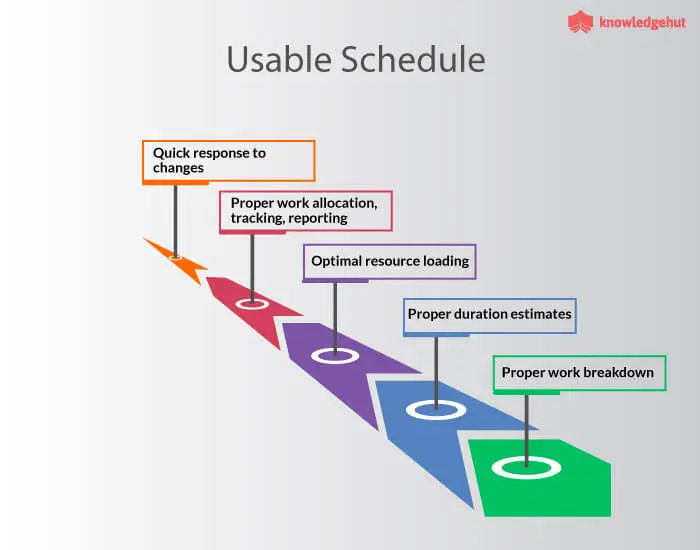
1. Work breakdown is immaculate
The structure of the work breakdown is completely aligned with the software engineering life cycle chosen for the project
The WBS covers at least 90% of all activities that will be performed in the project. The amount of time that people spend doing work not accounted for in the schedule, is negligible.
Milestones are identified appropriately
Granularity of task breakdown is optimal. A coarse-grained task breakdown results in a very lax tracking leading to delays whereas a very fine-grained task breakdown results in micro management and tracking overheads and can delay the project. The well-drafted schedules usually use the 1% to 10% rule – that is, the effort allocated to a leaf node of a breakdown structure should not be more than 10% of the effort aggregated at the root node and should not be less than 1% of the effort at the root node. If the effort of a leaf node is more than 10%, it is broken down into sub tasks and if the effort of a leaf node is less than 1%, it is folded up into its parent task so that the 1% to 10% rule is satisfied.
2. Duration estimates of the schedule are aligned with the project estimates
Duration estimates of tasks and sub tasks are derived from the project estimates
The overall project effort reflected in the schedule matches with the estimated effort. This is a key to the profitability of fixed price projects.
3. Resource loading is optimal
Resources are neither under loaded nor overloaded
Team members perform very minimum ad hoc activities because large part of their work is covered in the schedule. It is this factor that enables the team members to use the schedule for guidance, week-on-week, to plan their weekly activities.
Parallelism among tasks are identified and leveraged properly while allocating the resources
4. The schedule is an elegant tool for work allocation, tracking and reporting
The schedule enables allocation of work to team members on a weekly basis with a clear scope, activities, and deliverables. Many times, weekly task reports are maintained as a supplement to the schedule. The weekly plans draw tasks from the schedule and also ad hoc tasks if any. Sometimes, the sequence of tasks may have changed and hence rather than changing the schedule, the change is implemented using a supplementary weekly plan. In projects having a well-drafted schedule, the weekly plans for the individual team members don’t diverge significantly from the schedule and remain aligned to the schedule throughout the project.
A well-drafted schedule facilitates easy generation of status reports on task completion, work performance of team members and projections.
The schedule clearly shows dependencies and delivery dates for integration of modules to take place smoothly.
5. Facilitates quick response to changes.
With clarity on tasks, duration, and resource allocation, the schedule helps the PM to add, delete or move around tasks and resources to accommodate changes.
When project gets additional requirements and additional resources, a PM can assign the additional resources to non-critical path tasks and allocate current team members to tasks on critical path
When project gets additional requirement, there is no additional resource, but if PM is allowed to descope some functionality, the schedule comes in handy to decide which tasks among low priority ones can be removed to free up some resource load so that they can handle the changes.
Top Cities where KnowledgeHut Conduct Project Management Certification Training Course Online
Elevate your career with our best PRINCE2 Foundation certification online. Learn from experts and master project management.
Conclusion
Well-drafted schedules can provide the PM not only a significant grip but also enough maneuverability to navigate the project to successful completion amidst changes. It is not straightforward to draft schedules and it needs significant application of time and rigor to come up with schedules that are usable. If this rigor and time is invested, it can yield significant non-financial benefits in terms of better project control and financial benefits in terms of cost savings making it a high-priority area for PMs to spend their time and energies.
454 articles published
Kevin D. Davis is a seasoned and results-driven Program/Project Management Professional with a Master's Certificate in Advanced Project Management. With expertise in leading multi-million dollar proje...
Get Free Consultation
By submitting, I accept the T&C and
Privacy Policy