
- Home
- Blog
- Project Management
- Operations Management Software: Tools, Benefits & Future Trends
Operations Management Software: Tools, Benefits & Future Trends
Updated on Sep 02, 2025 | 1.63K+ views
Share:
Conducting operations isn’t about isolated tools and siloed processes. Operational friction is under harsh scrutiny in a fat-moving world. Operations Management Software (OMS) can boost efficiency with features spread across multiple tools. These tools bridge the gaps between teams with different workflows.
Let us look at what OMS means, how it has evolved over time, the top tools available and what does the future look like.
Ultimate PMP Formula Cheat Sheet
Get a quick, exam-ready PMP cheat sheet with all essential formulas and key concepts in one place.
What is Operations Management Software?
Operations management software are platforms that can organize, automate, and optimize operational work. They cover workflows such as services, manufacturing, logistics, or enterprise functions. These tools are built to handle all kinds of tasks, unlike generic project or task specific tools.
OMS can help with a lot of management processes. They handle orchestration, rule-based workflows, resource allocation, real-time status updates, and compliance tracking. All these within a single platform. They unify cross-functional operations, allow transparency, and provide analytics. This helps transform operations from chaos to structured and scalable performance.
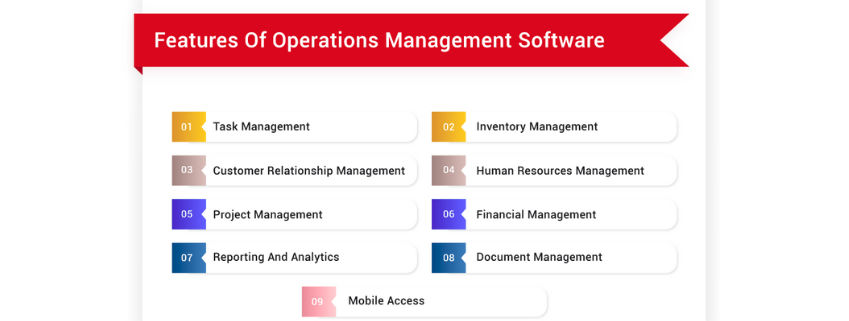
Source: softwaresuggest.com
The Evolution of Operations Management
The way organizations manage their operations has changed over time. Right from the time of only physical records to digitization, it has seen a lot of changes. Operation management software is now transforming with the emergence of smart workflows.
Manual
The earliest days of operation management were completely manually in a physical format. Pen, paper, and filing systems were the backbone at this time. One of the biggest drawbacks of this era was the lack of transparency. Since each department kept its own ledger, it was difficult for clarity. Similarly, change was extremely painful as everything was done manually.
Enterprise Software
The introduction of Enterprise Resource Planning (ERP) software brought structure. Central planning and hierarchies were enforced with the help of these tools. Despite central usage, usability was often disconnected.
Low-Code Workflows
Operation Management software like Zoho Creator ushered flexibility without affecting cohesive performance. Teams were able to build and adapt workflows in a quick manner. Agility and control began to align with the emergence of low-code workflows.
Automation
Today, there are tools that can automate administrative work. Tools like Enate have introduced cognitive orchestration for workflows. tasks are split between manual intervention and digital agents. Automation, SLA (Service Level Agreement) tracking, and real-time analytics are now available.
OMS isn’t merely about digitizing operation management. It reduces friction, making It cohesive and adaptive.
Top Tools for Operations Management 2025
Organizations need to understand the best operations management software that works in their system. It needs to be done by understanding and assessing what is needed for you.
Here is a list of a few popular tools used to streamline operations.
1. Asana
Asana is a project management tool. It helps teams in tracking goals, tasks, and workflows. This is done in an easily navigable and visual manner. Asana is quite effective in managing cross-functional projects.
Features
- Timelines and boards to track task and projects
- Rules and triggers for workflow automation
- Reporting dashboards to help with workflow management
- Easily integrable with Slack, Google Drive, and Microsoft Teams
Pricing
Asana offers a tier plan. Premium plans start at around $13.49 per user on a monthly basis. Asana also offers Business and Enterprise tiers.
Customer Rating
Asana has over 12,000 reviews and is rated at 4.4/5 on G2
2. Trello
Trello is a simple and flexible platform that adopts a Kanban-style working model. It is ideal for teams that are comfortable working in a drag-and-drop environment.
Features
- Tasks are organized with the help of boards, lists, and cards
- There is support for Gantt charts and calendars
- Collaboration made easy though comments, mentions, and file achievement
Pricing
Trello is always free for small teams. Standard plans start from $5 per user on a monthly basis, while enterprise plans begin at a monthly rate of $17.50 per user.
Customer Rating
Trello has around 13,7000 reviews on G2 with an average rating of 4,4/5
3. Jira
Jira, developed by Atlassian, is tailored for Agile and DevOps teams. It’s best used in complex projects requiring sprints, backlog prioritization, and advanced reporting.
Features
- Agile boards for Scrum and Kanban workflows
- Backlog and sprint planning features
- Real-time reporting (burndown, velocity charts)
- Extensive integrations with developer tools like GitHub and Bitbucket
Pricing
Premium tier around $13.53/user/month; Enterprise pricing is available on contact.
Customer Rating
4.3/5 on G2 based on 6,662 reviews
4. Microsoft Excel
Excel is still considered a staple in operations. It provides flexibility for custom data handling, modelling, and analysis. While not a modern OMS, it remains indispensable.
Features
- Customizable spreadsheets for task tracking or resource planning
- Advanced formulas, pivot tables, and macros
- Data visualization with charts and conditional formatting
- Integrations with Power BI and Microsoft 365 apps
Pricing
Microsoft Excel is now part of Microsoft 365 subscriptions; standalone pricing varies.
Customer Rating
Reviews frequently praise it as a versatile “Swiss army knife,” though no aggregate score is provided.
5. Slack
Slack streamlines team communication and has become a central hub for workplace collaboration. With apps and integrations, it can also manage workflows.
Features
- Channels for project-specific or department-based conversations
- Direct messaging and file sharing
- Workflow builder for automating routine requests
- Integrations with Jira, Trello, Asana, and various other tools
Pricing
There is a free tier with standard plans starting $6.67 per user monthly.
Customer Ratin.
Widely lauded for ease of use and integrations; specific G2 scores not listed.
6. Zoom
While best known for video conferencing, Zoom also supports operational collaboration through integrations and add-ons.
Features
- Reliable video and audio conferencing with recording
- Breakout rooms for focused discussions
- Webinar hosting and large meeting capabilities
- Integrations with project management and CRM tools
Pricing
There is a free tier available. Paid plans begin around $14.99/user/month.
Customer Rating
While there is no specific rating on G2, Zoom is used globally as a conferencing platform.
7. Freshdesk
Freshdesk is a customer support software that can streamline operations in service-oriented teams. It centralizes support tickets, automates responses, and improves SLA management.
Features
- Omnichannel ticketing (email, chat, phone, social media)
- Automated ticket routing and canned responses
- Self-service knowledge base creation
- Analytics dashboards for SLA and support performance
Pricing
Plans start around $15 per agent per month. Other plans include Pro at $49 per agent per month. Enterprise plans start at $79 per agent per month.
Customer Rating
Recognized among top help desk tools, though no explicit G2 score is mentioned.
8. Google Sheets
Google Sheets is the collaborative, cloud-based counterpart to Excel. It’s especially useful for distributed teams needing real-time access and editing.
Features
- Real-time multi-user collaboration
- Built-in formulas, pivot tables, and charts
- Easy integration with Google Workspace (Docs, Slides, Gmail)
- Add-ons for automation and extended capabilities
Pricing
Included in Google Workspace plans; with some features available on free versions.
Customer Rating
No standalone G2 score is available.
9. Monday.com
Monday is a visual work OS that enables teams to design workflows tailored to their operations. It’s versatile enough for projects, HR, sales, or IT.
Features
- Visual dashboards and customizable workflows
- Automations for recurring processes
- Time tracking and workload management
- Integrations with Slack, Google Workspace, and Microsoft Teams
Pricing
The basic plan starts at $9 per user on a monthly basis with a minimum 4 user cap. Higher tier Basic plan ~$9/user/month (4 seat minimum); higher tiers available.
Customer Rating
Customers rated Monday.com at 4.75/5 on G2.
10. Airtable
Airtable combines the flexibility of spreadsheets with the power of databases, making it a versatile tool for managing operations.
Features
- Customizable tables for projects, resources, or workflows
- Views including Kanban, calendar, Gantt, and gallery
- Built-in automation and scripting
- Extensive template library for different industries
Pricing
There are free plans with some paid versions available as well.
Customer Rating
There aren’t specific ratings on G2, Airtable is widely used.
11. Microsoft Teams
Microsoft Teams is primarily a communication hub. It also doubles as an operational platform through task management and app integrations.
Pricing: Teams Essentials about $4.80/user/month; higher tiers via 365 plans outscraper.com+10monday.com+10Asana+10G2
Customer Rating: Generally praised for efficiency and alignment; rating context present but aggregate score unavailable
Features
- Chat, audio, and video meetings with built-in file sharing
- Integration with Microsoft Planner and To-Do for task tracking
- Channels for organizing discussions by department or project
- Deep connectivity with Microsoft 365 ecosystem
Pricing
Teams Essentials start at $4.80 per user per month. There are higher tiers available via 365 plans.
Customer Rating
Teams is generally praised for efficiency and alignment. There is no aggregate score present.
12. Zendesk
Zendesk is a robust customer service platform that supports operational efficiency in handling customer interactions and back-office processes.
Pricing: Starting at $19/agent/month for Support Team; Suite Growth ~$89/agent/month; Professional ~$115/agent/month catchr.iosmartsuite.com+4TechRadar+4TechRadar+4
Customer Rating: Widely used with strong ROI case studies, though no aggregate G2 score captured.
Features
- Ticket management with automation and SLA tracking
- Omnichannel support: email, phone, chat, social
- Customer analytics and satisfaction scoring
- Integrations with CRM and collaboration tools
Pricing
Support Team plans start at $19 per agent monthly. The Suite Growth plans start at $89 per agent monthly. The Professional plans start at $115 per agent monthly.
Customer Rating
Zendesk is widely used with strong ROI case studies, though no aggregate G2 score is available.
Benefits of Operations Management Software
Operations Management Software (OMS) is not just about digitizing processes—it’s about reshaping how organizations work, collaborate, and grow. OMS creates measurable value across teams and functions by embedding intelligence and structure.
1. Real-Time Visibility
With centralized dashboards and monitoring tools, managers gain instant insight into workflows, bottlenecks, and progress. This transparency allows leaders to spot issues early and make informed, data-driven decisions.
2. Enhanced Productivity
Automation reduces time spent on repetitive tasks such as approvals, task assignment, and reporting. Teams can shift their focus to higher-value activities, improving overall efficiency and throughput.
3. Stronger Compliance and Traceability
Operations management software keeps audit trails, version histories, and regulatory documentation in one place. This reduces the risk of non-compliance and simplifies industry audits or internal quality checks.
4. Optimized Costs and Resource Utilization
Dynamic scheduling and intelligent allocation ensure that resources are used effectively. Organizations save costs while improving output quality by minimizing downtime and redundancy.
5. Improved Collaboration
Shared platforms connect distributed teams, aligning goals and reducing miscommunication. Cross-functional collaboration improves, ensuring that operations run seamlessly end-to-end.
In essence, OMS transforms operations from fragmented and reactive into cohesive, proactive systems that drive sustainable growth.
Future of Operations Management Tools
The future of Operations Management Software (OMS) lies in intelligent automation and deeper integration across the enterprise. As businesses grow more complex, OMS will evolve beyond tracking and monitoring into systems that actively anticipate and adapt to change.
1. AI-Augmented Decision-Making
Next-generation OMS platforms will embed artificial intelligence to recommend process improvements, predict bottlenecks, and even simulate operational scenarios. This shift will transform managers from reactive problem-solvers to proactive strategists.
2. Hyper-Automation of Workflows
OMS will increasingly integrate with robotic process automation (RPA) and digital assistants, automating not only routine approvals but also complex, multi-step workflows. This will reduce manual intervention and accelerate cycle times.
3. Seamless Ecosystem Integration
Future tools will not operate in isolation—they’ll connect with ERP, CRM, IoT, and supply chain systems. This will create an “operational nervous system” where data flows in real time, enhancing end-to-end visibility.
4. Predictive Compliance and Risk Management
OMS will shift from reactive compliance tracking to predictive monitoring, flagging potential violations or risks before they occur. This proactive compliance approach will be vital in regulated industries.
5. Adaptive Platforms with Low-Code Flexibility
Customization will move from optional to essential. Low-code OMS platforms will allow organizations to adjust workflows on the fly—aligning with changing business models without costly redevelopment.
The trajectory is clear: OMS will become less about managing operations and more about orchestrating adaptive, intelligent enterprises.
Final Thoughts
Operations Management Software has now become the engine that powers modern efficiency. From unifying workflows to enabling real-time visibility, these platforms turn fragmented operations into cohesive, data-driven ecosystems. As OMS continues to evolve with AI, automation, and seamless integrations, organizations that embrace it will be better positioned to adapt, scale, and thrive in unpredictable markets.
The key isn’t just adopting any tool, but selecting the right one for your business context. This needs to be done by balancing features, usability, and scalability. With a thoughtful approach, OMS becomes more than software: it becomes a strategic asset that transforms operations into a competitive advantage.
Frequently Asked Questions (FAQs)
1. What is the best software for operations?
It depends on your needs. Zoho Creator excels at customizable workflows; Enate offers advanced orchestration for service operations. Choose based on use-case fit.
2. What are the 7 main functions of operations management?
They typically include: design, planning, sourcing, production, delivery, quality maintenance, and continuous improvement.
3. What are the 5 basic functions of management operations?
They typically include: design, planning, sourcing, production, delivery, quality maintenance, and continuous improvement.
4. What is operational CRM software?
CRM tools focused on operations manage automating service workflows, such as sales pipelines or support tickets to streamline customer-facing operations.
1639 articles published
KnowledgeHut is an outcome-focused global ed-tech company. We help organizations and professionals unlock excellence through skills development. We offer training solutions under the people and proces...
Get Free Consultation
By submitting, I accept the T&C and
Privacy Policy