
Kanban Board - Types, Benefits, Features, Elements, Uses
Updated on Jul 28, 2025 | 2.5K+ views
Share:
Table of Contents
View all
A Kanban board is the most effective way to streamline your tasks. Using a Kanban board may appear complicated, but once you understand its elements and features, it is always easy to use. Kanban Board is an outstanding illustration of a visual tool that not only provides an overview of the current condition of the job but also facilitates communication between teams.
In addition, it is a crucial component of the Kanban methodology or Kanban project management, which aims to optimize and continuously improve the performance of any business operation. If you utilize a Kanban dashboard to organize the work in your office visually, it will become more efficient and organized. Go for Kanban Coaching Professional certification and boost your learning.
Master the Right Skills & Boost Your Career
Avail your free 1:1 mentorship session
What is a Kanban Board?
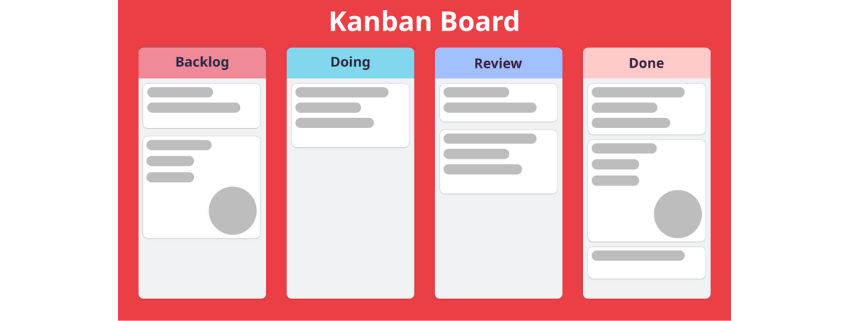
A Kanban Board is a dynamic visual management system designed to streamline workflows, boost productivity, and monitor task progression in real time. Originating from Toyota’s just-in-time production model, this approach has grown beyond its manufacturing roots to become widely used in software development, project coordination, and even personal task planning.
Fundamentally, a Kanban Board is divided into columns that signify different phases of a process—commonly To Do, In Progress, and Done. Each task is displayed as a card that transitions across these columns as work advances. This layout provides teams with a clear snapshot of task status, workload distribution, and potential roadblocks.
What makes the Kanban Board especially effective is its versatility. Whether applied to software sprints, marketing initiatives, or individual goals, it fosters clarity, collaboration, and timely execution.
In contrast to traditional planning models, Kanban supports continuous flow and iterative progress, which makes it particularly useful for environments that demand agility and rapid adaptation. As Agile and Lean methodologies gain traction across industries, the Kanban Board continues to be a trusted tool for visualizing and optimizing work processes.
Source: Wikipedia
How Does a Kanban Board Work?
A Kanban Board works by visualizing your workflow and helping you manage tasks more efficiently. It breaks down a process into distinct stages—typically represented by columns such as To Do, In Progress, and Done. Each task is displayed as a card that moves across the board from one stage to the next as work progresses.
This movement of cards gives teams a real-time view of task status, highlighting what’s being worked on, what’s completed, and where potential delays might occur. The board brings clarity to complex workflows, making it easy to spot bottlenecks, prioritize work, and maintain steady progress.
What sets Kanban apart is its pull-based system—team members “pull” tasks only when they have the capacity, preventing work overload and ensuring a smooth flow. It also promotes transparency, enabling better communication and accountability within the team.
Whether used physically on a whiteboard or digitally through tools like Trello, Jira, or Asana, a Kanban Board adapts to any environment. It’s especially useful in Agile teams, but equally effective for marketing, operations, or even personal productivity.
In short, Kanban Boards transform abstract workflows into clear, visual systems that help you work smarter—not harder.
Kanban Board Elements
1. Visual Signals
If you have never used a Kanban tool before, you'll notice the graphic cards (stickies, tickets, or otherwise). Members of a Kanban software team record all projects and work items on cards, often one item per card.
2. Columns
Columns, another defining characteristic of a Kanban board, are utilized here. The table's columns each represent a different action that, when combined, represents a "workflow." Until they are completed, the cards are processed through the workflow.
3. WIP Limits
WIP limit refers to the maximum number of cards in a single column at any given moment. If a column has a WIP board limit of three, there cannot be more than three cards in that column. Before new cards can progress to that workflow phase, the team must swarm these cards and advance them when the column is "full."
4. Commitment Point
It is typical for teams' Kanban boards to have an item backlog on their board. The point at which a group adopts a notion and begins work on a project is the "commitment point."
5. Delivery Point
A Kanban team's workflow is considered complete once it reaches the delivery point. The point at which most teams believe the product or service to have been delivered is when the client receives it.
Types Of Kanban Boards
Kanban boards can be of two types, depending on the user's preference. Each Kanban certifications course allows you to use and work upon these two types of Kanban tools.
1. Physical Kanban Board
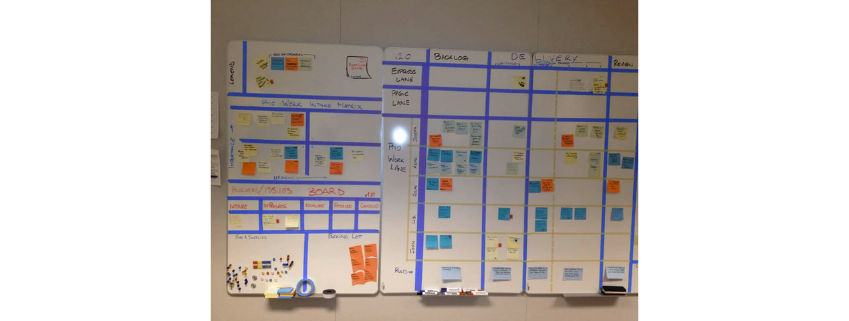
A physical Kanban board consists of a whiteboard and sticky notes. While Sticky notes indicate tasks, a whiteboard is the essential component of a physical Kanban board. It is the most basic sort of free Kanban board (corkboard). Sticky notes are transferred from one step of the work process to the next, where a column represents each phase.
Source: Kanbanzone
2. Digital Kanban Board
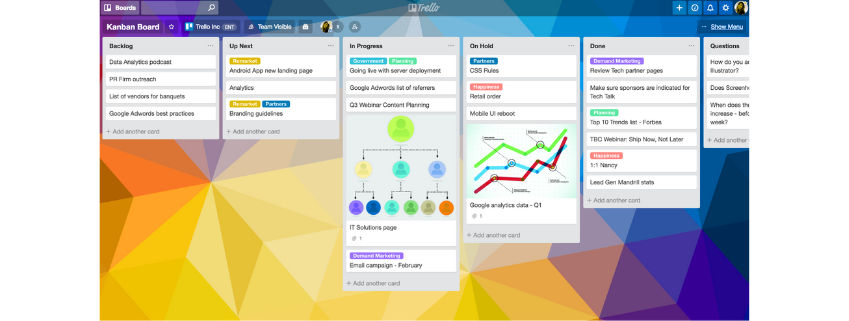
Digital Kanban boards are significantly more accessible than their physical counterparts because they are software-based. These online Kanban boards allow you to monitor the progress of a project from practically any place while also facilitating communication among team members.
Some digital systems provide a high level of adaptability, allowing managers to monitor many workflows and organize their work in various categories. Countless Kanban board examples are being utilized effectively across various industries and by teams composed of individuals from various cultural backgrounds.
Source: Atlassian
Kanban vs Scrum Board
Although Kanban and Scrum Boards both provide visual ways to manage workflows within Agile frameworks, they are built on different methodologies and serve unique purposes. Knowing how they differ can help you decide which approach suits your team better.
Kanban Boards emphasize a steady, continuous flow of work. Tasks progress through stages such as To Do, In Progress, and Done at their own pace, without set timelines or iterations. Since there are no fixed sprints, team members pull tasks as they become available, making Kanban especially useful for teams managing ongoing or reactive work like support, maintenance, or marketing operations.
In contrast, a Scrum Board is centered on fixed-length sprints—typically spanning 1 to 4 weeks—where tasks are planned in advance and completed within that cycle. This approach adds structure and rhythm to the workflow, making it a strong choice for development teams working on products or features in short, iterative bursts.
To summarize, Kanban offers flexibility and real-time adaptability, while Scrum provides a more disciplined, sprint-based process. The right choice depends not on which method is superior, but on which better matches your team's workflow, priorities, and delivery style.
Examples of Kanban Board
Following are some prominent Kanban Board examples:
Kanban for a Sales Department
A Kanban board is a popular software for visualizing and documenting the various stages of a sales process, beginning with the initial contact and continuing through the negotiation stages, document exchange, following up finalization, and feedback collecting.
It can assist you in building a sales technique that is dependable, straightforward to manage and maintain, and which will allow you to establish a strong relationship with your customers easily. Streamlining the process can be incredibly beneficial, especially for labor as demanding as sales.
Kanban Board Features and Components
You can begin by creating a simple Kanban board with three columns labeled "To Do," "In Progress," and "Completed," and populate each column with cards representing various types of work items.
The columns on the board are separated into the three groups listed below:
- The "To Do" column, also known as the "Ready" column, contains all your scheduled cards to be played next. Typically, a ready column will be placed at the very top of the board.
- The cards you are now working on can be located in the Doing (or "In Progress") column(s), depending on your preferred terminology. As was recently demonstrated, you can utilize several Doing columns for each operation phase.
- Included in the Done column(s) are the cards for which you have finished your work. Depending on the workflow's description, it is possible to have one or more Done columns. These columns aggregate cards that have completed a specific workflow stage.
Additionally, you may have a separate "gathering bin or region" known as the Backlog. This is where cards are initially created and stored. Similarly, at the opposite end, you could have a container labeled "Archive" for holding cards that have been completed and are now "closed."
One or more swim lanes, also known as lanes, may be added to a Kanban board. These lanes separate different types of work, each of which may require a distinct workflow.
Benefits Of Kanban Board
A Kanban tool or Kanban software provides several benefits, including the following:
A) Flexibility
When the Kanban project management method is applied to every project, each team member has access to the flexibility necessary for completing their tasks successfully.
B) Reduce the Amount Of Downtime
Utilizing Kanban boards improves workflow, resulting in a significant decrease in downtime.
C) Enhanced Efficiencies
Kanban dashboards foster regular and constant communication and robust conversation among team members, which typically results in increased productivity.
D) Intended for Enterprise-wide Implementation
Kanban's adaptability is one of the system's biggest features. It can be integrated into the activities of a company's whole workforce, from manufacturing and sales to software development and beyond.
Looking for the best institute for project management certification? Look no further than our online project management course. Designed to help you achieve mastery with ease, our course is the key to taking your skills to new heights and succeeding in your career. Enroll now and start your journey to success!
Investigate the top trending Agile Category Courses
Steps to Use Kanban Board
When developing your Kanban board, begin with a basic structure, then gradually enhance it, and then transform it into a workflow management system by:
Step 1. Familiarize Yourself With Kanban Board and Workflow
Establish a basic layout for your Kanban board, and then divide it into a few essential sections representing the project's various stages.
Step 2. Consider the Workflow from Old to New Tasks
If you observe that new tasks are being added to a column quicker than old ones are being removed, work will begin to build, and the problem will become evident to the entire team.
Step 3. Restrict the Amount of Work that is Currently in Process and Concentrate
By imposing Work-in-Progress (WIP) limits on your organization's capacity, the Kanban board could be an effective tool for discouraging multitasking among your personnel. If you want to increase the rate at which you provide value to your clients, you should ensure that the primary focus of each team is on completing the task at hand rather than starting a new project.
Step 4. Save Time by Utilizing Kanban Dashboard
Kanban boards can save you significant time, a major advantage of their use. This time may have been spent on meetings, progress reports, and other non-essential distractions.
Utilize the Kanban board specifically as a repository for information. The Kanban board will ensure that you and every other team member are informed of the progress of the assignments. Receiving progress reports in this manner would eliminate the need for frequent meetings.
In addition, the Kanban board will allow you to eliminate lengthy progress report books, whose preparation takes an infinite amount of time and which are out of date by the time they are handed to the stakeholders.
Step 5. Identify Workflow Bottlenecks on your Kanban Board
With the help of Kanban board, you may see the obstacles keeping your team from completing any particular task. When exhibited on a standard physical board, blockers are generally marked with red magnets (or pins if you use a corkboard).
The digital version of Kanban software provides more sophisticated visualization tools (e.g., stop signs on blocked cards). If your team cannot complete a task, they can designate it as blocked and begin working on another assignment without exceeding Work in Progress (WIP) limitations.
Step 6. Add Workflow Management Software to your Agile Kanban Board
Automating work processes can aid the development of a mature workflow management system. Teams are frequently required to complete regular tasks, notify one another of unanticipated changes, remind one another of deadlines, and hand off work. When these tasks are conducted manually, the system can become disorganized, time-consuming, and resource-intensive.
Therefore, modern Kanban boards allow you to apply automation rules to your activities to optimize the flow of such tasks inside the system. Typically, they take the form of "if-this-then-that" rules, which allow you to initiate previously established tasks on your Kanban board whenever something else occurs.
Conclusion
Kanban boards are a wonderful instrument for dividing huge, complex projects into smaller, more manageable tasks. Checking in on these steps allows the team to determine the project's current state at any moment. These boards could be used to build product road maps. However, their potential is seen when the team engages them as project management tools to coordinate the operations of several moving parts.
To get started quickly, explore some Kanban board templates that align with your industry or team structure — they can save time and help you hit the ground running
You can learn more about Kanban by going for KnowledgeHut Kanban certifications.
Frequently Asked Questions (FAQs)
1. What are the top 2 advantages of the Kanban Board?
There are many advantages to implementing the Kanban system to organize work, including flexibility and reduced wasted work / lost time.
2. What is Kanban Board?
The Kanban board is a workflow visualization tool designed to help you bring clarity to your work process and boost productivity by reducing the amount of work in progress.
3. What is the use of the Kanban Board?
A Kanban board aids in the visualization of work, and the limitation of work-in-progress, and maximizes productivity (or flow). It can assist agile and DevOps teams in establishing daily orders.
4. What goes on Kanban Board?
Kanban boards use cards to represent work items and columns to indicate process stages. Cards are shifted from left to right to demonstrate progress and aid in coordinating teams conducting the activity.
5. What are the 4 principles of Kanban?
- Start with what you do now: Kanban doesn’t require big changes—begin by visualizing your current workflow.
- Agree to pursue incremental, evolutionary change: It promotes gradual improvements over time rather than drastic overhauls.
- Respect current roles, responsibilities, and titles: Kanban integrates with existing setups without disrupting team structures.
- Encourage acts of leadership at all levels: Improvement is everyone’s responsibility, not just management’s.
6. What 3 headings should you use on your Kanban board?
The most common headings are:
- To Do – tasks yet to be started
- In Progress – tasks currently being worked on
- Done – completed tasks
1639 articles published
KnowledgeHut is an outcome-focused global ed-tech company. We help organizations and professionals unlock excellence through skills development. We offer training solutions under the people and proces...
Get Free Consultation
By submitting, I accept the T&C and
Privacy Policy
Ready to learn about Agile Certifications Roadmap?