
- Home
- Blog
- Web Development
- HTML Color Codes and Names [with Example]
HTML Color Codes and Names [with Example]
Updated on Mar 17, 2026 | 1.06K+ views
Share:
In web design, color is one of the most important elements to consider. Colors affect how a website looks and looks but also influence how users feel and behave when they visit your site. This is why it's important to be familiar with all the different HTML color names and their corresponding RGB values. This guide will provide a complete overview and concept of the HTML colors you need to know, along with the HTML color code tools. We'll also provide some HTML color-related terms to use colors effectively in your web designs. So let's get started!
What is a HTML Color Code?
An HTML color code identifies a color on the web and within other digital assets. Common color codes are in the forms of a keyword name, a hexadecimal value, a RGB (red, green, blue) triplet, or a HSL (hue, saturation, lightness) triplet.
For example, the color red can be identifier using the following formats:
- red (keyword name)
- #ff0000 (hex)
- (255,0,0) (RGB)
- (0, 100%, 50%) (HSL)
HTML Color Names Supported by All Browsers
When it comes to HTML, there are a lot of different color options available. There are 140 different color names that are supported by all browsers! These colors are sorted into different color groups so that you can easily find the perfect color for your website. Keep reading to learn more about the different colors in HTML.
The 140 Different Color Names Supported by All Browsers are Sorted by Color Groups. Here is the HTML colors list below.
- White
- Gray
- Black
- Red
- Green
- Blue
- Yellow
- Brown
- Orange
- Pink
- Purple
As you can see, a wide range of HTML color codes is listed. Whether you want a simple white or black background for your website or something more eye-catching like green or yellow, there is a color for you. Always consider the overall design of your website when choosing a color. Too many colors can be overwhelming and make your site look cluttered. Stick to one or two colors for a clean and polished look.
If you now think you know everything you need about HTML, why not test your skills now? But how?? It would be best to take an Angular Certification Exam and prove your skills here. So, get ready and level up your coding game.
HTML Color-related Terms
Ever wondered what those color-related HTML terms mean? Well, wonder no more! Here is a comprehensive guide to everything you need to know about HTML color codes, color name lists and more.
1. RGB Code
RGB code is a 6-digit representation of a color. Color values are expressed as the first two digits representing red, the next two digits representing green, and the last two digits representing blue. For example, RGB(255, 0, 0) is red, RGB(0, 255, 0) is green, RGB(0, 0 ,255) is blue, and so on.
2. HSL Code
HSL code is also a 6-digit representation of a color. HSL stands for hue, saturation, and lightness. The first two digits represent the hue (the shade of the color), the next two digits represent the saturation (how much white or black is mixed in), and the last two digits represent the lightness (how light or dark the color is).
For example, HSL(0, 100%, 50%) is red, HSL(120, 100%, 50%) is green, HSL(240 ,100%, 50%)is blue.
3. HEX Code
HEX code is a 6-digit representation of a color. The hex code to color name starts with a pound character (#) and is followed by six hexadecimal characters, ranging from 0-9 or A-F. For example, #000000 is black, #FFFFFF is white, #FF0000 is red, #00FF00 is green, and so on.
4. Color Names
There are 140 different color names that you can use in HTML. This color name list includes common colors like black and white and less common ones like burlywood and mediumpurple.
These are all the major terms when we talk about HTML color codes and names. But there is a lot to these and many other terms related to HTML color codes. Front End Masters Bootcamp is one of the best ways to get acquainted with some of the best vocabularies of HTML and front-end tools. Why wait? Enroll now and boost your skills.
What is Hex Code?
Hex code is a six-digit, hexadecimal numbering system used for specifying colors. The numbers 0-9 represent values zero to nine, and the letters A-F represent values ten to fifteen. To specify a color, three bytes are needed. The first byte represents the red color component, the second byte represents the green color component, and the third byte represents the blue color component. For example, the red color can be specified as #FF0000, with the first byte representing the red component set to FF (full intensity).
The result is pure white when all three components are set to FF. Colors can also be specified using a four-byte format, where the fourth byte represents the alpha channel. The alpha channel defines how opaque or transparent color should be and can have a value between 00 (fully transparent) and FF (fully opaque). Hex code is often used in web and graphic design as it provides various possibilities for creating custom colors.
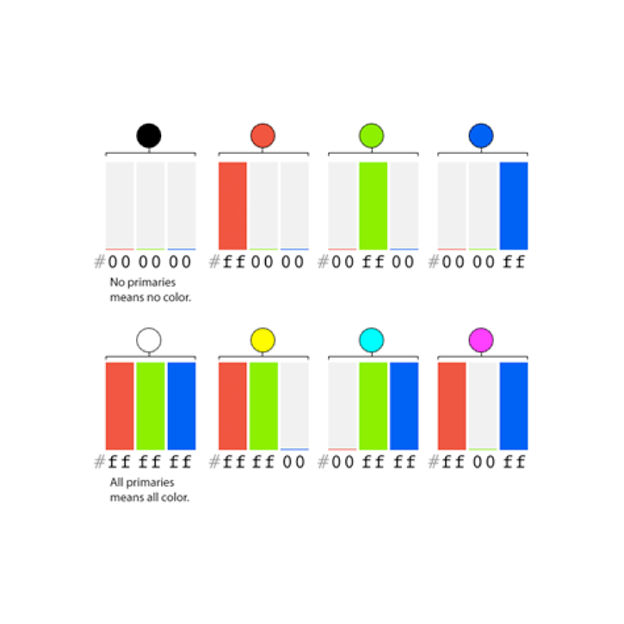
Source: digital.gov
Color Codes Based on HSL Triplet
How to Use Color Code in HTML
Below are the script on how to use color codes in HTML practically:
<html>
<head>
  <title>Shades of Red Colors</title>
</head>
<body>
  <h1>Welcome To KnowledgeHut</ h1>
  <h2 style="background-color:#FFA07A;">#FFA07A</h2>
  <h2 style="background-color:#FA8072;">#FA8072</h2>
  <h2 style="background-color:#FF0000;">#FF0000</h2>
  <h2 style="background-color:#8B0000;">#8B0000</h2>
</body>

</html>
How to Change the Font Type, Size, and Color on a Web Page?
Fortunately, changing the font type, size, and color on a web page is easy. For example, let's say you want to make the text on your blog larger and easier to read. To do this, simply find the HTML tag that contains the text you want to change. It will look like this: <p>This is some sample text</p>. Once you've found the tag, add the following attribute: style="font-size:14px;". This will increase the size of the font to 14 pixels.
If you want to change the color of the text, simply add the "color" attribute with a hex code for the desired color. For example, if you want to change the text to blue, you would use this code: style="color:#0000FF;".
Finally, if you want to change the text's typeface, you can use the "font-family" attribute. For example, to use the Arial font, you would use this code: style="". With a few simple changes to your HTML code, you can easily customize the appearance of your web page.
HTML Color Code Tools
Now, we'll take a look at some of the best tools related to color code in HTML to help make your life a little easier.
1. ColorZilla
ColorZilla is a Mozilla Firefox extension that allows you to get the hex code for any color on a web page. Simply click on the ColorZilla icon and then hover over the color you want to inspect. The hex code will be displayed in a tooltip. ColorZilla also has a nifty palette viewer that lets you view all the colors used on a web page. This can be helpful if you're trying to match colors or find out what colors are used on a particular site.
2. Chrome dev tools
Chrome dev tools are a set of web development tools built into Google Chrome. To access Chrome dev tools, simply open up Chrome and navigate to View > Developer > JavaScript Console or press Ctrl+Shift+J (Windows) or Cmd+Opt+J (Mac). Once you've opened the console, click on the Elements tab and then hover over the element you want to inspect. The hex code for the element will be displayed in the bottom right-hand corner of the screen.
3. Adobe Color CC
Adobe Color CC is an online color picker that lets you upload an image and then extract colors from it. This can be helpful if you're trying to match colors from an existing image or create a color scheme based on an image. Adobe Color CC also has several preset color schemes that you can use for inspiration.
There are many different tools for color codes for HTML available, but these three are some of the best. Whether you're looking for a quick way to get the hex code for color or want to create a custom color scheme, these tools will help you get the job done. So next time you're working on a website or web application, be sure to give them a try.
Unlock Your Potential: Dive into Computer Programming Courses for Beginners and Master the Art of Coding. Start Your Journey Today!
Conclusion
So there you have it, our complete guide to HTML color names list and HTML color codes. We hope this has been helpful and that you feel confident using colors to enhance your web pages. If you have any questions or feedback, please don’t hesitate to reach out to us, we love hearing from our readers! And finally, check out our other posts for more tips related to Certificate Web Development and design.
1639 articles published
KnowledgeHut is an outcome-focused global ed-tech company. We help organizations and professionals unlock excellence through skills development. We offer training solutions under the people and proces...
Get Free Consultation
By submitting, I accept the T&C and
Privacy Policy