
- Blog Categories
- Project Management
- Agile Management
- IT Service Management
- Cloud Computing
- Business Management
- BI And Visualisation
- Quality Management
- Cyber Security
- DevOps
- Most Popular Blogs
- PMP Exam Schedule for 2025: Check PMP Exam Date
- Top 60+ PMP Exam Questions and Answers for 2025
- PMP Cheat Sheet and PMP Formulas To Use in 2025
- What is PMP Process? A Complete List of 49 Processes of PMP
- Top 15+ Project Management Case Studies with Examples 2025
- Top Picks by Authors
- Top 170 Project Management Research Topics
- What is Effective Communication: Definition
- How to Create a Project Plan in Excel in 2025?
- PMP Certification Exam Eligibility in 2025 [A Complete Checklist]
- PMP Certification Fees - All Aspects of PMP Certification Fee
- Most Popular Blogs
- CSM vs PSM: Which Certification to Choose in 2025?
- How Much Does Scrum Master Certification Cost in 2025?
- CSPO vs PSPO Certification: What to Choose in 2025?
- 8 Best Scrum Master Certifications to Pursue in 2025
- Safe Agilist Exam: A Complete Study Guide 2025
- Top Picks by Authors
- SAFe vs Agile: Difference Between Scaled Agile and Agile
- Top 21 Scrum Best Practices for Efficient Agile Workflow
- 30 User Story Examples and Templates to Use in 2025
- State of Agile: Things You Need to Know
- Top 24 Career Benefits of a Certifed Scrum Master
- Most Popular Blogs
- ITIL Certification Cost in 2025 [Exam Fee & Other Expenses]
- Top 17 Required Skills for System Administrator in 2025
- How Effective Is Itil Certification for a Job Switch?
- IT Service Management (ITSM) Role and Responsibilities
- Top 25 Service Based Companies in India in 2025
- Top Picks by Authors
- What is Escalation Matrix & How Does It Work? [Types, Process]
- ITIL Service Operation: Phases, Functions, Best Practices
- 10 Best Facility Management Software in 2025
- What is Service Request Management in ITIL? Example, Steps, Tips
- An Introduction To ITIL® Exam
- Most Popular Blogs
- A Complete AWS Cheat Sheet: Important Topics Covered
- Top AWS Solution Architect Projects in 2025
- 15 Best Azure Certifications 2025: Which one to Choose?
- Top 22 Cloud Computing Project Ideas in 2025 [Source Code]
- How to Become an Azure Data Engineer? 2025 Roadmap
- Top Picks by Authors
- Top 40 IoT Project Ideas and Topics in 2025 [Source Code]
- The Future of AWS: Top Trends & Predictions in 2025
- AWS Solutions Architect vs AWS Developer [Key Differences]
- Top 20 Azure Data Engineering Projects in 2025 [Source Code]
- 25 Best Cloud Computing Tools in 2025
- Most Popular Blogs
- Company Analysis Report: Examples, Templates, Components
- 400 Trending Business Management Research Topics
- Business Analysis Body of Knowledge (BABOK): Guide
- ECBA Certification: Is it Worth it?
- Top Picks by Authors
- Top 20 Business Analytics Project in 2025 [With Source Code]
- ECBA Certification Cost Across Countries
- Top 9 Free Business Requirements Document (BRD) Templates
- Business Analyst Job Description in 2025 [Key Responsibility]
- Business Analysis Framework: Elements, Process, Techniques
- Most Popular Blogs
- Best Career options after BA [2025]
- Top Career Options after BCom to Know in 2025
- Top 10 Power Bi Books of 2025 [Beginners to Experienced]
- Power BI Skills in Demand: How to Stand Out in the Job Market
- Top 15 Power BI Project Ideas
- Top Picks by Authors
- 10 Limitations of Power BI: You Must Know in 2025
- Top 45 Career Options After BBA in 2025 [With Salary]
- Top Power BI Dashboard Templates of 2025
- What is Power BI Used For - Practical Applications Of Power BI
- SSRS Vs Power BI - What are the Key Differences?
- Most Popular Blogs
- Data Collection Plan For Six Sigma: How to Create One?
- Quality Engineer Resume for 2025 [Examples + Tips]
- 20 Best Quality Management Certifications That Pay Well in 2025
- Six Sigma in Operations Management [A Brief Introduction]
- Top Picks by Authors
- Six Sigma Green Belt vs PMP: What's the Difference
- Quality Management: Definition, Importance, Components
- Adding Green Belt Certifications to Your Resume
- Six Sigma Green Belt in Healthcare: Concepts, Benefits and Examples
- Most Popular Blogs
- Latest CISSP Exam Dumps of 2025 [Free CISSP Dumps]
- CISSP vs Security+ Certifications: Which is Best in 2025?
- Best CISSP Study Guides for 2025 + CISSP Study Plan
- How to Become an Ethical Hacker in 2025?
- Top Picks by Authors
- CISSP vs Master's Degree: Which One to Choose in 2025?
- CISSP Endorsement Process: Requirements & Example
- OSCP vs CISSP | Top Cybersecurity Certifications
- How to Pass the CISSP Exam on Your 1st Attempt in 2025?
- Most Popular Blogs
- Top 7 Kubernetes Certifications in 2025
- Kubernetes Pods: Types, Examples, Best Practices
- DevOps Methodologies: Practices & Principles
- Docker Image Commands
- Top Picks by Authors
- Best DevOps Certifications in 2025
- 20 Best Automation Tools for DevOps
- Top 20 DevOps Projects of 2025
- OS for Docker: Features, Factors and Tips
- More
- Agile & PMP Practice Tests
- Agile Testing
- Agile Scrum Practice Exam
- CAPM Practice Test
- PRINCE2 Foundation Exam
- PMP Practice Exam
- Cloud Related Practice Test
- Azure Infrastructure Solutions
- AWS Solutions Architect
- IT Related Pratice Test
- ITIL Practice Test
- Devops Practice Test
- TOGAF® Practice Test
- Other Practice Test
- Oracle Primavera P6 V8
- MS Project Practice Test
- Project Management & Agile
- Project Management Interview Questions
- Release Train Engineer Interview Questions
- Agile Coach Interview Questions
- Scrum Interview Questions
- IT Project Manager Interview Questions
- Cloud & Data
- Azure Databricks Interview Questions
- AWS architect Interview Questions
- Cloud Computing Interview Questions
- AWS Interview Questions
- Kubernetes Interview Questions
- Web Development
- CSS3 Free Course with Certificates
- Basics of Spring Core and MVC
- Javascript Free Course with Certificate
- React Free Course with Certificate
- Node JS Free Certification Course
- Data Science
- Python Machine Learning Course
- Python for Data Science Free Course
- NLP Free Course with Certificate
- Data Analysis Using SQL
- Home
- Blog
- Cloud Computing
- What is Azure Databricks? Features, Advantages, Limitations
What is Azure Databricks? Features, Advantages, Limitations
By Megha Bedi
Updated on Mar 15, 2024 | 7 min read | 4.59K+ views
Share:
Table of Contents
View all
As this digitalized world is rapidly moving towards Artificial Intelligence, the generation of humongous data has become an integral part of our daily lives. The data has been and will continue to grow exponentially. With increasing data, the need to process and accumulate these large datasets becomes very critical. Hence, the organizations have started to leverage Apache Spark to handle Big Data and the processing of these large datasets. The Apache Spark tech stack helped organizations execute data engineering, data science, and machine learning on single-node machines or clusters. Databricks is a web-based platform for working with Apache Spark. It provides end-to-end automated data engineering and ML solutions. Azure Databricks is a managed Databricks platform on Azure. Let's dive deeper into what Microsoft Azure Databricks has to offer.
Master the Right Skills & Boost Your Career
Avail your free 1:1 mentorship session
What is Databricks?
The creators of Apache Spark founded Databricks. Azure Databricks Spark is a managed Spark service that lets you simplify and streamline the process of data processing and data analytics. It provides a unified data analytics platform for data engineers, data analysts, data scientists, and machine learning engineers. Databricks have become popular among organizations dealing with large-scale data processing and analytics challenges. Databricks's ability to simplify and accelerate the development of big data and machine learning applications has made it a first choice for businesses.
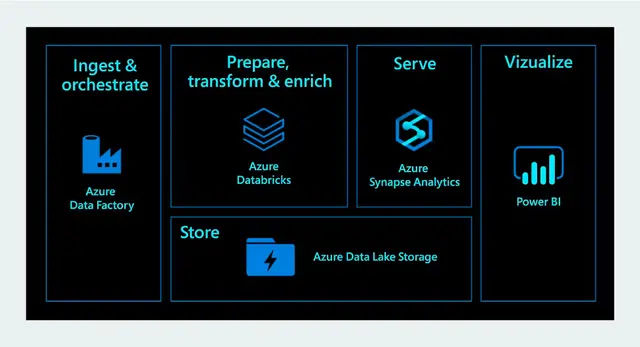
azure.microsoft.com
What is Azure Databricks?
Azure Databricks is a managed version of Apache Spark on Azure. Microsoft and Spark engineers worked together to build a managed Spark platform on Azure. To put the definition simply, the implementation of Apache Spark on Azure is a service which is called Azure Databricks and that’s what Databricks is used for. You can learn more about Azure via Azure learning.
With Azure Databricks you can set up your Apache Spark environment within minutes. You can autoscale your workloads and collaborate on shared projects in an interactive Azure Databricks workspace. When I started working with Azure Databricks, I found it very simple and flexible to use. I know Databricks for beginners can seem daunting so you can checkout KnowledgeHut Cloud computing courses to learn more about Databricks and Azure Databricks best practices.
Azure’s Databricks Feature
Azure Databricks helps you to start quickly with an optimized Apache Spark environment. It allows your workloads to integrate seamlessly with open-sourced libraries. Azure Databricks supports Python[GU5], Scala, R, Java, and SQL. It also supports data science frameworks and libraries including TensorFlow, PyTorch, and scikit-learn. With Azure Databricks you can spin up clusters quickly. It provides global scalability and availability which ensures reliability and performance. Below are some features of Azure Databricks :
- Collaborative & Interactive Workspace - With Azure Databricks you can quickly explore data and share insights, build models collaboratively.
- Native integration with Azure services - Microsoft Azure Databricks can be integrated seamlessly with native Azure services such as Azure Data Factory, Azure Data Lake Storage, Azure Machine Learning, and Power BI.
- Machine Learning runtime - Azure Databricks provides easy access to preset learning environments with just one click for enhanced machine learning using popular and cutting-edge frameworks like sci-kit-learn, TensorFlow, and PyTorch.
- MLflow - It lets you collaboratively manage models, replicate runs, and track and share experiments from a common repository.
- Delta Lake - With Delta Lake, an open-source transactional storage layer built for the whole data lifecycle, you can scale and improve the data dependability of your current data lake.
Advantages of Azure Databricks
Now that we have learned about Azure Databricks features, let's dive deeper into the advantages of using Spark on Azure. Below are several advantages of using Microsoft Azure Databricks :
- Automated Machine Learning - The Databricks platform on Azure has automated machine learning capabilities that help to streamline ML processes such as model selection, hyperparameter tuning, etc.
- Enterprise-grade security - Azure Databricks creates a secure, private, compliant, and isolated analytics workspace across users and datasets to protect data.
- Optimized Spark engine - Azure Databricks uses the latest highly optimized version of the Spark engine to perform simplified data processing on autoscaled infrastructure.
- Choice of Language - As mentioned in the Databricks overview, Azure Databricks supports languages such as R, Python, Scala, Spark SQL, and .NET. So, you can choose any language you want for data processing.
- Deep Learning Support - Azure Databricks supports various deep learning frameworks like Tensorflow and PyTorch.
- Integration with Azure DevOps - Data engineering and data science workflows can be integrated into an organization's complete development lifecycle with the help of Azure Databricks' seamless interaction with Azure DevOps for version control, continuous integration, and continuous delivery.
- Interactive Workspaces - Azure Databricks enables seamless collaboration between engineers, analysts, and data scientists.
Create an Azure Databricks service
A Microsoft Azure subscription is a must for using any service on the Azure platform. If you don't already have one, you can get one for free by going to the Azure portal.
Follow the below steps to create a Databricks service on Azure :
- Sign in and navigate to the Azure portal home page. Click on Create a resource and type Databricks in the search box.
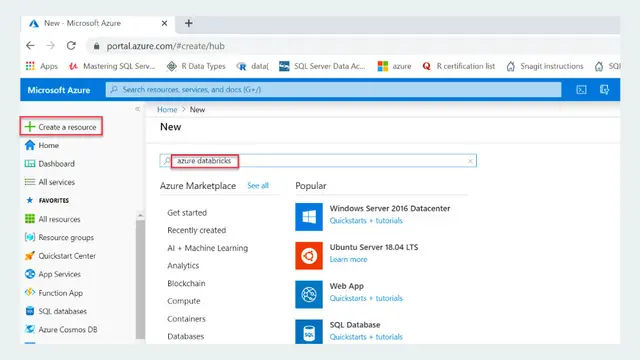
sqlshack
- Click on the Create button.
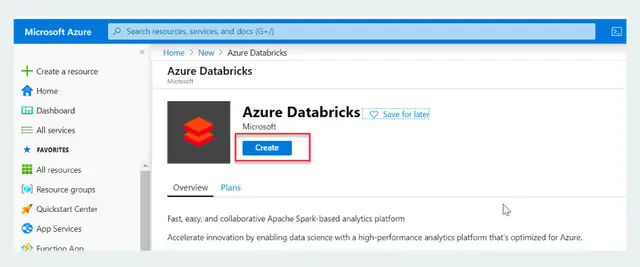
sqlshack
- Now you will get a form like shown in the image below. It has the following fields:\
- Subscription – Select your subscription.
- Resource group – Create a new resource group by clicking on the Create button. The name will automatically appear here.
- Workspace name – Pick any name for the Databricks service.
- Location – Select the region where you want to deploy your Databricks service.
- Pricing Tier – Select a suitable pricing tier for your service.
- After filling out all the details click on Review + Create button to review the values filled in the form. After reviewing click on the Create button to create the service.
- Now you'll get a message on the screen - "Deployment Succeeded" in case your deployment is successful. Click on the Go to Resource option to open the service that you have recently created.
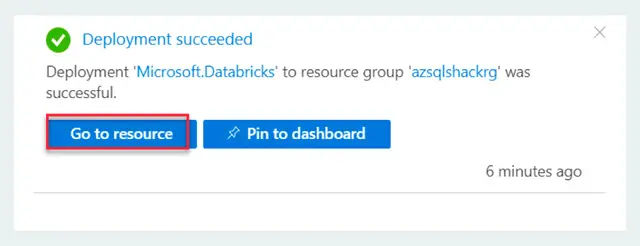
sqlshack
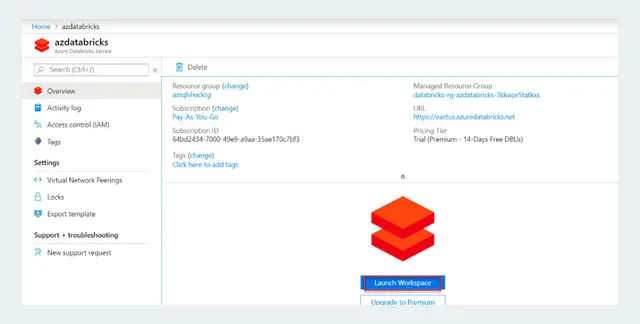
- Now you will see all the details of the service that you have created. Click on Launch Workspace to open the Azure Databricks portal. Now you will have to sign in again to access the Databricks portal.
sqlshack
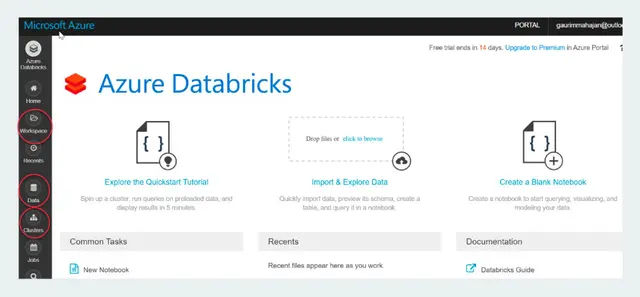
- On the Workspace tab, you can create notebooks and manage your documents. The Data tab lets you create tables and databases. You can also work with various data sources like Cassandra, Kafka, Azure Blob Storage, etc.
sqlshack
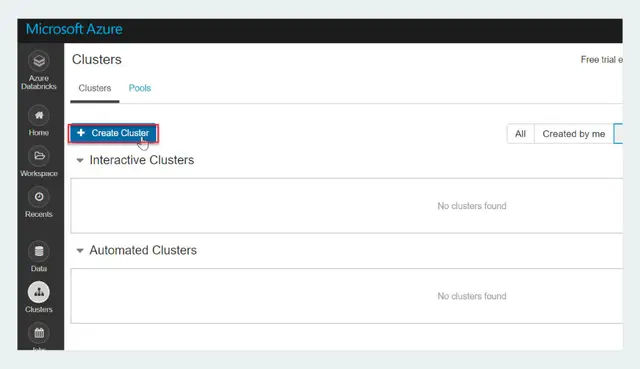
- After creating Databricks service we need to create a spark cluster. Click on Clusters in the left menu. Click on Create Cluster to create a cluster.
sqlshack
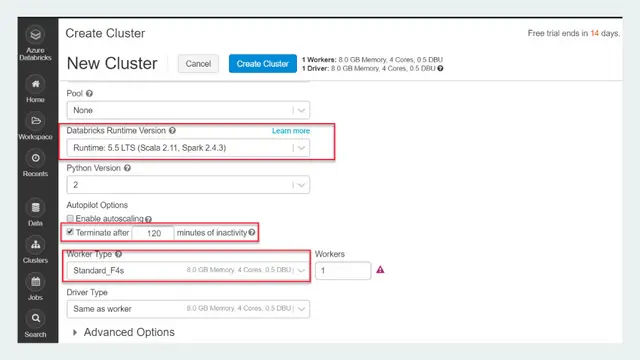
- Use the below image to fill up the configurations of the cluster. And finally, click on Create Cluster
sqlshack
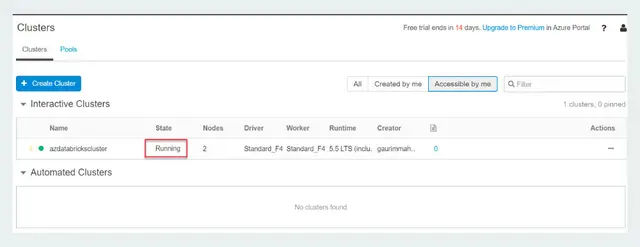
- Now you will see the status of the creation of the cluster as Pending until it is created.
- Once it is active and running you will see the status as Running.
sqlshack
- Now you can create a Notebook in a Spark cluster. A Notebook is a web-based code and visualization platform built to interact with Spark in various languages.
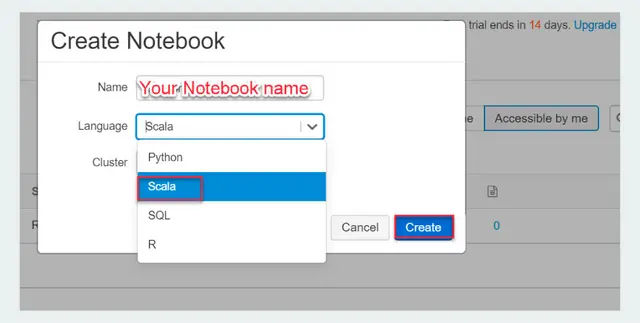
- Now to create a notebook, click on the Workspace option in the left menu. Click on Create and select the Notebook option.
- Provide the Notebook name, select Language and Cluster, and click on Create. This will create a Notebook.
sqlshack
You have successfully created Azure Databricks service.
Databricks SQL
Just like any other data residing in a database can be queried via SQL, the same is true for the datasets handled by Databricks. Databricks SQL is a feature that allows users to perform SQL queries and analytics on their data. It extends the capabilities of the Apache Spark SQL module and helps data analysts and engineers to collaborate effectively in a unified environment. Using Databricks SQL on the data stored in the data lake makes it easier for the users to create dashboards to be consumed by business users. Below are certain key aspects of Databricks SQL:-
- SQL Dialect Support - Databricks SQL supports ANSI SQL to allow users to write standard SQL queries and supports Spark SQL to handle complex data types.
- Data Exploration and Visualization - It allows users to easily visualize their data using SQL queries.
- Collaborative Notebooks - Users can create and share their code, and SQL queries ensuring collaboration between team members.
- Performance Optimization - Databricks SQL uses Spark engine which is optimized for distributed computing and efficient processing of large datasets.
- Connectivity to various data sources - Databricks SQL supports connectivity to various data sources, including data lakes, databases, and external file systems hence introducing flexible data integration.
- Optimization and Tuning - Users can optimize and tune their SQL queries using the Databricks platform. This includes leveraging features such as query optimization, indexing, and caching to enhance the performance of SQL-based analytics.
Databricks Machine Learning
Databricks Machine Learning (DBML) is a Databricks component in the unified Databricks platform which provides an integrated and collaborative environment for developing, training, streamlining ML workflows, and deploying machine learning models. It leverages the power of Apache Spark and combines it with powerful machine-learning libraries to prepare a production-ready machine-learning solution. It provides below key aspects below:
- Since Databricks ML is built on an open architecture with a foundation on Delta Lake, it simplifies all aspects of Data for ML and AI. It can turn features into production pipelines without much hassle.
- The MLflow component of Databricks helps automate experiment tracking and governance. Once you have identified the best version of a model for production you can register it to the Model Registry to simplify handoffs along the deployment lifecycle.
- It provides the capability to deploy ML models at scale and at low latency.
- Databricks allows you to use Large Language Models (LLMs) which can be extended using techniques such as parameter-efficient fine-tuning (PEFT) or standard fine-tuning.
- It can manage the full model lifecycle from data to production and back with model versions and other components.
Limitations of Azure Databricks
While Azure Databricks is a powerful and versatile platform to process and manage large data and analytics workloads it has certain limitations that a user must be aware of:-
- Dependency on Azure - Since Azure Databricks is a service provided by Microsoft Azure, any issues or outages in Azure can reflect the impact on Databricks workloads.
- Versioning Tool Integration - Azure Databricks does not integrate with Git or any other versioning tool at the moment.
- Limited control over infrastructure - Azure Databricks is a managed service and hence user has little control over its infrastructure.
- Costs - Azure Databricks can prove to be expensive, especially when dealing with large-scale data processing and compute-intensive workloads.
Final Words
In a data-driven world where insights are retrieved from large datasets that redefine business strategies, Azure Databricks seems like a compelling solution. It is a robust, collaborative, and scalable platform that lets data engineers, data analysts, and data scientists collaborate well and build end-to-end production-ready data processing and ML solutions. With all Azure Databricks components and Azure Databricks Storage, Azure Databricks becomes a great comprehensive platform to provide features that continue to harness the potential of big data to derive business successes. To learn more on Azure databricks Spark and Azure databricks components apart from the Azure Databricks example above you can checkout KnowledgeHut Azure certification courses.
Frequently Asked Questions (FAQs)
1. What is Azure Databricks and how does it integrate with other Azure services?
Azure Databricks is an Azure cloud-based unified data and analytics platform that is built over Apache Spark. It simplifies the deployment of large-scale data engineering and ML solutions. Azure Databricks seamlessly integrates with other Azure services like Azure Storage, Active Directory, Azure DevOps, Azure Data Factory, Azure SQL Data Warehouse, etc.
2. How does Azure Databricks differ from traditional Apache Spark?
Azure Databricks is a cloud-based managed service while traditional Apache Spark is an on-premises framework or self-managed. Azure Databricks is simple to deploy, manage, and provision whereas traditional Apache Spark requires users to manually configure clusters. Azure Databricks integrates with other Azure services seamlessly while for traditional Apache Spark, the integrations have to be manually set up.
3. What types of data can be processed and analyzed using Azure Databricks?
Azure Databricks is designed to handle a wide variety of data types and formats such as structured data, unstructured data, semi-structured data, streaming data, graph data, machine learning data, geospatial data, time-series data, transactional data, etc.
4. How do I set up and configure Azure Databricks for my organization?
To set up Azure Databricks for your organization you need to take an Azure subscription, log in to the Azure portal, navigate to Databricks, create a workspace, and create a cluster to host your workloads. Additionally, you can create a notebook to interact with the data stored in Azure data lake.
5. What are the pricing and cost management options for Azure Databricks?
On Azure Databricks, users are billed on both storage and computing on a pay-as-you-go basis. Users can choose various combinations of storage and computing. Additionally, Databricks also offers auto-termination and auto-scaling features to optimize cost. Azure Databricks can also integrate with Azure Cost Management service allowing users to monitor and manage their spend.
3 articles published
Megha Bedi is a seasoned Cloud Engineer at Google with a strong background in Data and Analytics solutions. With expertise across multiple cloud platforms, she's a contributor to open-source tools, a ...
Get Free Consultation
By submitting, I accept the T&C and
Privacy Policy