
- Blog Categories
- Project Management
- Agile Management
- IT Service Management
- Cloud Computing
- Business Management
- BI And Visualisation
- Quality Management
- Cyber Security
- DevOps
- Most Popular Blogs
- PMP Exam Schedule for 2025: Check PMP Exam Date
- Top 60+ PMP Exam Questions and Answers for 2025
- PMP Cheat Sheet and PMP Formulas To Use in 2025
- What is PMP Process? A Complete List of 49 Processes of PMP
- Top 15+ Project Management Case Studies with Examples 2025
- Top Picks by Authors
- Top 170 Project Management Research Topics
- What is Effective Communication: Definition
- How to Create a Project Plan in Excel in 2025?
- PMP Certification Exam Eligibility in 2025 [A Complete Checklist]
- PMP Certification Fees - All Aspects of PMP Certification Fee
- Most Popular Blogs
- CSM vs PSM: Which Certification to Choose in 2025?
- How Much Does Scrum Master Certification Cost in 2025?
- CSPO vs PSPO Certification: What to Choose in 2025?
- 8 Best Scrum Master Certifications to Pursue in 2025
- Safe Agilist Exam: A Complete Study Guide 2025
- Top Picks by Authors
- SAFe vs Agile: Difference Between Scaled Agile and Agile
- Top 21 Scrum Best Practices for Efficient Agile Workflow
- 30 User Story Examples and Templates to Use in 2025
- State of Agile: Things You Need to Know
- Top 24 Career Benefits of a Certifed Scrum Master
- Most Popular Blogs
- ITIL Certification Cost in 2025 [Exam Fee & Other Expenses]
- Top 17 Required Skills for System Administrator in 2025
- How Effective Is Itil Certification for a Job Switch?
- IT Service Management (ITSM) Role and Responsibilities
- Top 25 Service Based Companies in India in 2025
- Top Picks by Authors
- What is Escalation Matrix & How Does It Work? [Types, Process]
- ITIL Service Operation: Phases, Functions, Best Practices
- 10 Best Facility Management Software in 2025
- What is Service Request Management in ITIL? Example, Steps, Tips
- An Introduction To ITIL® Exam
- Most Popular Blogs
- A Complete AWS Cheat Sheet: Important Topics Covered
- Top AWS Solution Architect Projects in 2025
- 15 Best Azure Certifications 2025: Which one to Choose?
- Top 22 Cloud Computing Project Ideas in 2025 [Source Code]
- How to Become an Azure Data Engineer? 2025 Roadmap
- Top Picks by Authors
- Top 40 IoT Project Ideas and Topics in 2025 [Source Code]
- The Future of AWS: Top Trends & Predictions in 2025
- AWS Solutions Architect vs AWS Developer [Key Differences]
- Top 20 Azure Data Engineering Projects in 2025 [Source Code]
- 25 Best Cloud Computing Tools in 2025
- Most Popular Blogs
- Company Analysis Report: Examples, Templates, Components
- 400 Trending Business Management Research Topics
- Business Analysis Body of Knowledge (BABOK): Guide
- ECBA Certification: Is it Worth it?
- Top Picks by Authors
- Top 20 Business Analytics Project in 2025 [With Source Code]
- ECBA Certification Cost Across Countries
- Top 9 Free Business Requirements Document (BRD) Templates
- Business Analyst Job Description in 2025 [Key Responsibility]
- Business Analysis Framework: Elements, Process, Techniques
- Most Popular Blogs
- Best Career options after BA [2025]
- Top Career Options after BCom to Know in 2025
- Top 10 Power Bi Books of 2025 [Beginners to Experienced]
- Power BI Skills in Demand: How to Stand Out in the Job Market
- Top 15 Power BI Project Ideas
- Top Picks by Authors
- 10 Limitations of Power BI: You Must Know in 2025
- Top 45 Career Options After BBA in 2025 [With Salary]
- Top Power BI Dashboard Templates of 2025
- What is Power BI Used For - Practical Applications Of Power BI
- SSRS Vs Power BI - What are the Key Differences?
- Most Popular Blogs
- Data Collection Plan For Six Sigma: How to Create One?
- Quality Engineer Resume for 2025 [Examples + Tips]
- 20 Best Quality Management Certifications That Pay Well in 2025
- Six Sigma in Operations Management [A Brief Introduction]
- Top Picks by Authors
- Six Sigma Green Belt vs PMP: What's the Difference
- Quality Management: Definition, Importance, Components
- Adding Green Belt Certifications to Your Resume
- Six Sigma Green Belt in Healthcare: Concepts, Benefits and Examples
- Most Popular Blogs
- Latest CISSP Exam Dumps of 2025 [Free CISSP Dumps]
- CISSP vs Security+ Certifications: Which is Best in 2025?
- Best CISSP Study Guides for 2025 + CISSP Study Plan
- How to Become an Ethical Hacker in 2025?
- Top Picks by Authors
- CISSP vs Master's Degree: Which One to Choose in 2025?
- CISSP Endorsement Process: Requirements & Example
- OSCP vs CISSP | Top Cybersecurity Certifications
- How to Pass the CISSP Exam on Your 1st Attempt in 2025?
- Most Popular Blogs
- Top 7 Kubernetes Certifications in 2025
- Kubernetes Pods: Types, Examples, Best Practices
- DevOps Methodologies: Practices & Principles
- Docker Image Commands
- Top Picks by Authors
- Best DevOps Certifications in 2025
- 20 Best Automation Tools for DevOps
- Top 20 DevOps Projects of 2025
- OS for Docker: Features, Factors and Tips
- More
- Agile & PMP Practice Tests
- Agile Testing
- Agile Scrum Practice Exam
- CAPM Practice Test
- PRINCE2 Foundation Exam
- PMP Practice Exam
- Cloud Related Practice Test
- Azure Infrastructure Solutions
- AWS Solutions Architect
- IT Related Pratice Test
- ITIL Practice Test
- Devops Practice Test
- TOGAF® Practice Test
- Other Practice Test
- Oracle Primavera P6 V8
- MS Project Practice Test
- Project Management & Agile
- Project Management Interview Questions
- Release Train Engineer Interview Questions
- Agile Coach Interview Questions
- Scrum Interview Questions
- IT Project Manager Interview Questions
- Cloud & Data
- Azure Databricks Interview Questions
- AWS architect Interview Questions
- Cloud Computing Interview Questions
- AWS Interview Questions
- Kubernetes Interview Questions
- Web Development
- CSS3 Free Course with Certificates
- Basics of Spring Core and MVC
- Javascript Free Course with Certificate
- React Free Course with Certificate
- Node JS Free Certification Course
- Data Science
- Python Machine Learning Course
- Python for Data Science Free Course
- NLP Free Course with Certificate
- Data Analysis Using SQL
- Home
- Blog
- Project Management
- PMP ITTO (Inputs, Tools, Techniques & Outputs): A Complete Guide
PMP ITTO (Inputs, Tools, Techniques & Outputs): A Complete Guide
Updated on Sep 22, 2026 | 7 min read | 9.47K+ views
Share:
Table of Contents
View all
- What is PMP ITTO?
- Why is the ITTO Classification Used?
- Breaking Down the ITTO Framework
- Examples to Illustrate ITTO in Action
- The ITTO Relationship Matrix
- Common Tools in PMP ITTO
- Common Techniques in PMP ITTO
- How Can I Use the PMBOK® Guide 6th Edition to study ITTO?
- Master the ITTO PMP Questions with These 7 Steps
- Strategies for Mastering ITTOs
- Best Way to Learn ITTO for the PMP Exam?
- Can ITTO Outputs also be Inputs?
PMP ITTO stands for Inputs, Tools and Techniques, and Outputs. It is a structured way used in project management to explain how each of the 49 project management processes works.
In simple terms, it shows what goes into a process, what actions or methods are used, and what comes out at the end. Think of it like a recipe where Inputs are the ingredients, Tools and Techniques are the cooking methods, and Outputs are the final dish.
Instead of memorizing everything, the goal is to understand how these elements connect and flow from one process to another.
If you are preparing for PMP Certification or trying to understand project management better, mastering ITTO can make a big difference in how clearly you see the entire project lifecycle.
Ultimate PMP Formula Cheat Sheet
Get a quick, exam-ready PMP cheat sheet with all essential formulas and key concepts in one place.
What is PMP ITTO?
ITTO full form in PMP is Inputs, Tools, Techniques, and Outputs. These are the building blocks of project management in the Project Management Professional (PMP) certification. PMP Exam has a decent weightage for ITTO Exam questions and recommendation is to go through ITTO PMBOK thoroughly.
Inputs are like ingredients needed to start or carry out a project. Tools and Techniques are the methods or ways used to do project tasks. Outputs are the results or things that come out of doing project activities.
Understanding how these parts work together helps project managers plan, do, check, and control project activities effectively. It's like following a recipe: you need the right ingredients, the right tools, and you get a delicious outcome.
Knowing about ITTOs and how to remember ITTO PMP 6th edition is important for passing the PMP exam and for managing projects successfully in real life. They're like the ABCs of project management! Participating in a PMP certification program to solve ITTO questions in PMP can prove highly beneficial for gaining in-depth understanding. Preparing PMP ITTO Chart can help in understanding the overall concept. PMP ITTO cheat sheet as below can be an alternative to have greater recall of the concept.

project-management-prepcast
Why is the ITTO Classification Used?
The ITTO classification is pivotal in project management, offering a structured framework for comprehending and orchestrating project processes. By segmenting Inputs, Tools, Techniques, and Outputs, project managers attain clarity and coherence in their project execution strategies. This system aids in pinpointing essential resources and information required to commence and carry out project activities (Inputs), choosing apt methodologies and approaches for effective task execution (Tools and Techniques), and acknowledging the concrete or abstract outcomes of project endeavors (Outputs).
Knowing how these parts work together helps project managers make smart choices, use resources well, and achieve project goals accurately. Also, ITTOs serve as a common language in project management training and exams, like the PMP exam, making it easier to learn and assess project management skills.
Breaking Down the ITTO Framework
The importance of the ITTO framework can be understood if you look at the weightage it carries in the PMP® exam. Your understanding of the framework plays a crucial role in both earning your PMP® certification as well how well you can manage projects assigned to you.
Let us look at each part of the ITTO framework in detail:
1. Inputs
Starting and carrying out any process requires clear input. Inputs could be in the form of documents, plans, agreements and other assets that provide the relevant information to carry out this project. Clearly detailed inputs ensure that all teams involved have the right information needed to plan and carry out this project.
Inputs define the reasoning behind a project.
2. Tools and Techniques
Tools and Techniques (T&T) in the ITTO framework refer to the approaches used to comprehend the input and reach the expected outcome. Expert judgement, data analysis and statistical modelling are some examples of the various tools and techniques that can be used. Some of them are used across the project, while others are specialized for specific requirements.
Tools and techniques shed light on how the project will be executed.
3. Outputs
The ITTO framework defines outputs as the final deliverables and results on completion of the project. It could be in the form of documents, updates or new baselines for future projects. Outputs are often used as inputs for other projects.
Outputs refer to what the project generates once it is over.
The PMP ITTO framework creates a logical framework for continuous flow of information and processes in the project lifecycle. Executing this framework in a seamless manner creates an environment where projects are managed without much variance.
Examples to Illustrate ITTO in Action
In my project management journey, I encountered numerous instances where understanding ITTOs proved invaluable. Let me share a personal example:
During a software development project, one of our key Inputs was the project charter, defining project objectives and stakeholders' expectations. To execute the project successfully, we utilized various Tools and Techniques, including work breakdown structures (WBS) and project scheduling software. These tools helped us break down the project into manageable tasks and create a detailed project timeline.
As we progressed, we applied the technique of expert judgment to assess risks and make informed decisions. This proactive approach significantly mitigated potential project delays and budget overruns. Finally, the Output of our efforts was the successful delivery of the software product, meeting client specifications and exceeding stakeholder expectations.
In this scenario, understanding the PMP ITTO list helped me navigate project complexities effectively. Inputs guided our project initiation, Tools and Techniques empowered execution, and Outputs demonstrated project success. This firsthand experience reinforced the importance of ITTOs in achieving project objectives efficiently.
The ITTO Relationship Matrix
The ITTO relationship matrix is a powerful study aid that helps to understand the interconnections between processes across all knowledge areas and process groups in a visual manner. Rather than trying to memorize how ITTOs work, this matrix shows the underlying logic and flow of project information.
This is a great tool for those who want to memorize ITTO to clear the PMP exam. The matrix explains how outputs in a certain process are used as inputs for another process. This visual representation helps in understanding the sequence of processes and the underlying purpose behind each of them.
The ITTO relationship matrix can also be used to identify tools and techniques that appear in multiple processes, such as data analysis and accurate judgement. This will help you to group similar processes based on the recurring tools.
Studying ITTO using the relationship matrix helps candidates gain a holistic understanding of how project information evolves. This is crucial to gain an edge for the PMP exam as well as execute projects in any domain.
Explore structured learning paths with Project Management Certification Courses to build strong project management skills.
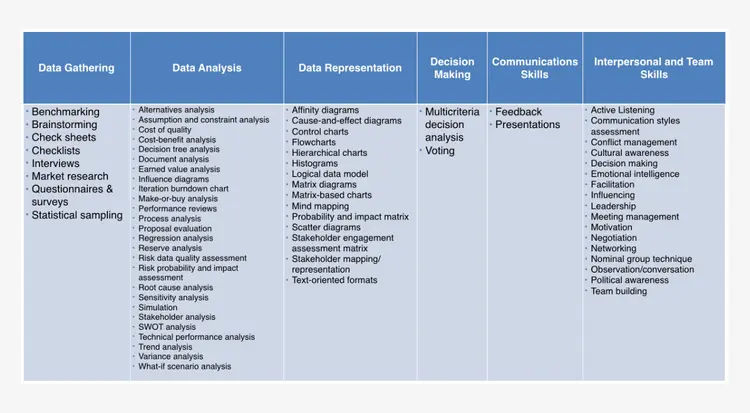
Common Tools in PMP ITTO
In the realm of Project Management Professional (PMP) ITTOs, several common tools stand out for their frequent application across various project management processes. Here are some notable examples:
- Work Breakdown Structure (WBS): A hierarchical decomposition of the project scope into smaller, more manageable components, aiding in task identification and resource allocation.
- Gantt Charts: Visual representations of project schedules, showing tasks, durations, dependencies, and milestones, facilitating project planning and monitoring.
- Ishikawa Diagrams (Fishbone Diagrams): Used in quality management processes to identify potential causes of a problem or effect, helping teams understand root causes and devise solutions.
- Risk Registers: Documents capturing identified project risks, their potential impact, probability, and planned responses, aiding in risk management and mitigation efforts.
- Decision Trees: Visual representations of decision-making scenarios, depicting possible outcomes and associated probabilities, assisting in decision analysis and risk assessment.
- SWOT Analysis: Assessments of project strengths, weaknesses, opportunities, and threats, aiding in strategic planning and risk identification.
- Performance Measurement Baselines: Established reference points for project performance evaluation, including scope, schedule, and cost baselines, enabling comparison and deviation analysis.
These tools, among others, play crucial roles in project planning, execution, monitoring, and control, helping project managers and teams effectively manage project constraints and achieve project objectives.
Common Techniques in PMP ITTO
Within the Project Management Professional (PMP) ITTO framework, several common techniques are frequently employed across various project management processes. Here are some notable examples:
- Expert Judgment: Involves seeking advice or insights from individuals or groups with specialized knowledge or experience relevant to the project, helping in decision-making, risk assessment, and problem-solving.
- Critical Path Method (CPM): A project scheduling technique used to determine the longest sequence of dependent tasks and identify the shortest project duration, aiding in schedule development and management.
- Earned Value Management (EVM): A technique for measuring project performance by integrating scope, schedule, and cost parameters, facilitating progress tracking, forecasting, and performance analysis.
- Stakeholder Analysis: Involves identifying, assessing, and prioritizing stakeholders based on their interests, influence, and impact on the project, guiding communication and stakeholder engagement strategies.
- Monte Carlo Simulation: Utilizes probabilistic models to simulate project outcomes under different scenarios, helping in risk analysis, decision-making, and uncertainty management.
- Benchmarking: Involves comparing project performance metrics, processes, or practices against industry standards or best practices, enabling performance improvement and process optimization.
- Variance Analysis: Compares actual project performance against planned performance to identify deviations, analyze root causes, and take corrective actions, supporting project control and management.
These techniques, among others, play essential roles in project planning, execution, monitoring, and control, helping project managers and teams effectively manage project constraints and achieve project objectives.
Examspm
How Can I Use the PMBOK® Guide 6th Edition to study ITTO?
To utilize the PMBOK® Guide 6th Edition for studying ITTOs, first, familiarize yourself with its structure, including Process Groups and Knowledge Areas. Then, focus on individual processes within each Knowledge Area, noting their Inputs, Tools and Techniques, and Outputs. Utilize the detailed descriptions and explanations provided in the guide to understand the purpose and significance of each ITTO. Create mnemonic devices or visual aids to aid retention and recall. Practice applying ITTOs to real-world project scenarios to enhance comprehension. Additionally, utilize practice questions and quizzes to reinforce learning. Finally, regularly review ITTOs to maintain proficiency and ensure readiness for the PMP exam.
KnowledgeHut's PMP certification programs offer unparalleled mentorship and comprehensive coverage of key concepts, including ITTOs and broader PMP principles.
Master the ITTO PMP Questions with These 7 Steps
Achieving proficiency in ITTO PMP questions requires a strategic approach.
- First, thoroughly understand the PMBOK® Guide's Process Groups and Knowledge Areas.
- Next, memorize Inputs, Tools and Techniques, and Outputs for each process.
- Utilize mnemonic devices and visual aids for reinforcement.
- Apply ITTOs to practical scenarios to grasp their real-world relevance.
- Regularly review and quiz yourself, engaging in mock exams to assess readiness.
- Seek clarification on challenging concepts through additional study materials.
- Consistent practice, review, and application will lead to mastery of ITTOs and success in PMP exam.
By adhering to these professional methodologies with diligence and discipline, you can confidently navigate PMP ITTO questions and demonstrate mastery of project management processes.
Strategies for Mastering ITTOs
It can feel difficult to master ITTOs due to the sheer volume of information. Using the right strategies will help you understand ITTOs instead of relying on rote memorization.
Here are some strategies to help you with gaining mastery over ITTOs.
1. Focus on Process Logic Over Memorization
Logic is your friend here. Understand the way each process works instead of memorizing. Once you have understood the logic behind different processes, you gain an intuitive knowledge of how ITTOs work.
2. Identify Common Inputs, Tools, and Outputs
Some tools and techniques appear repeatedly across various process groups. Identify these patterns and study those process groups together. This will help you reduce cognitive load and help you gain an understanding of additional process groups instead of tackling them individually.
3. Use Visual Aids and Flashcards
Using visual cues will help you to retain what you have learned. Using relationship matrices, ITTO mind maps will break down complex contents into digestible chunks. You will be able to retain your knowledge with these tools.
4. Apply ITTOs to Real-World Scenarios
Learn with the perspective of how you can apply them in a real-world scenario. Relating each process to a real-world context helps you to recall the relevant ITTO while attempting the exam.
5. Practice With PMP-Style Questions
Use case studies and scenario-based questions to identify the ITTO with proper logic. Understanding the reasoning is a better way to recall your knowledge instead of rote learning.
Using the right strategies will help you to shift your learning process. Focus on building a deep understanding of the PMP framework instead of learning isolated bits of knowledge. This is key to acing the exam as well as ensuring you are able to implement them in real-life scenarios.
Best Way to Learn ITTO for the PMP Exam?
Do I need to memorize ITTO for PMP is the question every PMP aspirant has. Well, to master ITTOs for the PMP exam, adopt a systematic approach. Understand Process Groups and Knowledge Areas, memorize Inputs, Tools, and Techniques, and Outputs for each process. Use mnemonic devices and practical applications to reinforce learning. Regularly review and quiz yourself, and engage in mock exams to assess readiness. Seek clarification on challenging topics as needed. Consistent practice, review, and application are key to mastering ITTOs and achieving success in the PMP exam.
The best Project Management training offered by KnowledgeHut has proven instrumental in assisting numerous aspirants in attaining their PMP certification. I highly recommend this program for individuals seeking comprehensive and effective preparation for the PMP exam.
Can ITTO Outputs also be Inputs?
Certainly! Indeed, they can and often do. PMP ITTO and Project Management Processes are not static linear procedures; instead, akin to a project, they constitute a dynamic system of interconnected relationships, feedback loops, and ongoing enhancements.
Conclusion
PMP ITTO is not just a framework for exams, it is a practical way to understand how project management processes work together. Inputs give you the starting point, Tools and Techniques guide the action, and Outputs show the results of that action.
Once you stop treating ITTO as something to memorize and start seeing it as a flow of work, it becomes much easier to understand and remember. For beginners, this mindset shift is the key to mastering PMP concepts and building strong project management skills in real life.
Contact our upGrad KnowledgeHut experts and get personalized guidance on choosing the right course, career path, and certification for your goals.
Frequently Asked Questions
Why do ITTOs feel difficult for beginners?
ITTOs feel difficult for beginners because they include many technical terms and processes that seem overwhelming at first. Most people try to memorize everything, which makes it more confusing instead of simple. Once you understand how inputs, tools, and outputs connect as a flow, it becomes much easier to learn and remember.
Do I need to memorize all ITTOs for PMP exam?
You do not need to memorize all ITTOs for the PMP exam as it is not a memory-based test. The exam focuses more on understanding how different processes are connected and how they work in real scenarios. If your concepts are clear, you can easily answer most ITTO related questions.
Are ITTOs used in real project work?
Yes, ITTOs are used in real project management work, even if not always in a formal way. Project managers naturally apply inputs, tools, and outputs while planning, executing, and monitoring tasks. This structure helps in keeping work organized and ensures better decision making.
Do ITTOs change in different PMP versions?
ITTOs may change slightly when PMP exam versions are updated, but the core framework remains the same. The basic idea of inputs, tools and techniques, and outputs does not change across versions. Only some details or emphasis may be adjusted in newer editions.
What is the best way to learn ITTO quickly?
The best way to learn ITTO is to focus on understanding the flow between processes instead of memorizing long lists. Using simple real-life examples helps you connect concepts in a better way. Regular revision and practice also make it easier to retain and recall information.
Which ITTO component is most important?
All ITTO components are important, but Tools and Techniques are often considered the most crucial part. They explain how the actual work is performed in a project using different methods and approaches. Understanding them helps you apply concepts practically instead of just theoretically.
Are ITTO questions directly asked in PMP exam?
Direct questions on ITTO memorization are rarely asked in the PMP exam. Instead, the exam focuses on testing your understanding of how processes interact with each other. You need to know the logic behind ITTO rather than remembering exact lists.
Can ITTO help improve project performance?
Yes, ITTO helps improve project performance by bringing structure and clarity to how work is done. It allows project managers to better understand inputs and choose the right tools for execution. This leads to better planning, fewer mistakes, and improved outcomes.
Why do some ITTOs repeat across processes?
Some ITTOs repeat because project management processes are closely connected and follow a continuous flow. Many inputs and tools are reused in different stages depending on the requirement. This repetition actually reflects how real projects function in practice.
Is ITTO useful outside PMP exam?
Yes, ITTO is useful beyond the PMP exam because it helps in understanding structured project execution. Professionals use this thinking to plan work, manage teams, and make better decisions. It is a practical framework that applies to real project environments.
4 articles published
Shashank Jain is a seasoned Senior Consultant with over 16 years of extensive experience in the IT industry. With a versatile background spanning 14+ years in Project Management, Business Analysis, Pr...
Get Free Consultation
By submitting, I accept the T&C and
Privacy Policy