
- Home
- Blog
- Project Management
- What is a War Room in Project Management?
What is a War Room in Project Management?
Updated on May 12, 2026 | 6 min read | 17.27K+ views
Share:
Table of Contents
View all
- What is War Room in Project Management?
- What is the Purpose of a War Room?
- Key Features of a War Room in Project Management
- Benefits of Using a War Room
- Main Functions of War Room in Project Management
- How to Conduct Effective War Room Meetings?
- Best Practices for War Room in Project Management
- What are the Challenges of War Room Meetings?
- Real-Life Examples of Successful War Room Implementations
- Conclusion
A war room in project management is a dedicated space, either physical or virtual, where teams come together to focus on important projects and make quick decisions. It acts like a central hub where all key information, discussions, and updates are shared in one place to improve coordination and speed up problem solving. This setup helps teams stay aligned, respond faster to challenges, and manage complex work more effectively.
If you are looking to strengthen your project management skills and understand such practical concepts in depth, you can explore upGrad KnowledgeHut PMP Certification Training for structured learning and career growth.
Ultimate PMP Formula Cheat Sheet
Get a quick, exam-ready PMP cheat sheet with all essential formulas and key concepts in one place.
What is War Room in Project Management?
A war room in project management is a central place where key team members gather to monitor progress, discuss issues, and make decisions in real time.
It can be:
- A physical room with whiteboards and dashboards
- A virtual setup using tools like Teams, Zoom, or Slack
The main goal is to focus, collaborate, and respond quickly to challenges.
What is the Purpose of a War Room?
A war room is created to help teams work together in a focused and organized way, especially when handling critical or high priority projects. Its main purpose is to bring all key people, information, and decisions into one place so that issues can be resolved quickly without delays or confusion.
It improves communication by reducing back and forth between different teams and ensures everyone stays on the same page. A war room also helps in faster decision making, better collaboration, and real time problem solving when projects are complex or time sensitive.
Build strong project management expertise with PMP® Certification Training and learn to handle complex projects with confidence.
Also Read: Project Manager Skills
Key Features of a War Room in Project Management
Centralized Collaboration
A war room brings all important team members together in one space, making collaboration faster and more effective. It reduces communication gaps and helps teams work toward common project goals.
Visual Project Tracking
War rooms often use dashboards, charts, timelines, and task boards to display project information clearly. This makes it easier to track progress and identify issues quickly.
Real Time Communication
Teams can discuss updates, solve problems, and make decisions immediately without long delays or excessive email communication.
Focused Work Environment
A war room creates a dedicated space where teams can concentrate on project priorities without regular workplace distractions.
Faster Problem Solving
Since different teams and stakeholders work together closely, challenges can be identified and resolved much more quickly.
Cross Functional Team Involvement
War rooms encourage input from multiple departments and skill sets, helping teams make better decisions and improve overall project outcomes.
Better Alignment and Transparency
Everyone involved has visibility into project progress, responsibilities, and priorities, which keeps the team aligned and informed at all times.
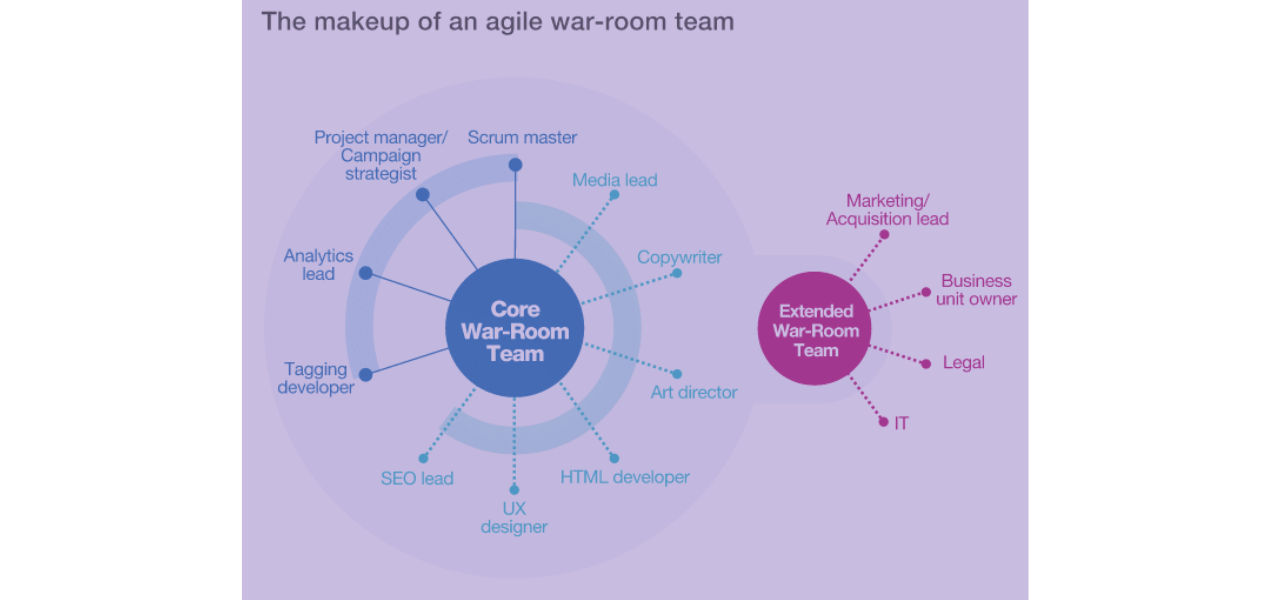
Source: Source: ResearchGate
Benefits of Using a War Room
Improved Team Focus
A war room creates a dedicated environment where teams can concentrate fully on project goals without everyday distractions.
Faster Decision Making
With key team members and stakeholders available in one place, questions can be answered quickly and issues can be resolved without delays.
Better Project Visibility
Project details like timelines, KPIs, dashboards, and progress updates are visible to everyone, making it easier to track work and identify risks early.
Stronger Collaboration
Teams from different departments can work together in real time, share ideas, and provide quicker feedback throughout the project.
Quick Problem Resolution
Since communication is direct and immediate, bottlenecks and challenges can be addressed much faster than in traditional setups.
Higher Team Engagement
A war room creates a sense of urgency and shared purpose, helping team members stay motivated and more involved in project success.
Increased Productivity
By improving communication, reducing delays, and keeping everyone aligned, war rooms help teams work more efficiently and deliver better results.
Main Functions of War Room in Project Management
Data Analysis and Tracking
A war room helps teams analyze project data, monitor progress, and identify trends or issues early. Visual tools and dashboards make it easier to understand project performance.
Team Collaboration and Communication
It brings project stakeholders together in one space, making communication smoother and encouraging quick discussions, exchanging ideas, knowledge sharing, and teamwork.
Faster Decision Making
War rooms support quick and informed decisions by keeping all important information and team members easily accessible during discussions.
Problem Solving
Teams can identify risks, address challenges, and find solutions more efficiently when everyone collaborates in real time.
Project Planning and Strategy
A war room provides a focused environment for brainstorming ideas, building project plans, and developing effective strategies for execution.
Improved Alignment
By keeping everyone updated with the same information, war rooms help teams stay aligned on priorities, responsibilities, and project goals.
Better Project Execution
With stronger communication, faster responses, and improved coordination, war rooms help projects move forward more smoothly and efficiently.
How to Conduct Effective War Room Meetings?
Define Clear Objectives
Start each meeting with a clear purpose and agenda so everyone understands the goals and comes prepared with the required updates or information.
Involve the Right People
Include key stakeholders, decision makers, and subject experts who can contribute valuable insights and help resolve issues quickly.
Set Meeting Guidelines
Create basic ground rules to keep discussions organized and productive. Encourage active participation, respect for opinions, and timely communication.
Use Visual Tools
Make use of dashboards, charts, timelines, and project boards to present information clearly and help teams understand progress and challenges easily.
Assign Action Items
Clearly define tasks, responsibilities, and deadlines during the meeting so everyone knows what needs to be done next.
Track Progress Regularly
Review action items and updates in follow up meetings to ensure accountability and keep the project moving forward smoothly.
Encourage Open Collaboration
Create an environment where team members feel comfortable sharing ideas, concerns, and solutions to improve overall decision making.
Best Practices for War Room in Project Management
To optimize the utilization of a war room, consider the following best practices:
- Create a Collaborative Environment: Design the physical or virtual war room space to encourage collaboration and creative thinking. Ensure it is comfortable, well-equipped, and conducive to productive work sessions.
- Maintain Real-time Data: Keep project information, metrics, and updates up to date within the war room. This ensures the team works with accurate and relevant data, promoting informed decision-making.
- Foster Open Communication: Encourage open and transparent communication within the war room. Create a surrounding where team members feel comfortable sharing their thoughts, concerns, and ideas without fear of judgment or reprisal.
- Regularly Review Progress: Schedule regular progress review sessions in the war room to assess the project's status, identify bottlenecks, and realign strategies if necessary. This helps keep the project on track and ensures timely course corrections.
In addition to these best practices, ensuring that team members are adequately trained in project management methodologies is crucial. Consider enrolling them in the best institute for PRINCE2 certification to equip them with the skills and knowledge necessary to manage complex projects.
Thinking about leveling up your career? Discover why PMP certification might be the smartest move you make this year.
What are the Challenges of War Room Meetings?
Dependence on Team Availability
War rooms work best when all key members can actively participate. In remote or hybrid teams, coordinating across locations and time zones can become difficult.
Risk of Team Burnout
War rooms often involve intense focus and constant pressure to deliver results quickly. Over time, this high stress environment can lead to fatigue and reduced morale.
Narrow Project Focus
Teams may become so focused on one urgent issue or project goal that other important tasks and long-term priorities get overlooked.
Resource and Time Demands
Setting up and maintaining a war room requires dedicated space, tools, and continuous coordination. It can also pull important team members away from their regular responsibilities.
Decision Fatigue
Frequent discussions and rapid decision making can mentally exhaust teams. This may result in rushed decisions or important details being missed.
Need for Proper Management
War rooms are effective only when managed with balance and clear objectives. Without a defined purpose and exit plan, they can become inefficient over time.
Explore upGrad KnowledgeHut Project Management Certifications designed to build practical project management expertise and improve your decision making in high pressure project environments.
Real-Life Examples of Successful War Room Implementations
1. Amazon
Amazon, one of the world's largest e-commerce companies, is known for effectively using war rooms to manage complex projects. For example, during peak sales periods like Prime Day, Amazon sets up dedicated war rooms staffed with cross-functional teams. These teams closely monitor website traffic, sales metrics, and real-time customer feedback. By having all stakeholders in one room, they can quickly identify and address any issues that may arise, ensuring a seamless customer experience.
2. Obama 2012 Campaign
During the 2012 U.S. presidential campaign, the Obama campaign set up a war room to coordinate and manage their election strategy. The war room was a central hub where data analysts, strategists, and communication experts worked to monitor polling data, track media coverage, and respond to opponent attacks. This real-time analysis and communication allowed the campaign to make data-driven decisions, adjust its messaging, and effectively respond to changing circumstances.
3. NASA's Mission Control Center
NASA's Mission Control Center is a prime example of a war room used in the context of space exploration and mission management. The Mission Control Center is the nerve center for monitoring and managing space missions. It brings together experts from various disciplines, such as engineers, scientists, and astronauts, to monitor spacecraft systems, track mission progress, and make real-time critical decisions. The war room environment allows for close collaboration and communication, enabling swift responses to any anomalies or emergencies during missions.
4. Financial Institutions
Many financial institutions, such as banks and investment firms, utilize war rooms to manage high-stakes projects, such as mergers and acquisitions or trading operations. In these war rooms, teams of financial analysts, legal experts, and project managers collaborate to analyze financial data, assess risks, and make informed investment decisions. The war room is a dedicated space where real-time market data is analyzed, and strategies are formulated, ensuring quick and effective responses to market fluctuations.
Conclusion
A war room can be a highly effective approach in project management when teams need quick collaboration and faster decision making. It helps improve communication, keeps everyone aligned, and supports efficient problem solving during critical project situations.
By bringing the right people and information together, teams can respond to challenges more confidently and stay focused on project goals. However, war rooms work best when used strategically for high priority situations rather than as a permanent working setup.
Contact our upGrad KnowledgeHut experts and get personalized guidance on choosing the right course, career path, and certification for your goals.
Frequently Asked Questions (FAQs)
Is a war room only used in IT projects?
No, war rooms are not limited to IT projects. They are used across industries like construction, healthcare, and event management. Any project that requires quick decisions and close collaboration can benefit from a war room setup.
How long should a war room be active during a project?
A war room is usually temporary and should only be active during critical phases. It can last a few days to a few weeks depending on the situation. Keeping it short helps avoid fatigue and keeps the team focused.
Who should be part of a project war room?
The war room should include key decision makers, subject experts, and team members directly involved in solving issues. You do not need everyone, just the right people. Having a focused team makes discussions more effective.
Can small teams use a war room approach?
Yes, even small teams can use a simplified war room setup. It can be as simple as a shared online space or a focused meeting structure. The goal is quick coordination, not complexity.
How is a war room different from regular team meetings?
War room discussions are more focused, frequent, and action oriented. Unlike regular meetings, they aim to solve problems immediately and make quick decisions. They are less formal and more urgent in nature.
Can a war room improve team communication?
Yes, a war room brings everyone together in one place, making communication faster and clearer. It reduces delays caused by emails or scattered updates. This helps teams stay aligned and informed in real time.
What tools are commonly used in a virtual war room?
Tools like Microsoft Teams, Zoom, Slack, and shared dashboards are commonly used. These tools help teams communicate, track progress, and share updates easily. Choosing the right tools depends on team needs.
How do you keep a war room organized?
Clear roles, structured updates, and defined priorities help maintain order. Using dashboards or trackers keeps information visible. Regular check ins ensure everyone stays on track without confusion.
Can a war room help reduce project delays?
Yes, it can significantly reduce delays by addressing issues immediately. Faster decisions and rapid problem solving prevent small issues from becoming bigger problems. This helps keep the project on schedule.
What risks are involved in using a war room?
If not managed well, war rooms can lead to stress, confusion, or too many discussions. Long hours can also impact team wellbeing. Proper planning and clear focus can help avoid these issues.
454 articles published
Kevin D. Davis is a seasoned and results-driven Program/Project Management Professional with a Master's Certificate in Advanced Project Management. With expertise in leading multi-million dollar proje...
Get Free Consultation
By submitting, I accept the T&C and
Privacy Policy