

Domains
Artificial Intelligence
Harness AI to create smarter workflows and scalable growth.
View All Artificial Intelligence Coursesicon-aiCertifications
Certification
100+ Hours
Trending
Post Graduate Certification Program in Data Analytics and Applied AI
Certification
140+ Hours
Trending
Executive Post Graduate Certificate in Data Science and Applied AI
Certification
140+ Hours
Trending
PG Certificate in Applied Generative Engineering & LLM Applications
Certification
150+ Hours
Trending
PG Certificate in AI Powered Product and Design Thinking
Certification
15 Weeks
Trending
AI Masters Program
Certification
4 Weeks
Trending
Vibe Coding 101: No-code AI Programming.svg)
Certification
48 Hours
Trending
Applied Agentic AI - No Code
Certification
16 Hours
Trending
Generative AI and Prompt Engineering
Certification
8 Weeks
Trending
AI-Powered Product Management
Certification
8 Weeks
Trending
Applied Agentic AI Certification
Certification
16 Hours
Generative AI Course for Scrum Masters
Certification
16 Hours
Generative AI Course for Project Managers
Certification
16 Hours
Generative AI Course for POPM
Certification
16 Hours
Gen AI Course for Business Analysts
Certification
16 Hours
AI Powered Software Development
Certification
16 Hours
AI-Data Analytics with Power BI
Certification
16 Hours
AI-Driven Digital Marketing Training
Certification
16 Hours
Gen AI for Enterprise Agilist
Advanced Certifications
Masters
Executive Diploma
Executive Diploma in Machine Learning and AI
Executive Diploma
Executive Diploma in Data Science & Artificial Intelligence from IIITBCertification
Chief Technology Officer & AI Leadership ProgrammeMaster's Degree
Master of Science in Machine Learning & AI
Dual Certification
Executive Programme in Generative AI for LeadersCertification
Executive Post Graduate Programme in Applied AI and Agentic AIExecutive PG Program
IIT KGP-Executive PG Certificate in Gen AI and Agentic
Self-Learning Courses
Universal AI by MIT Open LearningAgile Management
Master Agile methodologies for efficient and timely project delivery.
View All Agile Management Coursesicon-refresh-cwCertifications
Scrum Alliance
16 Hours
Best Seller
Certified ScrumMaster (CSM) Certification
Scrum Alliance
16 Hours
Best Seller
Certified Scrum Product Owner (CSPO) Certification
Scaled Agile
16 Hours
Trending
Leading SAFe 6.0 Certification.svg)
Scrum.org
16 Hours
Professional Scrum Master (PSM) Certification
Scaled Agile
16 Hours
AI-Empowered SAFe® 6.0 Scrum Master
PMI
21 Hours
Best Seller
PMI Agile Certified Practitioner (PMI-ACP) Certification
Advanced Certifications
Scaled Agile, Inc.
32 Hours
Recommended
Implementing SAFe 6.0 (SPC) Certification.svg)
Scaled Agile, Inc.
24 Hours
AI-Empowered SAFe® 6 Release Train Engineer (RTE) Course
Scaled Agile, Inc.
16 Hours
Trending
SAFe® AI-Empowered Product Owner/Product Manager (6.0)
IC Agile
24 Hours
ICP Agile Certified Coaching (ICP-ACC)
Scrum.org
16 Hours
Professional Scrum Product Owner I (PSPO I) Training
Masters
32 Hours
Trending
Agile Management Master's Program
32 Hours
Agile Excellence Master's ProgramOn-Demand Courses
Agile and ScrumRoles
Scrum MasterAccreditation Bodies
Scrum Alliance Scaled Agile, Inc.
 Scrum.org
 ICAgile
 PMI
PMI
Top Resources
Scrum TutorialProject Management
Gain expert skills to lead projects to success and timely completion.
View All Project Management Coursesicon-standCertifications
PMI
36 Hours
Best Seller
Project Management Professional (PMP) Certification
Axelos
32 Hours
PRINCE2 Foundation & Practitioner Certification
Axelos
16 Hours
PRINCE2 Foundation Certification
Axelos
16 Hours
PRINCE2 Practitioner Certification
PMI
23 Hours
Best Seller
Certified Associate in Project Management (CAPM)®
PMI
24 Hours
Best Seller
Program Management Professional (PgMP®)
PMI
24 Hours
Best Seller
Portfolio Management Professional (PfMP)®
PMI
30 Hours
Best Seller
Project Management Institute-Risk Management Professional (PMI-RMP)®
Skills
Change ManagementMasters
Job Oriented
45 Hours
Trending
Project Management Master's Program
On-Demand Courses
PRINCE2 Practitioner CourseRoles
Project ManagerAccreditation Bodies
PMIAxelos Scrum Alliance
Top Resources
Theories of MotivationCyber Security
Understand how to protect data and systems from threats or disasters.
View All Cyber Security Coursesicon-refresh-cwCertifications
CompTIA
40 Hours
Best Seller
CompTIA Security+
EC-Council
40 Hours
Certified Ethical Hacker (CEH v13) Certification
ISACA
40 Hours
Certified Information Systems Auditor (CISA) Certification
ISACA
40 Hours
Certified Information Security Manager (CISM) Certification
(ISC)²
40 Hours
Certified Information Systems Security Professional (CISSP)
(ISC)²
40 Hours
Certified Cloud Security Professional (CCSP) Certification
16 Hours
Certified Information Privacy Professional - Europe (CIPP-E) Certification
ISACA
16 Hours
COBIT5 Foundation
16 Hours
Payment Card Industry Security Standards (PCI-DSS) Certification
On-Demand Courses
CISSPTop Resources
Laptops for IT SecurityCloud Computing
Learn to harness the cloud to deliver computing resources efficiently.
View All Cloud Computing Coursesicon-cloud-snowingCertifications
AWS
32 Hours
Best Seller
AWS Certified Solutions Architect - Associate
AWS
32 Hours
AWS Cloud Practitioner CertificationAWS
24 Hours
AWS DevOps CertificationMicrosoft
16 Hours
Azure Fundamentals Certification
Microsoft
24 Hours
Best Seller
Azure Administrator CertificationMicrosoft
45 Hours
Recommended
Azure Data Engineer CertificationMicrosoft
32 Hours
Azure Solution Architect CertificationMicrosoft
40 Hours
Azure DevOps CertificationAWS
24 Hours
Systems Operations on AWS Certification TrainingAWS
24 Hours
Developing on AWSMasters
Job Oriented
48 Hours
New
AWS Cloud Architect Masters Program
Roles
Cloud EngineerOn-Demand Courses
AWS Certified Developer Associate - Complete GuideAuthorized Partners of
AWSMicrosoft
Top Resources
Scrum TutorialIT Service Management
Understand how to plan, design, and optimize IT services efficiently.
View All ITSM Coursesicon-git-commitCertifications
Axelos
16 Hours
New
ITIL Foundation (Version 5) Certification
Axelos
16 Hours
Best Seller
ITIL 4 Foundation Certification
Axelos
8 Hours
New
ITIL Foundation Bridge Course (Version 5)Axelos
16 Hours
ITIL Practitioner Certification
PeopleCert
16 Hours
ISO 14001 Foundation Certification
PeopleCert
16 Hours
ISO 20000 CertificationPeopleCert
24 Hours
ISO 27000 Foundation CertificationAxelos
24 Hours
ITIL 4 Specialist: Create, Deliver and Support Training
Axelos
24 Hours
ITIL 4 Specialist: Drive Stakeholder Value TrainingAxelos
16 Hours
ITIL 4 Strategist Direct, Plan and Improve TrainingOn-Demand Courses
ITIL 4 Specialist: Create, Deliver and Support ExamTop Resources
ITIL Practice TestData Science
Unlock valuable insights from data with advanced analytics.
View All Data Science Coursesicon-dataOur Courses
Data Science with PythonRoles
Data ScientistOn-Demand Courses
Data Analysis Using ExcelTop Resources
Machine Learning TutorialDevOps
Automate and streamline the delivery of products and services.
View All DevOps Coursesicon-terminal-squareCertifications
DevOps Institute
16 Hours
Best Seller
DevOps Foundation Certification
CNCF
32 Hours
New
Certified Kubernetes Administrator
Devops Institute
16 Hours
Devops LeaderSkills
KubernetesRoles
DevOps EngineerOn-Demand Courses
CI/CD with Jenkins XGlobal Accreditations
DevOps Institute
Top Resources
Top DevOps ProjectsBI And Visualization
Understand how to transform data into actionable, measurable insights.
View All BI And Visualization Coursesicon-microscopeBI and Visualization Tools
Certification
24 Hours
Recommended
Tableau Certification
Certification
24 Hours
Data Visualization with Tableau Certification
Microsoft
24 Hours
Best Seller
Microsoft Power BI Certification
TIBCO
36 Hours
TIBCO Spotfire Training
Certification
30 Hours
Data Visualization with QlikView CertificationCertification
16 Hours
Sisense BI Certification
On-Demand Courses
Data Visualization Using Tableau TrainingTop Resources
Python Data Viz LibsWeb Development
Learn to create user-friendly, fast, and dynamic web applications.
View All Web Development Coursesicon-codeOur Courses
ReactOn-Demand Courses
Angular TrainingTop Resources
Top HTML ProjectsBlockchain
Understand how transactions and databases work in blockchain technology.
View All Blockchain Coursesicon-stop-squareBlockchain Certifications
40 Hours
Blockchain Professional Certification
32 Hours
Blockchain Solutions Architect Certification
32 Hours
Blockchain Security Engineer Certification
24 Hours
Blockchain Quality Engineer Certification
5+ Hours
Blockchain 101 Certification
On-Demand Courses
NFT Essentials 101: A Beginner's GuideTop Resources
Blockchain Interview QsProgramming
Learn to code efficiently and design software that solves problems.
View All Programming Coursesicon-codeSkills
Python CertificationInterview Prep
Career Accelerator
3 Months
Software Engineer Interview Prep
On-Demand Courses
Data Structures and Algorithms with JavaScriptTop Resources
Python Tutorial- Home
- Interview Questions
- Programming
- Array Interview Questions and Answers for 2026
Programming
Array Interview Questions and Answers for 2026
4.7 Rating 56 Questions 30 mins read248 Readers

Introduction
1. Explain Arrays in Programming.
This is a frequently asked question in Array interview questions.
An array is a type of data structure that we use to store data in contiguous memory locations. But this data should be of the same data type as the one used for array declaration.
The advantage of having a contiguous memory is that we can easily find the location of any element in the array by just finding its index value. For example, if we want to access an element present at the 3rd index(4th element) in an array arr, then we can write arr[3]. This is generally because when it comes to arrays, we mostly follow 0-based indexing and not 1-based indexing.

While this is good and all, an array cannot be resized once declared. This may sometimes lead to memory leaks which are not good for any programmer.
2. Differentiate between Array and ArrayList in Java?
Expect to come across this popular question in Programming questions on Arrays.
The main difference between them is that array is static, meaning we have to specify the size of the array along with its data type to initialize an array which can sometimes become the reason for memory leaks. While in the case of ArrayList, no such memory leaks happen as it is dynamic, meaning it can adjust its size according to the input given.
This is because, in the case of an ArrayList, as soon as an element is added, JVM checks whether it has enough space or not by calling the ensureCapacity() method. If the space exists, the element gets added to the ArrayList, else the ArrayList gets resized.
In the resizing process, an array of a larger size is created, the old array is copied to the new array using the Arrays.copyOf method, and the new array is then assigned to the existing array.
Let us understand some more differences in a tabular format:
Array | ArrayList | |
|---|---|---|
Definition | An Array is a collection of similar data types stored in contiguous memory locations. | An ArrayList is a class of Java Collections framework which contains popular classes like Vector, HashMap, etc. |
Performance | It is fast as compared to ArrayList. | Its resizing ability slows it down. |
Type of Data Structure stored | It can store both objects and primitive data type like int, long, float, etc. | It cannot store primitive data type and automatically converts primitive data types into objects. |
Type - Safety | It is not type safe as we cannot save generics along with the array thus making the array convertible in nature. | ArrayList, on the other hand, can store generics. Hence is not convertible and thus is type-safe. |
3. What is the maximum size of an array?
In Java, when we initialize an array with the new keyword, the size argument is of the type int and a 32-bit Java int can go up to 2,147,483,647 elements which can be considered as the theoretical max limit of an array when it is initialized with an int data type.
However, in reality, the virtual machines of different operating systems may not allocate every bit of it to the array elements. Thus, the maximum number of elements a Java array can hold is typically a little less than the upper limit of a Java int.

In the above example, we tried to test out this theoretical max limit of an array but what we received was an OutOfMemory exception. This is because this is not the actual max limit of an array. Moreover, it totally depends upon the type of OS we are using.
4. What is the difference between the size and length of arrays in Java?
Commonly we use the terms ‘size’ when we want to know how many elements an array can hold, on the contrary in java we do not have a size() method nor do we have a length() method in java. What we do have is the length property which we use to find out the length of the array or the number of elements it holds.
To confuse the matters even more, Java Collection class that implements a list interface does have a size() method. Collection classes like Vector, ArrayList, and Stacks have a size method that is used to calculate the number of elements present in them.
5. Mention some Advantages and Disadvantages of Arrays.
A must-know for anyone heading into an Array interview, this question is frequently asked in Array interview questions.
Advantages
- Arrays can store multiple data of the same data type in a contiguous memory location, making it simpler to read and get the desired data.
- As the arrays are static in nature, there is minimal possibility of underflow and overflow of memory.
- Since the elements are stored in a contiguous manner:
- It is easy to sort data.
- It is easy to access any data randomly.
- It is easy to iterate in this data structure and unit time is required to access an element if the index is known.
Disadvantages
- An array cannot be declared without size. When we declare an array without assigning the size, it throws the compile-time error.
- Array is static in nature, meaning its size is fixed and cannot be modified.
- To fill in or close gaps, we have to shift the other elements, which take the worst case of O(n)
- Insertion and deletion operations are costly in arrays as elements are stored in contiguous memory.
- If the declared array size is more than the required size, it can lead to memory wastage.


1. What will happen if we don’t initialize an array?
There are two ways of initializing an array:
- At the time of the Array declaration
- Any time after declaring the array
But if for some reason we don't initialize the array in both scenarios, the array will be initialized with some random values, and at each memory location as in the array, elements are stored in contiguous order. These random values can again be categorized into two categories - Default values and Garbage values.
In the case of Java Programming Language, if the elements of the array which has already been declared are not set to their specific values, they will be initialized as the default values of the Data Type that was used for Array Declaration.
- For type byte, the default value is zero, that is, the value of (byte)0.
- For type short, the default value is zero, that is, the value of (short)0.
- For type int, the default value is zero, that is, 0.
- For type long, the default value is zero, that is, 0L.
- For type float, the default value is positive zero, that is, 0.0f.
- For type double, the default value is positive zero, that is, 0.0d.
- For type char, the default value is the null character, that is, '\u0000'.
- For type boolean, the default value is false.
- For type object, the default is null


In the case of JavaScript, this default value is undefined. While in the case of C++, these random values will be the garbage values that the compiler has initialized the array with, and it's not a good thing for a programmer to rely on. While he can do so in the case of Java.
C++
JS
2. Find the target element in an Array.
One of the most frequently posed Array coding questions, be ready for it.
The question is that you are given an array of size ‘n’ and a target value. You have to find the index at which this target value is and also tell its time complexity.
Approach
We will run a loop through the input array and check whether the given target value is present or not. If it’s present, we will return its index value, and if it's not, we will return -1.
- Time Complexity - O(n)
- Space Complexity - O(1)
- Efficient Approach - Using Binary Search Algorithm
We can also use Binary Search Algorithm, but we can only use it if the given array is sorted. And we just cannot sort our array as it will increase the time complexity to O(n log n).
Approach
- Find the middle element of the array using (h+l)/2, where h and l are the first and the last index values.
- Compare x with the middle element, where x is the target element.
- If x matches with the middle element, we return the mid index.
- Else If x is greater than the mid element, then x can only lie in the right half subarray after the mid element. So the whole process continues in that subarray while forgetting about the other part.
- Else follow the same steps for the left half of the array while forgetting the right half.
import java.io.*;
import java.util.*;
class Main {
    static void binarySearch(int v[], int x)
    {
       int lo = 0, hi = v.length - 1;
        while (hi - lo > 1) {
        int mid = (hi + lo) / 2;
        if (v[mid] < x) {
            lo = mid + 1;
        }
        else {
            hi = mid;
        }
    }
    if (v[lo] == x) {
      System.out.println("Found At Index " + lo );
    }
    else if (v[hi] == x) {
        System.out.println("Found At Index " + hi );
    }
    else {
        System.out.println("Not Found" );
    }
}
    public static void main (String[] args) {

      int v[]= {1, 3, 4, 5, 6};

    int x = 1;
    binarySearch(v, x);
x = 6;
    binarySearch(v, x);
    x = 10;
    binarySearch(v, x);
    }
}
Output
- Time Complexity - O(log n)
- Space Complexity - O(1)
3. Why are Arrays always stored in heap memory?
In Java, we have something known as JVM - Java Virtual Machine. It is mainly a part of JRE - Java Runtime Environment and acts as a run-time engine to run Java applications. JVM is the one that actually calls the main method present in a java code.
Now to answer the question as to why arrays are stored in the heap part of the JVM and not in any other part, we first have to understand that in Java reference types are stored in the Heap area. As arrays are also referenced types, (they can be created using the “new” keyword) they are also stored in the Heap area.
Let us understand this concept with the help of an example:
int myArray[]; //array declaration
      myArray = new int[4];//memory allocation using the new keyword
      myArray[0] = 25;//allocating memory
      myArray[1] = 32;//allocating memory
      myArray[2] = 56;//allocating memory
      myArray[3] = 93;//allocating memory
The int myArray[] is just a reference to the array of four integers. While to allocate the memory to an array, we have to use the new keyword. See the diagram below to get a better understanding of the concept.
4. Consider the following statement and tell whether the following statement is true or not. Also, specify the reason for the same.
The above statement is true. This is because in Java language we are free to use as many array-specific syntaxes as we want for both initializing (putting explicit values into an array) and constructing (creating the array object itself) in a single line.
Let us see how the above statement is true. We have initialized a variable y as 56 and it is inside an array of length 5. Now the compiler will replace the value of the y variable with its value as we print the array. See the image below.

But what if we try to initialize the variable after initializing the same array. We will get an error. This is because we have initialized the y variable after using it in the array which becomes the root cause of the error as y is an unknown variable for him.

5. Why would you choose a Linked List over an Array?
A staple in Array interview questions, be prepared to answer this one.
There are various reasons to choose a Linkedlist over an Array. Some of them have been listed below:
- Size: The Major drawback when it comes to the basic array is its size, we cannot resize it at runtime as data is stored in contiguous blocks of memory. But that’s not the case with Linkedlist, due to its node structure, we can resize it according to our wish and will, as in linkedlist the data is not stored in a contiguous manner. This is because, in the linked list, each node point is connected to the next one such that data can exist at scattered (non-contiguous) addresses.
In the case of a Linked list, we can add any element in the middle at any index without replacing any element from the original list, which we, of course, can’t do in both static and dynamic arrays.
- Memory: For static arrays, the memory is allocated at the compile time, whereas in the case of a linked list, the memory is allocated at the runtime. Though in dynamic arrays, the memory is also allocated at the run time.


1. How do you find a missing integer in an array of ranges 1 to 100?
It's no surprise that this one pops up often in Array programming questions in Java.
The missing integer can be found using a very simple math formula - S = [n(n+1)]/2. Adding all the numbers given in the array and subtracting them from S will give us our answer or the missing number.
But this formula will not work if the array contains duplicates or is missing more than one number. If the array contains duplicates, sort the array and find and remove the duplicate element from the array and then use the above formula to find the missing number.
2. How do you check the equality of two arrays?
A common question in Array related interview questions, don't miss this one.
First of all, we won’t use the ‘==’ operator here, as it will not give the desired result, and it will compare them as objects.
The best way to check whether the two arrays are the same or not is first to compare their lengths, if they are the same, then we can proceed, but if not, return arrays' arrays are not the same.
Then sort both the arrays in ascending order and, using a loop compare each index value using the == operator - through this we can ensure that only the values are compared and not the whole array.
import java.io.*;
import java.util.*;
class Main {
    public static void main(String[] args)
    {
        int arr1[] = {1, 2, 4, 5, 3};
        int arr2[] = {3, 4, 2, 1, 5};
        int N = arr1.length;
        int M = arr2.length;
        if (N != M)
            System.out.println("Arrays are not equal");
        Arrays.sort(arr1);
        Arrays.sort(arr2);
        for (int i = 0; i < N; i++)
            if (arr1[i] != arr2[i])
                System.out.println("Arrays are not equal");
        System.out.println("Arrays are equal");
    }
}
Output
There are other ways of checking whether the two arrays are the same or not - Using the Arrays.equals() method and Arrays.deepEquals() method.
- Using Arrays.equals(array1, array2) method − This method iterates over each value of an array and compares using equals method.
- Using Arrays.deepEquals(array1, array2) method − This method iterates over each value of an array and deep compare using any overridden equals method.
3. How do dynamic arrays work?
A dynamic array is an array of variable size which will automatically expand its size when we try to insert a new element in it and there is no room for it. At this stage a new array is created with a new address and reference of double the size than the previous one so that the old elements as well the new elements can be appended. See the figure below.

In Java, Array works as a dynamic array while in C/C++ we have vectors showing us the same characteristics as of a dynamic array.
Implementation of Dynamic Array
In dynamic arrays elements are stored contiguously in the same manner from start to end but if after all the elements are appended and some space is left, that space is called reserved space.
We can add until that reserved space is consumed, but once it gets completely full then only a new array of double the size is created, and the same process continues ,of copying and inserting old and new elements in that new array and waiting until the reserved space gets filled. Or another way to add an element is that first, create a function that creates a new array of double size, copies all the elements from the old array, and returns the new array.
The table given below gives us a brief idea as to how much growth we can expect from different programming to show us when it comes to dynamic arrays:
| Programming Language | Growth Rate |
|---|---|
Java | 1.5 |
Python | ~1.125 |
C++ | 1.5 |
Go | 1.5 - 2 |
4. Can we make an array volatile?
Yes, we can make both primitive data types and reference types volatile, but we can only make the variable pointing towards the array volatile and the whole array.
To understand this concept, first we have to understand that the concept of making an array volatile is simply taken to protect the elements of the array from multiple threads which can modify the data of the array, and that this is only possible with the help of volatile keywords.
The volatile keyword can be applied to both primitive data types and objects. It never caches the variable's value and always reads it from main memory. Although it cannot be used with classes or methods, it is perfectly fine with static variables. It stops the compiler from reordering code while ensuring visibility and ordering.
5. What are the benefits of Heap over Sorted Arrays?

- Construction of heap data structures take less time - O(n) in comparison to sorted arrays which takes O(n log n) time.
- Heap Data Structure has not only surpassed Sorted Arrays in case of its construction, but also in terms of different operations like insertion and deletion. In case of heap data structure, insertion and deletion takes only O(log n) time while in case of sorted arrays the time complexity for operations like insertion and deletion is O(n).
- For a given set of n elements, multiple heaps can be formed. But only two sorted arrays are possible.


Want to Know More?

10% OFF
Description
Top Tips and Tricks for Array Interview Questions
1. Removing Duplicates from an Array
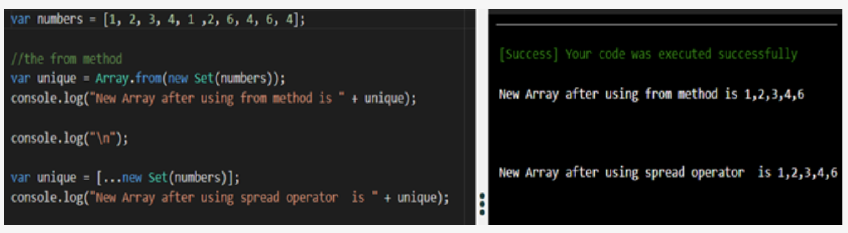
It is one of the most favored questions asked in any array interview. It is basically asked to check your basic knowledge of arrays. There are two methods using which we can easily remove the duplicates from the array no matter how many there are, but we have created a new array that will be printed as it will contain the array without duplicates.
To create the new array, we will be using the new set() method of JavaScript. The two which we will use to remove duplicates are from and the spread operator.
2. Mapping an Array Without Using map() Function
It has been a couple of years since ES6 came into existence, and by now, every JavaScript must have heard and used the map() function to destructure the elements of either array or an object.
But what if I tell you there is another way of mapping elements without using the map() function or the good old for loop. The one drawback of map() method, I think, is that we have to first store everything into another variable and then either destructure them or use the dot notation - in the case of objects.
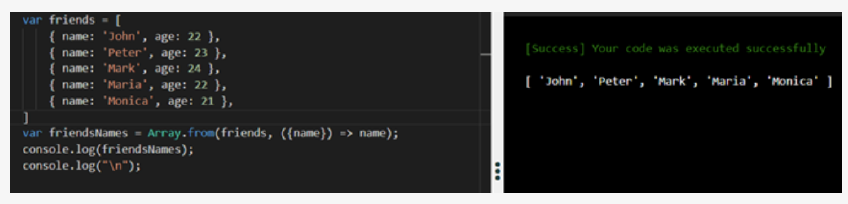
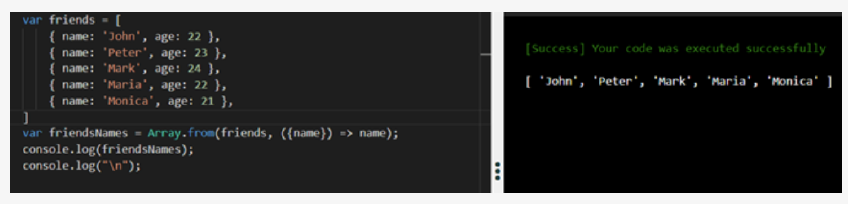
Now see what happens if we use the from the method in the same example.
3. Convert an Array into an Object
The interviewer might ask this question to confuse you. Imagine a situation where you have to convert an array into an object, how will you do it? The fastest way and the easiest way to approach and solve it is to use the spread operator.

4. Find the Insertion of two Arrays
It is again one of the popular questions based on array JavaScript. To solve this problem, we will be using two of the JavaScript methods simultaneously. Those two methods are filter() and includes().

5. Inserting an Element in the Middle of an Array
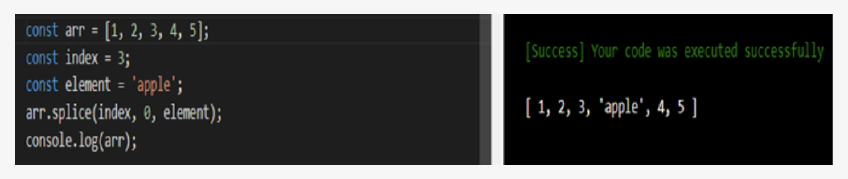
This, again, is the most asked question in JavaScript interviews when it comes to arrays. In this, we have to insert an element at the center of the given array. This element can be anything from a string to a number. We will be using the splice method for this question.
This method is generally used to add or remove a specific element at the given index. Its parameters include - the index at which we have to either insert the element or remove the element, the number of elements that will be either added or removed, and lastly, the element that needs to be added.
- Do not hesitate to ask the interviewer to clear your doubts if you have any. Sometimes the interviewer checks your interpersonal skills through a coding round as well, and it can boost your score in the final round.
- Clarify if there are any duplicates in the array if there are, what effect are they having on the overall question and your approach to solving it.
- In your code, be careful when slicing or concatenating arrays. Normally, it would take O(n) time to slice and concatenate an array. Where possible, delimit a subarray/range with start and end indices.
How to Prepare for Programming Questions on Arrays?
There is only one way to prepare for coding interviews for not only arrays but for any programming interviews, be it for SDE or Front-end Developer or Back-end developers, one thing that will remain common for all is practice. You have to do a lot of practice not only with coding or array questions in java but also with other programming languages and how to approach a problem, as the main thing that counts, in the end, is your approach.
Your approach to a given problem should be calm and calculative. Understand the problem well and ask the interviewer or anyone sitting there for doubts if you have any confusion. Consider breaking the problem down into smaller parts, as it will make the problem easier to deal with. Before you start coding, ensure you have the algorithm in mind — jot it down or create a flowchart to picture it. Then start coding.
But before everything, be sure to brush up on all your concepts of arrays, like declaring, creating an array, accessing, modifying array elements, and programming constructors such as loop, recursion, and fundamental operators. You can also visit KnowledgeHut short Programming courses to get a better idea of all things to brush up on before your tech interview.
Job Roles
- System Design Engineer - I
- System Design Engineer – II
- System Desing Engineer – III
- Software Engineer
- Dev Ops Engineer
- Web Developer
Top Companies
- Meta
- Amazon
- Adobe
- Netflix
- Oracle
What to Expect in Java Array Interview Questions?
The Array is the simplest form of data structure that can store multiple values of the same data type in contiguous memory locations. In your coding journey, you will find the use of arrays in almost every other question, as most of the questions can be solved with the help of an array.
Because arrays are the simplest form of data structure, we can use all our techniques, like the sliding window approach and two-pointer approach, and some basic understanding of that programming language can be used together to solve a particular problem.
Most of the array interview rounds are held to check your understanding of the basic concepts of programming and programming languages like JS, Python, Java, and C++. We recommend Programming languages online training courses to clear all your doubts.
Summary
In this article, we have discussed mainly the array questions in Java, array interview questions in C, and many more programming languages, which are essential to do before an array technical interview.
This article consists of a mix of coding problems and logical problems explained thoroughly so that you can understand them well, but again the key to cracking any interview is practice. The more you practice, the better you will get at it.
Array interview questions are asked in many tech rounds as they are perfect for judging your coding and logical skills and also your approach to new and old problems. So, let us discuss some of the main concepts here as well, which we have described in the above article.
There are many methods that can be used to solve a problem in an efficient way. When we say efficient, we are talking about time complexity, as this is one of the main factors which interviewers check while taking your interview. Some methods include sliding windows, dividing and conquering two pointers, traversing from the right, sorting, etc.
Also, the interviewer will check all these techniques in your tech round as an effective way of using these techniques will give him/her a good idea about your problem-solving skills, not only in terms of coding but also in terms of real life.
Recommended Courses
