
- Blog Categories
- Project Management
- Agile Management
- IT Service Management
- Cloud Computing
- Business Management
- BI And Visualisation
- Quality Management
- Cyber Security
- DevOps
- Most Popular Blogs
- PMP Exam Schedule for 2025: Check PMP Exam Date
- Top 60+ PMP Exam Questions and Answers for 2025
- PMP Cheat Sheet and PMP Formulas To Use in 2025
- What is PMP Process? A Complete List of 49 Processes of PMP
- Top 15+ Project Management Case Studies with Examples 2025
- Top Picks by Authors
- Top 170 Project Management Research Topics
- What is Effective Communication: Definition
- How to Create a Project Plan in Excel in 2025?
- PMP Certification Exam Eligibility in 2025 [A Complete Checklist]
- PMP Certification Fees - All Aspects of PMP Certification Fee
- Most Popular Blogs
- CSM vs PSM: Which Certification to Choose in 2025?
- How Much Does Scrum Master Certification Cost in 2025?
- CSPO vs PSPO Certification: What to Choose in 2025?
- 8 Best Scrum Master Certifications to Pursue in 2025
- Safe Agilist Exam: A Complete Study Guide 2025
- Top Picks by Authors
- SAFe vs Agile: Difference Between Scaled Agile and Agile
- Top 21 Scrum Best Practices for Efficient Agile Workflow
- 30 User Story Examples and Templates to Use in 2025
- State of Agile: Things You Need to Know
- Top 24 Career Benefits of a Certifed Scrum Master
- Most Popular Blogs
- ITIL Certification Cost in 2025 [Exam Fee & Other Expenses]
- Top 17 Required Skills for System Administrator in 2025
- How Effective Is Itil Certification for a Job Switch?
- IT Service Management (ITSM) Role and Responsibilities
- Top 25 Service Based Companies in India in 2025
- Top Picks by Authors
- What is Escalation Matrix & How Does It Work? [Types, Process]
- ITIL Service Operation: Phases, Functions, Best Practices
- 10 Best Facility Management Software in 2025
- What is Service Request Management in ITIL? Example, Steps, Tips
- An Introduction To ITIL® Exam
- Most Popular Blogs
- A Complete AWS Cheat Sheet: Important Topics Covered
- Top AWS Solution Architect Projects in 2025
- 15 Best Azure Certifications 2025: Which one to Choose?
- Top 22 Cloud Computing Project Ideas in 2025 [Source Code]
- How to Become an Azure Data Engineer? 2025 Roadmap
- Top Picks by Authors
- Top 40 IoT Project Ideas and Topics in 2025 [Source Code]
- The Future of AWS: Top Trends & Predictions in 2025
- AWS Solutions Architect vs AWS Developer [Key Differences]
- Top 20 Azure Data Engineering Projects in 2025 [Source Code]
- 25 Best Cloud Computing Tools in 2025
- Most Popular Blogs
- Company Analysis Report: Examples, Templates, Components
- 400 Trending Business Management Research Topics
- Business Analysis Body of Knowledge (BABOK): Guide
- ECBA Certification: Is it Worth it?
- Top Picks by Authors
- Top 20 Business Analytics Project in 2025 [With Source Code]
- ECBA Certification Cost Across Countries
- Top 9 Free Business Requirements Document (BRD) Templates
- Business Analyst Job Description in 2025 [Key Responsibility]
- Business Analysis Framework: Elements, Process, Techniques
- Most Popular Blogs
- Best Career options after BA [2025]
- Top Career Options after BCom to Know in 2025
- Top 10 Power Bi Books of 2025 [Beginners to Experienced]
- Power BI Skills in Demand: How to Stand Out in the Job Market
- Top 15 Power BI Project Ideas
- Top Picks by Authors
- 10 Limitations of Power BI: You Must Know in 2025
- Top 45 Career Options After BBA in 2025 [With Salary]
- Top Power BI Dashboard Templates of 2025
- What is Power BI Used For - Practical Applications Of Power BI
- SSRS Vs Power BI - What are the Key Differences?
- Most Popular Blogs
- Data Collection Plan For Six Sigma: How to Create One?
- Quality Engineer Resume for 2025 [Examples + Tips]
- 20 Best Quality Management Certifications That Pay Well in 2025
- Six Sigma in Operations Management [A Brief Introduction]
- Top Picks by Authors
- Six Sigma Green Belt vs PMP: What's the Difference
- Quality Management: Definition, Importance, Components
- Adding Green Belt Certifications to Your Resume
- Six Sigma Green Belt in Healthcare: Concepts, Benefits and Examples
- Most Popular Blogs
- Latest CISSP Exam Dumps of 2025 [Free CISSP Dumps]
- CISSP vs Security+ Certifications: Which is Best in 2025?
- Best CISSP Study Guides for 2025 + CISSP Study Plan
- How to Become an Ethical Hacker in 2025?
- Top Picks by Authors
- CISSP vs Master's Degree: Which One to Choose in 2025?
- CISSP Endorsement Process: Requirements & Example
- OSCP vs CISSP | Top Cybersecurity Certifications
- How to Pass the CISSP Exam on Your 1st Attempt in 2025?
- Most Popular Blogs
- Top 7 Kubernetes Certifications in 2025
- Kubernetes Pods: Types, Examples, Best Practices
- DevOps Methodologies: Practices & Principles
- Docker Image Commands
- Top Picks by Authors
- Best DevOps Certifications in 2025
- 20 Best Automation Tools for DevOps
- Top 20 DevOps Projects of 2025
- OS for Docker: Features, Factors and Tips
- More
- Agile & PMP Practice Tests
- Agile Testing
- Agile Scrum Practice Exam
- CAPM Practice Test
- PRINCE2 Foundation Exam
- PMP Practice Exam
- Cloud Related Practice Test
- Azure Infrastructure Solutions
- AWS Solutions Architect
- IT Related Pratice Test
- ITIL Practice Test
- Devops Practice Test
- TOGAF® Practice Test
- Other Practice Test
- Oracle Primavera P6 V8
- MS Project Practice Test
- Project Management & Agile
- Project Management Interview Questions
- Release Train Engineer Interview Questions
- Agile Coach Interview Questions
- Scrum Interview Questions
- IT Project Manager Interview Questions
- Cloud & Data
- Azure Databricks Interview Questions
- AWS architect Interview Questions
- Cloud Computing Interview Questions
- AWS Interview Questions
- Kubernetes Interview Questions
- Web Development
- CSS3 Free Course with Certificates
- Basics of Spring Core and MVC
- Javascript Free Course with Certificate
- React Free Course with Certificate
- Node JS Free Certification Course
- Data Science
- Python Machine Learning Course
- Python for Data Science Free Course
- NLP Free Course with Certificate
- Data Analysis Using SQL
- Home
- Blog
- Cloud Computing
- What is Computer Networking? A Complete Guide
What is Computer Networking? A Complete Guide
Updated on Dec 09, 2024 | 7 min read | 2.44K+ views
Share:
Table of Contents
View all
- What is a Computer Network?
- Key Components of a Computer Network
- Key Objectives of Creating and Deploying a Computer Network
- Types of Computer Network
- Types of Computer Network Architecture
- Types of Enterprise Computer Networks
- How Does a Computer Network Work?
- How is Computer Networking Evolving?
- To Sum Up
A computer network enables the computers and devices to share information and communicate effectively. Computer networks that run in the background are necessary for many of the productivity tools as well as entertainment we use today. We'll cover all the essential components of computer networks and precisely explain how they work if you're interested in this significant field of technology.
Master the Right Skills & Boost Your Career
Avail your free 1:1 mentorship session
What is a Computer Network?
A system that links numerous separate computers together to exchange resources and information is called a computer network. It is easier for people to communicate when computers and other gadgets are integrated. Two or more machines connected to one another form a computer network. It is possible to connect to a network by wireless or cable media. Computers and tools are connected to any network using hardware and software.
The traffic tracking systems seen in urban areas are an example of a large-scale computer network. Officials and emergency personnel are informed about traffic patterns and occurrences via these systems. A more straightforward computer network example would be sharing documents with coworkers who work remotely via collaboration software like Google Drive. Computer networks are used whenever we make video calls, stream movies, transfer data, talk via instant messaging, or simply browse the internet.
What do Computer Networks do?
One of computer science's key components is computer networks. In the past, it was only used for data transfer via telephone lines, but today it is utilized in many more contexts.
These days, computer networks are useful for improving connectivity. Contemporary computer networks are capable of the following:
- Computer networks enable virtual operating
- Computer networks can be widely integrated.
- Computer networks react to changes in conditions very rapidly.
- Data security is made possible by computer networks.
Key Components of a Computer Network
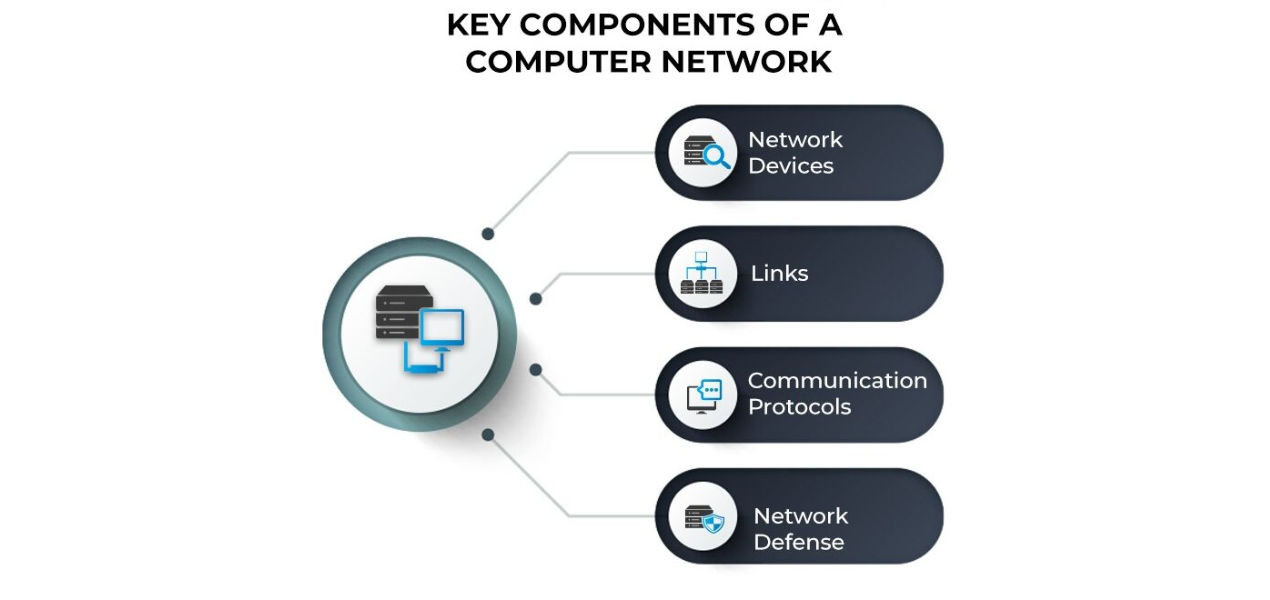
Source: spcieworks
Each component contributes to the functionality, efficiency, and security of a computer network, ensuring smooth communication and data management.
1. Network Devices
- Nodes: Devices like computers, servers, or mobile phones that send or receive data.
- Switches: Connect multiple devices in a network and direct data to the correct destination.
- Routers: Manage data transmission between networks and determine the best path for data.
- Access Points: Enable wireless devices to connect to the network.
- Network Interface Cards (NICs): Allow devices to interface with the network.
2. Links
- Wired Links: Use physical cables such as Ethernet or fiber optics for data transmission.
- Wireless Links: Use radio waves or infrared signals, such as Wi-Fi and Bluetooth, for connectivity.
- Data Transmission Mediums: Ensure seamless data flow using copper wires, fiber optics, or wireless signals.
3. Communication Protocols
- TCP/IP: Ensures reliable data transmission across the network.
- HTTP/HTTPS: Facilitates web communication and ensures secure data exchange.
- FTP: Used for transferring files between devices over a network.
- DNS (Domain Name System): Converts user-friendly domain names into IP addresses for proper routing.
- IP Addressing: Assigns unique identifiers to devices for precise communication.
4. Network Defense
- Firewalls: Protect the network by monitoring and controlling traffic.
- Antivirus and Antimalware: Safeguard against malicious software that could harm the network.
- Encryption: Secures data in transit to prevent unauthorized access.
- Authentication Mechanisms: Verify user identities to ensure only authorized access.
- Intrusion Detection Systems (IDS): Identify and respond to potential threats in real-time.
Key Objectives of Creating and Deploying a Computer Network
No sector of the economy, including healthcare, education, retail, banking, technology, and government, could function without efficient computer networks. The network gets more complicated as an organization grows in size. Prior to starting the daunting effort of building and implementing a computer network, the following important goals need to be taken into account.
1. Efficient Communication
- Enable seamless sharing of information among users and devices.
- Facilitate communication through email, messaging, and video conferencing.
2. Resource Sharing
- Provide centralized access to shared resources like printers, storage, and applications.
- Optimize hardware and software utilization across multiple users.
3. Data Management
- Ensure centralized storage, retrieval, and backup of critical data.
- Simplify data access and improve consistency.
4. Scalability
- Support the addition of new devices and users without major disruptions.
- Allow for flexible growth as organizational needs evolve.
5. Cost Reduction
- Minimize expenses by sharing resources and reducing hardware redundancy.
- Lower operational costs with efficient network management.
6. Security
- Protect data and resources with authentication, encryption, and firewalls.
- Enable controlled access to sensitive information.
7. Collaboration
- Foster teamwork with shared tools and real-time communication platforms.
- Computer network support ensures remote work and global operations effectively.
8. Integration
- Connect multiple computer network systems and devices for cohesive workflows.
- Ensure compatibility among diverse hardware and software.
Types of Computer Network
Computer networks vary by scale, purpose, and technology, catering to diverse personal, organizational, and global needs.
1. Personal Area Network (PAN)
- Covers a small area, such as around a person.
- Connects devices like smartphones, laptops, and wearables.
- Typically uses Bluetooth or USB connections.
2. Local Area Network (LAN)
- Spans a limited area like a home, office, or school.
- Connects computers, printers, and other devices.
- High-speed and cost-effective for small environments.
3. Wireless Local Area Network (WLAN)
- Similar to LAN but uses wireless technology like Wi-Fi.
- Offers mobility and convenience.
- Common in homes, offices, and public spaces.
4. Metropolitan Area Network (MAN)
- Covers a city or large campus.
- Bridges multiple LANs using high-speed connections.
- Often used by municipalities or large organizations.
5. Wide Area Network (WAN)
- Spans vast geographical areas, even countries or continents.
- Uses public networks like telephone lines or satellites.
- The Internet is the largest example of a WAN.
6. Storage Area Network (SAN)
- Dedicated to data storage and retrieval.
- Used in data centers and enterprises.
- Ensures high-speed access to storage devices.
7. Virtual Private Network (VPN)
- Provides secure remote access to a private network.
- Encrypts data for privacy over public networks.
- Common for remote work and secure browsing.
8. Enterprise Private Network (EPN)
- Designed for large organizations.
- Links multiple locations with secure communication.
- Provides robust performance for business operations.
Types of Computer Network Architecture
There are two forms of computer network architecture.
- Client-Server Architecture: This architecture essentially connects the client and the server since it allows two clients to communicate with one another and uses the devices in the network as servers.
- Peer-to-Peer Architecture: There does not exist a central server in this architecture; instead, machines are connected to one another and are all equally capable of operating. Any of the devices here can be either a client or a server.
Types of Enterprise Computer Networks
Below is a list of the three primary categories of enterprise computer networks.
- Local Area Networks (LANs): LANs are small-scale networks that are used as test networks or in small businesses. Its size is restricted.
- Wide region Networks (WAN): Wide Area Networks are used for long-distance communication and cover a wider region than local area networks.
- Service provider networks: Networks that facilitate wireless communication, fast internet access, and other services are known as service provider networks.
How Does a Computer Network Work?
The core of computer networks is made up of specialized hardware like routers, switches, and access points. Computers, servers, printers, and other devices are connected to networks in homes or businesses via switches, which also aid in internal security. Devices are connected to networks using access points, which are switches that eliminate the need for cables.
As dispatchers, routers link networks to different networks. After analyzing the data to be transported over a network, they select the most efficient routes and send the data its way. By connecting your house and place of business to the outer world, routers help shield data from external security risks.
Although switches and routers have many differences, one important distinction is how they recognize endpoints. A device is uniquely identified via the "burned-in" MAC address on a Layer 2 switch. A network-assigned IP address is used by a Layer 3 router to uniquely identify a device's network connection.
The majority of switches nowadays have some sort of routing capability.
In a network, devices are uniquely defined by their MAC & IP addresses, respectively. The manufacturer of a device assigns a NIC (network interface card) a number known as its MAC address. A network connection is allocated a number known as an IP address.
How is Computer Networking Evolving?
These days, networks offer more than just connectivity. Businesses are starting the process of digital transformation. Their success and this change depend heavily on their computer network projects. In order to satisfy these demands, the following kinds of network topologies are developing:
- Software-defined (SDN) Network design is becoming increasingly programmable, programmed, and open in response to new demands in the "digital" age. Traffic routing in software-defined networks is managed centrally using software-based techniques. This facilitates the network's rapid response to shifting circumstances.
- Intent-based: Based on SDN concepts, IBN (intent-based networking) not only adds agility but also configures a network to accomplish specific goals by deeply automating tasks, assessing its performance, identifying trouble spots, offering comprehensive network security in computer network, and incorporating with business procedures.
- Virtualized: Several "overlay" networks can be created by logically dividing the fundamental physical network architecture. Everyone of those logical networks could be adjusted to satisfy particular QoS, security, and other needs.
- Controller-based: Scaling and protecting networks depend heavily on network controllers. By converting business purpose into device configurations, controllers automate networking tasks. They also continuously monitor devices to help guarantee security and performance. Controllers assist firms adapt to shifting business needs and streamline processes.
- Multi-domain integrations: Bigger businesses can establish distinct networks for their workplaces, WANs, and information centers. These networks are also referred to as networking domains. The controllers of these networks facilitate communication between them. These cross-network integrations typically entail sharing pertinent operating parameters to help guarantee the achievement of intended business objectives that cut across network domains.
To Sum Up
With the lowest overhead expenses, a successful computer network boosts creativity, security, and productivity. Only with a solid design and implementation that clearly outlines the needs of the business can this be achieved. Despite its apparent technical nature, network building necessitates business input, particularly in its early phases. Network management also includes changing processes and adapting to new computer network technology.
Frequently Asked Questions (FAQs)
1. What are the 3 main advantages of computer network?
- Resource Sharing: Enables efficient sharing of files, printers, and other resources.
- Improved Communication: Facilitates instant messaging, email, and video conferencing.
- Cost Efficiency: Reduces hardware and software costs through shared use.
2. What are the two fundamental types of networks?
- Local Area Network (LAN): Connects devices within a limited area, such as a home or office.
- Wide Area Network (WAN): Links devices over large geographical distances, such as the internet.
3. What are the uses of a computer network?
- Data Sharing: Enables seamless sharing of files and resources among connected devices.
- Communication: Facilitates instant communication through email, messaging, and video calls.
- Resource Sharing: Allows shared access to hardware like printers and servers.
- Remote Access: Supports accessing systems and data from anywhere.
4. What is the main power of a computer network?
The main power of a computer network is connectivity. It enables devices to share data, resources, and applications efficiently. It also fosters collaboration and remote access for increased productivity and seamless communication.
243 articles published
Kingson Jebaraj is a highly respected technology professional, recognized as both a Microsoft Most Valuable Professional (MVP) and an Alibaba Most Valuable Professional. With a wealth of experience in...
Get Free Consultation
By submitting, I accept the T&C and
Privacy Policy