
- Blog Categories
- Project Management
- Agile Management
- IT Service Management
- Cloud Computing
- Business Management
- BI And Visualisation
- Quality Management
- Cyber Security
- DevOps
- Most Popular Blogs
- PMP Exam Schedule for 2025: Check PMP Exam Date
- Top 60+ PMP Exam Questions and Answers for 2025
- PMP Cheat Sheet and PMP Formulas To Use in 2025
- What is PMP Process? A Complete List of 49 Processes of PMP
- Top 15+ Project Management Case Studies with Examples 2025
- Top Picks by Authors
- Top 170 Project Management Research Topics
- What is Effective Communication: Definition
- How to Create a Project Plan in Excel in 2025?
- PMP Certification Exam Eligibility in 2025 [A Complete Checklist]
- PMP Certification Fees - All Aspects of PMP Certification Fee
- Most Popular Blogs
- CSM vs PSM: Which Certification to Choose in 2025?
- How Much Does Scrum Master Certification Cost in 2025?
- CSPO vs PSPO Certification: What to Choose in 2025?
- 8 Best Scrum Master Certifications to Pursue in 2025
- Safe Agilist Exam: A Complete Study Guide 2025
- Top Picks by Authors
- SAFe vs Agile: Difference Between Scaled Agile and Agile
- Top 21 Scrum Best Practices for Efficient Agile Workflow
- 30 User Story Examples and Templates to Use in 2025
- State of Agile: Things You Need to Know
- Top 24 Career Benefits of a Certifed Scrum Master
- Most Popular Blogs
- ITIL Certification Cost in 2025 [Exam Fee & Other Expenses]
- Top 17 Required Skills for System Administrator in 2025
- How Effective Is Itil Certification for a Job Switch?
- IT Service Management (ITSM) Role and Responsibilities
- Top 25 Service Based Companies in India in 2025
- Top Picks by Authors
- What is Escalation Matrix & How Does It Work? [Types, Process]
- ITIL Service Operation: Phases, Functions, Best Practices
- 10 Best Facility Management Software in 2025
- What is Service Request Management in ITIL? Example, Steps, Tips
- An Introduction To ITIL® Exam
- Most Popular Blogs
- A Complete AWS Cheat Sheet: Important Topics Covered
- Top AWS Solution Architect Projects in 2025
- 15 Best Azure Certifications 2025: Which one to Choose?
- Top 22 Cloud Computing Project Ideas in 2025 [Source Code]
- How to Become an Azure Data Engineer? 2025 Roadmap
- Top Picks by Authors
- Top 40 IoT Project Ideas and Topics in 2025 [Source Code]
- The Future of AWS: Top Trends & Predictions in 2025
- AWS Solutions Architect vs AWS Developer [Key Differences]
- Top 20 Azure Data Engineering Projects in 2025 [Source Code]
- 25 Best Cloud Computing Tools in 2025
- Most Popular Blogs
- Company Analysis Report: Examples, Templates, Components
- 400 Trending Business Management Research Topics
- Business Analysis Body of Knowledge (BABOK): Guide
- ECBA Certification: Is it Worth it?
- Top Picks by Authors
- Top 20 Business Analytics Project in 2025 [With Source Code]
- ECBA Certification Cost Across Countries
- Top 9 Free Business Requirements Document (BRD) Templates
- Business Analyst Job Description in 2025 [Key Responsibility]
- Business Analysis Framework: Elements, Process, Techniques
- Most Popular Blogs
- Best Career options after BA [2025]
- Top Career Options after BCom to Know in 2025
- Top 10 Power Bi Books of 2025 [Beginners to Experienced]
- Power BI Skills in Demand: How to Stand Out in the Job Market
- Top 15 Power BI Project Ideas
- Top Picks by Authors
- 10 Limitations of Power BI: You Must Know in 2025
- Top 45 Career Options After BBA in 2025 [With Salary]
- Top Power BI Dashboard Templates of 2025
- What is Power BI Used For - Practical Applications Of Power BI
- SSRS Vs Power BI - What are the Key Differences?
- Most Popular Blogs
- Data Collection Plan For Six Sigma: How to Create One?
- Quality Engineer Resume for 2025 [Examples + Tips]
- 20 Best Quality Management Certifications That Pay Well in 2025
- Six Sigma in Operations Management [A Brief Introduction]
- Top Picks by Authors
- Six Sigma Green Belt vs PMP: What's the Difference
- Quality Management: Definition, Importance, Components
- Adding Green Belt Certifications to Your Resume
- Six Sigma Green Belt in Healthcare: Concepts, Benefits and Examples
- Most Popular Blogs
- Latest CISSP Exam Dumps of 2025 [Free CISSP Dumps]
- CISSP vs Security+ Certifications: Which is Best in 2025?
- Best CISSP Study Guides for 2025 + CISSP Study Plan
- How to Become an Ethical Hacker in 2025?
- Top Picks by Authors
- CISSP vs Master's Degree: Which One to Choose in 2025?
- CISSP Endorsement Process: Requirements & Example
- OSCP vs CISSP | Top Cybersecurity Certifications
- How to Pass the CISSP Exam on Your 1st Attempt in 2025?
- Most Popular Blogs
- Top 7 Kubernetes Certifications in 2025
- Kubernetes Pods: Types, Examples, Best Practices
- DevOps Methodologies: Practices & Principles
- Docker Image Commands
- Top Picks by Authors
- Best DevOps Certifications in 2025
- 20 Best Automation Tools for DevOps
- Top 20 DevOps Projects of 2025
- OS for Docker: Features, Factors and Tips
- More
- Agile & PMP Practice Tests
- Agile Testing
- Agile Scrum Practice Exam
- CAPM Practice Test
- PRINCE2 Foundation Exam
- PMP Practice Exam
- Cloud Related Practice Test
- Azure Infrastructure Solutions
- AWS Solutions Architect
- IT Related Pratice Test
- ITIL Practice Test
- Devops Practice Test
- TOGAF® Practice Test
- Other Practice Test
- Oracle Primavera P6 V8
- MS Project Practice Test
- Project Management & Agile
- Project Management Interview Questions
- Release Train Engineer Interview Questions
- Agile Coach Interview Questions
- Scrum Interview Questions
- IT Project Manager Interview Questions
- Cloud & Data
- Azure Databricks Interview Questions
- AWS architect Interview Questions
- Cloud Computing Interview Questions
- AWS Interview Questions
- Kubernetes Interview Questions
- Web Development
- CSS3 Free Course with Certificates
- Basics of Spring Core and MVC
- Javascript Free Course with Certificate
- React Free Course with Certificate
- Node JS Free Certification Course
- Data Science
- Python Machine Learning Course
- Python for Data Science Free Course
- NLP Free Course with Certificate
- Data Analysis Using SQL
AI in DevOps: Use Cases, Benefits, and How It Improves Software Delivery
Updated on Oct 19, 2026 | 0.5k+ views
Share:
Quick Overview
- What is AI in DevOps? AI in DevOps uses artificial intelligence and machine learning to improve software development, testing, deployment, monitoring, and infrastructure management.
- Key Use Cases: AI supports code generation, CI/CD pipeline optimization, automated incident detection, predictive troubleshooting, security analysis, and cloud cost optimization.
- Benefits of AI in DevOps: It can accelerate software delivery, reduce repetitive work, improve system reliability, strengthen security, and support better resource utilization.
- Challenges and Implementation: AI hallucinations, poor data quality, security risks, and integration costs require human oversight, controlled permissions, gradual adoption, and performance monitoring.
- This guide explains the key use cases, benefits, challenges, implementation steps, and delivery metrics that show how AI improves DevOps workflows.
Professionals looking to connect AI capabilities with business goals can explore AI Powered Product Management to learn how AI-driven insights, prioritization, and product strategy can improve decision-making across software delivery workflows.
Master the Right Skills & Boost Your Career
Avail your free 1:1 mentorship session
What is AI in DevOps?
AI in DevOps refers to the use of artificial intelligence and machine learning to improve software development, deployment, monitoring, and infrastructure management. It helps teams analyse large volumes of operational data, identify unusual behaviour, and make informed decisions with less manual effort.
Traditional DevOps automation follows predefined rules, such as running tests whenever code changes. AI adds the ability to recognise patterns, interpret information, and provide recommendations based on available data.
How AI improves the DevOps lifecycle
AI can support different stages of the DevOps lifecycle, from writing code to monitoring applications after deployment.
- Planning and development: Helps developers understand requirements, generate code, and identify potential issues.
- Building and testing: Assists with test generation, failure analysis, and identifying areas that need additional testing.
- Deployment: Analyses pipeline results and highlights potential deployment risks.
- Operations and monitoring: Examines logs, metrics, and traces to detect unusual system behaviour.
- Continuous improvement: Uses historical performance data to help teams identify recurring problems and improve workflows.
Also read: DevOps Roadmap with AI
What are the key use cases of AI in DevOps?
AI has practical applications across development, testing, deployment, security, and infrastructure management. Its main value lies in helping teams process information faster, reduce repetitive work, and identify problems before they affect users.
1. AI powered code generation and infrastructure as code
AI coding assistants can help developers write, explain, review, and improve code. They can also support infrastructure as code (IaC), which allows teams to define and manage infrastructure through configuration files.
Common applications include:
- Generating code snippets and configuration templates.
- Explaining unfamiliar code and suggesting improvements.
- Drafting Terraform or Kubernetes configurations.
- Identifying potential configuration errors.
- Helping developers understand infrastructure changes.
2. Intelligent CI/CD pipeline optimization
Continuous integration and continuous delivery (CI/CD) pipelines automate the process of building, testing, and releasing software. AI can help teams understand pipeline performance and identify opportunities to reduce unnecessary delays.
It can support tasks such as:
- Analysing failed builds and test results.
- Identifying recurring pipeline bottlenecks.
- Recommending improvements to testing workflows.
- Prioritising tests based on changes and historical results.
- Helping engineers investigate deployment failures.
3. Automated monitoring, log analysis, and incident detection
Modern applications generate large volumes of logs, metrics, and traces. Reviewing this information manually can be difficult, especially when several services are involved.
AI powered monitoring tools can analyse operational data, detect unusual patterns, group related alerts, and help engineers identify the possible causes of incidents.
Key applications include:
- Detecting unexpected increases in latency or error rates.
- Identifying unusual traffic and resource usage.
- Correlating alerts from different services.
- Summarising logs to support faster investigations.
- Highlighting changes that may have contributed to an incident.
4. Predictive troubleshooting and failure prevention
AI can use historical incidents, system metrics, and performance patterns to identify warning signs of potential failures. This allows teams to investigate problems before they develop into major service disruptions.
For example, a system may identify a recurring pattern of memory consumption that has previously led to application instability. Engineers can investigate the trend and take corrective action before the service becomes unavailable.
Predictive capabilities can support:
- Early identification of performance degradation.
- Detection of recurring failure patterns.
- Analysis of probable root causes.
- Capacity planning based on historical trends.
- Recommendations for preventive maintenance.
5. AI driven security and vulnerability detection
AI can strengthen DevSecOps practices by helping teams identify security risks throughout the software delivery process. It can analyse code, dependencies, configurations, and system activity to highlight potential vulnerabilities.
Common applications include:
- Identifying suspicious code patterns.
- Helping prioritise vulnerabilities based on risk.
- Detecting unusual access or system behaviour.
- Reviewing infrastructure configurations for security issues.
- Supporting security alert analysis and incident investigation.
6. Cloud resource and cost optimization
Cloud environments can become expensive when resources are overprovisioned or remain active without sufficient demand. AI can analyse resource utilisation and usage trends to help teams make better infrastructure decisions.
It can help with:
- Identifying underused computing resources.
- Forecasting capacity requirements.
- Recommending suitable scaling adjustments.
- Detecting unusual increases in cloud spending.
- Highlighting opportunities to reduce unnecessary resource consumption.
DevOps professionals looking to strengthen their data-driven approach can explore the Executive Post Graduate Certificate in Data Science and Applied AI to build skills in data analytics, machine learning, and applied AI that support smarter automation and software delivery decisions.
What are the benefits of AI in DevOps?
AI in DevOps can help organisations improve software delivery by reducing repetitive work, supporting faster troubleshooting, and making operational data easier to understand. The results depend on how well AI tools fit into existing workflows and how effectively teams monitor their performance.
1. Faster software delivery and deployment
AI can reduce the time developers spend writing routine code, investigating build failures, and reviewing operational information.
The main advantages include:
- Faster feedback during development and testing.
- Less time spent diagnosing common pipeline failures.
- Quicker identification of deployment risks.
- Better visibility into delivery bottlenecks.
2. Reduced manual work and operational errors
Repetitive operational tasks can consume significant engineering time. AI can assist with tasks such as log summarisation, test generation, configuration reviews, and incident triage.
Reducing manual effort gives engineers more time to focus on system design, complex troubleshooting, and improvements that require technical judgment.
However, AI generated changes still need appropriate validation to prevent new errors from entering production.
3. Improved reliability and system performance
AI driven monitoring and analysis can help teams recognise abnormal behaviour and investigate performance issues earlier.
This can lead to:
- Faster identification of potential service disruptions.
- Better understanding of recurring incidents.
- More informed capacity planning.
- Improved visibility into application performance.
4. Better security and resource utilization
AI can help teams identify security concerns earlier and understand how infrastructure resources are being used. This supports more informed decisions about access controls, vulnerability remediation, scaling, and cloud spending.
The greatest benefit comes from combining AI recommendations with established security policies, cost controls, and operational standards.
Also read: Agentic AI in DevOps
What are the challenges of using AI in DevOps?
Despite its benefits, AI introduces risks that teams must consider before integrating it into critical workflows. Understanding these limitations helps organisations decide which tasks are suitable for AI assistance and which require stricter controls.
1. AI hallucinations and the need for human oversight
AI tools can produce incorrect explanations, recommend unsuitable fixes, or generate code that appears valid but does not work as intended.
To manage this risk, teams should:
- Review generated code and configuration changes.
- Run automated tests before merging changes.
- Validate recommendations against system evidence.
- Require approval for high impact production changes.
- Maintain rollback procedures for deployments.
2. Limited infrastructure context and data quality
AI tools can only make useful recommendations when they have access to relevant and sufficiently reliable information. Incomplete logs, inconsistent monitoring data, and missing infrastructure context can reduce the quality of their output.
Teams should maintain accurate documentation, standardise telemetry where possible, and provide tools with the context they are authorised to access.
They should also check whether AI recommendations remain useful after infrastructure, application behaviour, or deployment patterns change.
3. Security, privacy, and compliance risks
AI integrations may expose sensitive information if teams do not control what data is shared and which actions a tool can perform.
Important safeguards include:
- Restricting access to source code and production systems.
- Protecting credentials and API keys.
- Applying role based permissions.
- Reviewing data retention and processing policies.
- Auditing AI initiated actions and changes.
4. Integration complexity and implementation costs
Introducing AI into DevOps may require changes to existing pipelines, monitoring platforms, access controls, and team workflows. Some tools also involve subscription fees, infrastructure costs, or additional maintenance.
Before investing, teams should identify a specific problem, check compatibility with existing systems, and estimate the effort required to implement and maintain the solution.
A small pilot can help determine whether the expected benefits justify the cost and complexity.
Also read: AI Observability Tools
How can teams implement AI in DevOps workflows?
Successful implementation starts with a clear operational problem rather than adopting AI simply because the technology is available. Teams should introduce AI gradually, measure its impact, and expand its role only when the results are reliable.
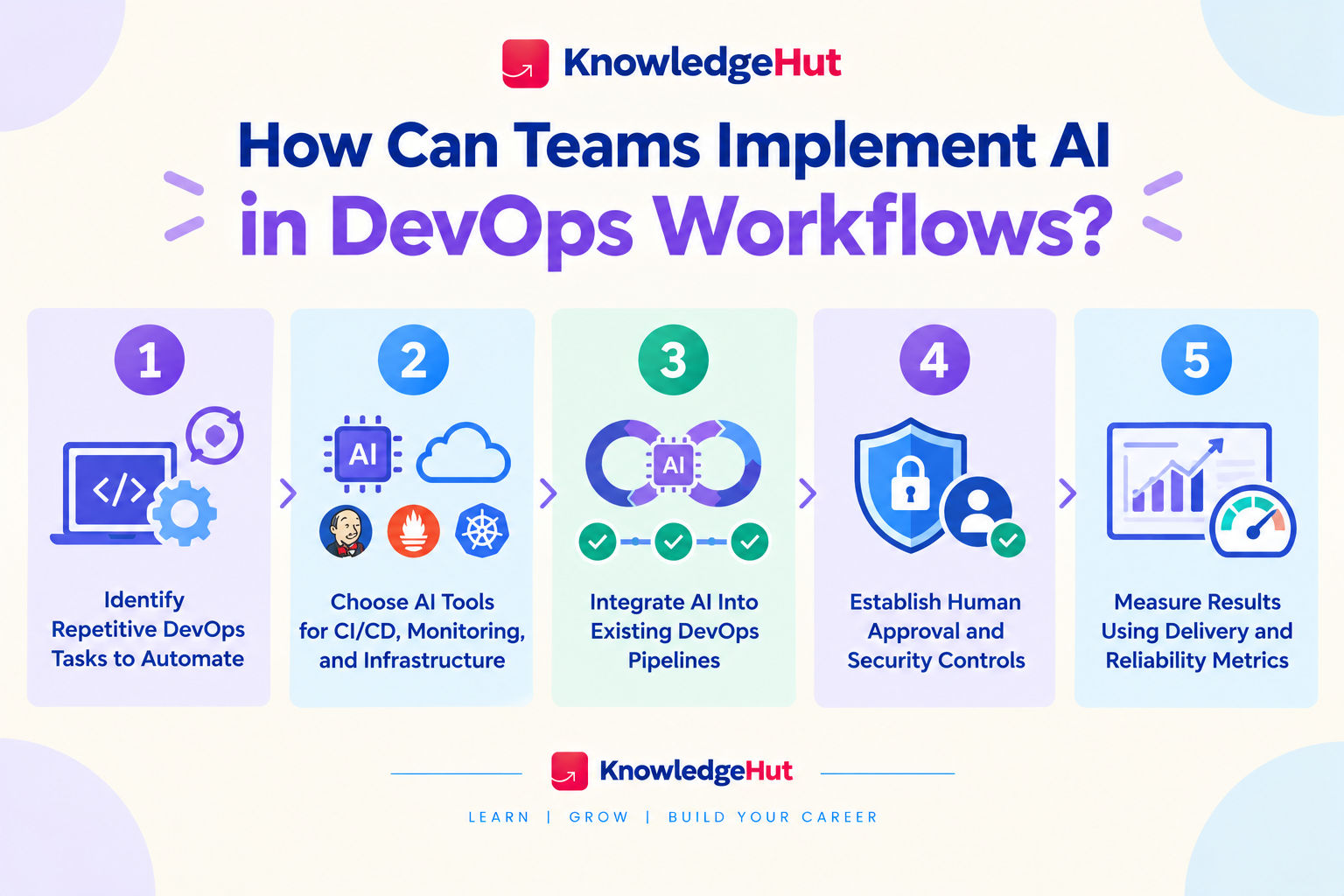
Step-1 Identify repetitive DevOps tasks to automate
Start by reviewing existing workflows and identifying tasks that take time but follow reasonably consistent patterns.
Potential starting points include:
- Summarising build failures.
- Analysing recurring alerts.
- Drafting test cases.
- Reviewing configuration files.
- Investigating common deployment errors.
Step-2 Choose AI tools for CI/CD, monitoring, and infrastructure
Select tools based on the problem being addressed, the existing technology stack, and the team's security requirements.
Evaluate whether a tool can:
- Integrate with current development and operations platforms.
- Access relevant data without excessive permissions.
- Explain recommendations clearly.
- Support testing and human review.
- Meet privacy, compliance, and budget requirements.
Step-3 Integrate AI into existing DevOps pipelines
Introduce AI into a limited part of the workflow before expanding it across the delivery lifecycle.
For instance, a team can begin by using AI to summarise failed tests and suggest possible causes while leaving the existing testing and approval process unchanged.
Once the team has verified the results, it can consider adding further capabilities. Existing quality gates should remain in place until there is sufficient evidence to justify any changes.
Step-4 Establish human approval and security controls
Define what AI can recommend, what it can execute, and which actions require human approval.
Use restricted permissions, audit logs, secure credential management, and automated validation. Production deployments, infrastructure changes, and security related actions should have safeguards appropriate to their potential impact.
These controls allow teams to benefit from AI while keeping important operational decisions accountable and traceable.
Step-5 Measure results using delivery and reliability metrics
Teams should measure whether AI improves actual delivery outcomes rather than relying on the number of tasks automated.
Useful metrics include:
- Deployment frequency: How often software is released.
- Lead time for changes: How long code changes take to reach production.
- Change failure rate: The proportion of deployments that cause failures requiring intervention.
- Time to restore service: How quickly a service recovers after an incident.
- Pipeline failure investigation time: How long engineers take to identify the cause of failed builds.
- Cloud cost per workload: How much it costs to run a particular application or service.
Also read: How Do DevOps Teams Take Advantage of AI?
Conclusion
AI in DevOps helps developers and operations teams automate repetitive tasks, improve software delivery, and detect issues faster. However, it works best when combined with reliable data, human oversight, and strong security practices.
Teams should start with a specific workflow, test an AI tool, and measure its impact before expanding its use.
Have A Query? Get in Touch With Our Customer Support | upGrad KnowledgeHut
Frequently Asked Questions (FAQs)
1. Can we use AI in DevOps?
Yes, AI in DevOps helps automate repetitive tasks, analyse logs, detect failures, and improve software delivery. It supports code generation, testing, deployment, security checks, and cloud resource optimisation. Teams can use AI tools alongside existing DevOps practices to improve efficiency and reliability.
2. How to use AI in a CI/CD pipeline?
AI in a CI/CD pipeline can help analyse build failures, generate test cases, identify bottlenecks, and detect potential deployment risks. Integrate AI coding assistants and pipeline analysis tools into existing workflows. Always validate AI recommendations before applying changes to production systems.
3. How to use AI for deployment?
AI can support deployment by analysing release data, identifying potential risks, and recommending suitable deployment strategies. It can also help investigate failed releases and monitor application performance after deployment. Human approval and rollback mechanisms remain important for production changes.
4. What role can AI play in DevOps?
AI in DevOps supports code generation, automated testing, intelligent monitoring, incident detection, security analysis, and infrastructure management. It helps engineers identify patterns in operational data and troubleshoot problems faster. This allows teams to spend more time on complex engineering tasks and continuous improvement.
5. Which is the most widely used tool in DevOps?
There is no single tool that is the most widely used across every DevOps workflow. Popular options include Git, Jenkins, Docker, Kubernetes, Terraform, and GitHub Actions. The right choice depends on the team's requirements, infrastructure, and existing technology stack.
6. Does Copilot work in DevOps?
Yes, GitHub Copilot can assist with DevOps tasks by generating scripts, explaining code, suggesting configuration changes, and helping troubleshoot errors. It can support workflows involving GitHub Actions and other development tools. Its capabilities depend on the environment, integrations, and available features.
7. What is the future of DevOps?
The future of DevOps is likely to involve greater AI integration, intelligent automation, predictive monitoring, and stronger security practices. AI in DevOps can help teams streamline delivery and resolve issues more efficiently. However, human expertise will remain important for architecture, risk management, and complex decisions.
8. Will DevOps get replaced by AI?
AI is more likely to automate specific DevOps tasks than replace the entire discipline. Tasks such as log analysis, script generation, and routine troubleshooting can benefit from AI assistance. Engineers will still need to manage infrastructure, security, reliability, and deployment decisions.
9. Will DevSecOps be replaced by AI?
No, AI is unlikely to eliminate the need for DevSecOps because software security requires continuous oversight and accountability. AI can help detect vulnerabilities, analyse suspicious activity, and prioritise security risks. Human review remains essential for validating findings and managing complex security decisions.
10. Can a DevOps engineer become an AI engineer?
Yes, a DevOps engineer can transition into an AI engineering role by learning Python, machine learning fundamentals, APIs, and AI model deployment. Existing skills in automation, cloud infrastructure, CI/CD, and monitoring provide a useful foundation. Learning MLOps and AI infrastructure can also help bridge the gap between the two roles.
1648 articles published
KnowledgeHut is an outcome-focused global ed-tech company. We help organizations and professionals unlock excellence through skills development. We offer training solutions under the people and proces...
Get Free Consultation
By submitting, I accept the T&C and
Privacy Policy