
- Blog Categories
- Project Management
- Agile Management
- IT Service Management
- Cloud Computing
- Business Management
- BI And Visualisation
- Quality Management
- Cyber Security
- DevOps
- Most Popular Blogs
- PMP Exam Schedule for 2025: Check PMP Exam Date
- Top 60+ PMP Exam Questions and Answers for 2025
- PMP Cheat Sheet and PMP Formulas To Use in 2025
- What is PMP Process? A Complete List of 49 Processes of PMP
- Top 15+ Project Management Case Studies with Examples 2025
- Top Picks by Authors
- Top 170 Project Management Research Topics
- What is Effective Communication: Definition
- How to Create a Project Plan in Excel in 2025?
- PMP Certification Exam Eligibility in 2025 [A Complete Checklist]
- PMP Certification Fees - All Aspects of PMP Certification Fee
- Most Popular Blogs
- CSM vs PSM: Which Certification to Choose in 2025?
- How Much Does Scrum Master Certification Cost in 2025?
- CSPO vs PSPO Certification: What to Choose in 2025?
- 8 Best Scrum Master Certifications to Pursue in 2025
- Safe Agilist Exam: A Complete Study Guide 2025
- Top Picks by Authors
- SAFe vs Agile: Difference Between Scaled Agile and Agile
- Top 21 Scrum Best Practices for Efficient Agile Workflow
- 30 User Story Examples and Templates to Use in 2025
- State of Agile: Things You Need to Know
- Top 24 Career Benefits of a Certifed Scrum Master
- Most Popular Blogs
- ITIL Certification Cost in 2025 [Exam Fee & Other Expenses]
- Top 17 Required Skills for System Administrator in 2025
- How Effective Is Itil Certification for a Job Switch?
- IT Service Management (ITSM) Role and Responsibilities
- Top 25 Service Based Companies in India in 2025
- Top Picks by Authors
- What is Escalation Matrix & How Does It Work? [Types, Process]
- ITIL Service Operation: Phases, Functions, Best Practices
- 10 Best Facility Management Software in 2025
- What is Service Request Management in ITIL? Example, Steps, Tips
- An Introduction To ITIL® Exam
- Most Popular Blogs
- A Complete AWS Cheat Sheet: Important Topics Covered
- Top AWS Solution Architect Projects in 2025
- 15 Best Azure Certifications 2025: Which one to Choose?
- Top 22 Cloud Computing Project Ideas in 2025 [Source Code]
- How to Become an Azure Data Engineer? 2025 Roadmap
- Top Picks by Authors
- Top 40 IoT Project Ideas and Topics in 2025 [Source Code]
- The Future of AWS: Top Trends & Predictions in 2025
- AWS Solutions Architect vs AWS Developer [Key Differences]
- Top 20 Azure Data Engineering Projects in 2025 [Source Code]
- 25 Best Cloud Computing Tools in 2025
- Most Popular Blogs
- Company Analysis Report: Examples, Templates, Components
- 400 Trending Business Management Research Topics
- Business Analysis Body of Knowledge (BABOK): Guide
- ECBA Certification: Is it Worth it?
- Top Picks by Authors
- Top 20 Business Analytics Project in 2025 [With Source Code]
- ECBA Certification Cost Across Countries
- Top 9 Free Business Requirements Document (BRD) Templates
- Business Analyst Job Description in 2025 [Key Responsibility]
- Business Analysis Framework: Elements, Process, Techniques
- Most Popular Blogs
- Best Career options after BA [2025]
- Top Career Options after BCom to Know in 2025
- Top 10 Power Bi Books of 2025 [Beginners to Experienced]
- Power BI Skills in Demand: How to Stand Out in the Job Market
- Top 15 Power BI Project Ideas
- Top Picks by Authors
- 10 Limitations of Power BI: You Must Know in 2025
- Top 45 Career Options After BBA in 2025 [With Salary]
- Top Power BI Dashboard Templates of 2025
- What is Power BI Used For - Practical Applications Of Power BI
- SSRS Vs Power BI - What are the Key Differences?
- Most Popular Blogs
- Data Collection Plan For Six Sigma: How to Create One?
- Quality Engineer Resume for 2025 [Examples + Tips]
- 20 Best Quality Management Certifications That Pay Well in 2025
- Six Sigma in Operations Management [A Brief Introduction]
- Top Picks by Authors
- Six Sigma Green Belt vs PMP: What's the Difference
- Quality Management: Definition, Importance, Components
- Adding Green Belt Certifications to Your Resume
- Six Sigma Green Belt in Healthcare: Concepts, Benefits and Examples
- Most Popular Blogs
- Latest CISSP Exam Dumps of 2025 [Free CISSP Dumps]
- CISSP vs Security+ Certifications: Which is Best in 2025?
- Best CISSP Study Guides for 2025 + CISSP Study Plan
- How to Become an Ethical Hacker in 2025?
- Top Picks by Authors
- CISSP vs Master's Degree: Which One to Choose in 2025?
- CISSP Endorsement Process: Requirements & Example
- OSCP vs CISSP | Top Cybersecurity Certifications
- How to Pass the CISSP Exam on Your 1st Attempt in 2025?
- Most Popular Blogs
- Top 7 Kubernetes Certifications in 2025
- Kubernetes Pods: Types, Examples, Best Practices
- DevOps Methodologies: Practices & Principles
- Docker Image Commands
- Top Picks by Authors
- Best DevOps Certifications in 2025
- 20 Best Automation Tools for DevOps
- Top 20 DevOps Projects of 2025
- OS for Docker: Features, Factors and Tips
- More
- Agile & PMP Practice Tests
- Agile Testing
- Agile Scrum Practice Exam
- CAPM Practice Test
- PRINCE2 Foundation Exam
- PMP Practice Exam
- Cloud Related Practice Test
- Azure Infrastructure Solutions
- AWS Solutions Architect
- IT Related Pratice Test
- ITIL Practice Test
- Devops Practice Test
- TOGAF® Practice Test
- Other Practice Test
- Oracle Primavera P6 V8
- MS Project Practice Test
- Project Management & Agile
- Project Management Interview Questions
- Release Train Engineer Interview Questions
- Agile Coach Interview Questions
- Scrum Interview Questions
- IT Project Manager Interview Questions
- Cloud & Data
- Azure Databricks Interview Questions
- AWS architect Interview Questions
- Cloud Computing Interview Questions
- AWS Interview Questions
- Kubernetes Interview Questions
- Web Development
- CSS3 Free Course with Certificates
- Basics of Spring Core and MVC
- Javascript Free Course with Certificate
- React Free Course with Certificate
- Node JS Free Certification Course
- Data Science
- Python Machine Learning Course
- Python for Data Science Free Course
- NLP Free Course with Certificate
- Data Analysis Using SQL
Canary in Cybersecurity: Meaning, Types, and Uses
Updated on Oct 12, 2026 | 1.13K+ views
Share:
Table of Contents
View all
Quick Overview
- Canary in cybersecurity: A canary acts as a digital tripwire that alerts security teams when someone interacts with a decoy file, credential, account, or service without authorization.
- Types of cyber canaries: Common types include canary tokens, decoy credentials, canary files, canary accounts, network services, and canary systems.
- Key Uses: Canaries help detect unauthorized access, credential misuse, network intrusions, insider threats, and suspicious activity after a security breach.
- Benefits and Limitations: They provide targeted alerts and support incident response, but their effectiveness depends on proper placement, reliable monitoring, and timely investigation.
- This guide explains the meaning, types, uses, benefits, limitations, and implementation of canaries in cybersecurity.
Cybersecurity professionals can explore Applied Agentic AI to understand how AI agents can support security monitoring, automate threat response workflows, and improve incident investigation.
Master the Right Skills & Boost Your Career
Avail your free 1:1 mentorship session
What is a canary in cybersecurity?
A cybersecurity canary acts as a digital tripwire. It is deliberately placed in an environment to reveal suspicious activity when an attacker or unauthorized user interacts with it.
Canaries are part of cyber deception, a defensive approach that uses decoy resources to help detect intruders. They complement existing security controls rather than replacing firewalls, endpoint protection, access controls, or intrusion detection systems.
How a cybersecurity canary works
The process is straightforward: create a decoy, place it where unauthorized activity may expose it, and configure an alert for when it is accessed or used.
Here is how the process generally works:
- Create a decoy asset: Prepare a fake document, unique tracking link, decoy credential, or simulated service.
- Place it strategically: Position the asset in a location where an intruder might search for sensitive information.
- Monitor interactions: Configure the canary to generate an alert when its specific trigger occurs.
- Investigate the alert: Review available logs and context to understand what happened and whether other systems may be affected.
- Respond to the incident: Follow the organization's incident response process if the activity indicates a possible compromise.
Also read: What is Cybersecurity Architecture Mesh?
What are the different types of canaries in cybersecurity?
Canaries come in different forms depending on what an organization wants to monitor. Some focus on individual files or credentials, while others imitate accounts, services, or larger parts of an IT environment.
The right choice depends on the risks being monitored, the systems involved, and how the security team plans to investigate alerts.
1. Canary tokens and decoy credentials
Canary tokens are unique digital markers embedded in resources to detect unauthorized access or use. They can be associated with links, cloud resources, API keys, and other digital assets.
Common forms include:
- URL and DNS tokens: Unique links or hostnames that generate alerts when accessed or resolved.
- Decoy API keys: Fake keys placed in monitored locations to flag attempts to use them.
- Cloud credential tokens: Decoy credentials or configuration artifacts designed to reveal unauthorized discovery or attempted use.
- Application tokens: Unique identifiers associated with applications or services that help expose suspicious interactions.
2. Canary files and documents
Canary files are decoy documents or other file based assets designed to alert the security team when a monitored interaction occurs. They may be placed in controlled file shares, document repositories, or other locations that could attract an intruder searching for valuable information.
Their purpose is to reveal activity such as:
- Unauthorized browsing of sensitive looking documents.
- Access to files that should not be used during normal business operations.
- Possible attempts to collect confidential information.
- Suspicious access to monitored directories or shared resources.
3. Canary accounts and network services
Canary accounts are decoy identities created to detect suspicious account discovery, login attempts, or other unauthorized interactions. Depending on the implementation, a monitored identity may resemble a regular employee account, an administrative account, or a service account.
Canary network services work similarly by imitating selected services or devices. They can help reveal attempts to discover systems, connect to internal services, or explore resources after an initial compromise.
These canaries are useful for detecting activity that may not immediately trigger a conventional security alert. They should be isolated and configured carefully so they do not introduce real privileges, disrupt production systems, or create a route into the environment.
4. Honeypots and canary systems
Honeypots and canaries are related, but the terms do not always mean the same thing. A honeypot is typically a decoy system, service, or resource designed to attract intruders. A canary often refers to a more focused tripwire that alerts when a particular asset is accessed or used.
The main differences are:
- Canary tokens: Usually lightweight markers embedded in documents, credentials, links, or other resources.
- Honeypots: Often provide a larger simulated environment where defenders can observe interactions.
- Canary systems or devices: May imitate real infrastructure and notify defenders when someone interacts with them.
Cybersecurity professionals can explore the PG Certificate in AI Powered Product and Design Thinking to understand how AI can support security product innovation, user-focused design, and smarter decision-making in cybersecurity solutions.
How are canaries used in cybersecurity?
Canaries help security teams detect suspicious activity that might otherwise remain unnoticed. They are particularly useful when an attacker has already gained some access and begins searching for credentials, documents, accounts, or other valuable resources.
In September 2026, the US Cybersecurity and Infrastructure Security Agency (CISA) published guidance on using cyber decoys to strengthen detection and response. The guidance highlights how decoys can help identify suspicious post compromise activity and complement broader security controls.
1. Detecting unauthorized access and data theft
Organizations can place canary assets in carefully selected locations to detect unauthorized browsing or potential data collection. Interaction with an asset that has no legitimate operational purpose can alert the security team to activity worth investigating.
Canaries can support the detection of:
- Unauthorized access to monitored documents and file shares.
- Attempts to discover or use exposed credentials.
- Suspicious access to cloud resources and internal repositories.
- Potential data collection following an account or system compromise.
2. Identifying network intrusions and suspicious activity
Canaries can help identify intruders exploring an internal network after gaining initial access. Decoy services, network resources, and monitored accounts can reveal attempts to discover available systems or move toward more valuable targets.
Security teams can use these signals to investigate:
- Unusual connections to decoy network services.
- Attempts to discover internal hosts or services.
- Interactions with resources that should not receive normal user traffic.
- Suspicious activity that occurs alongside other network or endpoint alerts.
3. Monitoring insider threats and credential misuse
Not all suspicious activity comes from an external attacker. A compromised employee account, unauthorized insider, or third party with inappropriate access may also search for resources beyond their legitimate responsibilities.
Canaries can help security teams identify possible misuse when a decoy account, credential, or file is accessed unexpectedly.
Useful monitoring areas include:
- Unusual access to restricted repositories.
- Attempts to use decoy credentials.
- Interactions with monitored service accounts.
- Activity that conflicts with established access permissions.
4. Supporting threat detection and incident response
Canaries can add another detection layer to a security operations workflow. They work alongside security information and event management (SIEM) platforms, endpoint detection and response tools, identity monitoring, and incident response procedures.
Once a canary triggers, security teams can:
- Review the timestamp, source information, and type of interaction.
- Correlate the alert with relevant identity, network, and endpoint logs.
- Determine whether the activity was expected, accidental, or potentially malicious.
- Escalate confirmed or high risk activity according to the incident response plan.
- Preserve relevant evidence and take containment measures when needed.
Also read: Cybersecurity in Healthcare
What are the benefits and limitations of cyber canaries?
Cyber canaries can provide focused alerts with relatively little monitoring overhead, especially when deployed as lightweight tokens. However, they are detection mechanisms rather than complete security solutions.
Their effectiveness depends on thoughtful placement, reliable alert delivery, and the team's ability to respond when an alert occurs.
1. Early threat detection and faster alerts
A well placed canary can reveal suspicious activity without requiring the security team to identify every malicious behavior through complex detection rules.
Key benefits include:
- Earlier warning: A triggered canary can reveal suspicious access during an attack.
- Focused alerts: Assets with no legitimate reason to be accessed can produce useful investigation signals.
- Visibility after compromise: Canaries may expose attempts to explore an environment after an attacker gains access.
- Improved investigations: The alert can provide a starting point for reviewing related systems and activity.
- Support for existing controls: Canaries complement security monitoring, access management, and incident response.
2. Low interaction overhead and targeted monitoring
Many canary tokens are lightweight and do not require a dedicated server or continuous analysis of every event. Some can be deployed in minutes, although integration, testing, and governance still require planning.
They can help organizations focus on specific risks by monitoring assets such as credentials, documents, cloud resources, and decoy services.
This approach can be particularly useful when security teams want to add targeted detection without building a complex monitoring system from scratch. More advanced canary devices or honeypots may require additional infrastructure and maintenance.
3. False positives, deployment challenges, and evasion risks
Although canary alerts can be valuable, they are not completely free from operational challenges. A trigger can result from an unexpected but legitimate process, such as automated scanning, document previewing, indexing, or backup activity.
Other limitations include:
- Incorrect placement: A canary that an intruder never encounters may provide little detection value.
- Alerting problems: Incorrect notification settings or integration failures can delay awareness of a trigger.
- Maintenance overhead: Teams need clear records of where canaries are deployed and what activates each one.
- Attacker evasion: An intruder may avoid suspicious assets or use another attack path.
- Limited coverage: A canary usually reveals interaction with a specific resource, not every action taken by an attacker.
Cybersecurity professionals can explore the Post Graduate Certification Program in Data Analytics and Applied AI to build skills in data analysis and applied AI that support threat detection, security insights, and data-driven incident response.
How to implement a canary in cybersecurity
Implementing canaries effectively starts with choosing the right assets and defining what an alert should mean. The goal is not to scatter decoys randomly, but to place them where unauthorized interaction would provide useful security information.
Start with a small, manageable deployment, verify that alerts work, and expand only after the team understands how to maintain and investigate them.
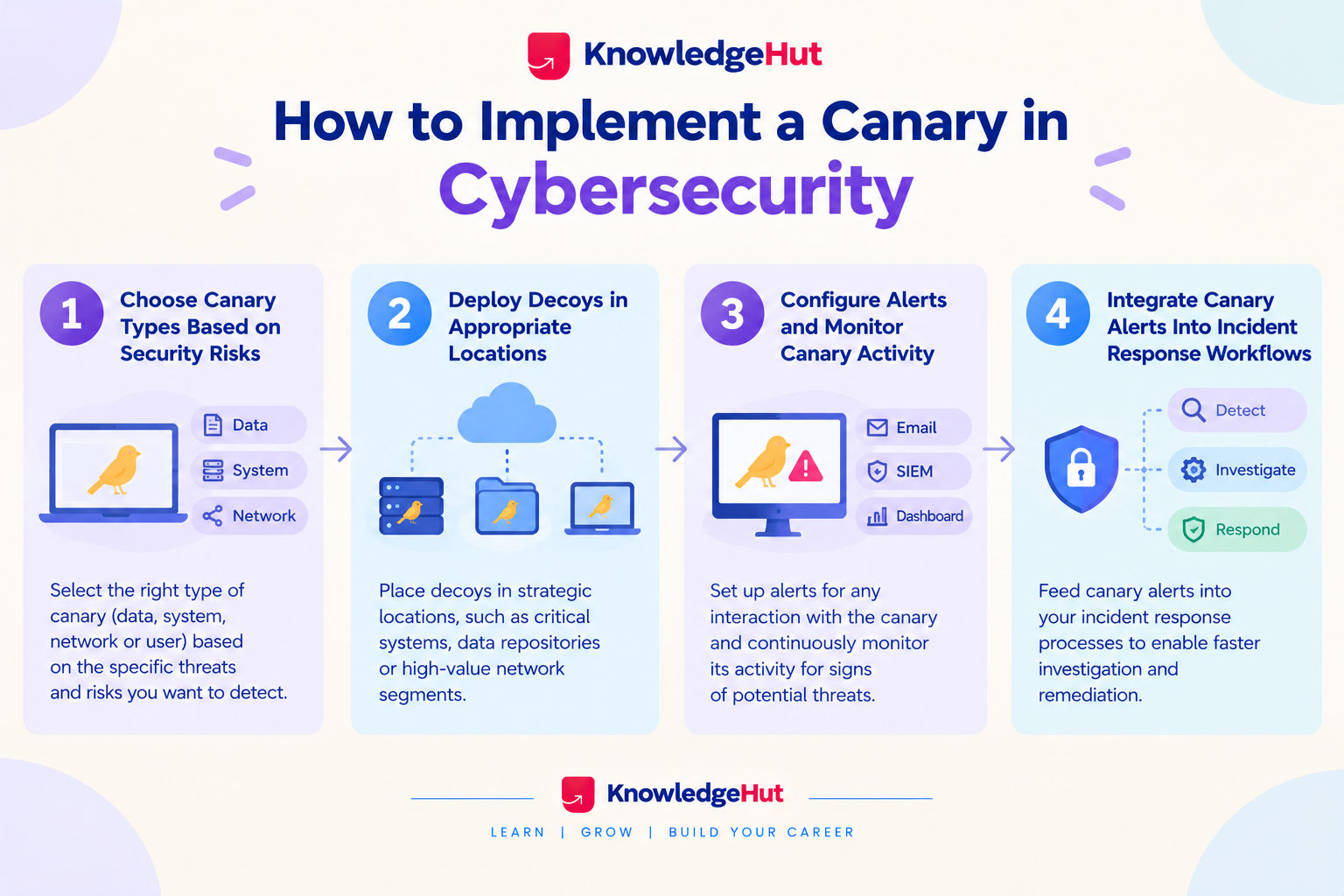
Step-1 Choose canary types based on security risks
Select canary types according to the threats and assets that matter most to the organization.
- Credential theft: Consider decoy credentials or tokens that flag attempted use.
- Unauthorized document access: Use monitored files or document based tokens in appropriate repositories.
- Cloud resource discovery: Consider decoy cloud artifacts designed to alert when accessed or used.
- Internal network exploration: Evaluate decoy services or systems that can reveal suspicious connections.
Step-2 Deploy decoys in appropriate locations
Place canaries where they may reveal meaningful unauthorized activity, while keeping them safe from accidental activation and operational disruption.
Consider these deployment principles:
- Use controlled file shares, repositories, or network areas relevant to the threat model.
- Ensure decoy assets are distinguishable in internal records even when they resemble legitimate resources.
- Avoid placing real credentials or actual privileged access inside a decoy.
- Document the owner, deployment location, trigger condition, and expected legitimate interactions.
- Obtain the required security, system owner, and privacy approvals before deployment.
Step-3 Configure alerts and monitor canary activity
Configure notifications so a triggered canary reaches the people responsible for investigating it. Where supported, forward the events to existing security monitoring platforms.
Before relying on the deployment, verify that:
- The trigger produces an alert as expected.
- The alert identifies the relevant canary and its recorded location.
- Notifications reach the correct security team.
- Legitimate automated processes are accounted for.
- The team can correlate the alert with relevant logs and events.
Step-4 Integrate canary alerts into incident response workflows
A canary is most useful when its alert leads to a clear investigation and response process. A notification by itself does not contain the incident or establish the full extent of a compromise.
Create a response workflow that covers:
- Initial triage: Review the canary, trigger details, timestamp, and source information.
- Evidence collection: Correlate the event with identity, network, endpoint, and cloud logs.
- Risk assessment: Determine whether the trigger indicates unauthorized activity and identify potentially affected systems.
- Containment and remediation: Follow established procedures to disable compromised credentials, isolate affected systems, or address other confirmed risks.
- Review and improvement: Document the outcome and adjust canary placement, alert rules, or response steps where necessary.
Conclusion
A canary in cybersecurity helps detect unauthorized access, credential misuse, and suspicious activity through targeted alerts. It works best when deployed strategically and connected to a clear incident response process. Choose canaries based on your security risks, and use them alongside existing security controls rather than as a replacement.
Have A Query? Get in Touch With Our Customer Support | upGrad KnowledgeHut
Frequently Asked Questions (FAQs)
1. How can you tell whether a canary alert is a false positive or a real cyberattack?
Review the alert timestamp, source IP, user agent, and the type of canary triggered. Correlate this information with identity, network, and endpoint logs to identify legitimate automated activity or suspicious access. A canary in cybersecurity provides an investigation lead, not automatic proof of an attack.
2. What information does a canary token reveal when someone triggers it?
Depending on the token type, an alert may include the timestamp, source IP address, user agent, and details about the accessed resource. Some specialized tokens may also capture system or account information. However, the available data varies, and an IP address does not necessarily identify the individual responsible.
3. How do you test a canary token before deploying it in production?
Create a test token and trigger it from an authorized test environment to confirm that the expected alert arrives. Check the recorded details, notification settings, and incident response workflow. Test in a controlled environment first to avoid accidental alerts or exposure of sensitive information.
4. Can attackers detect or bypass canaries in a cybersecurity environment?
Yes, attackers may recognize suspicious decoy assets, avoid interacting with them, or use alternative attack paths. A canary in cybersecurity is most effective when combined with endpoint monitoring, access controls, network detection, and other defensive measures. No single canary can guarantee that every intrusion will be detected.
5. Where should organizations place canary tokens in cloud environments and source code repositories?
Organizations can place suitable tokens in monitored cloud storage, configuration files, source code repositories, and controlled document shares. Choose locations where unauthorized access would provide a meaningful security signal, and document each deployment for investigation. Never expose real credentials or grant unnecessary privileges to decoy assets.
6. How many canary tokens should an organization deploy?
There is no universally correct number of canary tokens. The quantity depends on the organization's size, sensitive assets, threat exposure, and ability to monitor alerts effectively. Start with a small deployment covering high risk areas, evaluate the results, and expand when needed.
7. How can security teams measure the effectiveness of cybersecurity canaries?
Track successful alert delivery, coverage of important assets, investigation time, and the proportion of alerts that provide actionable information. Regularly test triggers and confirm that alerts reach the correct security team. Effective canary in cybersecurity deployment is measured by useful detection and response, not simply by the number of tokens installed.
8. How often should canary tokens be reviewed, rotated, or removed?
Review canary tokens periodically and whenever infrastructure, access permissions, or security requirements change. Replace exposed or compromised tokens, remove obsolete deployments, and verify that alerting still works. Maintain an inventory so every token has a clear purpose, owner, and response procedure.
9. Can canary tokens work in air gapped networks without an internet connection?
Many hosted canary tokens rely on DNS or HTTP callbacks, so they cannot send alerts normally from a fully isolated network without an available communication path. Organizations can instead use internally hosted canary systems with local logging and monitoring. Any external alerting must follow the network's approved security procedures.
10. Are canary tokens legal and ethical for monitoring employee activity?
Canary tokens can support legitimate security monitoring, but their use must comply with applicable privacy, employment, and data protection laws. Organizations should define a clear security purpose, restrict collected information, and follow relevant employee notice and monitoring policies. Consult legal or privacy teams before deploying canaries that may capture employee activity.
1648 articles published
KnowledgeHut is an outcome-focused global ed-tech company. We help organizations and professionals unlock excellence through skills development. We offer training solutions under the people and proces...
Get Free Consultation
By submitting, I accept the T&C and
Privacy Policy