
- Blog Categories
- Project Management
- Agile Management
- IT Service Management
- Cloud Computing
- Business Management
- BI And Visualisation
- Quality Management
- Cyber Security
- DevOps
- Most Popular Blogs
- PMP Exam Schedule for 2025: Check PMP Exam Date
- Top 60+ PMP Exam Questions and Answers for 2025
- PMP Cheat Sheet and PMP Formulas To Use in 2025
- What is PMP Process? A Complete List of 49 Processes of PMP
- Top 15+ Project Management Case Studies with Examples 2025
- Top Picks by Authors
- Top 170 Project Management Research Topics
- What is Effective Communication: Definition
- How to Create a Project Plan in Excel in 2025?
- PMP Certification Exam Eligibility in 2025 [A Complete Checklist]
- PMP Certification Fees - All Aspects of PMP Certification Fee
- Most Popular Blogs
- CSM vs PSM: Which Certification to Choose in 2025?
- How Much Does Scrum Master Certification Cost in 2025?
- CSPO vs PSPO Certification: What to Choose in 2025?
- 8 Best Scrum Master Certifications to Pursue in 2025
- Safe Agilist Exam: A Complete Study Guide 2025
- Top Picks by Authors
- SAFe vs Agile: Difference Between Scaled Agile and Agile
- Top 21 Scrum Best Practices for Efficient Agile Workflow
- 30 User Story Examples and Templates to Use in 2025
- State of Agile: Things You Need to Know
- Top 24 Career Benefits of a Certifed Scrum Master
- Most Popular Blogs
- ITIL Certification Cost in 2025 [Exam Fee & Other Expenses]
- Top 17 Required Skills for System Administrator in 2025
- How Effective Is Itil Certification for a Job Switch?
- IT Service Management (ITSM) Role and Responsibilities
- Top 25 Service Based Companies in India in 2025
- Top Picks by Authors
- What is Escalation Matrix & How Does It Work? [Types, Process]
- ITIL Service Operation: Phases, Functions, Best Practices
- 10 Best Facility Management Software in 2025
- What is Service Request Management in ITIL? Example, Steps, Tips
- An Introduction To ITIL® Exam
- Most Popular Blogs
- A Complete AWS Cheat Sheet: Important Topics Covered
- Top AWS Solution Architect Projects in 2025
- 15 Best Azure Certifications 2025: Which one to Choose?
- Top 22 Cloud Computing Project Ideas in 2025 [Source Code]
- How to Become an Azure Data Engineer? 2025 Roadmap
- Top Picks by Authors
- Top 40 IoT Project Ideas and Topics in 2025 [Source Code]
- The Future of AWS: Top Trends & Predictions in 2025
- AWS Solutions Architect vs AWS Developer [Key Differences]
- Top 20 Azure Data Engineering Projects in 2025 [Source Code]
- 25 Best Cloud Computing Tools in 2025
- Most Popular Blogs
- Company Analysis Report: Examples, Templates, Components
- 400 Trending Business Management Research Topics
- Business Analysis Body of Knowledge (BABOK): Guide
- ECBA Certification: Is it Worth it?
- Top Picks by Authors
- Top 20 Business Analytics Project in 2025 [With Source Code]
- ECBA Certification Cost Across Countries
- Top 9 Free Business Requirements Document (BRD) Templates
- Business Analyst Job Description in 2025 [Key Responsibility]
- Business Analysis Framework: Elements, Process, Techniques
- Most Popular Blogs
- Best Career options after BA [2025]
- Top Career Options after BCom to Know in 2025
- Top 10 Power Bi Books of 2025 [Beginners to Experienced]
- Power BI Skills in Demand: How to Stand Out in the Job Market
- Top 15 Power BI Project Ideas
- Top Picks by Authors
- 10 Limitations of Power BI: You Must Know in 2025
- Top 45 Career Options After BBA in 2025 [With Salary]
- Top Power BI Dashboard Templates of 2025
- What is Power BI Used For - Practical Applications Of Power BI
- SSRS Vs Power BI - What are the Key Differences?
- Most Popular Blogs
- Data Collection Plan For Six Sigma: How to Create One?
- Quality Engineer Resume for 2025 [Examples + Tips]
- 20 Best Quality Management Certifications That Pay Well in 2025
- Six Sigma in Operations Management [A Brief Introduction]
- Top Picks by Authors
- Six Sigma Green Belt vs PMP: What's the Difference
- Quality Management: Definition, Importance, Components
- Adding Green Belt Certifications to Your Resume
- Six Sigma Green Belt in Healthcare: Concepts, Benefits and Examples
- Most Popular Blogs
- Latest CISSP Exam Dumps of 2025 [Free CISSP Dumps]
- CISSP vs Security+ Certifications: Which is Best in 2025?
- Best CISSP Study Guides for 2025 + CISSP Study Plan
- How to Become an Ethical Hacker in 2025?
- Top Picks by Authors
- CISSP vs Master's Degree: Which One to Choose in 2025?
- CISSP Endorsement Process: Requirements & Example
- OSCP vs CISSP | Top Cybersecurity Certifications
- How to Pass the CISSP Exam on Your 1st Attempt in 2025?
- Most Popular Blogs
- Top 7 Kubernetes Certifications in 2025
- Kubernetes Pods: Types, Examples, Best Practices
- DevOps Methodologies: Practices & Principles
- Docker Image Commands
- Top Picks by Authors
- Best DevOps Certifications in 2025
- 20 Best Automation Tools for DevOps
- Top 20 DevOps Projects of 2025
- OS for Docker: Features, Factors and Tips
- More
- Agile & PMP Practice Tests
- Agile Testing
- Agile Scrum Practice Exam
- CAPM Practice Test
- PRINCE2 Foundation Exam
- PMP Practice Exam
- Cloud Related Practice Test
- Azure Infrastructure Solutions
- AWS Solutions Architect
- IT Related Pratice Test
- ITIL Practice Test
- Devops Practice Test
- TOGAF® Practice Test
- Other Practice Test
- Oracle Primavera P6 V8
- MS Project Practice Test
- Project Management & Agile
- Project Management Interview Questions
- Release Train Engineer Interview Questions
- Agile Coach Interview Questions
- Scrum Interview Questions
- IT Project Manager Interview Questions
- Cloud & Data
- Azure Databricks Interview Questions
- AWS architect Interview Questions
- Cloud Computing Interview Questions
- AWS Interview Questions
- Kubernetes Interview Questions
- Web Development
- CSS3 Free Course with Certificates
- Basics of Spring Core and MVC
- Javascript Free Course with Certificate
- React Free Course with Certificate
- Node JS Free Certification Course
- Data Science
- Python Machine Learning Course
- Python for Data Science Free Course
- NLP Free Course with Certificate
- Data Analysis Using SQL
- Home
- Blog
- Artificial Intelligence
- How Azure AI Studio Supports Agentic AI Development
How Azure AI Studio Supports Agentic AI Development
Updated on Aug 11, 2026 | 494 views
Share:
Table of Contents
View all
- What capabilities does Azure AI Studio provide for agentic AI development?
- How do you build an AI agent using Azure AI Studio?
- How does Azure AI Studio help agents use tools and enterprise data?
- How does Azure AI Studio support multi-agent AI development?
- How does Azure AI Studio evaluate and monitor AI agents?
- How does Azure AI Studio secure agentic AI applications?
- What are the benefits of using Azure AI Studio for agentic AI development?
- How is Azure AI Studio different from traditional AI application development?
- What should you consider before developing agents with Azure AI Studio?
- Conclusion
Quick Overview
- Azure AI Studio supports agentic AI development with models, tools, enterprise data, evaluation, security, and monitoring.
- Developers can build AI agents that reason, use tools, retrieve information, and complete multi-step tasks.
- Azure AI Studio supports single-agent and multi-agent workflows for different business needs.
- Its evaluation, governance, and monitoring features help teams build and manage enterprise-ready AI agents.
- This guide covers how to build, connect, evaluate, secure, deploy, and monitor AI agents using Azure AI Studio.
Ready to build the next generation of AI applications? Learn practical agentic AI skills with the Applied Agentic AI Certification Course by upGrad KnowledgeHut.
What capabilities does Azure AI Studio provide for agentic AI development?
This platform provides the core development capabilities needed to create, connect, test, deploy, and manage AI agents. It brings model selection, agent creation, tool connections, data grounding, and monitoring together in one workspace.
Instead of using many separate services, teams can handle most of the agent lifecycle in this single environment, which makes the whole process faster and easier to manage.
Also Read: What is Microsoft Agentic AI?
Select and experiment with AI models
The first step in building an agent is choosing a model that fits the task. Different models can offer different levels of reasoning, speed, cost, and context handling.
Azure AI Studio gives developers access to models through the Foundry model catalog. This makes it easier to test models and choose one that fits the agent's purpose instead of building the application around a single model from the beginning.
Create AI agents that can reason and take action
The platform allows teams to build agents that do not just generate text. These agents can reason through a problem, plan steps, and take action based on the situation.
This is a core part of Azure AI Studio agentic AI development, since agentic systems are built to work toward a goal rather than only reply to a single message.
Connect agents with tools and APIs
Modern AI agents need access to external systems. Azure AI Studio enables developers to connect agents with APIs, applications, databases, and enterprise services.
These integrations allow agents to perform actions such as retrieving information, updating records, scheduling tasks, or initiating workflows.
Ground agents with enterprise knowledge
Agents that only rely on general knowledge can give answers that are not accurate for a specific business. Grounding lets agents be connected with company documents, records, and internal data.
This keeps responses relevant and reduces incorrect answers, which is a major goal for any enterprise use case.
Evaluate and monitor agent behavior
Before and after launch, agents need to be checked for quality and safety. Built-in evaluation tools measure how well an agent performs. Monitoring features also track agent activity after deployment, which supports safe and steady results at scale.
Also Read: Microsoft Agentic AI Architecture
How do you build an AI agent using Azure AI Studio?
Building an agent starts with a clear business task and then gradually adds the model, instructions, tools, and knowledge needed to complete it.
A practical Azure AI Studio agentic AI development process can be divided into six steps.
Step1: Define the agent's goal and instructions
Every agent needs a clear purpose. The first step is writing simple instructions that describe what the agent should do, what it should avoid, and how it should respond. Clear instructions make the rest of the process much smoother.
For example, an agent could be designed to answer employee questions, help customers track orders, or summarize internal documents.
Step 2: Choose the right AI model
Next, select a model based on the work the agent needs to perform. A simple information retrieval task may not need the same model as a complex reasoning workflow.
Consider factors such as response quality, reasoning ability, speed, context requirements, and cost when making the choice.
Step 3: Configure the agent and its capabilities
After choosing a model, the agent is configured with settings such as response style, memory, and permissions. This step shapes how the agent behaves in real situations and is a key part of getting a reliable outcome.
Step 4: Add tools, APIs, and knowledge sources
Agents become more useful when connected to external resources. Developers can integrate APIs, databases, enterprise applications, and knowledge repositories.
These integrations help agents retrieve information and complete business tasks.
Step 5: Test and evaluate the agent
Before going live, the agent should be tested with sample questions and real-world scenarios. Built in evaluation features check accuracy, groundedness, and overall response quality.
Microsoft Foundry supports agent evaluations using test data and different evaluators for quality, safety, and agent behavior.
Step 6: Deploy and monitor the agent
After validation, the agent can be deployed to production environments. Azure AI Studio provides monitoring features that help teams track usage, performance, and operational health.
Also Read: AI Agent Orchestration in the Microsoft Ecosystem
How does Azure AI Studio help agents use tools and enterprise data?
One of the biggest advantages of Azure AI Studio agentic AI development is the ability to connect an agent with information and systems outside the model itself. This gives the agent more context and allows it to perform useful actions.
Connect agents with business tools
Azure AI Studio supports integration with business applications such as CRM systems, collaboration platforms, databases, and internal services. This allows agents to participate directly in business workflows.
Enable agents to call APIs and external services
Agents can call APIs to fetch live information or trigger actions in other systems. For example, an agent could check order status, pull weather data, or send a request to another service, all as part of its normal task flow.
Ground agent responses with enterprise data
Grounding means connecting the agent to real company information instead of relying only on general training data. This is supported by linking agents to internal documents, records, and databases, which improves accuracy across the board.
Use Azure AI search for knowledge retrieval
This platform works closely with Azure AI Search, which helps agents search through large sets of documents quickly. This retrieval step allows agents to pull the most relevant information before forming a response, improving overall answer quality.
Maintain context with agent memory
Good agents remember earlier parts of a conversation instead of treating every message as new. Memory features help agents stay consistent across a longer interaction, which is important for complex, multi-step tasks.
Also Read: How to Build Autonomous AI Agents
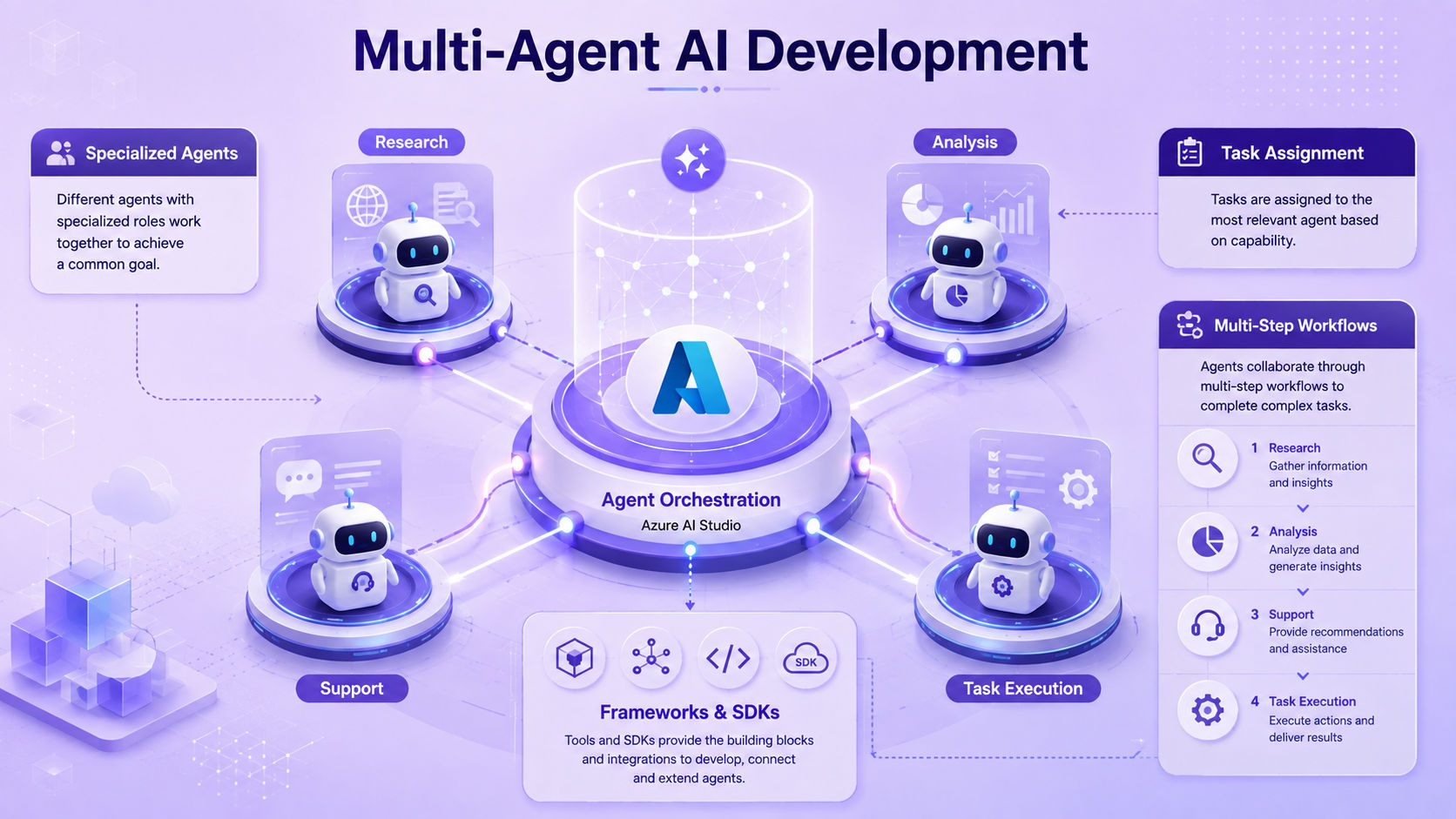
How does Azure AI Studio support multi-agent AI development?
Some tasks are too broad for one agent. In these cases, Azure AI Studio agentic AI development can support workflows where multiple specialized agents handle different parts of a larger task.
Coordinate multiple specialized Agents
Instead of building one agent that tries to do everything, teams can build several smaller agents, each focused on a specific job. The platform allows these agents to be coordinated, so they work together smoothly.
Assign different tasks to different agents
Each agent can focus on a specific part of the workflow. This can make complex applications easier to organize when tasks require different instructions, tools, or expertise.
Manage multi-step agent workflows
Multi agent workflows can connect several steps into one process. The output from one agent can become the input for another agent.
This approach is useful when a business process includes several related tasks rather than one simple request.
Use agent frameworks and SDKs for orchestration
For advanced setups, agent frameworks and software development kits can be used to control how agents communicate and hand off tasks to one another. This gives development teams more control over complex agent systems.
Build a strong foundation in AI with the Artificial Intelligence Course by upGrad KnowledgeHut and develop practical skills to work with modern AI technologies.
How does Azure AI Studio evaluate and monitor AI agents?
Reliable Azure AI Studio agentic AI development requires more than testing whether an agent can answer a few questions. Developers need to evaluate the quality of responses and understand how the agent behaves during real workflows.
Evaluate agent response quality
Check whether the agent provides relevant and useful responses. Evaluation can be based on test datasets, simulated conversations, or real interactions.
Foundry supports evaluations for agents before deployment and for monitoring quality after deployment.
Test groundedness and accuracy
Groundedness checks confirm that an agent's answers are based on real, connected data rather than guesses. This is especially important in a business setting, where incorrect answers can cause real problems.
Evaluate tool selection and usage
When an agent has access to multiple tools, it needs to pick the right one for each situation. Evaluation features check whether an agent is choosing and using tools correctly during a task.
Trace multi-step agent execution
For agents that complete several steps, tracing features show exactly what the agent did at each stage. This makes it easier to find and fix issues in complex workflows.
Monitor agents after deployment
Monitoring continues after an agent goes live. Developers can track operational metrics and evaluation results to identify changes in performance.
Foundry's Agent Monitoring Dashboard can show information such as token usage, latency, success rates, and evaluation outcomes.
Also Read: Benefits of Agentic AI for Businesses
How does Azure AI Studio secure agentic AI applications?
Security is important because agents may have access to company data, applications, and tools. Azure AI Studio agentic AI development should therefore include access controls and governance from the beginning.
Control agent and tool permissions
The platform allows teams to set clear permissions for what an agent can and cannot do. This limits the risk of an agent taking unintended actions or accessing data it should not touch.
Manage identity and access
Identity and access controls decide who can build, edit, or use a given agent. This integrates with existing identity systems, making it easier to manage access across large teams.
Protect enterprise data
Since agents often connect to sensitive company data, safeguards are in place to protect that information during storage and use. This protection is a key requirement for enterprise-level projects.
Apply security and governance policies
Organizations can apply governance policies across all their agents, keeping development consistent with company rules and compliance needs. This is especially useful for large teams running many agents at once.
Monitor agent activity
Monitoring can help identify unusual behavior, unexpected tool calls, and other issues. Tracing data can contain prompts, responses, and application content, so access to trace data should also be controlled carefully.
Also Read: How Microsoft Copilot Uses Agentic AI to Automate Workflows
What are the benefits of using Azure AI Studio for agentic AI development?
Azure AI Studio offers several benefits compared to building agent systems from scratch.
- Connect agents with business systems: Built-in integration capabilities make it easier to connect agents with enterprise applications and workflows.
- Build more context-aware AI applications: Access to enterprise knowledge and memory capabilities enables agents to provide more relevant and informed responses.
- Test and improve agent performance: Evaluation and monitoring tools help teams continuously improve agent behavior and effectiveness.
- Support enterprise AI development: Security, identity, monitoring, governance, and deployment capabilities make the platform suitable for organizations that need more control over AI applications.
How is Azure AI Studio different from traditional AI application development?
Traditional AI applications usually focus on giving a response to a user’s request. Azure AI Studio also supports agents that can work toward a goal, use tools, and complete tasks in multiple steps.
Feature |
Traditional AI Development |
Azure AI Studio Agentic AI Development |
| Goal | Responds to user requests | Works toward a specific goal or task |
| Reasoning | Usually follows fixed steps | Can decide what to do next |
| Actions | Mainly gives responses or predictions | Can use tools, APIs, and functions |
| Knowledge | Uses predefined or fixed data | Can connect to business data and knowledge sources |
| Workflow | Mostly fixed and predictable | Supports flexible, multi-step workflows |
| Multi-agent support | Usually not a main feature | Can support multiple agents working together |
| Monitoring | Tracks basic app performance | Tracks agent steps, tool use, and performance |
| Deployment | Often needs separate setup | Provides tools to deploy and manage agents |
Also Read: Microsoft Agentic AI Customer Support Automation
What should you consider before developing agents with Azure AI Studio?
Before starting Azure AI Studio agentic AI development, a few planning steps can help avoid common mistakes and wasted effort.
1. Start with a clearly defined business problem
Agents work best when built to solve a specific, well understood problem. Starting with a clear business need makes the rest of the development process much easier.
2. Choose the simplest agent architecture
It is tempting to build a complex multi agent system right away, but starting with the simplest possible design often works better. More complexity can be added later if it is truly needed.
3. Limit tool and data access
Giving an agent access to only the tools and data it actually needs reduces risk and keeps the system easier to manage.
4. Define evaluation and success metrics
Before launch, it helps to decide how success will be measured. Clear metrics make it easier to judge whether the agent is actually performing well.
5. Plan for failures and human escalation
No agent will be perfect. Planning for failure cases, including when a task should be handed over to a human, keeps the system reliable and trustworthy.
6. Consider cost, performance, and scalability
Finally, it is worth thinking ahead about cost, response speed, and how well the system will scale as usage grows. These factors matter just as much as the agent's core features.
Also Read: Best Practices for Developing Secure AI Agents in the Microsoft Ecosystem
Conclusion
Azure AI Studio supports agentic AI development by bringing models, tools, enterprise data, evaluation, and monitoring into one development environment. It helps teams build agents that can reason, use tools, retrieve information, and complete multi-step tasks.
With security, governance, and deployment capabilities, teams can move agents from development to production more confidently.
Have A Query? Get in Touch With Our Customer Support | upGrad KnowledgeHut
Frequently Asked Questions
What is Azure AI Studio used for?
Azure AI Studio is used to develop, test, deploy, and manage AI applications and agents. It provides access to AI models, tools, enterprise data, evaluation, monitoring, and governance capabilities. It helps developers move AI solutions from experimentation to production.
How do I create an AI agent in Azure AI Studio?
Start by defining the agent's goal, instructions, and required capabilities. Then select a suitable model, connect tools or knowledge sources, and test the agent with different scenarios. Once the agent performs reliably, it can be deployed and monitored in production.
What is Azure AI Foundry Agent Service?
Azure AI Foundry Agent Service is a managed service for building, deploying, and scaling AI agents. It provides capabilities such as tools, identity, memory, tracing, and monitoring for agent applications. It reduces the infrastructure work required to run agents in production.
Can Azure AI agents use external tools and APIs?
Yes, Azure AI agents can connect with tools, APIs, custom functions, and external services. These connections allow agents to retrieve information or perform approved actions in other applications. Developers can control which tools an agent can access based on its purpose.
Can Azure AI Studio connect AI agents to enterprise data?
Yes, AI agents can be connected to enterprise data sources to provide more relevant and grounded responses. This can include documents, search indexes, databases, and other approved business information. Azure AI Search can also support knowledge retrieval for enterprise AI applications.
Does Azure AI Studio support multi-agent systems?
Yes, the Microsoft Foundry ecosystem supports multi-agent development for workflows that require several specialized agents. Different agents can handle tasks such as research, analysis, decision making, or execution. Developers can use orchestration frameworks and SDKs to coordinate these agents.
How do you evaluate AI agents in Azure AI Studio?
Developers can evaluate agents by testing response quality, accuracy, groundedness, safety, tool selection, and task completion. Test datasets and evaluation methods can be used to compare agent performance across different scenarios. Tracing and monitoring also help identify problems during development and after deployment.
How do you secure AI agents in Azure?
AI agents can be secured by controlling identity, permissions, tools, data access, and network access. Role based access control and other governance capabilities help restrict access to resources and business information. Monitoring and tracing can also help organizations identify unexpected agent activity.
What is the difference between Azure AI Studio and Microsoft Foundry?
Azure AI Studio was Microsoft's earlier name and development experience for building generative AI applications. Microsoft has since evolved this platform into Microsoft Foundry, which brings together models, agents, tools, evaluation, monitoring, and governance. For current content, it is useful to mention Azure AI Studio as the earlier terminology and Microsoft Foundry as the current platform name.
Is Azure AI Studio suitable for enterprise agentic AI development?
Yes, it can support enterprise agentic AI development through models, tools, enterprise data integration, evaluation, monitoring, security, and governance. These capabilities help organizations build and manage agents across business workflows. The right architecture still depends on the organization's data, security, scalability, and business requirements.
1639 articles published
KnowledgeHut is an outcome-focused global ed-tech company. We help organizations and professionals unlock excellence through skills development. We offer training solutions under the people and proces...
Get Free Consultation
By submitting, I accept the T&C and
Privacy Policy