
- Blog Categories
- Project Management
- Agile Management
- IT Service Management
- Cloud Computing
- Business Management
- BI And Visualisation
- Quality Management
- Cyber Security
- DevOps
- Most Popular Blogs
- PMP Exam Schedule for 2025: Check PMP Exam Date
- Top 60+ PMP Exam Questions and Answers for 2025
- PMP Cheat Sheet and PMP Formulas To Use in 2025
- What is PMP Process? A Complete List of 49 Processes of PMP
- Top 15+ Project Management Case Studies with Examples 2025
- Top Picks by Authors
- Top 170 Project Management Research Topics
- What is Effective Communication: Definition
- How to Create a Project Plan in Excel in 2025?
- PMP Certification Exam Eligibility in 2025 [A Complete Checklist]
- PMP Certification Fees - All Aspects of PMP Certification Fee
- Most Popular Blogs
- CSM vs PSM: Which Certification to Choose in 2025?
- How Much Does Scrum Master Certification Cost in 2025?
- CSPO vs PSPO Certification: What to Choose in 2025?
- 8 Best Scrum Master Certifications to Pursue in 2025
- Safe Agilist Exam: A Complete Study Guide 2025
- Top Picks by Authors
- SAFe vs Agile: Difference Between Scaled Agile and Agile
- Top 21 Scrum Best Practices for Efficient Agile Workflow
- 30 User Story Examples and Templates to Use in 2025
- State of Agile: Things You Need to Know
- Top 24 Career Benefits of a Certifed Scrum Master
- Most Popular Blogs
- ITIL Certification Cost in 2025 [Exam Fee & Other Expenses]
- Top 17 Required Skills for System Administrator in 2025
- How Effective Is Itil Certification for a Job Switch?
- IT Service Management (ITSM) Role and Responsibilities
- Top 25 Service Based Companies in India in 2025
- Top Picks by Authors
- What is Escalation Matrix & How Does It Work? [Types, Process]
- ITIL Service Operation: Phases, Functions, Best Practices
- 10 Best Facility Management Software in 2025
- What is Service Request Management in ITIL? Example, Steps, Tips
- An Introduction To ITIL® Exam
- Most Popular Blogs
- A Complete AWS Cheat Sheet: Important Topics Covered
- Top AWS Solution Architect Projects in 2025
- 15 Best Azure Certifications 2025: Which one to Choose?
- Top 22 Cloud Computing Project Ideas in 2025 [Source Code]
- How to Become an Azure Data Engineer? 2025 Roadmap
- Top Picks by Authors
- Top 40 IoT Project Ideas and Topics in 2025 [Source Code]
- The Future of AWS: Top Trends & Predictions in 2025
- AWS Solutions Architect vs AWS Developer [Key Differences]
- Top 20 Azure Data Engineering Projects in 2025 [Source Code]
- 25 Best Cloud Computing Tools in 2025
- Most Popular Blogs
- Company Analysis Report: Examples, Templates, Components
- 400 Trending Business Management Research Topics
- Business Analysis Body of Knowledge (BABOK): Guide
- ECBA Certification: Is it Worth it?
- Top Picks by Authors
- Top 20 Business Analytics Project in 2025 [With Source Code]
- ECBA Certification Cost Across Countries
- Top 9 Free Business Requirements Document (BRD) Templates
- Business Analyst Job Description in 2025 [Key Responsibility]
- Business Analysis Framework: Elements, Process, Techniques
- Most Popular Blogs
- Best Career options after BA [2025]
- Top Career Options after BCom to Know in 2025
- Top 10 Power Bi Books of 2025 [Beginners to Experienced]
- Power BI Skills in Demand: How to Stand Out in the Job Market
- Top 15 Power BI Project Ideas
- Top Picks by Authors
- 10 Limitations of Power BI: You Must Know in 2025
- Top 45 Career Options After BBA in 2025 [With Salary]
- Top Power BI Dashboard Templates of 2025
- What is Power BI Used For - Practical Applications Of Power BI
- SSRS Vs Power BI - What are the Key Differences?
- Most Popular Blogs
- Data Collection Plan For Six Sigma: How to Create One?
- Quality Engineer Resume for 2025 [Examples + Tips]
- 20 Best Quality Management Certifications That Pay Well in 2025
- Six Sigma in Operations Management [A Brief Introduction]
- Top Picks by Authors
- Six Sigma Green Belt vs PMP: What's the Difference
- Quality Management: Definition, Importance, Components
- Adding Green Belt Certifications to Your Resume
- Six Sigma Green Belt in Healthcare: Concepts, Benefits and Examples
- Most Popular Blogs
- Latest CISSP Exam Dumps of 2025 [Free CISSP Dumps]
- CISSP vs Security+ Certifications: Which is Best in 2025?
- Best CISSP Study Guides for 2025 + CISSP Study Plan
- How to Become an Ethical Hacker in 2025?
- Top Picks by Authors
- CISSP vs Master's Degree: Which One to Choose in 2025?
- CISSP Endorsement Process: Requirements & Example
- OSCP vs CISSP | Top Cybersecurity Certifications
- How to Pass the CISSP Exam on Your 1st Attempt in 2025?
- Most Popular Blogs
- Top 7 Kubernetes Certifications in 2025
- Kubernetes Pods: Types, Examples, Best Practices
- DevOps Methodologies: Practices & Principles
- Docker Image Commands
- Top Picks by Authors
- Best DevOps Certifications in 2025
- 20 Best Automation Tools for DevOps
- Top 20 DevOps Projects of 2025
- OS for Docker: Features, Factors and Tips
- More
- Agile & PMP Practice Tests
- Agile Testing
- Agile Scrum Practice Exam
- CAPM Practice Test
- PRINCE2 Foundation Exam
- PMP Practice Exam
- Cloud Related Practice Test
- Azure Infrastructure Solutions
- AWS Solutions Architect
- IT Related Pratice Test
- ITIL Practice Test
- Devops Practice Test
- TOGAF® Practice Test
- Other Practice Test
- Oracle Primavera P6 V8
- MS Project Practice Test
- Project Management & Agile
- Project Management Interview Questions
- Release Train Engineer Interview Questions
- Agile Coach Interview Questions
- Scrum Interview Questions
- IT Project Manager Interview Questions
- Cloud & Data
- Azure Databricks Interview Questions
- AWS architect Interview Questions
- Cloud Computing Interview Questions
- AWS Interview Questions
- Kubernetes Interview Questions
- Web Development
- CSS3 Free Course with Certificates
- Basics of Spring Core and MVC
- Javascript Free Course with Certificate
- React Free Course with Certificate
- Node JS Free Certification Course
- Data Science
- Python Machine Learning Course
- Python for Data Science Free Course
- NLP Free Course with Certificate
- Data Analysis Using SQL
- Home
- Blog
- Artificial Intelligence
- How Does Microsoft Agentic AI Help Businesses Automate Tasks?
How Does Microsoft Agentic AI Help Businesses Automate Tasks?
Updated on Aug 10, 2026 | 459 views
Share:
Table of Contents
View all
- How does Microsoft agentic AI automate business tasks?
- What business tasks can Microsoft agentic AI automate?
- How does Microsoft Copilot Studio enable agentic AI automation?
- What does a Microsoft agentic AI automation workflow look like?
- What are the benefits of Microsoft agentic AI for business automation?
- What are the limitations of Microsoft agentic AI automation?
- How can businesses start automating tasks with Microsoft agentic AI?
- Conclusion
Quick Overview
- Microsoft agentic AI automates business tasks by understanding requests, accessing data, making decisions, and taking actions across connected systems.
- Microsoft Copilot Studio enables agents to automate tasks such as customer support, sales follow-ups, invoice processing, HR requests, and IT tickets.
- Agents can handle multi-step workflows and exceptions, while human employees can step in when approval or judgment is needed.
- Businesses can combine AI agents with workflows to automate tasks faster while maintaining control.
- This guide explains how Microsoft agentic AI supports business automation, where it works best, and how businesses can start using it.
Build practical skills in AI agents and business automation with the Applied Agentic AI Certification from upGrad KnowledgeHut and learn to apply agentic AI to real-world business tasks.
How does Microsoft agentic AI automate business tasks?
Microsoft agentic AI business automation works by combining understanding, reasoning, and action into one system. Instead of just answering a question, an AI agent studies the request, checks connected data, plans the right steps, and completes the task.
Below are the core abilities that make this possible.
1. Understands business tasks and context
The first step in Microsoft agentic AI business automation is understanding what needs to be done. An agent can interpret a request, identify the required information, and determine which tools or business systems may be needed.
For example, if an employee asks an agent to check the status of a customer order, the agent can understand the request and identify the customer or order information required before taking action.
This ability makes AI agents for task automation useful for business processes where requests can vary instead of following exactly the same format every time.
2. Accesses business data and connected applications
Once the task is understood, the AI agent needs information to complete it. Microsoft agentic AI connects with tools such as Outlook, SharePoint, Dynamics 365, and other business applications to pull the exact data needed.
Because AI agents for task automation rely on accurate, connected data, this step is one of the most important parts of the whole process. Without proper data access, even the smartest agent cannot complete a task correctly.
3. Reasons through multi step tasks and takes action
Many business processes involve several steps rather than a single action. Microsoft agentic AI can evaluate available information, determine the next step, and continue moving through a workflow until the task is completed.
For example, AI agents for task automation can review a support request, check customer details, identify possible solutions, and create follow-up actions.
This ability to reason through multiple stages helps organizations automate processes that were traditionally handled manually.
4. Combines AI agents with automated workflows
Microsoft agentic AI does not work alone. It often works together with automated workflows built in tools such as Power Automate.
The AI agent decides what needs to happen, and the workflow carries out the repeatable, structured part of the task. This combination allows AI agents for task automation to scale across large volumes of work without slowing down.
5. Escalates complex tasks to human employees
Not every task can or should be completed entirely by AI. Some situations require expert judgment, compliance reviews, or sensitive decision-making.
When needed, Microsoft agentic AI can escalate requests to employees and provide relevant information that helps them resolve the issue quickly. This balance between automation and human oversight makes AI agents for task automation practical for real-world business operations.
Also Read: How to Build Autonomous AI Agents
What business tasks can Microsoft agentic AI automate?
Microsoft AI agents for business are being used across almost every business department. Below are some of the most common areas where companies are already seeing results.
1. Customer service and support tasks
Customer service teams often deal with repeated questions about orders, refunds, and account details. Microsoft agentic AI can answer these questions directly, update tickets, and escalate harder cases to a support agent. This reduces wait times and frees up staff to focus on complex customer issues.
2. Sales and lead management tasks
Sales teams often lose time on manual data entry and follow up emails. Microsoft AI agents for business can automatically qualify leads, update the customer relationship management system, and send timely follow up messages.
This helps sales teams focus more on closing deals instead of manual admin work.
3. Finance and invoice processing tasks
Finance departments deal with repetitive tasks such as invoice matching, approval routing, and expense checks. Microsoft agentic AI business automation can read invoice details, match them against purchase orders, and route them for approval automatically. This reduces manual errors and speeds up the entire finance cycle.
4. HR and employee operations tasks
Human resources teams manage onboarding, policy requests, leave inquiries, and employee support activities. Microsoft AI agents for business can answer employee questions, guide onboarding processes, and automate routine HR workflows.
This allows HR professionals to spend more time on strategic initiatives rather than repetitive administrative tasks.
5. IT and internal support tasks
IT teams receive a steady stream of internal requests, from password resets to access approvals. AI agents for task automation can resolve common IT requests on their own and only escalate tickets that need deeper technical support.
This reduces the load on IT staff and speeds up issue resolution for employees.
Also Read: AI Agent Orchestration in the Microsoft Ecosystem
How does Microsoft Copilot Studio enable agentic AI automation?
Microsoft Copilot Studio is the platform businesses use to build and manage their own AI agents. It plays a central role in making Microsoft agentic AI business automation possible for companies without needing a large technical team.
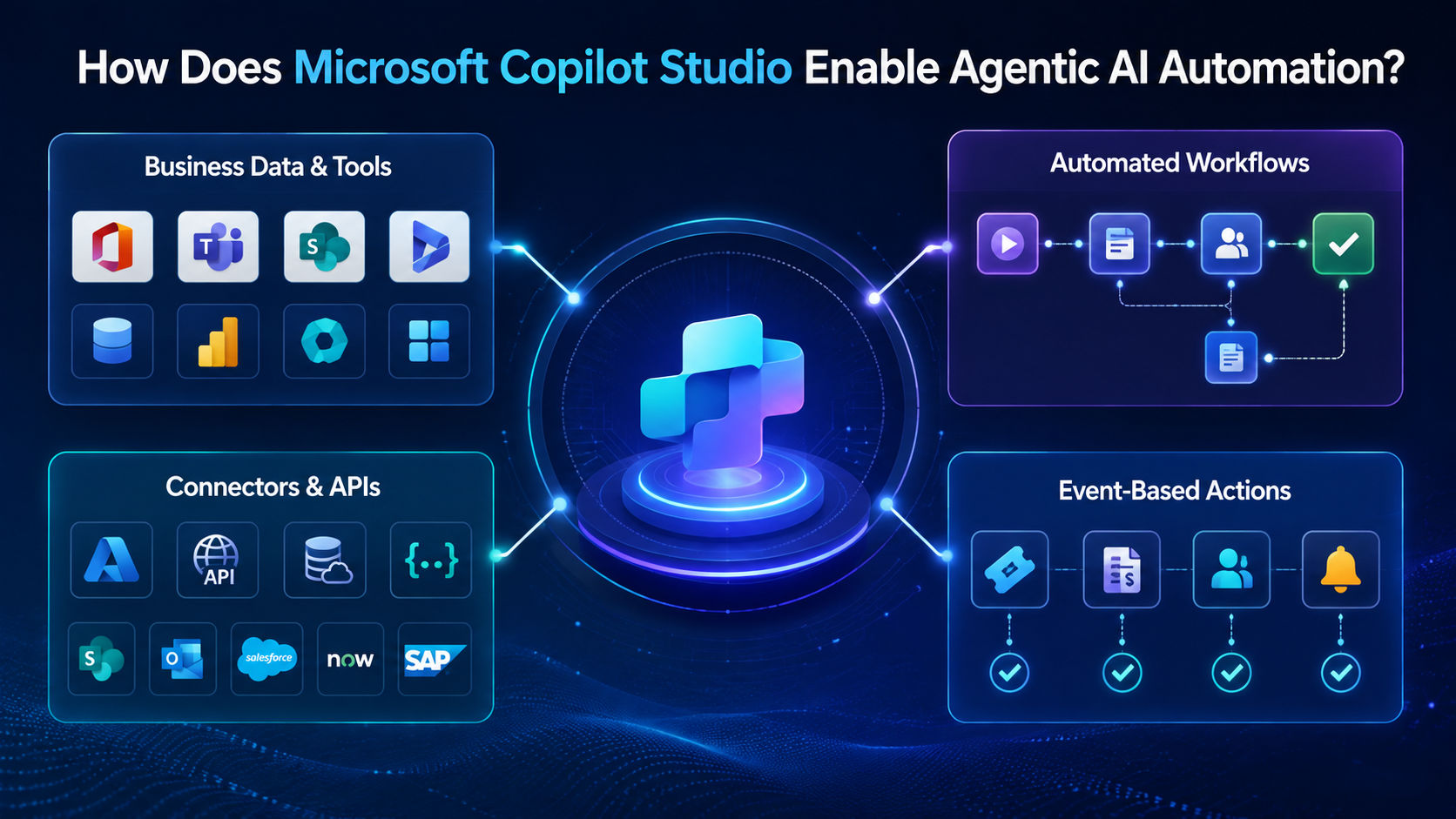
1. Connects AI agents to business data and tools
Copilot Studio allows an AI agent to connect directly with business systems such as Microsoft 365, Dynamics 365, and other line of business applications.
This connection gives Microsoft agentic AI the real time data it needs to make accurate decisions instead of relying on guesswork.
2. Uses workflows to automate repeatable processes
Inside Copilot Studio, businesses can design workflows that describe exactly how a task should be completed step by step. These workflows work alongside the AI agent, so routine and repeatable processes run smoothly every time without needing constant supervision.
3. Uses connectors and APIs to perform actions across systems
Connectors allow Microsoft AI agents for business to interact with different services. Microsoft documentation lists connectors for services such as SharePoint, Outlook, Salesforce, ServiceNow, and SAP. MCP servers can also provide access to custom services, databases, and internal APIs.
For Microsoft agentic AI business automation, these connections are important because many business tasks involve more than one application.
4. Triggers automated actions based on events or requests
AI agents built in Copilot Studio can be set up to trigger automatically, either when an employee makes a request or when a certain business event happens, such as a new support ticket or an incoming invoice.
This event-based triggering is a major reason AI agents for task automation can work around the clock without manual starting points.
Also Read: How Microsoft Copilot Uses Agentic AI to Automate Workflows
What does a Microsoft agentic AI automation workflow look like?
A typical Microsoft agentic AI business automation workflow can combine an AI agent with structured actions. The exact steps depend on the business process and the systems connected to the agent.
Step 1: Understand the business request
The process begins when an employee or customer makes a request, such as asking for an invoice status or requesting time off. Microsoft agentic AI reads this request and identifies exactly what needs to be done.
Step 2: Retrieve relevant data and context
Next, the AI agent pulls related information from connected systems, such as past records, account details, or company policies. This step ensures the agent has everything it needs before deciding on the next action.
Step 3: Decide the next action
Using the request and the retrieved data, Microsoft agentic AI decides what should happen next. This could be a single action or several linked steps, depending on how complex the task is.
Step 4: Execute the task across connected systems
Once a decision is made, the AI agent carries out the task directly within the connected business systems, whether that means updating a record, sending an email, or completing an approval step.
Step 5: Verify the outcome or escalate the task
Finally, the AI agent checks whether the task was completed correctly. This verification step is what makes AI agents for task automation reliable over time. If everything looks correct, the process ends there. If something is unclear or unusual, the task is escalated to a human employee for review.
Learn how data, AI, and automation work together with upGrad KnowledgeHut Data Science courses and strengthen your skills for AI-powered business solutions.
What are the benefits of Microsoft agentic AI for business automation?
Businesses that adopt Microsoft AI agents for business often see noticeable improvements across daily operations. Here are some of the biggest benefits:
Reduces repetitive manual work
By handling routine requests automatically, Microsoft agentic AI removes a large share of repetitive manual work from employee schedules, allowing staff to spend time on more valuable tasks.
Speeds up multi step business processes
Tasks that once needed several people and multiple handoffs can now move much faster, since AI agents for task automation can complete many steps within minutes instead of hours or days.
Improves employee productivity
When routine tasks are automated, employees can focus on decision making, problem solving, and customer relationships instead of spending hours on admin work.
Scales business operations
As a business grows, the volume of requests grows too. Microsoft AI agents for business can handle this increased volume without needing a matching increase in staff, which makes scaling much more manageable.
Also Read: Benefits of Agentic AI for Businesses
What are the limitations of Microsoft agentic AI automation?
While Microsoft agentic AI business automation offers real benefits, it is important for businesses to understand its current limitations before relying on it fully.
AI agents still need reliable business data
Microsoft agentic AI can only make good decisions when the data behind it is accurate and up to date. Poor quality data can lead to mistakes, so businesses need strong data management alongside their automation efforts.
Complex tasks require human oversight
AI agents for task automation should not automatically make every high-impact business decision. Tasks involving financial approval, sensitive employee information, or important customer decisions may require human review.
Permissions and governance must be controlled
Since Microsoft agentic AI can access business systems directly, companies must carefully manage what each agent is allowed to see and do. Without proper governance, automation can create security or compliance risks.
Not every business process should be fully automated
Some processes benefit from a human touch, particularly those involving sensitive customer relationships or major decisions. Microsoft agentic AI business automation works best when applied selectively rather than everywhere at once.
How can businesses start automating tasks with Microsoft agentic AI?
Getting started with Microsoft agentic AI business automation does not need to be complicated. A structured approach helps businesses see results without taking on unnecessary risk.
1. Identify high value repetitive tasks
The first step is to look for tasks that happen often, take up significant time, and follow a predictable pattern. These are usually the best starting points for Microsoft AI agents for business.
2. Define what the AI agent can access and do
Before deployment, businesses should clearly define what data the AI agent can access and what actions it is allowed to take. This keeps automation safe and within proper boundaries.
3. Connect the required business systems
Next, the necessary systems, such as customer relationship management tools, email platforms, or finance software, need to be connected so the AI agent has everything required to complete tasks.
4. Add human approval and escalation points
Even well-designed automation should include clear points where a human can step in, particularly for sensitive or high value tasks. This builds trust in AI agents for task automation over time.
5. Measure results before scaling automation
Finally, businesses should track how well the automation is performing, including time saved, accuracy, and employee feedback, before expanding it to more tasks or departments.
Conclusion
Microsoft agentic AI helps businesses automate repetitive and multi-step tasks across customer service, sales, finance, HR, and IT. By combining AI agents with business data, connected applications, and workflows, companies can speed up processes and reduce manual work.
Human approval remains important for sensitive or complex decisions. The best approach is to start with high-value repetitive tasks, measure results, and scale automation gradually.
Have A Query? Get in Touch With Our Customer Support | upGrad KnowledgeHut
Frequently Asked Questions
What can Microsoft AI agents automate?
Microsoft AI agents can automate customer support, sales follow-ups, invoice processing, HR requests, and IT support. They can retrieve information, update records, route requests, trigger workflows, and send notifications. Their capabilities depend on connected systems, permissions, and business requirements.
How does Microsoft Copilot Studio enable AI automation?
Microsoft Copilot Studio allows businesses to build AI agents and connect them with business data, tools, workflows, APIs, and applications. These connections allow agents to retrieve information and perform approved actions across systems. Businesses can also add human approval and escalation points.
What is the difference between AI agents and traditional automation?
Traditional automation generally follows predefined rules and fixed steps, while AI agents can interpret requests and determine suitable actions. Automation works well for predictable processes, while agents can handle varied inputs and multi-step tasks. Businesses can also combine both approaches for greater flexibility and control.
How does an AI agent complete a multi-step task?
An AI agent first understands the request, gathers the required data, and determines what needs to happen next. It then uses connected tools or workflows to complete each step and checks the result before moving forward. If it cannot complete a step, the task can be paused or escalated to a human.
Can Copilot Studio agents use APIs?
Yes, Copilot Studio agents can use APIs to retrieve information or perform actions in connected business systems. Businesses can connect agents to APIs through tools and custom connectors, allowing them to work with data and applications beyond Microsoft products.
Can Microsoft AI agents work without human intervention?
Yes, Microsoft AI agents can complete defined tasks automatically when they have the required data, tools, and permissions. Businesses can still require human approval for sensitive or complex actions. This allows routine work to be automated while keeping people involved where necessary.
What happens when a Microsoft AI agent encounters an exception?
An AI agent can stop the process, request additional information, or escalate the task to a human employee. This is useful when a request is unclear or falls outside the agent's defined capabilities. Human intervention helps maintain accuracy and control over important tasks.
What are the benefits of Microsoft agentic AI for businesses?
Microsoft agentic AI can reduce repetitive work, speed up multi-step processes, and improve employee productivity. It can also help businesses manage larger volumes of routine tasks without the same increase in manual effort. The results depend on data quality, process design, and implementation.
Can Microsoft AI agents work with business applications?
Yes, Microsoft AI agents can connect with business applications through tools, connectors, APIs, and workflows. These connections allow agents to retrieve information and perform approved actions across different systems. This makes them useful for automating processes that involve multiple applications.
Is Microsoft agentic AI suitable for every business process?
No, some processes should not be fully automated with AI agents, especially those involving sensitive information or important decisions. Businesses should consider human involvement when judgment, approval, or compliance review is required. Repetitive and well-defined tasks are usually better starting points.
1639 articles published
KnowledgeHut is an outcome-focused global ed-tech company. We help organizations and professionals unlock excellence through skills development. We offer training solutions under the people and proces...
Get Free Consultation
By submitting, I accept the T&C and
Privacy Policy