
- Home
- Blog
- Cloud Computing
- Understanding Hypervisors in Cloud Computing: Types, Importance, and Benefits
Understanding Hypervisors in Cloud Computing: Types, Importance, and Benefits
Updated on May 30, 2025 | 1.46K+ views
Share:
Table of Contents
View all
Cloud computing has completely changed how businesses and individuals store, manage, and process data. You would know if you’re in the IT industry that the usage of cloud computing is only increasing every year as more and more businesses move towards cloud adoption from on-prem solutions. According to a report, the global cloud computing market size is expected to grow from USD 626.4 billion in 2023 to a whopping USD 1266.4 billion by 2028 at a CAGR of 15.1% during the forecast period.
One key enabler of cloud computing is virtualization, which allows multiple virtual machines/environments to run on a single physical server. This part of virtualization is enabled by the hypervisor in cloud computing, which creates and manages virtual machines (VMs). Understanding how hypervisors work is essential for businesses to optimize cloud performance, scalability, and resource efficiency. In this article we’ll cover everything from what a hypervisor is, how it works; to the hypervisor and its types in cloud computing, advantages, and disadvantages.
Master the Right Skills & Boost Your Career
Avail your free 1:1 mentorship session
What is a Hypervisor in Cloud Computing?
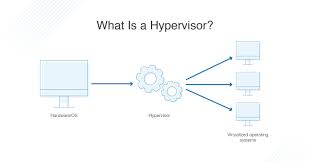
Don’t you want us to explain hypervisor in cloud computing? Now that we know how prevalent cloud adoption is becoming, it’s time to define hypervisor in cloud computing. A hypervisor in cloud computing is a layer of software that allows multiple virtual machines (VMs) to run on a single physical server. It manages the distribution of resources such as CPU, memory, and storage among the VMs, thereby enabling them to operate independently, as if they were running on separate physical hardware. The hypervisor in virtualization creates an abstraction between the hardware and the virtual machines, making the cloud environment a lot more efficient and flexible.
Here’s a hypervisor diagram in cloud computing –
Source: DNSstuff
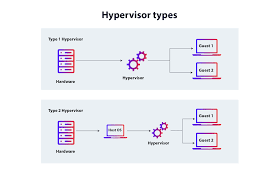
There are two primary types of hypervisors in cloud computing: Type 1, which run directly on the host hardware, and Type 2, which run on top of an operating system. By virtualizing resources, hypervisors make it possible to scale cloud environments, optimize server utilization, and ensure isolation and security between VMs – a lucrative selling point for all organizations. We’ll cover more about the types of hypervisors later.
Why is a Hypervisor Important in Cloud Computing?
What is the function of a hypervisor in cloud computing? Well, hypervisors are indispensable for cloud computing for several reasons. First, they enable virtualization; this allows multiple VMs to run on a single physical server, maximizing hardware utilization and lowering infrastructure costs. Hypervisors also offer resource isolation – if one VM crashes or experiences performance degradation, it does not affect others. This isolation ensures security, as each VM is sandboxed from the others.
Furthermore, hypervisors enhance scalability by enabling on-demand creation or removal of VMs. This capability is essential in cloud computing, where environments need to be elastic and scalable in response to changing workloads. Finally, hypervisors in virtualization make it easier to perform live migrations, allowing VMs to be moved across physical machines with no downtime, which is crucial for cloud operations.
We now hope you know the use of hypervisor in cloud computing. There are a bunch of other advantages as well that we’ll cover in a bit.
Types of Hypervisors in Cloud Computing
There are two main types of hypervisors in cloud computing: Type 1 and Type 2. Both play a vital role in virtualization, but their architecture and use cases differ.
Type 1 Hypervisor
A Type 1 hypervisor, also known as a "bare-metal" hypervisor, runs directly on the physical hardware of a server without the need for an underlying operating system. It acts as the intermediary between the hardware and the virtual machines (VMs), managing the allocation of resources to each VM. These include CPU, memory, and storage. Since it runs directly on the hardware, a Type 1 hypervisor is typically more efficient, offering better performance and security. It is commonly used in enterprise data centers and large-scale cloud environments.
Type 1 Hypervisor Example
A popular example of a Type 1 hypervisor in cloud computing is VMware ESXi. It is widely used in enterprise environments for server virtualization and cloud computing. VMware ESXi is suitable for large organizations and service providers.
Type 2 Hypervisor
A Type 2 hypervisor, also known as a "hosted" hypervisor, runs on top of a conventional operating system (OS), such as Windows or Linux. Unlike a Type 1 hypervisor, it relies on the host OS to manage hardware resources. While Type 2 hypervisors are generally easier to install and use, they tend to have slightly lower performance and efficiency compared to Type 1 hypervisors because they operate in a virtualized environment themselves.
Type 2 Hypervisor Example
An example of a Type 2 hypervisor is Oracle VM VirtualBox. VirtualBox is widely used for desktop virtualization, testing, and development purposes. It supports a range of guest operating systems and offers a user-friendly interface, making it popular among developers and IT professionals who need to run multiple OS instances on a single machine.
Source: AppViewX
There, we’ve covered hypervisor types in cloud computing. It’s now time to learn how they work.
How Does a Hypervisor Work?
Now that we’ve seen what hypervisors in cloud computing roughly do; at a technical level, they create and manage virtual environments by abstracting the physical hardware and allocating it to virtual machines (VMs). The process involves resource virtualization and virtual machine monitors (VMMs) that control access to hardware. Here's a more detailed breakdown of how a hypervisor works:
Hardware Abstraction: The hypervisor sits between the hardware and the virtual machines, managing resource allocation (CPU, RAM, storage) to each VM. It ensures that each VM operates as if it has dedicated hardware, even though the physical resources are limited and shared.
Resource Allocation: A key role of a hypervisor is to allocate physical resources dynamically to VMs based on demand. For example, if one VM is running a resource-intensive application, the hypervisor can allocate more CPU or memory to it from the available pool, ensuring performance and scalability.
VM Isolation: Hypervisors provide isolation between VMs by enforcing boundaries around each virtualized environment. This prevents one VM’s issues (like crashes or security breaches) from affecting others. In Type 1 hypervisors, this isolation is more secure since the hypervisor runs directly on the hardware.
Resource Scheduling and Management: A hypervisor uses scheduling algorithms to manage access to physical resources, ensuring that VMs get the necessary CPU cycles, memory, and I/O bandwidth without contention.
Hypervisor Layer and Guest OS Communication: In Type 1 hypervisors, the guest OS communicates directly with the hypervisor layer. In Type 2 hypervisors, the communication goes through the host OS. This impacts performance, with Type 1 hypervisors typically providing faster and more efficient resource allocation due to the lack of an intermediary OS.
Advantages of Hypervisors
Resource Optimization: By enabling virtualization, hypervisors allow multiple VMs to run on a single physical server, maximizing hardware utilization. This reduces the need for additional physical servers, cutting down on hardware, maintenance, and energy costs.
Scalability: Hypervisors in virtualization enable rapid provisioning and scaling of virtual machines. This allows cloud environments to scale up or down based on demand, offering flexibility for workloads that vary in intensity. Organizations with varying cloud loads find this highly useful.
Isolation and Security: Hypervisors ensure strong isolation between VMs, making sure that each VM’s processes and data are protected. This isolation limits the impact of failures or security breaches, keeping the entire system stable and secure. This also helps all organizations stay compliant with respect to regional data regulations.
Disaster Recovery: Features like VM snapshots and live migrations allow for quick backups and recovery, that ensures business continuity in case of system failures or disasters. Since data retrieval and recovery are crucial for organizations during/after data breaches, this particular advantage is useful.
Cost Savings: Hypervisors help consolidate workloads onto fewer physical machines, leading to reduced hardware and operational costs which is what all organizations ultimately want.
Disadvantages of Hypervisors
Performance Overhead: Hypervisors, particularly Type 2, introduce some overhead. Since they operate on top of a host OS (in the case of Type 2), they have to share resources, which can reduce performance compared to running directly on hardware.
Complexity: While setting up a hypervisor may seem simple, managing a large-scale virtualized environment requires skilled professionals and additional tools for monitoring, backup, and management. This complexity might increase operational costs.
Security Risks: If there is a vulnerability in hypervisors, it can potentially compromise multiple VMs. For instance, hypervisor-level attacks can allow an attacker to break the isolation between VMs.
Resource Contention: In environments with high workloads, VMs may compete for physical resources, leading to contention. Hypervisors must carefully manage resource allocation to prevent this from impacting the overall performance.
Limited Performance for High-Performance Workloads: Virtualized environments might not be ideal for applications that require direct access to hardware or high-performance computing, like GPU-intensive tasks.
Conclusion
Hypervisors are a cornerstone in cloud computing, providing the necessary virtualization layer that allows cloud resources to be efficiently allocated and managed. They are crucial for scaling cloud environments, improving resource utilization, and enhancing security through isolation. Understanding the types of hypervisors Type 1 and Type 2, along with their advantages and disadvantages, can help organizations choose the right solution for their specific needs as these are different on a case-to-case basis.
As cloud computing continues to evolve, the role of hypervisors in cloud computing will also remain essential in optimizing infrastructure and ensuring the performance and reliability of virtualized environments. We hope you now have all the information you need on finding solutions that are tailor-made for you!
Frequently Asked Questions (FAQs)
1. Which hypervisor is used by AWS?
AWS primarily uses a customized version of the Xen hypervisor for EC2 instances, although they are also transitioning to Nitro for improved performance and security.
2. What is the difference between a hypervisor and virtual machine?
A hypervisor is the software that enables virtualization by creating and managing virtual machines (VMs). A VM, on the other hand, is a virtualized instance of an operating system that runs on the hypervisor.
3. What is a major difference between a hypervisor and a container?
A hypervisor virtualizes the entire hardware, running multiple OS instances on top of it. A container, however, shares the same OS kernel but runs applications in isolated user spaces, making containers more lightweight than virtual machines.
4. What are three examples of hypervisors choose three?
- VMware ESXi
- Microsoft Hyper-V
- Oracle VM VirtualBox
5. Which type of hypervisor is faster?
Type 1 hypervisors are generally faster and more efficient when compared to type 2 because they run directly on the host hardware, eliminating the overhead of a host operating system.
1638 articles published
KnowledgeHut is an outcome-focused global ed-tech company. We help organizations and professionals unlock excellence through skills development. We offer training solutions under the people and proces...
Get Free Consultation
By submitting, I accept the T&C and
Privacy Policy