
- Home
- Blog
- Cloud Computing
- What Is Platform as a Service (PaaS) in Cloud Computing?
What Is Platform as a Service (PaaS) in Cloud Computing?
Updated on Dec 05, 2024 | 8 min read | 1.95K+ views
Share:
Table of Contents
View all
In today’s age where nearly 90% of the organization has transitioned to cloud from on-premises. The cloud services provide companies access to huge computing resources and services according to their use over the Internet. The PaaS is a cloud computing platform where the third party offers the necessary software and hardware resources.
The PaaS architectures are similar to serverless computing or function-as-a-service (FaaS) which are priced based on computations, storage space, and network resources.
Some of the examples for PaaS cloud computing includes SAP Cloud, Microsoft Azure, Salesforce Lightning, AWS Lambda and Google App Engine.
These PaaS providers are equipped to operate across languages, libraries, containers, and equivalent tools.
Master the Right Skills & Boost Your Career
Avail your free 1:1 mentorship session
What is Platform-as-a-Service (PaaS)?
In PaaS in cloud computing model, a third-party provider delivers hardware and software tools, typically essential for application development, to users via the internet. The PaaS model in cloud computing streamlines web application development by handling all backend management behind the scenes, allowing developers to focus solely on building and deploying applications.
The application of PaaS in cloud computing is offered by cloud service providers on a pay-as-you-go basis and can be accessed via an Internet connection. The cloud provider handles back-end scalability, relieving end-users from the responsibility of managing the underlying infrastructure.
The services that are provided in PaaS includes Programming Languages, Application Frameworks, Databases and Additional Tools and Services.
What is PaaS in cloud computing? PaaS, or Platform as a Service, provides an abstracted environment that integrates middleware, operating systems, development, and deployment tools, operating independently of the organization’s existing ecosystem.
Some of the examples of PaaS model in cloud computing are Google App Engine, Force.com, Azure etc.
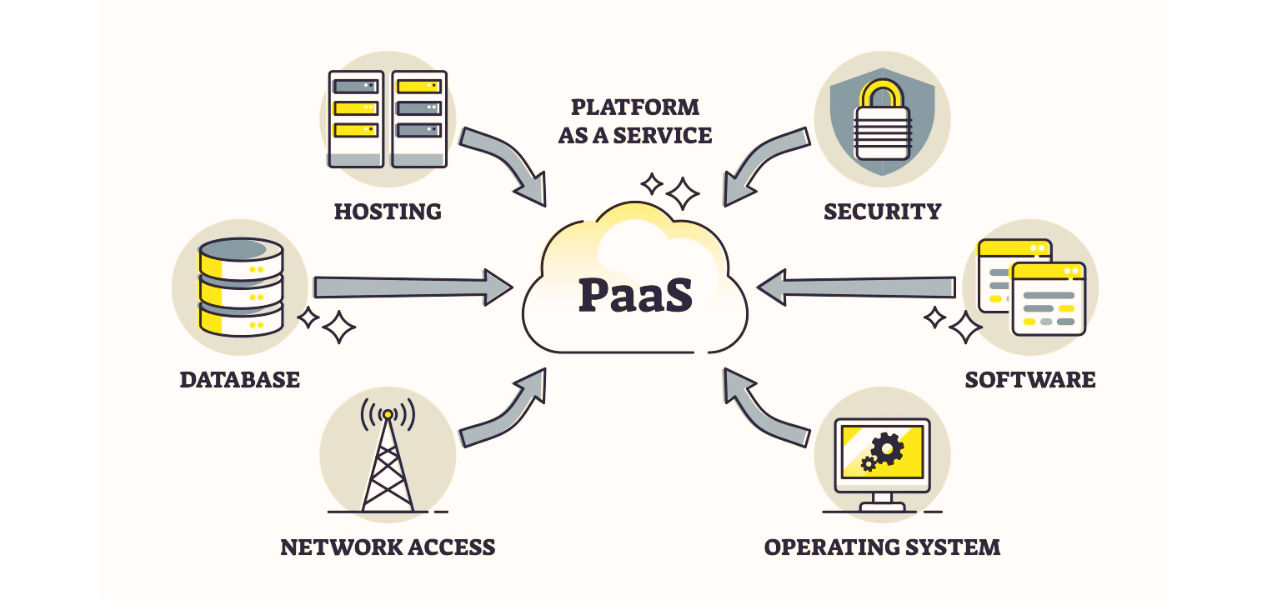
Source: 63SATS
What is Included in PaaS?
PaaS model in cloud computing makes it possible to build an entire application in a web browser. It is not hosted locally but the developers can work on the application from anywhere in the world.
The providers of PaaS host the hardware and software on its own infrastructure. There are following offers that are included by PaaS vendors:
- Development Tools
- Collaboration and Communication
- Analytics and Monitoring
- Security and Identity Management
- Scalability and load balancing
Types of PaaS
There are various types of PaaS, including public, private, and hybrid PaaS models, each catering to different needs and use cases.
1. Public PaaS: This model is hosted in the cloud and fully managed by the cloud provider, including its underlying infrastructure. These are suitable for the businesses which are looking for cost-efficiency and scalability.
2. Private PaaS: This type of model is hosted on the organization’s own infrastructure or onsite, private data centers etc. It offers security, control, and customization to the organization.
3. Hybrid PaaS: The Hybrid PaaS combines both public and private cloud environments, enabling the execution of applications across multiple cloud infrastructures.
Some of the specialized types of PaaS based on the type of programming are ava PaaS, .NET PaaS, and Node.js PaaS among others.
The PaaS infrastructure comprises of components such as servers, storage, and networking, along with middleware, development tools, business intelligence (BI) services, and database management systems. It also provides features for team collaboration, web service integration, data marshalling, and database integration. Additional services include security, scalability, storage, persistence, state management, application versioning, and more, making PaaS a comprehensive solution for application development and deployment. These are used by the developers who are building application or software.
PaaS ensures that resources can be scaled up or down as per the demand, so you pay for what you use and also supports web application lifecycle: building, testing, deploying, managing, and updating.
How Does PaaS Work in Cloud Computing?
The working of PaaS in cloud computing depends on the three main components:
- Cloud infrastructure: It includes operating system software, virtual machines (VMs), storage, networking, cloud security features etc.
- Software: It is used for building, deploying and managing applications.
- Graphic user interface (GUI): The development team or DevOps teams would work throughout the entire application lifecycle.
The PaaS delivers development tools through the GUI online interface, the developers can collaborate on the projects, test new applications etc. Through middleware the application is developed in PaaS. The PaaS providers manage the bulk of your cloud computing services, such as servers, runtime and virtualization
To most of PaaS, the developers test PaaS by logging in to the system from an office, their homes, or any different environment that combine efforts to create products, test applications etc.
Middleware facilitates data management and communication between applications and the operating system. In a PaaS architecture, multiple development teams can collaborate simultaneously on the same project.
The PaaS provider ensures the availability of the cloud computing resources required for your work, while you, as the customer, are responsible for managing your data and applications.
Benefits of PaaS
There are following benefits of PaaS cloud computing:
- Accelerated time to market
- Cost-effective access to a diverse range of resources
- Increased freedom to experiment with reduced risk
- Simple and affordable scalability
- Enhanced flexibility for development teams
- Overall reduction in costs
There are many advantages and disadvantages of PaaS in cloud computing:
- The developers need not to worry about development and innovation for the application that has been programmed in.
- It gives the freedom to developers to focus on the application’s design.
- It is flexible and portable.
- It is quite economical.
- There is a Prebuilt business functionality.
- The vendors for PaaS frequently provide online communities that can get ideas, share experience etc.
Disadvantages:
- The data is not secured and is a big risk.
- The data can be mismatched since it is stied in both in local storage and cloud.
- The application needs to deployed as per the platform provided by the PaaS vendor, so migration of an application to another PaaS vendor would be an issue.
- There would be chances of increased complexity when we use data in the cloud with the local data.
- There is a Limited Customization and Control over the underlying infrastructure is constrained by PaaS platforms.
- There can be a risk of privacy, if the data is not located within the walls of the company.
PaaS use cases in Cloud Computing
There are following use cases in cloud computing:
- Budget management with PaaS
It helps in reducing capital expenditure and allowing for better cost control. It eliminates cost savings, development capabilities, and application lifecycle. The PaaS is a cloud environment that provides developers with everything they need to build, run, and manage applications. It includes servers, operating systems, networking, storage, middleware etc.
- Adapting legacy applications
To free up resources and improve service, consolidate applications and move everyone to a more modern technology.
- Spark Innovation
It is important to get employees on board with making the kinds of PaaS changes that will make the company more successful.
- Business Process Management
With BPM, businesses can design, develop, and execute processes in the cloud, enabling faster deployment and seamless scalability.
- Rapid Application Development
This provides the capabilities that you need to support the complete web application lifecycle: building, testing, deploying, managing, and updating etc. Developers can access and work on projects anytime, from anywhere, and on any device with an internet connection.
PaaS vs. IaaS vs. SaaS
Basis Of |
PaaS |
IaaS |
SaaS |
Full Form |
It stands for Platform as a Service | It stands for Infrastructure as a Service | It stands for Software as a Service |
Uses |
It is mostly used by developers. | It is mostly used by network architects. | It is used by the end users. |
Maintenance |
In case of PaaS, application and data is managed by user and Runtime, Middleware, O/S, Servers etc is manage by the cloud provider. | In case of IaaS, application, data, runtime, middleware and O/S is managed by user and Virtualization, Servers, Storage and Networking is managed by the cloud provider. | In case of SaaS, application, data, runtime, middleware, O/S, Virtualization, Servers, Storage and Networking is managed by the cloud provider. |
Cloud Services |
Facebook, and Google search engine. | Amazon Web Services, sun, vCloud Express. | MS Office web, Facebook and Google Apps. |
Usage |
It is used by the mid-level developers to build applications. | It is used by the skilled developer to develop unique applications. | It is used by the users of entertainment. |
Conclusion
The PaaS model in cloud computing has revolutionized the way applications are developed and deployed. It offers a comprehensive environment for development and deployment in the cloud. It simplifies the process of development and deployment in the cloud as it focusses on writing the software, rather than managing the underlying infrastructure.
There are many benefits of PaaS cloud computing and characteristics of PaaS in cloud computing as it offers cost-effectiveness, speed, agility, scalability, flexibility, and security. It is widely used and adopted by developers and organizations around the world. There are many use cases that includes rapid application development, business process management etc.
Frequently Asked Questions (FAQs)
1. Which one is the example for PaaS?
PaaS examples include Google App Engine, AWS Elastic Beanstalk, and Microsoft Azure App Services. These platforms provide development environments where users can build, deploy, and scale applications without managing the underlying infrastructure.
2. Is Netflix a PaaS or SaaS?
Netflix is a SaaS (Software as a Service) platform. It delivers on-demand video streaming directly to users via the Internet, without requiring them to manage software or infrastructure.
3. What is PaaS used for?
PaaS is utilized for developing, testing, and deploying applications. It provides a ready-to-use platform with tools, frameworks, and runtime environments, enabling developers to focus on coding without worrying about infrastructure management.
4. What are the two benefits of PaaS?
- Simplifies application development by automating backend infrastructure management.
- Offers scalability, allowing applications to grow seamlessly with user demand.
5. Does PaaS provide OS?
Yes, PaaS includes an operating system as part of its environment, allowing developers to run applications without managing the OS themselves
243 articles published
Kingson Jebaraj is a highly respected technology professional, recognized as both a Microsoft Most Valuable Professional (MVP) and an Alibaba Most Valuable Professional. With a wealth of experience in...
Get Free Consultation
By submitting, I accept the T&C and
Privacy Policy