
- Home
- Blog
- Project Management
- What is Context Diagram in Project Management?
What is Context Diagram in Project Management?
Updated on Apr 24, 2026 | 10 min read | 6.66K+ views
Share:
Table of Contents
View all
- What is a Context Diagram?
- When to Use Context Diagram?
- Uses of Context Diagram
- Elements of a context diagram
- Context diagram examples
- How to make a context diagram?
- Benefits of making a context diagram
- Context Diagram Templates
- Advantages of Implementing Context Diagrams
- Limitations of Context Diagrams
- Tips for creating an effective context diagram
- Conclusion
A context diagram, often called a Level 0 Data Flow Diagram, is a simple yet powerful way to visualize the overall scope of a system in project management. It gives a big picture view by placing the main system at the center and showing how it interacts with external entities like users, other systems, or processes. By clearly outlining inputs, outputs, and key dependencies, it helps teams communicate ideas more effectively and reduces confusion or risks early in the project.
This article will walk you through the concept of a context diagram, covering its purpose, structure, real world examples, and how to create one effectively.
If you are looking to build strong project management fundamentals and master tools like context diagrams, enrolling in upGrad KnowledgeHut's PMP® Certification Training can be a valuable step. It not only strengthens your understanding of project workflows but also equips you with industry recognized skills to manage complex projects efficiently.
Ultimate PMP Formula Cheat Sheet
Get a quick, exam-ready PMP cheat sheet with all essential formulas and key concepts in one place.
What is a Context Diagram?
Project management utilizes a context diagram to visualize a project's scope and limitations. It provides an overall perspective of how a system or project interacts with external factors such as people, other systems, or processes outside the system. The primary purpose of a context diagram is to illustrate the connections and dependencies between the project and its environment.
The context diagram is a useful tool for project managers, partners, and team members because it provides a comprehensive overview of the project's objectives and the external factors that may impact them. It assists in determining the system's boundaries, clarifies how it links to external entities, and lays the groundwork for more detailed analysis and planning.
When to Use Context Diagram?
A context diagram is a tool commonly used in project management at the beginning of a project to provide an overview of the system or project and how it interacts with external groups. It is beneficial if a context model diagram is used in the following situations and stages of a project:
- During the start-up phase, use a context map to define the boundaries of the project and identify external factors that influence the system.
- Stakeholders can use a context diagram to clarify project-environment connections, discuss project scope, and establish boundaries.
- Use a context diagram to provide stakeholders with a clear project overview.
- To define the project's scope by visualizing it with its external entities. Identify key interfaces and boundaries for planning and execution.
- During the planning phase, a context diagram is used as a foundation to identify resources, risks, and constraints.
- When upgrading a system, a context diagram shows affected areas and their interdependencies, enabling planned changes.
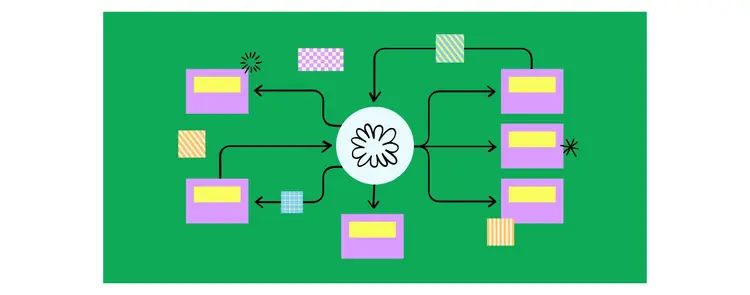
Figma
Uses of Context Diagram
Project managers use context diagrams to get insights and benefits throughout the project lifecycle. The main context diagram uses are:
- Provides a quick, high-level overview of the project's context; no technical knowledge is necessary to understand the diagram.
- Visually illustrating the system's main elements and external interactions helps define the project's boundaries and scope.
- Helps discover potential risks including third-party system dependencies and external procedures.
- This diagram will serve as a foundation for documenting the system's abilities and needs as the project progresses.
- Helps with planning projects by giving a base for allocating resources, evaluating risks, and finding limits.
- It could be useful for many different types of individuals, including stakeholders, business analysts, developers, and so on.
- Assist in gathering requirements and making them clear.
Elements of a context diagram
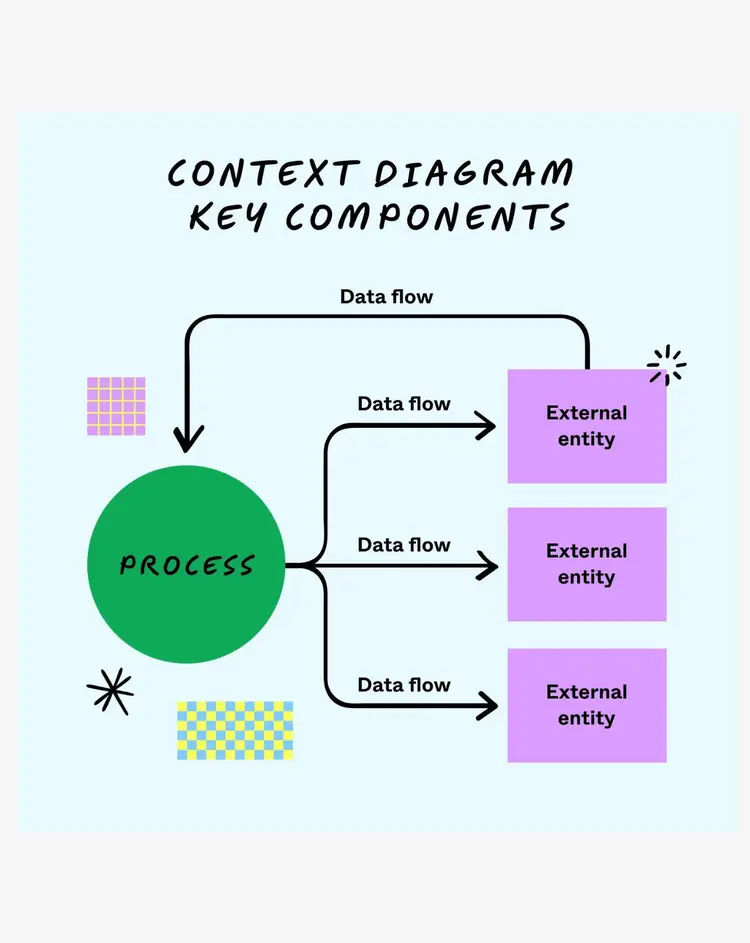
Figma
The following are the three key elements of a context diagram:
- Project or System:
Usually, it is displayed as a square or circle in the center of the image. It aims to illustrate the project's interaction with external factors. In conclusion, the central focus of a context diagram is the "system" or "project" part. It helps to understand how the project interacts with the outside world.
- External Entities:
Named ovals or rectangles surrounding the system or project represent individuals or groups that use it but are not within the system or project limit.
Entities external to the central system can establish a connection with it and, as a result, either modify the way the system operates or be modified by it. These entities could encompass individuals, other systems, groups, or processes that have a link to the system being displayed.
- Interactions or Flow Lines:
Arrows or lines indicate external connections and demonstrate the movement of information or data through the system. Label these interactions to clarify the type of relationship. Text often accompanies arrows to indicate the transmitted data or activity.
Want to deepen your understanding of tools like context diagrams? Explore Project Management Certifications from upGrad’s KnowledgeHut, to build practical skills in planning, stakeholder management, and execution.
Context diagram examples
Below is each type of project context diagram example with explanation:
- Construction Project:
In a building project, a context diagram highlights the project site at the center, surrounded by individuals or groups who are involved in the project, such as architects, engineers, contractors, subcontractors, regulatory bodies, suppliers, and properties nearby. The map illustrates the boundaries of the project and how it connects with outside groups.
- Hotel Room Reservation System:
Context diagrams for hotel room reservation systems depict the system at the center, as well as its external relationships with customers, hotel personnel, and payment gateways. Arrows demonstrate the flow of data between the system and these entities, including booking requests, room availability checks, and payment processing. This diagram provides stakeholders with a visual representation of how the reservation system interacts with its environment, helping them understand its scope and role.
- Railway Ticketing System:
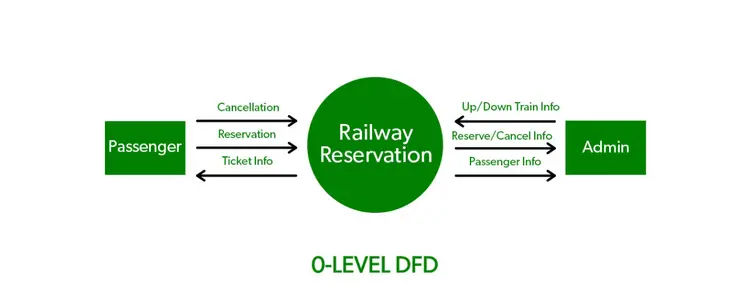
geeksforgeeks
A context diagram for railway ticket booking would focus on the "Railway Ticket Booking System." The diagram would depict external entities such as "passengers," "railway staff," "payment gateway," and "train schedule database." It would showcase how these entities interact with the booking system, including passenger details, payment transactions, and train availability. This helps in comprehending the comprehensive scope of the booking system and its connections with other railway ticketing aspects.
How to make a context diagram?
Here's a step-by-step guide on how to make context diagrams of the following types:
System Context Diagram:
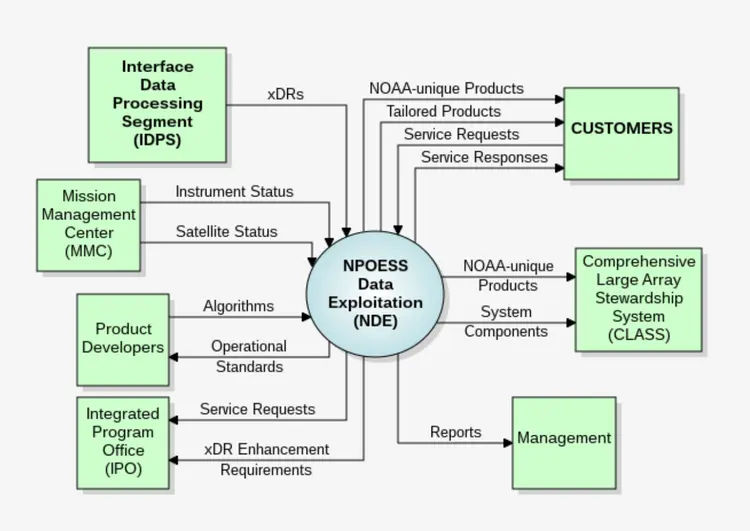
Wikipedia
- Choose a system or software application for the context diagram.
- Find all external entities that interact with the system, like users, other systems, and databases.
- Show the primary system in a square or rectangle in the diagram's center. Put the name of the system on this shape.
- Draw circles or ovals around the main system to indicate external elements. Name every shape with the external entity.
- Connect external entities to the main system with lines or arrows to show data flow.
- Optionally determine each link between the primary system and external entities with a brief description of the data exchanged.
Work Context Diagram
- Choose a work process or method for the context flow diagram.
- Determine all external entities that affect the work process, such as workers, departments, and stakeholders.
- Draw a square or rectangle in the diagram center to depict the work process. Write the process name on this shape.
- Draw circles or ovals around the work process to indicate external entities. Name each form after the external entity.
- Connect external entities to the work process with lines or arrows to show task or information flow.
- If necessary, you can name each work process-external entity link with a brief description of the task or information transmitted.
Business Context Diagram
- Choose a business system or organization for the context diagram.
- Customers, suppliers, and regulatory bodies that interact with the business system should be identified.
- A square or rectangle in the diagram's center represents the business system. Write the system name on this shape.
- Draw circles or ovals around the business system to indicate external entities. Name each form after the external entity.
- Connect external entities to the business system with lines or arrows to show commodities, services, or information flow.
- Additionally, mark each business system-external connection with a brief description of the transaction or interaction.
Benefits of making a context diagram
The following are the benefits of making a context diagram:
- A context diagram description provides a clear and concise graphical representation of a project's boundaries, limitations, and external factors, improving stakeholders' understanding.
- A context diagram depicts how a project interacts with its environment. This helps stakeholders understand and align project goals.
- Enables making informed decisions during project design, development, and implementation to ensure the project requirements are met.
- Getting stakeholders involved by demonstrating the system's function in its environment promotes teamwork and fosters buy-in.
Context Diagram Templates
Template 1: System Context Diagram
PDF Link: Context diagram.pdf
Template 2:
PDF link: edrawsoft
Advantages of Implementing Context Diagrams
Implementing context diagrams gives significant benefits in several domains:
- They help project teams, stakeholders, and users quickly understand a system's key components and interactions. It improves stakeholder collaboration and alignment.
- Context diagrams define the scope of a project or system by identifying its inputs, outputs, and external interfaces. This guarantees that planning and implementation address all essential system aspects.
- Context diagrams are useful documentation for future reference. They collect important system context information for knowledge transfer, maintenance, and upgrades.
- Understanding the system's context helps detect external dependencies or interface risks. Project teams may eliminate risks early and execute smoothly with this proactive strategy.
- Complex system interactions are simplified by context diagrams, which provide a clear visual representation of the overall picture and help ensure everyone understands.
Limitations of Context Diagrams
The following are the limitations of context diagram in project management:
- Context diagrams provide a summary of a project's scope and external interactions. However, they do not capture important details like tasks, resources, and dependencies, which are crucial for project planning and execution.
- Context diagrams help define project boundaries, but may not accurately describe project scope, leading to ambiguity and scope creep.
- Relying solely on a context diagram may restrict the adaptability of a project throughout its lifecycle due to changing requirements, stakeholders, and external factors.
- Complicated relationships may cause confusion or missing elements, oversimplifying system interactions.
Tips for creating an effective context diagram
Getting Project Management training demonstrates to you the scope, stakeholder analysis, and communication methods that are essential to creating context diagrams. The following tips can assist you in creating one:
- The context diagram should identify the system's or project's scope. Determine what's in and out of the system.
- Identify all external entities that communicate with the system. These could be individuals, other systems, organizations, or external processes that transmit and receive data to and from the system.
- Context diagrams should summarize processes and data flows without going into depth. Focus on the most important interactions and entities to simplify the diagram.
- Rectangles represent the system, and ovals represent external elements in context diagrams. Consistent symbols and descriptors enhance comprehension.
- Show how data flows between the system and external entities. Show data flow with arrows or directional symbols to show who sends and gets data.
- Verify the accuracy and completeness of the context diagram with stakeholders. Ensure that it aligns with project requirements and stakeholder expectations and represents the system's context.
Conclusion
My analysis of the context diagram definition, usage, elements, and how to create context diagram shows its importance to project success. Mastering the context diagram is crucial for you if you are an aspiring project manager or PMP credential holder. It aids project management by improving communication, stakeholder engagement, and decision-making. I prefer KnowledgeHut's PMP training course to get proficient in the context diagram.
Project managers may expedite planning, detect hazards, and meet stakeholder expectations by using context diagrams. Also, be familiar with the context diagram software that is being used to create context diagrams. Aspiring project managers can use this knowledge to navigate difficulties, foresee issues, and achieve project goals.
Context diagram proficiency improves PMP certification holders' project management skills and correlates with PMI best practices. Context level diagrams are essential to project management, helping professionals traverse the ever-changing world of project execution. So be familiar with the concept of context diagram and all the best for future projects.
Contact our upGrad KnowledgeHut experts for personalized guidance on choosing the right course, career path, and certification to achieve your goals.
Frequently Asked Questions (FAQs)
What is a context diagram in project management?
A context diagram is a high-level visual representation of a system or project and its interaction with external entities. It defines the system boundary and shows how data flows between the system and outside factors. It is typically used at the initial stages of a project. This helps stakeholders understand the overall scope quickly.
What is the main purpose of a context diagram?
The primary purpose is to provide a simplified overview of a system’s interactions with external entities. It helps define project scope, boundaries, and dependencies. By visualizing connections, it ensures alignment among stakeholders. It also sets the foundation for detailed system design.
What is the difference between a context diagram and a data flow diagram (DFD)?
A context diagram is a high-level overview showing only the system and external interactions. A data flow diagram (DFD) goes deeper into internal processes and data movement. Context diagrams are simpler and used early in projects. DFDs are more detailed and used in later stages.
What are the key elements of a context diagram?
A context diagram consists of three main elements: the central system, external entities, and data flows. The system is placed at the center, while external entities surround it. Arrows indicate interactions or data exchange. Together, they provide a complete high-level view of the system.
Who uses context diagrams and why?
Project managers, business analysts, developers, and stakeholders commonly use context diagrams. They help everyone understand how a system interacts with external entities. This improves communication and collaboration. It also ensures all parties are aligned on project scope and objectives.
How do you create an effective context diagram?
Start by identifying the system and placing it at the center. Then list all external entities interacting with it. Draw arrows to represent data flow between them. Keep the diagram simple, consistent, and easy to understand.
What are some best practices for creating context diagrams?
Focus on clarity and simplicity by including only key elements and interactions. Use consistent symbols for systems and external entities. Clearly label all data flows. Validate the diagram with stakeholders to ensure accuracy and completeness.
How does a context diagram help in defining project scope?
A context diagram visually separates what is inside the system from what is outside. This helps clearly define the project’s boundaries. By identifying external interactions, it prevents scope creep. It ensures that all stakeholders agree on what the project includes.
What are some common examples of context diagrams?
Examples include a hotel reservation system, railway ticketing system, and construction project diagrams. Each shows the system at the center and external entities like users or suppliers. Data flow is represented with arrows. These examples help visualize real-world applications.
What are the limitations of context diagrams?
Context diagrams provide only a high-level overview and lack detailed information. They do not show internal processes, tasks, or workflows. This can sometimes lead to oversimplification. For detailed analysis, additional diagrams are required.
454 articles published
Kevin D. Davis is a seasoned and results-driven Program/Project Management Professional with a Master's Certificate in Advanced Project Management. With expertise in leading multi-million dollar proje...
Get Free Consultation
By submitting, I accept the T&C and
Privacy Policy