
- Blog Categories
- Project Management
- Agile Management
- IT Service Management
- Cloud Computing
- Business Management
- BI And Visualisation
- Quality Management
- Cyber Security
- DevOps
- Most Popular Blogs
- PMP Exam Schedule for 2025: Check PMP Exam Date
- Top 60+ PMP Exam Questions and Answers for 2025
- PMP Cheat Sheet and PMP Formulas To Use in 2025
- What is PMP Process? A Complete List of 49 Processes of PMP
- Top 15+ Project Management Case Studies with Examples 2025
- Top Picks by Authors
- Top 170 Project Management Research Topics
- What is Effective Communication: Definition
- How to Create a Project Plan in Excel in 2025?
- PMP Certification Exam Eligibility in 2025 [A Complete Checklist]
- PMP Certification Fees - All Aspects of PMP Certification Fee
- Most Popular Blogs
- CSM vs PSM: Which Certification to Choose in 2025?
- How Much Does Scrum Master Certification Cost in 2025?
- CSPO vs PSPO Certification: What to Choose in 2025?
- 8 Best Scrum Master Certifications to Pursue in 2025
- Safe Agilist Exam: A Complete Study Guide 2025
- Top Picks by Authors
- SAFe vs Agile: Difference Between Scaled Agile and Agile
- Top 21 Scrum Best Practices for Efficient Agile Workflow
- 30 User Story Examples and Templates to Use in 2025
- State of Agile: Things You Need to Know
- Top 24 Career Benefits of a Certifed Scrum Master
- Most Popular Blogs
- ITIL Certification Cost in 2025 [Exam Fee & Other Expenses]
- Top 17 Required Skills for System Administrator in 2025
- How Effective Is Itil Certification for a Job Switch?
- IT Service Management (ITSM) Role and Responsibilities
- Top 25 Service Based Companies in India in 2025
- Top Picks by Authors
- What is Escalation Matrix & How Does It Work? [Types, Process]
- ITIL Service Operation: Phases, Functions, Best Practices
- 10 Best Facility Management Software in 2025
- What is Service Request Management in ITIL? Example, Steps, Tips
- An Introduction To ITIL® Exam
- Most Popular Blogs
- A Complete AWS Cheat Sheet: Important Topics Covered
- Top AWS Solution Architect Projects in 2025
- 15 Best Azure Certifications 2025: Which one to Choose?
- Top 22 Cloud Computing Project Ideas in 2025 [Source Code]
- How to Become an Azure Data Engineer? 2025 Roadmap
- Top Picks by Authors
- Top 40 IoT Project Ideas and Topics in 2025 [Source Code]
- The Future of AWS: Top Trends & Predictions in 2025
- AWS Solutions Architect vs AWS Developer [Key Differences]
- Top 20 Azure Data Engineering Projects in 2025 [Source Code]
- 25 Best Cloud Computing Tools in 2025
- Most Popular Blogs
- Company Analysis Report: Examples, Templates, Components
- 400 Trending Business Management Research Topics
- Business Analysis Body of Knowledge (BABOK): Guide
- ECBA Certification: Is it Worth it?
- Top Picks by Authors
- Top 20 Business Analytics Project in 2025 [With Source Code]
- ECBA Certification Cost Across Countries
- Top 9 Free Business Requirements Document (BRD) Templates
- Business Analyst Job Description in 2025 [Key Responsibility]
- Business Analysis Framework: Elements, Process, Techniques
- Most Popular Blogs
- Best Career options after BA [2025]
- Top Career Options after BCom to Know in 2025
- Top 10 Power Bi Books of 2025 [Beginners to Experienced]
- Power BI Skills in Demand: How to Stand Out in the Job Market
- Top 15 Power BI Project Ideas
- Top Picks by Authors
- 10 Limitations of Power BI: You Must Know in 2025
- Top 45 Career Options After BBA in 2025 [With Salary]
- Top Power BI Dashboard Templates of 2025
- What is Power BI Used For - Practical Applications Of Power BI
- SSRS Vs Power BI - What are the Key Differences?
- Most Popular Blogs
- Data Collection Plan For Six Sigma: How to Create One?
- Quality Engineer Resume for 2025 [Examples + Tips]
- 20 Best Quality Management Certifications That Pay Well in 2025
- Six Sigma in Operations Management [A Brief Introduction]
- Top Picks by Authors
- Six Sigma Green Belt vs PMP: What's the Difference
- Quality Management: Definition, Importance, Components
- Adding Green Belt Certifications to Your Resume
- Six Sigma Green Belt in Healthcare: Concepts, Benefits and Examples
- Most Popular Blogs
- Latest CISSP Exam Dumps of 2025 [Free CISSP Dumps]
- CISSP vs Security+ Certifications: Which is Best in 2025?
- Best CISSP Study Guides for 2025 + CISSP Study Plan
- How to Become an Ethical Hacker in 2025?
- Top Picks by Authors
- CISSP vs Master's Degree: Which One to Choose in 2025?
- CISSP Endorsement Process: Requirements & Example
- OSCP vs CISSP | Top Cybersecurity Certifications
- How to Pass the CISSP Exam on Your 1st Attempt in 2025?
- Most Popular Blogs
- Top 7 Kubernetes Certifications in 2025
- Kubernetes Pods: Types, Examples, Best Practices
- DevOps Methodologies: Practices & Principles
- Docker Image Commands
- Top Picks by Authors
- Best DevOps Certifications in 2025
- 20 Best Automation Tools for DevOps
- Top 20 DevOps Projects of 2025
- OS for Docker: Features, Factors and Tips
- More
- Agile & PMP Practice Tests
- Agile Testing
- Agile Scrum Practice Exam
- CAPM Practice Test
- PRINCE2 Foundation Exam
- PMP Practice Exam
- Cloud Related Practice Test
- Azure Infrastructure Solutions
- AWS Solutions Architect
- IT Related Pratice Test
- ITIL Practice Test
- Devops Practice Test
- TOGAF® Practice Test
- Other Practice Test
- Oracle Primavera P6 V8
- MS Project Practice Test
- Project Management & Agile
- Project Management Interview Questions
- Release Train Engineer Interview Questions
- Agile Coach Interview Questions
- Scrum Interview Questions
- IT Project Manager Interview Questions
- Cloud & Data
- Azure Databricks Interview Questions
- AWS architect Interview Questions
- Cloud Computing Interview Questions
- AWS Interview Questions
- Kubernetes Interview Questions
- Web Development
- CSS3 Free Course with Certificates
- Basics of Spring Core and MVC
- Javascript Free Course with Certificate
- React Free Course with Certificate
- Node JS Free Certification Course
- Data Science
- Python Machine Learning Course
- Python for Data Science Free Course
- NLP Free Course with Certificate
- Data Analysis Using SQL
- Home
- Blog
- Business Intelligence And Visualization
- What Are AI Visuals in Power BI and How Do They Work?
What Are AI Visuals in Power BI and How Do They Work?
Updated on Aug 12, 2026 | 0.6k+ views
Share:
Table of Contents
View all
- What are AI visuals in Power BI?
- How do AI visuals in Power BI work?
- What AI visuals are available in Power BI?
- What can AI visuals help you analyze in Power BI?
- How are AI visuals different from regular Power BI visuals?
- What data do you need to use AI visuals in Power BI?
- What are the limitations of AI visuals in Power BI?
- When should you use AI visuals in Power BI?
- Conclusion
Quick Overview
- AI visuals in Power BI use AI and automated analysis to help identify patterns, influencing factors, anomalies, and trends in data.
- Power BI AI visuals include Key influencers, Decomposition tree, Anomaly detection, Smart narrative, and Q&A for different analysis needs.
- These visuals work best with clean data, reliable semantic models, relevant fields, and suitable filters.
- AI visuals can make analysis faster than regular charts, but their results still require business context and human judgment.
- This guide covers how AI visuals in Power BI work, available visual types, use cases, differences from regular visuals, data requirements, and limitations.
Ready to turn Power BI data into meaningful business insights? Learn Power BI from the fundamentals to advanced reporting techniques with upGrad KnowledgeHut Microsoft Power BI Training.
Last Few Days to Save Up To 90% on Career Transformation
Ends December 1 – Don't Miss Out!
What are AI visuals in Power BI?
AI visuals in Power BI are built-in Power BI visualizations that use artificial intelligence or automated analytical techniques to help users understand their data. They can identify important factors, break down metrics, find unusual values, and create summaries from report data.
Regular charts such as bar charts, line charts, and pie charts mainly help users see data. Power BI AI visuals go a step further by helping users investigate the data.
For example, a sales report may show that revenue has fallen. A regular line chart can show the decline, while an AI-powered visual can help identify the products, regions, or other factors linked to that change.
Also Read: How Long Does It Take to Learn Power BI with AI Features?
How do AI visuals in Power BI work?
AI visuals in Power BI work by combining data modeling with built-in machine learning logic. The process may look simple on the surface, but there are a few important steps happening behind the scenes.
The role of the Power BI semantic model
Every report in Power BI is built on top of a semantic model. This model organizes tables, relationships, and measures so the data makes sense. AI visuals in Power BI rely heavily on this model because the accuracy of any insight depends on how well the underlying data is structured.
A clean and well-connected semantic model helps Power BI AI visuals produce more reliable results.
AI-powered analysis of data
Once the semantic model is ready, the AI visual studies the data using statistical and machine learning techniques. It scans for correlations, outliers, and trends.
This is the core stage where AI visuals in Power BI actually apply intelligence rather than just plotting numbers on a chart.
Presentation of AI-generated insights
After the analysis, the result appears as an interactive visual, chart, or text-based explanation. Users can then apply filters, select data points, drill into categories, and compare results.
This makes AI visuals in Power BI useful for exploring a report instead of simply viewing a fixed chart. The goal of Power BI AI visuals at this stage is to communicate the insight clearly, so the person reading the report does not need extra explanation.
Also Read: 35 Effective Power BI Best Practices in 2026
What AI visuals are available in Power BI?
Power BI offers several AI visuals in Power BI, each designed for a different kind of analysis. Knowing what each one does helps in choosing the right visual for the right situation.
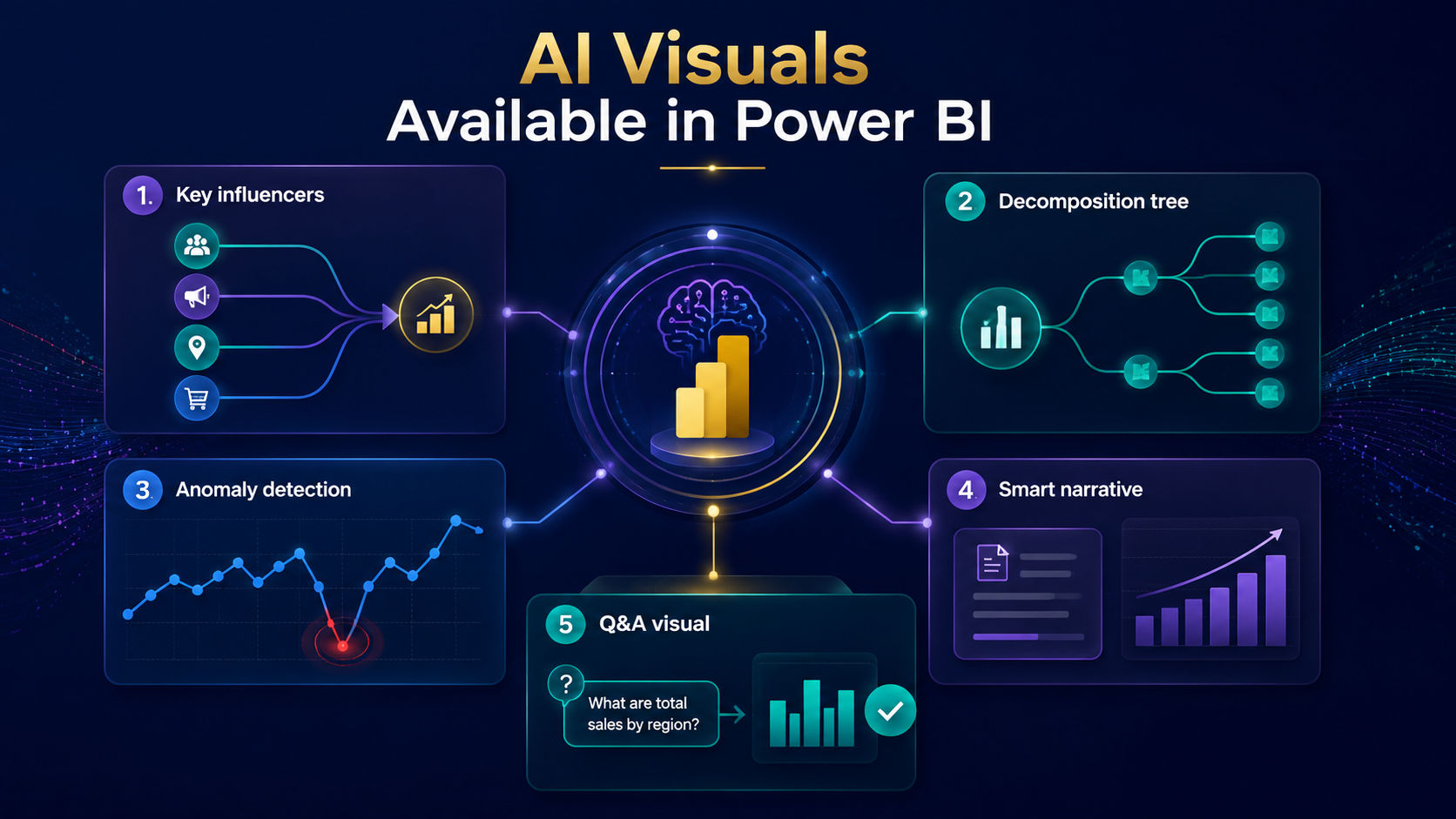
1. Key influencers
The Key Influencers visual helps identify the factors that have the biggest impact on a business outcome.
For example, it can show what influences employee attrition or product returns. It is one of the most popular AI visuals in Power BI because it removes the guesswork from finding cause and effect relationships.
2. Decomposition tree
The Decomposition Tree breaks down a metric into multiple contributing factors. Users can drill into different dimensions and allow Power BI to suggest the next most important contributor automatically.
This visual is especially helpful for root cause analysis and is a common choice among Power BI AI visuals used in business reporting.
3. Anomaly detection
Anomaly detection helps identify unusual values in line-chart data. It can highlight unexpected spikes or dips that may need further investigation.
For example, if monthly sales usually remain within a certain range but suddenly fall sharply, anomaly detection can draw attention to that point.
This makes anomaly detection useful for monitoring sales, website traffic, revenue, customer activity, and other time-based measures.
4. Smart narrative
Smart narrative adds written explanations to Power BI reports. It can highlight trends, changes, and important findings in a report.
Instead of asking every reader to interpret several charts manually, a Smart narrative can provide a quick text-based summary.
For Power BI AI visuals, this is especially useful when reports need to communicate findings to managers or other business users who want a quick overview.
5. Q&A visual
The Q&A visual lets users type a question in normal language and get an instant chart or number as the answer.
It works using natural language processing, making it one of the most interactive Power BI AI visuals available today.
Also Read: Best Learning Roadmap for Power BI and AI Analytics
What can AI visuals help you analyze in Power BI?
AI visuals in Power BI are useful across many types of analysis. Here are some common areas where they add real value.
1. Identifying factors that influence an outcome
The key influencers visual is ideal for understanding what drives a result, such as customer churn or sales performance. It ranks the most important factors so teams can focus on what truly matters.
2. Breaking down metrics and contributing factors
The decomposition tree helps explore how a total number is made up of smaller parts. This is helpful when trying to understand which region, product, or department is contributing the most to a metric.
3. Detecting unusual changes and patterns
Anomaly detection is best suited for monitoring metrics over time, such as website traffic or revenue. It highlights sudden changes that might need further investigation.
4. Summarizing trends and important insights
Smart narrative is great for quick reporting, especially when sharing updates with people who do not want to read through detailed charts. It condenses the story of the data into a few readable sentences.
Also Read: Is Power BI with AI a Good Career Skill in 2026?
How are AI visuals different from regular Power BI visuals?
Regular Power BI visuals and AI visuals serve different purposes in data analysis. The key differences become clearer when compared across their purpose, analytical capabilities, insights, and use cases.
Feature |
Regular Power BI visuals |
Power BI AI visuals |
| Main purpose | Display and summarize data | Analyze data and identify insights and patterns |
| Data analysis | Show data based on selected fields | Identify patterns, trends, relationships, drivers, and anomalies |
| Insights | Mainly show what happened | Help explain what may be influencing an outcome or where unusual changes occurred |
| Best for | Reporting, monitoring, and dashboard presentation | Exploratory and diagnostic analysis |
| User control | Users choose the data and fields to display | Users provide the data context while AI-assisted analysis identifies relevant insights |
| Output | Charts, numbers, and tables | Detected patterns, influencing factors, anomalies, and written summaries |
| Examples | Bar chart, line chart, pie chart, table, card | Key influencers, Decomposition tree, Anomaly detection, Smart narrative |
| Ease of use | Simple to create and customize | Easy to use but requires careful interpretation of results |
Ready to strengthen your business intelligence skills? Explore upGrad KnowledgeHut Business Intelligence and Visualization Courses and build practical expertise in data analysis, visualization, and reporting.
What data do you need to use AI visuals in Power BI?
The quality of insights from AI visuals in Power BI depends heavily on the quality of the data feeding into them. A few requirements help these visuals work at their best.
Clean and structured data
Data should have consistent values, correct data types, and clear field names. Duplicate, incomplete, or incorrectly formatted data can make analysis harder.
Reliable semantic models and measures
A well built semantic model with clearly defined measures ensures that calculations behind AI visuals in Power BI are correct. Without this, insights may be misleading.
Relevant fields and filters
Choosing the right fields and applying suitable filters allows AI visuals in Power BI to focus on meaningful data rather than noise. This improves both accuracy and speed of the analysis.
Also Read: Can Beginners Learn AI-Powered Data Analytics with Power BI?
What are the limitations of AI visuals in Power BI?
AI visuals in Power BI can be useful, but they also have some limitations:
1. Dependence on data quality
AI visuals work best when the data is clean and accurate. Poor data can lead to incorrect results, such as:
- Missing or duplicate values.
- Incorrect data.
- Different names for the same category.
- Outdated or incomplete records.
- Unhandled unusual values.
2. Dependence on the semantic model
Power BI uses the semantic model to understand the data. Poor table relationships, unclear column names, or incorrect measures can lead to wrong results.
3. Correlation is not causation
AI visuals can show that two factors are related, but they cannot always prove that one causes the other.
For example, higher sales from one channel do not necessarily mean that the channel caused the increase. Other factors may be involved.
4. Limited business context
AI visuals mainly use the information available in the data. They may not understand:
- Company-specific rules.
- Industry requirements.
- Events not included in the data.
- Reasons behind business changes.
5. Limitations of different visuals
Each AI visual has its own limitations:
- Anomaly Detection: Mainly works with time-based data.
- Key Influencers: May give weak results with small or limited data.
- Decomposition Tree: Can become difficult to understand with many categories.
- Q&A: May misunderstand unclear questions.
- Smart Narrative: Can summarize trends but may not explain why they happened.
6. Small datasets
AI visuals need enough data to find useful patterns. Small datasets or categories with very few records may produce unreliable results.
7. Privacy and security
AI features should be used carefully when working with sensitive or confidential data. Access permissions and security settings should be properly configured.
Also Read: 10 Limitations of Power BI You Must Know in 2026
When should you use AI visuals in Power BI?
Choosing the right AI visual depends on the type of question being asked. Here is a quick guide to help decide.
Key influencers for identifying drivers
Use this visual when trying to understand what is causing a specific outcome, such as low customer satisfaction or high employee turnover.
Examples include:
- Customer churn analysis
- Sales performance analysis
- Employee satisfaction analysis
Decomposition tree for exploring contributing factors
Use this visual when a metric needs to be broken down into smaller categories to find where the biggest contribution is coming from.
It is particularly useful for:
- Revenue analysis
- Profitability analysis
- Operational performance reviews
Anomaly detection for finding unusual changes
Use this visual for tracking metrics over time and getting alerted automatically when something unusual happens.
Common use cases include:
- Sales forecasting reviews
- Fraud detection
- Website traffic monitoring
- Supply chain performance analysis
Smart narrative for summarizing trends
Use this visual when a quick, easy to read summary of the data is needed, especially for reports shared with non-technical audiences.
It works well for:
- Executive dashboards
- Monthly business reviews
- KPI reporting
- Performance summaries
Conclusion
AI visuals in Power BI make data analysis easier by helping users identify patterns, influencing factors, anomalies, and key trends. They work best with clean data and a well-structured semantic model.
While these visuals can speed up analysis, their results still need business context and human judgment. Choosing the right visual helps turn complex Power BI data into clearer and more useful insights.
Have A Query? Get in Touch With Our Customer Support | upGrad KnowledgeHut
Frequently Asked Questions
When should I use AI visuals instead of regular charts?
Use AI visuals when the goal is to investigate data, identify patterns, find influencing factors, or detect unusual changes. Regular charts are better for straightforward reporting, comparisons, and KPI monitoring. For deeper analysis, AI visuals can help reduce the amount of manual exploration required.
How much data is needed for accurate AI insights?
There is no single minimum data size that guarantees accurate AI insights in Power BI. The required amount depends on the visual, the number of categories, and the quality and consistency of the data. More importantly, the data should be relevant, sufficiently detailed, and well-structured for the analysis.
Can AI visuals predict future outcomes?
Most built-in AI visuals are designed to analyze existing data rather than predict future outcomes. For example, Key influencers identifies factors associated with an outcome, while Anomaly detection finds unusual patterns in historical data. Power BI provides separate forecasting capabilities for analyzing potential future trends.
Which AI visual is best for root-cause analysis?
The Decomposition tree is generally the best choice for exploring potential reasons behind a change in a metric. It lets users break down a measure across different dimensions and explore contributing factors step by step. Key influencers can also help identify factors associated with a specific outcome.
How accurate are Power BI AI-generated insights?
The accuracy of Power BI AI-generated insights depends heavily on the quality, completeness, and structure of the underlying data. AI visuals can highlight useful patterns and relationships, but their results should be reviewed in the context of the business problem. An identified relationship should not automatically be treated as proof of causation.
Do AI visuals require machine learning expertise?
No, built-in AI visuals do not require users to have machine learning expertise or build their own models. Power BI provides the underlying analytical capabilities through its built-in features. Users mainly need a suitable semantic model, relevant data fields, and an understanding of how to interpret the results.
How does Q&A work in Power BI?
The Q&A visual lets users ask questions about report data using natural language instead of manually selecting fields and building a visual. Power BI interprets the question and generates a suitable visual based on the available data and semantic model. Microsoft has announced that the Q&A experience is scheduled to be deprecated in December 2026.
How does Power BI detect anomalies?
Power BI anomaly detection examines values in a line chart and identifies points that differ significantly from the expected pattern. It uses statistical analysis to highlight unusual spikes or dips in the time series. Users can then investigate those points to understand the possible reasons behind the change.
Why do AI visuals give different insights after filtering?
AI visuals analyze the data available within the current report context, so applying filters can change the dataset being examined. When the underlying values or categories change, the relationships and patterns identified by the visual can also change. This is why filtering can produce different AI-assisted insights.
Can AI visuals work with DirectQuery datasets?
Some Power BI AI visuals can work with DirectQuery, but support depends on the specific visual. For example, Q&A supports certain DirectQuery sources, while Key influencers does not support DirectQuery. Anomaly detection also has specific DirectQuery limitations, so users should check the requirements of the selected visual before using it with a DirectQuery model.
1639 articles published
KnowledgeHut is an outcome-focused global ed-tech company. We help organizations and professionals unlock excellence through skills development. We offer training solutions under the people and proces...
Get Free Consultation
By submitting, I accept the T&C and
Privacy Policy