
- Home
- Blog
- Data Science
- Prompt Engineering Tools: Top Platforms to Create, Test, and Optimize AI Prompts
Prompt Engineering Tools: Top Platforms to Create, Test, and Optimize AI Prompts
Updated on Aug 09, 2026 | 1k+ views
Share:
Table of Contents
View all
Quick Overview
- Prompt engineering tools help users create, test, manage, evaluate, and optimize prompts for Large Language Models (LLMs).
- Popular tools include OpenAI Playground, LangSmith, PromptLayer, Humanloop, Promptfoo, Langfuse, and Weights & Biases Weave.
- These platforms offer features such as prompt versioning, experimentation, evaluation, collaboration, and performance monitoring.
- Choosing the right tool depends on your AI model, workflow, team size, and deployment needs.
- In this guide, you'll learn about the best prompt engineering tools, their features, and how to choose the right one.
Ready to deepen your understanding of prompt engineering? Check out upGrad KnowledgeHut Generative AI and Prompt Engineering Course for hands-on learning, practical examples, and industry-relevant skills.
What are the best prompt engineering tools?
The best prompt engineering tools help users create, test, improve, and manage prompts more effectively. Some tools are designed for simple experimentation, while others focus on tracking, teamwork, testing, and managing larger projects.
The right tool depends on your experience, workflow, and the type of projects you are working on.
Here is a quick comparison of the top prompt engineering tools:
Tool |
Best For |
Key Features |
Free Plan |
| OpenAI Playground | Beginners & prompt testing | Prompt testing, settings control, model comparison | Yes |
| LangSmith | Developers | Debugging, tracking, evaluation | Limited |
| PromptLayer | Prompt management | Logging, version history, analytics | Yes |
| Humanloop | Teams | Testing, feedback, prompt improvement | Limited |
| Promptfoo | Prompt testing | Automated testing, comparisons | Yes (Open Source) |
| Langfuse | Monitoring & analysis | Tracking, analytics, performance insights | Yes |
| Weights & Biases Weave | Experiment tracking | Testing, collaboration, result comparison | Yes |
| Microsoft Prompt Flow | Enterprise projects | Workflow management, Azure integration | Limited |
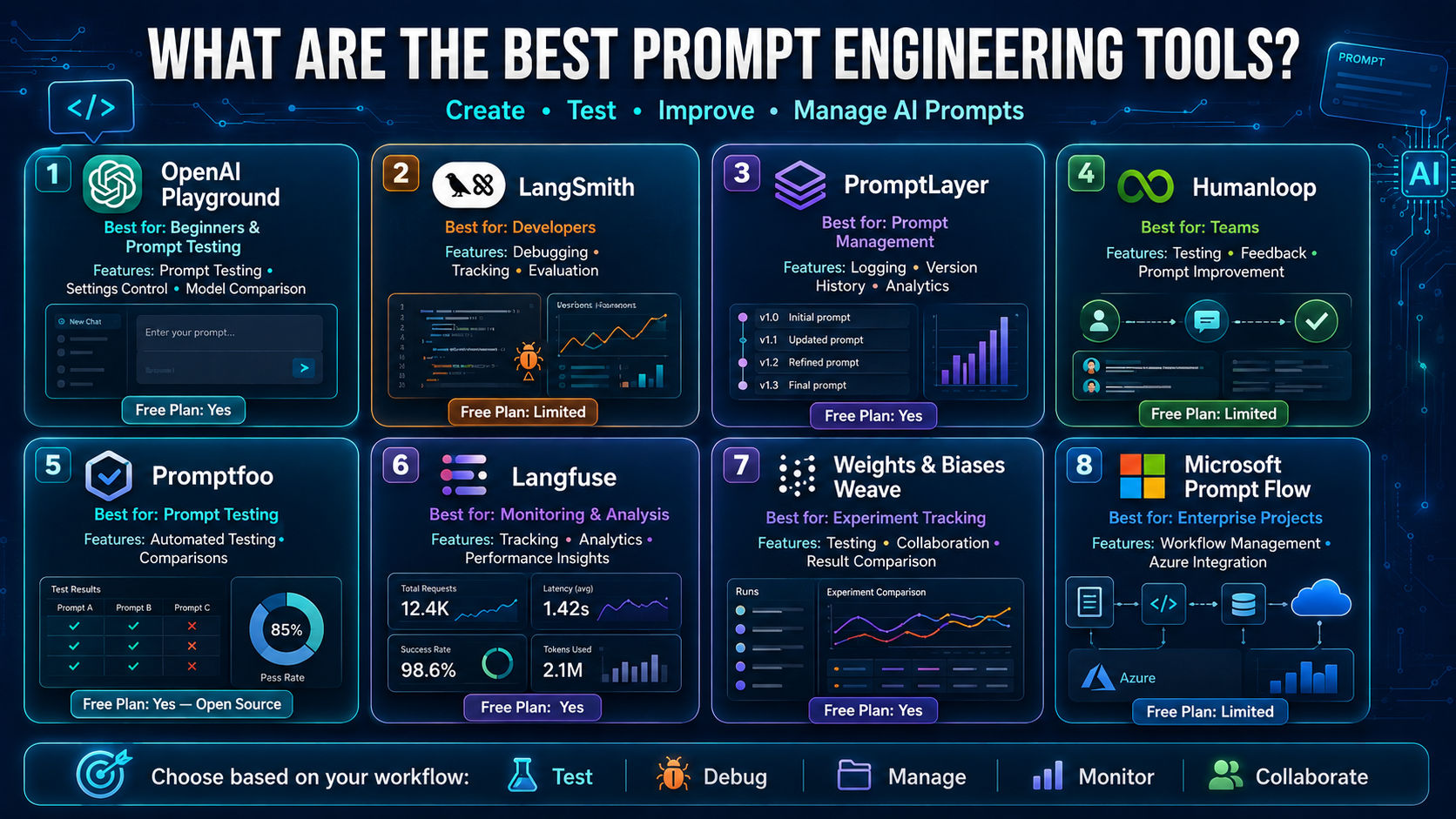
Let’s look at each tool in more detail.
OpenAI Playground
OpenAI Playground is a simple online tool where users can create, test, and improve prompts before using them in real projects. Its clean interface makes it easy for beginners to explore, while its customization options also make it useful for more experienced users.
Users can try different instructions, change settings, and compare results to understand which approach works better.
Key features include:
Prompt testing
Users can write a prompt and instantly see the output. This makes it easier to experiment with different instructions, formats, and writing styles.
Settings control
The tool allows users to adjust options that influence the response style, length, and level of creativity.
Comparing models
Users can test different models and choose the one that best fits their specific requirements.
Code support
Developers can generate code examples from tested prompts, making it easier to connect them with their own applications.
Best for: Beginners, content creators, writers, and developers exploring prompt ideas.
Also Read: How to Write Effective Prompts for AI Models
LangSmith
LangSmith is one of the most powerful prompt engineering tools for developers building AI applications. It helps teams understand how prompts perform, identify issues, and improve results through testing and evaluation.
Instead of guessing why a prompt failed, users can trace interactions and analyze outputs in detail. This makes prompt optimization much more efficient, especially for production environments.
Key Features
Finding Issues
Track prompt behavior step by step to understand why specific outputs were generated and where problems occur.
Tracking Progress
Monitor prompt changes over time and evaluate how updates affect performance.
Comparing Results
Compare multiple prompt versions side by side to identify the highest-performing option.
Managing Experiments
Organize prompt evaluations, fan out testing, and performance reviews in a structured workflow.
Best for: Developers, AI engineers, and teams building production-ready applications.
PromptLayer
PromptLayer is designed to help teams manage prompts more effectively. As AI projects grow, keeping track of prompt versions and changes becomes difficult. PromptLayer solves this challenge by providing visibility and organization.
It acts as a central place for storing, reviewing, and managing prompts across multiple projects.
Key Features
Prompt History
Store past prompts and outputs so teams can review what worked and learn from previous experiments.
Version Tracking
Manage prompt updates with version control, making it easy to compare versions or roll back changes when needed.
Performance Insights
Review prompt performance data and identify which prompts generate the best results.
Best for: Teams managing large prompt libraries and collaborative AI projects.
Also Read: Advanced Prompt Engineering Techniques for Better Results
Humanloop
Humanloop combines prompt management, testing, and human feedback in one platform. It helps teams create more reliable AI experiences by continuously evaluating and improving prompt performance.
The platform is particularly valuable for organizations where response quality and consistency are top priorities.
Key Features
Testing Prompts
Run evaluations across multiple prompt versions to determine which performs best.
Collecting Feedback
Gather feedback from reviewers and stakeholders to improve prompt quality.
Continuous Improvement
Use testing results and human evaluations to refine prompts over time.
Best for: AI teams, enterprises, and organizations that prioritize quality control.
Promptfoo
Promptfoo focuses on prompt testing and evaluation. It helps developers compare prompts quickly without spending hours reviewing every output manually.
For teams running lots of experiments, Promptfoo can significantly speed up the testing process.
Key Features
Prompt Testing
Evaluate different prompts against the same tasks and compare outputs side by side.
Automated Checks
Apply predefined evaluation rules to assess output quality automatically.
Performance Comparison
Track prompt changes and identify improvements through structured testing.
Best for: Developers looking for faster testing, evaluation, and benchmarking workflows.
Langfuse
Langfuse is an open-source platform that helps teams monitor and improve AI applications. It focuses on observability, making it easier to understand what's happening after deployment.
By tracking prompts, responses, user queries, and costs, Langfuse provides valuable insights for optimization.
Key Features
Monitoring
Track response times, requests, errors, and application performance in real time.
Managing Prompts
Store prompts, organize updates, and maintain version history from a centralized location.
Reports and Insights
Analyze usage patterns, costs, and performance metrics to make informed decisions.
Best for: Developers and teams that need visibility into production AI systems.
Weights & Biases Weave
Weights & Biases Weave helps teams manage experiments and evaluate AI applications more effectively. It creates a structured process for comparing results and tracking progress.
For teams running multiple prompt experiments, Weave makes it easy to stay organized and identify winning approaches.
Key Features
Experiment Tracking
Record prompt tests and evaluation results in a centralized location.
Comparing Results
Analyze different prompt versions and determine which delivers the strongest performance.
Team Collaboration
Share findings, review experiments, and collaborate across teams.
Best for: Researchers, machine learning engineers, and AI teams running large-scale experiments.
Microsoft Prompt Flow
Microsoft Prompt Flow is built for organizations that need more than simple prompt testing. It helps teams design, test, automate, and manage AI workflows from end to end.
Because it integrates closely with Azure services, it is a strong choice for businesses already operating within the Microsoft ecosystem.
Key Features
Managing Workflows
Connect prompts, models, and business processes into structured AI workflows.
Connecting Tools
Integrate different services and components to create complete AI applications.
Microsoft Integration
Work seamlessly with Azure AI services and enterprise-grade Microsoft infrastructure.
Best for: Enterprises and organizations building scalable AI applications on Azure.
Also Read: Prompt Engineering Best Practices for High-Quality Outputs
What Features Should You Look for in a Prompt Engineering Tool?
The right prompt engineering tool should do more than help you write prompts. It should make testing, organizing, improving, and managing prompts easier.
Before choosing a tool, consider the features that match your goals and workflow.
1. Prompt Version Control
Prompts often change as you test new ideas and improve results. Version control helps you save previous versions, compare changes, and restore older prompts when needed.
This feature is especially useful for teams working on long-term projects where many updates happen over time.
2. Prompt Testing and Evaluation
A good prompt tool should allow you to test different prompts and compare results. Features like A/B testing, scoring, and automated reviews help identify which prompts work better.
This makes it easier to choose the most effective approach instead of relying on guesswork.
3. Experiment Tracking
Improving prompts usually requires trying different versions and approaches. Experiment tracking keeps a record of these tests, making it easier to compare results and understand what changes made a difference.
It helps teams make better decisions based on actual performance.
4. Prompt Collaboration
When multiple people work on the same project, collaboration features become important. Shared libraries, comments, approvals, and user permissions help teams stay organized and work together smoothly.
5. Model Integration
Choose a tool that supports the models you regularly use, such as GPT, Claude, Gemini, Llama, or other options.
Support for multiple models gives you more flexibility and makes it easier to adapt as your projects grow.
6. Analytics and Monitoring
Analytics help you understand how prompts perform after they are being used. Useful features include tracking response quality, usage, speed, costs, and user feedback.
These insights help teams find areas for improvement and maintain better performance.
7. Security and Access Control
For businesses working with sensitive information, security features are important. Look for options like user permissions, activity records, encryption, and compliance support.
These features help protect prompt data and ensure that only the right people can access important information.
Want to build stronger AI and prompt engineering skills? Explore upGrad KnowledgeHut Data Science Courses to gain hands-on experience in AI, machine learning, and real-world applications.
Types of Prompt Engineering Tools
Different prompt engineering tools are built for different stages of AI development. Understanding these categories can help you choose a platform that matches your workflow.
Prompt Design Tools
Prompt design tools help users create, refine, and optimize prompts before they are used in real applications. These tools usually provide a testing environment where you can experiment with instructions, model settings, and prompt structures to see what works best.
They are especially useful for beginners who want to learn prompt engineering and for teams that frequently iterate on prompts.
Example: OpenAI Playground
Prompt Testing Platforms
Once a prompt is created, it needs to be tested. Prompt testing platforms help teams evaluate prompts across multiple models and scenarios to ensure consistent performance.
Many of these platforms support automated testing, benchmark comparisons, A/B testing, and fan out evaluations, allowing developers to compare outputs from different models with the same user queries. This helps identify the most effective prompts before deployment.
Example: Promptfoo
Prompt Evaluation Tools
Prompt evaluation tools focus on measuring prompt quality and performance. Instead of simply generating responses, they help determine whether outputs meet predefined standards.
These platforms often combine automated metrics with human feedback to assess accuracy, relevance, consistency, and reliability. They are particularly valuable for AI teams building production applications where output quality directly impacts user experience.
Examples: LangSmith and Humanloop
Prompt Management Platforms
As organizations scale their AI initiatives, managing hundreds of prompts can quickly become challenging. Prompt management platforms solve this problem by providing version control, collaboration tools, reusable templates, and centralized prompt libraries.
These features make it easier to track prompt changes, organize prompt assets, and collaborate across teams.
Example: PromptLayer
LLM Observability Tools
Creating a prompt is only the beginning. Once AI applications are live, teams need visibility into how prompts perform in the real world.
LLM observability tools monitor prompts, responses, latency, costs, errors, and user query patterns. This data helps teams troubleshoot issues, improve performance, and control AI spending.
Example: Langfuse
AI Workflow Automation Tools
AI workflow automation tools go beyond prompt management by connecting prompts, models, business rules, and external systems into complete workflows.
These platforms make it possible to build, test, and deploy complex AI applications without manually managing every step. They are especially useful for enterprises that need scalable and repeatable AI processes.
Example: Microsoft Prompt Flow
Also Read: Common Prompt Engineering Mistakes and How to Avoid Them
How to Choose the Right Prompt Engineering Tool
With many prompt engineering tools available, choosing the right one can be difficult. Instead of selecting a tool with the most features, focus on finding one that matches your goals, workflow, and future requirements.
Check Model Support
Start by checking whether the tool supports the models you plan to use. Some tools work mainly with GPT models, while others support options like Claude, Gemini, Llama, Mistral, and other models.
Choosing a tool with the right compatibility helps avoid limitations as your projects grow.
Understand Your Use Case
Think about what you actually need the tool for.
- If you are learning prompt engineering, simple tools like OpenAI Playground are a good place to start.
- If you are developing and managing larger projects, tools like LangSmith or Langfuse provide better testing and tracking features.
- If you are building business-level workflows, platforms like Microsoft Prompt Flow offer advanced management options.
Choosing based on your needs helps you avoid paying for features you may not use.
Check Collaboration Features
If you are working with a team, collaboration features can make a big difference. Look for options like shared prompt libraries, version history, comments, approvals, and user permissions.
These features help teams stay organized, avoid repeated work, and manage updates more easily.
Compare Pricing Options
Many prompt engineering tools offer free plans, but advanced features usually come with paid options.
Before choosing a tool, compare:
- Free plan limits
- Subscription costs
- Usage-based pricing
- Team features
- Enterprise plans
A tool that fits your current budget and can grow with your needs is usually the better choice.
Think About Scalability
Your projects may become more complex over time. Choose a tool that can support growth with features like larger prompt libraries, multiple users, higher usage limits, and better management options.
A scalable tool saves you from switching platforms later.
Review Integration Options
The tool should work well with your existing setup. Check whether it connects with the platforms and services you already use, such as LangChain, Azure, GitHub, or OpenAI APIs.
Good integration makes the development process smoother and reduces unnecessary changes to your workflow.
Also Read: Importance of Prompt Engineering in AI Applications
Prompt Engineering Tools Comparison
The table below compares the key capabilities of the most popular prompt engineering tools to help you find the right fit.
Tool |
Open Source |
Evaluation |
Prompt Versioning |
Collaboration |
API Support |
Best For |
| OpenAI Playground | No | Basic | No | No | OpenAI API | Learning and prompt testing |
| LangSmith | No | Advanced | Yes | Yes | LangChain, OpenAI | Developers building LLM applications |
| PromptLayer | No | Moderate | Yes | Yes | Multiple LLM APIs | Prompt management and tracking |
| Humanloop | No | Advanced | Yes | Yes | Multiple LLM APIs | AI teams and enterprises |
| Promptfoo | Yes | Advanced | Limited | Yes | Multiple LLMs | Prompt testing and benchmarking |
| Langfuse | Yes | Moderate | Yes | Yes | Multiple LLM APIs | LLM observability and analytics |
| Weights & Biases Weave | Partial | Advanced | Yes | Yes | Multiple LLM APIs | Experiment tracking and evaluation |
| Microsoft Prompt Flow | No | Advanced | Yes | Yes | Azure AI | Enterprise AI workflows |
Conclusion
Choosing the right prompt engineering tools can significantly improve how you create, test, evaluate, and manage AI prompts. While beginners may prefer simple platforms like OpenAI Playground, developers and AI teams often benefit from advanced tools such as LangSmith, PromptLayer, or Langfuse for debugging, evaluation, and collaboration.
The best tool ultimately depends on your AI models, workflow, team size, and project requirements. By comparing features, integrations, and scalability, you can invest in a solution that streamlines prompt development and helps you build more accurate, reliable, and efficient AI applications.
Have A Query? Get in Touch With Our Customer Support | upGrad KnowledgeHut
FAQs
What are prompt engineering tools?
Prompt engineering tools are software platforms that help users create, test, organize, and optimize prompts for AI models like GPT, Gemini, Claude, and Llama. They often include features such as prompt versioning, evaluation, analytics, and collaboration. These tools simplify prompt management and help improve the quality and consistency of AI-generated responses.
Which is the best prompt engineering tool?
The best prompt engineering tool depends on your goals and technical expertise. OpenAI Playground is ideal for beginners, LangSmith is popular among developers for debugging and evaluation, while Microsoft Prompt Flow is better suited for enterprise AI workflows. Consider your use case, integrations, and budget before making a choice.
Are prompt engineering tools free?
Yes, several prompt engineering tools offer free plans or open-source versions. OpenAI Playground, Promptfoo, Langfuse, and Weights & Biases Weave provide free access with basic features, while advanced capabilities like team collaboration and enterprise security may require a paid subscription.
Can beginners use prompt engineering tools?
Yes, many prompt engineering tools are designed with beginners in mind. Platforms like OpenAI Playground and Google AI Studio provide intuitive interfaces that let users experiment with prompts without extensive coding knowledge. As your skills grow, you can transition to more advanced tools with additional testing and monitoring features.
What is the difference between PromptLayer and LangSmith?
PromptLayer primarily focuses on prompt logging, version control, and analytics, making it useful for managing prompt history. LangSmith offers more advanced capabilities, including prompt debugging, tracing, evaluation, and experiment management. If you're building production-ready AI applications, LangSmith generally provides a more comprehensive development experience.
Which tools support GPT models?
Most leading prompt engineering tools support GPT models through direct integrations or APIs. Platforms such as OpenAI Playground, LangSmith, PromptLayer, Humanloop, Promptfoo, Langfuse, and Microsoft Prompt Flow allow users to build, test, and optimize prompts for GPT-based applications.
Which tools work with open-source LLMs?
Several prompt engineering tools support open-source LLMs, including Promptfoo, Langfuse, Humanloop, and Weights & Biases Weave. Support may vary depending on the model and deployment method, so it's worth checking each platform's documentation before choosing a tool.
Do prompt engineering tools require coding?
Not necessarily. Some prompt engineering tools, such as OpenAI Playground, are designed for users with little or no programming experience. However, developer-focused platforms like LangSmith and Promptfoo offer advanced features that are easier to use if you have coding knowledge.
What features should a prompt engineering platform have?
A good prompt engineering platform should include prompt versioning, testing and evaluation, experiment tracking, collaboration tools, analytics, and support for multiple AI models. Security, integrations, and scalability are also important factors, especially for teams and enterprise users.
How do prompt engineering tools improve AI performance?
Prompt engineering tools improve AI performance by helping users test different prompts, compare outputs, and identify the most effective prompt strategies. Features like automated evaluations, analytics, and monitoring enable continuous optimization, resulting in more accurate, consistent, and reliable AI responses.
1639 articles published
KnowledgeHut is an outcome-focused global ed-tech company. We help organizations and professionals unlock excellence through skills development. We offer training solutions under the people and proces...
Get Free Consultation
By submitting, I accept the T&C and
Privacy Policy