
- Home
- Blog
- Project Management
- AI for Project Management: Types, Tools, and Best Practices
AI for Project Management: Types, Tools, and Best Practices
Updated on Aug 21, 2025 | 1.76K+ views
Share:
Table of Contents
View all
- What is AI for Project Management?
- The Importance of AI for Project Management
- Benefits of AI in Project Management
- Types of AI Solutions for Project Management
- Commonly Used AI Project Management Tools
- Challenges in Using AI for Project Management
- Best Practices for Implementing AI in Project Management
- Summing Up
The margin for error in project management is getting thinner every year. Project managers need to have a stable balance between time, cost, and quality today. Changes in the way we work have made it more difficult.
There is a lot of pressure on project managers as they deal with constant change, remote teams, and complex portfolios. Smart decisions need to be made on a quick basis.
The emergence of Artificial Intelligence (AI) shows some promise for project managers. Project managers can use AI as an assistive tool and focus on the big picture.
In this blog, we will look at what does AI mean for project managers, the various solutions, commonly used tools, benefits and challenges.
Ultimate PMP Formula Cheat Sheet
Get a quick, exam-ready PMP cheat sheet with all essential formulas and key concepts in one place.
What is AI for Project Management?
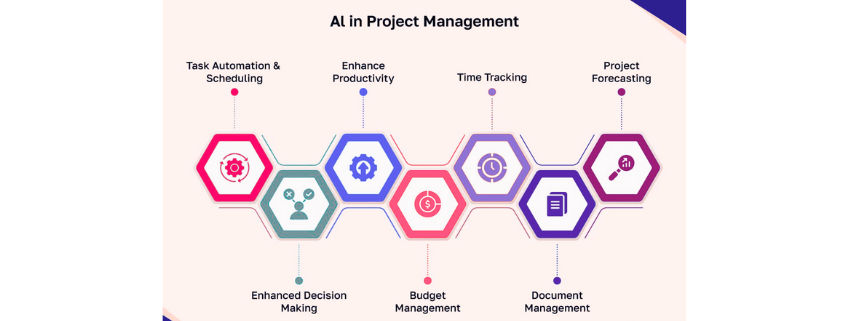
AI for project management is the use of various technologies to improve the efficiency of project delivery. Project managers don’t need to rely on traditional automation tools. Project managers need tools that can use a blend of machine learning, natural language processing, and other technologies. They need AI tools that learn from data, identify patterns, and adapt over time.
Such AI capabilities make it ideal for certain tasks done by project managers. Here is a list of project manager responsibilities and tasks that can be automated and handled faster with the help of AI:
- Predicting delays in any project
- Automating the scheduling process
- Optimizing the allocation of resources
- Summarizing conversations
Here are some examples of what AI can be used for as a project manager. Predictive analytics can identify project completion probability within the defined timeline. This is done by comparing past performance with the project’s current status.
AI can be used by project managers across all stages of the project’s lifecycle. Using AI for project management can increase efficiency, improve accuracy, with other benefits. Project managers need to use the power of AI to stay ahead in this environment of rapid changes.
Source: Software Suggest
The Importance of AI for Project Management
Projects today have a lot more complexity than ever before. Project managers work with distributed teams and cross-functional dependencies to meet tight deadlines. The tools to manage these changing project pieces haven’t caught up yet. Spreadsheets and manual reporting spread across isolated software isn’t enough.
AI can help bridge this gap. It provides real-time insights and automates repetitive work. Project managers can save the time spent on manually creating reports and focus on other valuable activities. There will be more time for tasks like stakeholder alignment and strategic planning.
Such efficient use of a project manager’s time will help the organization deliver value. This is extremely important today where each project works on tight deadlines.
Benefits of AI in Project Management
Project managers can see various benefits by integrating AI into their workflow. Let us look at a few of them:
1. Improved Forecast Accuracy
AI can predict various metrics by relying on historic data. This leads to better planning in terms of time, cost, and resources. Project managers can also plan better and create strategies to avoid misallocation of resources.
2. Reduced Burden of Administration
Project managers can rely on AI to send automated updates and reports to all relevant stakeholders. AI also automates the process of documentation. This allows project managers to have more time to focus on higher-level work.
3. Faster Decision-Making
Real-time insights and anomaly detection help project managers to take decisions quickly. Accuracy is also retained as all decisions are made with the help of data.
4. Better Risk Management
Any warning sign is flagged by AI tools. This helps in proactive approach and better risk mitigation strategies.
5. Enhanced Communication
Using tools like natural language processing and cognitive assistance improves clarity of communication. This will lead to fewer misunderstandings and transparency in all communication.
Learn from the best Project Management certifications to upskill and improve on your journey.
All of these benefits show that project managers have a lot to gain by implementing AI in their project management workflow.
Types of AI Solutions for Project Management
Project managers have a lot of pain points that can be solved by the integration of AI. Here are some solutions that can be solved by using artificial intelligence in project management:
1. Predictive Analytics
There are analytics tools with AI integrations to analyze data. They compare historical data with real-time insights. This can help in forecasting project performance, resource utilization, and flag potential risks. For example, construction firms can use these models to estimate any delays in schedule based on weather conditions.
2. Natural Language Processing (NLP)
NLP solutions can extract action items from calls, emails, and texts. It can also extract sentiment trends. This helps project managers to gauge team morale and identify any gaps in communication.
3. Automated Scheduling and Resource Management
AI-driven tools can dynamically adjust timelines based on a lot of variables. Resource allocation is done based on workload, skillset, and availability. For instance, a hospital can optimize doctor and nurse assignments based on planned leave during festivals.
4. Intelligent Dashboards and Reporting
Using AI to create dashboards has many advantages. Managers can see a consolidated view without preparing static reports. AI can collect data from multiple sources and use it to flag anomalies and KPIs needing attention.
5. Cognitive Assistants
Administrative work can be reduced with the help of chatbots and virtual assistants. They can be integrated into tools like Microsoft Copilot and Atlassian Intelligence. These AI-driven tools can answer queries, create task lists, and automate routine updates.
Looking for ways to improve your project management skills? Take the PMP training today.
These various benefits of AI project management tools can transform organizational efficiency on a large scale.
Commonly Used AI Project Management Tools
The most popular project management tools have started embedding AI functions in their platforms. Here are how some tools have integrated AI into their functions:
Atlassian Intelligence
Atlassian has integrated AI capabilities in Jira and Confluence. Project managers can generate project documentation, summarize tickets, and suggest workflow improvements with the help of AI.
ClickUp with AI Assist
ClickUp now offers AI-driven writing, task creation, and project summaries inside the workspace.
Monday.com AI Features
Monday.com has included AI automation in workflows related to scheduling, task prioritization, and drafting updates.
Microsoft Copilot for Project
Microsoft has integrated Copilot in both Microsoft Project and Teams. It offers assistance for plan generation, schedule analysis, and meeting summaries.
Wrike AI
Wrike has integrated AI into their platform to boost their initial offering. Wrike now offers risk prediction, smart tagging, and workload benching, powered by AI.
Asana Intelligence
Asana Intelligence helps enhance work management with a lot of features. Some of them include automated prioritization, smart fields, and AI summaries.
Project managers can use these AI-driven tools for various solutions. They enhance existing project workflows by offering additional capabilities.
Challenges in Using AI for Project Management
Despite the various benefits of AI in project management, there are challenges in adoption. There are some cultural, ethical, and technical challenges in introducing AI. Project managers need to be wary of these common challenges faced by complex and dynamic project environments.
1. Data Quality and Availability
The effectiveness of AI depends on the dataset it learns from. Accuracy is reduced when using isolated, inconsistent, or incomplete data. This can also lead to flawed recommendations by AI. There should be a strong governance of the data being fed into any AI tool.
2. Change Resistance
Professionals and teams can show hesitation in trusting and using AI. This is primarily due to the concern of their roles being threatened by AI. There should be learning sessions to show the enhancement provided by AI. AI adoption can only be done if AI is seen as a support system rather than a replacement.
3. Integration Complexity
Project managers rely on various tools in their daily workflow. Embedding AI into these existing systems is a fragile task. If done incorrectly, it can lead to workflow disruption. There should be careful vendor selection and technical planning while integrating AI.
4. Ethical and Privacy Concerns
AI often uses sensitive project and personnel data. Proper safeguards need to be put in place when feeding data into any AI tools. The lack of such safeguards can lead to concerns over data security, confidentiality, and ethical information usage.
5. Over-Reliance on AI Outputs
Project managers shouldn’t blindly follow the recommendations of an AI tool. These valuable insights should be balanced by personal judgement, stakeholder insights, and context awareness.
Take UpGrad Knowledgehut’s best Project Management certifications to upskill today!
Project managers can make the right use of AI if they’re aware of these potential challenges. Integration plans need to be made with mitigation strategies in place for these common challenges.
Best Practices for Implementing AI in Project Management
There should be an understanding that the use of AI in project management isn’t solely focused on adopting new software. It is about a shift in understanding and approach. Project managers need to plan an approach blending strategy, technology, and culture.
Let us look at some of the best practices to implement AI in project management. These practices will also help project managers to overcome the commonly discussed challenges of AI-based project management.
1. Start with Clear Goals
There should be a clear goal of what AI should achieve in your project management workflow. Having clearly defined and measurable goals is key. This is how it is ensured that AI is implemented by aligning with business value.
Here are some common goals for artificial intelligence in project management:
- Better forecasting
- Reducing time spent on administrative tasks
- Improved resource allocation
- Early risk identification
2. Choose the Right Tools
Each AI-enabled tool has a specific purpose. Not all of them are suitable for your team’s workflow. Identify and select tools that can seamlessly integrate with your existing systems. One key factor in selecting a tool is that it should be able to scale as your requirements increase. Tool selection isn’t about chasing the next new one on the market.
3. Train Teams in AI Literacy
AI adoption in project management will be successful only when people and teams trust and understand the tools being used. Conduct training sessions for project managers and team members. They should know how AI works, using the right prompts, interpreting AI output, and relying on human judgment.
4. Pilot Before Scaling
The best way to introduce AI is by doing a pilot project on a small scale. This is better than doing a complete rollout. Small scale pilot projects help in testing functionality and gaining user feedback. It can also help with process refinement before it is extended across the organization.
5. Maintain Human Oversight
Project managers shouldn’t completely rely on AI. It is a guidance tool and shouldn’t replace human decision making. AI insights are to be used as supporting tools, while project managers maintain accountability for the final judgement. This is crucial especially when stakeholder management or risk trade-offs are involved.
6. Monitor and Continuously Improve
There should be frequent tracking and comparison with initially set goals. The performance of these AI tools should be assessed in terms of efficiency, accuracy, and project outcomes. This is then used iterate and adapt the usage of AI over time.
Following such practices will make AI a trusted partner in project management. Project managers can drive value with AI without undermining human skills and experience.
Summing Up
AI is rapidly reshaping how projects are planned, executed, and monitored. Project managers need to adapt and use AI to focus on leadership and strategy. As AI capabilities grow, expect more advanced predictive insights, generative planning, and even partially autonomous project execution. Forward-looking managers should start small, learn fast, and scale thoughtfully to stay ahead.
Frequently Asked Questions (FAQs)
1. Which is the best AI for project management?
It depends on your needs. Popular AI options include Atlassian Intelligence, Microsoft Copilot, and ClickUp AI.
2. Will AI replace project managers?
No. AI augments human decision-making but can’t replace leadership, judgment, and stakeholder management.
3. How many project managers use AI?
Adoption of AI is growing among project managers. PMI’s 2023 survey found over 20% of PMs are already integrating AI tools.
4. What is the future of AI in project management?
Expect deeper integration, generative planning, and more predictive analytics shaping decision-making.
5. What skills will project managers need in the age of AI?
Data literacy, AI tool proficiency, change management, and strategic thinking will be essential.
1639 articles published
KnowledgeHut is an outcome-focused global ed-tech company. We help organizations and professionals unlock excellence through skills development. We offer training solutions under the people and proces...
Get Free Consultation
By submitting, I accept the T&C and
Privacy Policy