
- Home
- Blog
- Web Development
- What is React Router: A Complete Guide [Updated 2026]
What is React Router: A Complete Guide [Updated 2026]
Updated on Mar 17, 2026 | 0.9k+ views
Share:
Table of Contents
View all
- What is React Router?
- Why Do We Need a React Router?
- Basic Routing Example
- Nested Routing Example
- How Routing Works / Routing Mechanism
- How to Install React Router?
- How to Setup React Router?
- Components in React Router
- Adding Navigation Using Link Component
- Benefits Of React Router
- Difference Between React Router and React Router DOM
- Practice What You Learn
If you are a web developer or a frontend developer, you probably already know about the javascript library ReactJS. It is one of the most popular and widely used frontend libraries for building single page applications (SPAs). Reactjs is open source and created by Meta (formerly Facebook).
If you are new to React and want to learn the basics of react js then you can enrol for the React JS course by KnowledgeHut. It is a comprehensive course that gives you plenty of hands-on practice and gives you the confidence to work with React comfortably.
The reason for most companies to use this library is because it provides so many out of the box features and allows developers to use other libraries/tools to integrate with this library. One such tool that every react application uses is React Router. It helps us to navigate to other parts of the application based on the user request, and it all happens without reloading the webpage.
In this article, we will understand why we need a react router. How to install a react router. What are the benefits of a react router. We will also answer some of the most frequently asked questions (FAQs) about React Router.
At the time of writing this article, the latest and most stable version is React Router v6.
What is React Router?
First let’s understand the Routing in React. It is a process or a way of navigating to the different parts or different pages of the application based on the user request without reloading the webpage.
A React router is a tool or a library which is built on top of React, which supports the routing mechanism. Using this library, we can configure the routes and when the user request matches, the respective route will be executed, which will load the specific component.
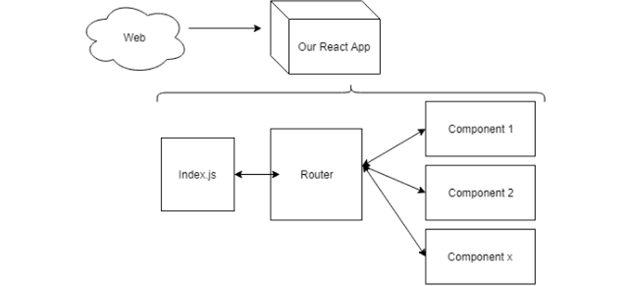
Source: React Router
Why Do We Need a React Router?
As I said earlier, React router is a popular tool used by every React application. The reason is simple, we want to create an application which contains multiple pages, and we want to navigate to those pages without reloading the webpage, that is only possible with the help of a react router.
If we want to create an application, which does not contain multiple pages/views then we don’t really use React, instead we can create non single page applications using HTML and CSS. If you want to learn the web design and development course then it's worth checking the KnowledgeHut course.
For example, if we are creating a single-page application, which contains multiple pages such as Contact us, About us, and Services then do you think we can navigate to these pages without using any routing library? The answer is no. Not only this, if you take any library which is used to create a single-page application, they use one or the other routing library to navigate to different parts of the application. React router is one such tool to use in the React library. Without a react-router, it is impossible to navigate other parts of the application without reloading the webpage.
Basic Routing Example
Now that we know what React Router DOM is, we’ll come across two divisions, namely basic routing and nested routing.
Let’s look at a basic React Router DOM Routes example for better understanding. I make a simple React application and include an example React Router for basic routing. First, I install the package called ‘react-router-dom’. Then, in my main component I import BrowserRouter as Router and Route from ‘react-router dom’.
I define several elements, each representing a different page. I established routes for these components using the Route component and providing a path to each route.
Users move to different paths, and the corresponding components render when this happens; creating a smooth navigation experience.
The code that I used for this is defined below:
// Basic Routing Example

import React from 'react';
import { BrowserRouter as Router, Route, Link } from 'react-router-dom';

// Component for Page 1
const Page1 = () => {
  return (
    <div>
     <h1>Page 1</h1>
      <p>This is the content of Page 1.</p>
    </div>
  );
};

// Component for Page 2
const Page2 = () => {
  return (
    <div>
     <h1>Page 2</h1>
      <p>This is the content of Page 2.</p>
    </div>
  );
};

// Component for Page 3
const Page3 = () => {
  return (
    <div>
     <h1>Page 3</h1>
      <p>This is the content of Page 3.</p>
    </div>
  );
};

// App Component
const App = () => {
  return (
    <Router>
      <div>
        <nav>
          <ul>
           <li><Link to="/page1">Page 1</Link></li>
           <li><Link to="/page2">Page 2</Link></li>
           <li><Link to="/page3">Page 3</Link></li>
          </ul>
       </nav>

        {/* Routes for Different Pages */}
        <Route path="/page1" component={Page1} />
        <Route path="/page2" component={Page2} />
        <Route path="/page3" component={Page3} />
      </div>
    </Router>
  );
};

export default App;
In this code example, the App component serves as the main component containing navigation links to Page1, Page2, and Page3. The routes for these pages are defined using the Route component, and the navigation links use the Link component from react-router-dom.
As users navigate to different paths, the corresponding components (Page1, Page2, or Page3) render, creating a seamless navigation experience in the React application using basic React role based routing.
Nested Routing Example
Let’s look at the nested React Router DOM typescript example next for differentiation. In addition to the basic routing, I introduce nested routing in my React application. I use the idea of parent and child components to build a more complicated navigation structure. Inside the parent component, I established further Route components for child components with different paths.
This allows me to have my pages of page. The nested routes enable the application to have more fine-grained control over what is displayed as users travel through it allowing for a structured and organized experience when using the app.
The code that I used for this is defined below:
// Nested Routing Example

import React from 'react';
import { BrowserRouter as Router, Route, Link } from 'react-router-dom';

// Parent Component
const ParentComponent = () => {
  return (
    <div>
     <h1>Parent Component</h1>
      <nav>
        <ul>
         <li><Link to="/parent/child1">Child 1</Link></li>
         <li><Link to="/parent/child2">Child 2</Link></li>
        </ul>
      </nav>

      {/* Nested Routes for Child Components */}
      <Route path="/parent/child1" component={ChildComponent1} />
      <Route path="/parent/child2" component={ChildComponent2} />
    </div>
  );
};

// Child Component 1
const ChildComponent1 = () => {
  return (
    <div>
     <h2>Child Component 1</h2>
      <p>This is the content of Child Component 1.</p>
    </div>
  );
};

// Child Component 2
const ChildComponent2 = () => {
  return (
    <div>
     <h2>Child Component 2</h2>
      <p>This is the content of Child Component 2.</p>
    </div>
  );
};

// App Component
const App = () => {
  return (
    <Router>
      <div>
        {/* Route for the Parent Component */}
        <Route path="/parent" component={ParentComponent} />
      </div>
    </Router>
  );
};

export default App;
In this code example, the ParentComponent serves as the main component with navigation links to ChildComponent1 and ChildComponent2. The nested routes for child components are defined inside the ParentComponent, enabling a more intricate navigation structure.
As users navigate through the application, the nested routes control the content displayed, providing a structured and organized user experience.
How Routing Works / Routing Mechanism
We know routing is user-side navigation to different pages or different pages on a website. Every rendering mechanism has its own routing way to navigate but dealing with React Router here that comes under Client Side Routing but eventually under Client Side Rendering has a dynamic mechanism to look upon.
Client Side rendering orders the server to deal with data only whereas the rest of all rendering and routing is handled by the client itself.
Traditional routing has always requested the server to provide different index.html of different pages but Client Side Rendering will only return one index.html file for Client Side Routing.
This will give you the smooth Single Page Application Routing experience with forwarding and backward route ability using history API keeping the URL updated as well.
How to Install React Router?
React router contains 3 different packages for routing.
- react-router: contains most of the core functionality of React Router including the route matching algorithm and most of the core components and react hooks
- react-router-native: It is designed for mobile applications.
- react-router-dom: It is designed for web applications.
Installing a react router is a straight forward process, if you are using npm as a package manage then you can run the following command from the root of your project:
npm install react-router-dom
This will install the latest version of react router v6 and registered in the package.json file as a dependency. If you want to install a specific version, then you need to append the version at the end react-router-dom@version-number
If you are using yarn then you can run the following command instead:
yarn add react-router-dom
How to Setup React Router?
Once react router installed, setting up is also easy. Every react application comes with Root component which <App> component. We must wrap this component with <BrowserRouter> component, which is a built-in component, comes with react-router-dom. Once we wrap this, now react router is available anywhere in the application.
Every react application comes with index.js file, which is the starting point for the react application, this is the file which bootstraps the <App> component. Inside this file, we can include the <BrowserRouter> component.
Below is the index.js file, which comes with every react application
import React from 'react';
import ReactDOM from 'react-dom';
import './index.css';
import App from './App';
ReactDOM.render(
  <React.StrictMode>
    <App />
 </React.StrictMode>,
 document.getElementById('root')
);
We can replace <React.StrictMode> with <BrowserRouter> component from react-router-dom. This is how it would look like after we replace it:
import React from 'react';
import ReactDOM from 'react-dom';
import './index.css';
import App from './App';
import { BrowserRouter } from "react-router-dom";
ReactDOM.render(
  <BrowserRouter>
    <App />
  </BrowserRouter>,
 document.getElementById("root")
);
Now routing is available across the application. We can use the routing features to navigate to the different parts of the application.
Components in React Router
React router components are divided into 3 main categories -
- Routers - for instance, <BrowserRouter> and <HashRouter> components
- Route matchers - for instance, <Routes> and <Route> components
- Navigation – for instance, <Link> and <NavLink> components
1. Routers
Routers are the building blocks of every react router application. React-router-dom is specifically designed for web applications, it provides two popular components <BrowserRouter> and <HashRouter>
a) HashRouter
The real use case of HashRouter is when we are creating web application which does not require any backend then in that case, we can use HashRouter because when we use hashes in the URL, browser does not make any server request. The react router will parse this # on the client side.
<HashRouter
 basename={optionalString}
 getUserConfirmation={optionalFunc}
 hashType={optionalString}
>
  <App />
</HashRouter>- basename is of string type, the base URL for all locations. A properly formatted basename should have a leading slash, but no trailing slash.
- getUserConfirmation, is a function to use to confirm navigation. Defaults to using window.confirm.
- hashType is of string type, The type of encoding to use for window.location.hash.
b) BrowserRouter
It uses history API, i.e. it's unavailable for legacy browsers (IE 9 and lower and contemporaries). Client-side React application is able to maintain clean routes like example.com/react/route but needs to be backed by a web server. Usually this means that a web server should be configured for a single page application, i.e. the same index.html is served for /react/route path or any other route on server side. On the client side, window.location.pathname is parsed by React router. React router renders a component that it was configured to render for /react/route.
Additionally, the setup may involve server-side rendering, index.html may contain rendered components or data that are specific to the current route.
import React from 'react';
import ReactDOM from 'react-dom';
import './index.css';
import App from './App';
import { BrowserRouter } from "react-router-dom";
ReactDOM.render(
  <BrowserRouter>
    <App />
  </BrowserRouter>,
 document.getElementById("root")
);
2. Route Matchers
The two most important route matchers are <Routes> and <Route>. The component <Routes> are introduced in the v6 and it is the replacement for <Switch> component with some powerful features. These components will help us to render the content on to the webpage based on the user request.
For every user request, <Routes> will scan for the URL, if the URL matches then the respective <Route> will be executed. Here the <Routes> acts a parent which contains the children, which is <Route>.
<Route> takes 2 React props, path and element. Path contains the url of the respective component and element contains the actual component which we need to render.
import { Routes, Route } from "react-router-dom"
import Home from "./Home"
import About from "./About"
import Contact from "./Contact"
function App() {
  return (
    <div className="App">
      <Routes>
        <Route path="/" element={ <Dashboard/> } />
        <Route path="services" element={ <Services/> } />
        <Route path="contact" element={ <Contact/> } />
      </Routes>
    </div>
  )
}
export default App
3. Navigation
React router provides different navigation components such as <Link> and <NavLink>
Link: It is similar to the <a> element in HTML. It allows us to navigate to another view by clicking on it.
NavLink: The <NavLink> is a special type of <Link>, by default active class is added when it is active. We mostly use this when we are building a navigation menu which contains the set of links.
Adding Navigation Using Link Component
As we discussed above, <Link> is similar to <a> element in HTML. It is used to navigate to the other views or pages.
import { Link } from "react-router-dom";
function Dashboard() {
  return (
    <div>
      <h1>This is the home page</h1>
      <Link to="services">We are offering the following services</Link>
      <Link to="contact">You can contact us by submitting form</Link>
    </div>
  );
}
export default Home;
The <Link> component navigates the prop to the target url/route mentioned in double quotes. Once the user clicks on the Link, react router matches the URL with the <Routes> if the url matches then respective <Route> will be executed.
Looking for a Python certification course near me? Unlock the power of coding with Python and take your skills to new heights. Join now and become a Python pro!
Benefits Of React Router
- Client-side routing is required to keep the application in sync with the browser URL.
- It provides so many features out of the box
- Using <BrowserRouter>, we can make routing available across the application
- It uses <Link> to navigate to other pages or views
- It uses <Routes> and <Route> for rendering
- It is mainly used for single page application
- It is built on top of React library
Difference Between React Router and React Router DOM
| Feature | React Router | React Router DOM |
| 1. Installation | Requires separate installation (npm install react-router) | Requires separate installation (npm install react-router-dom) |
| 2. Purpose | Serves as the core library for routing in React | A wrapper around React Router for web applications |
| 3. Platform | Supports various platforms, including web, mobile, and native | Primarily designed for web applications |
| 4. Use Cases | Ideal for multi-platform applications and projects that require a single routing solution across different environments | Suitable for web applications built with React |
| 5. Dependencies | May have additional dependencies for specific platform integrations | Tends to have fewer dependencies due to its focus on web applications |
| 6. BrowserRouter and HashRouter | Both are available for configuring the router, with BrowserRouter using regular URLs and HashRouter using URLs with a hash | Typically uses BrowserRouter for cleaner URLs and HashRouter for compatibility with older browsers or static file servers |
| 7. Memory Router | Provides a memory-based router for non-browser environments | Primarily designed for browser-based routing |
Practice What You Learn
We have discussed a lot about React router in this blog, including what a react router is; how to install react router; how to setup the react router; and, what are the components of React router, etc. All in all, react router is a great library for adding routing to the react application. It is built on top of React and it provides lots of features out of the box. Every react application uses this library in the production. It makes the development easier. You can read more about the latest React router features on the official website.
If you found this article on React router helpful, then do check the React JS course by KnowledgeHut, you will learn everything about React and React Router.
1639 articles published
KnowledgeHut is an outcome-focused global ed-tech company. We help organizations and professionals unlock excellence through skills development. We offer training solutions under the people and proces...
Get Free Consultation
By submitting, I accept the T&C and
Privacy Policy