
- Blog Categories
- Project Management
- Agile Management
- IT Service Management
- Cloud Computing
- Business Management
- BI And Visualisation
- Quality Management
- Cyber Security
- DevOps
- Most Popular Blogs
- PMP Exam Schedule for 2025: Check PMP Exam Date
- Top 60+ PMP Exam Questions and Answers for 2025
- PMP Cheat Sheet and PMP Formulas To Use in 2025
- What is PMP Process? A Complete List of 49 Processes of PMP
- Top 15+ Project Management Case Studies with Examples 2025
- Top Picks by Authors
- Top 170 Project Management Research Topics
- What is Effective Communication: Definition
- How to Create a Project Plan in Excel in 2025?
- PMP Certification Exam Eligibility in 2025 [A Complete Checklist]
- PMP Certification Fees - All Aspects of PMP Certification Fee
- Most Popular Blogs
- CSM vs PSM: Which Certification to Choose in 2025?
- How Much Does Scrum Master Certification Cost in 2025?
- CSPO vs PSPO Certification: What to Choose in 2025?
- 8 Best Scrum Master Certifications to Pursue in 2025
- Safe Agilist Exam: A Complete Study Guide 2025
- Top Picks by Authors
- SAFe vs Agile: Difference Between Scaled Agile and Agile
- Top 21 Scrum Best Practices for Efficient Agile Workflow
- 30 User Story Examples and Templates to Use in 2025
- State of Agile: Things You Need to Know
- Top 24 Career Benefits of a Certifed Scrum Master
- Most Popular Blogs
- ITIL Certification Cost in 2025 [Exam Fee & Other Expenses]
- Top 17 Required Skills for System Administrator in 2025
- How Effective Is Itil Certification for a Job Switch?
- IT Service Management (ITSM) Role and Responsibilities
- Top 25 Service Based Companies in India in 2025
- Top Picks by Authors
- What is Escalation Matrix & How Does It Work? [Types, Process]
- ITIL Service Operation: Phases, Functions, Best Practices
- 10 Best Facility Management Software in 2025
- What is Service Request Management in ITIL? Example, Steps, Tips
- An Introduction To ITIL® Exam
- Most Popular Blogs
- A Complete AWS Cheat Sheet: Important Topics Covered
- Top AWS Solution Architect Projects in 2025
- 15 Best Azure Certifications 2025: Which one to Choose?
- Top 22 Cloud Computing Project Ideas in 2025 [Source Code]
- How to Become an Azure Data Engineer? 2025 Roadmap
- Top Picks by Authors
- Top 40 IoT Project Ideas and Topics in 2025 [Source Code]
- The Future of AWS: Top Trends & Predictions in 2025
- AWS Solutions Architect vs AWS Developer [Key Differences]
- Top 20 Azure Data Engineering Projects in 2025 [Source Code]
- 25 Best Cloud Computing Tools in 2025
- Most Popular Blogs
- Company Analysis Report: Examples, Templates, Components
- 400 Trending Business Management Research Topics
- Business Analysis Body of Knowledge (BABOK): Guide
- ECBA Certification: Is it Worth it?
- Top Picks by Authors
- Top 20 Business Analytics Project in 2025 [With Source Code]
- ECBA Certification Cost Across Countries
- Top 9 Free Business Requirements Document (BRD) Templates
- Business Analyst Job Description in 2025 [Key Responsibility]
- Business Analysis Framework: Elements, Process, Techniques
- Most Popular Blogs
- Best Career options after BA [2025]
- Top Career Options after BCom to Know in 2025
- Top 10 Power Bi Books of 2025 [Beginners to Experienced]
- Power BI Skills in Demand: How to Stand Out in the Job Market
- Top 15 Power BI Project Ideas
- Top Picks by Authors
- 10 Limitations of Power BI: You Must Know in 2025
- Top 45 Career Options After BBA in 2025 [With Salary]
- Top Power BI Dashboard Templates of 2025
- What is Power BI Used For - Practical Applications Of Power BI
- SSRS Vs Power BI - What are the Key Differences?
- Most Popular Blogs
- Data Collection Plan For Six Sigma: How to Create One?
- Quality Engineer Resume for 2025 [Examples + Tips]
- 20 Best Quality Management Certifications That Pay Well in 2025
- Six Sigma in Operations Management [A Brief Introduction]
- Top Picks by Authors
- Six Sigma Green Belt vs PMP: What's the Difference
- Quality Management: Definition, Importance, Components
- Adding Green Belt Certifications to Your Resume
- Six Sigma Green Belt in Healthcare: Concepts, Benefits and Examples
- Most Popular Blogs
- Latest CISSP Exam Dumps of 2025 [Free CISSP Dumps]
- CISSP vs Security+ Certifications: Which is Best in 2025?
- Best CISSP Study Guides for 2025 + CISSP Study Plan
- How to Become an Ethical Hacker in 2025?
- Top Picks by Authors
- CISSP vs Master's Degree: Which One to Choose in 2025?
- CISSP Endorsement Process: Requirements & Example
- OSCP vs CISSP | Top Cybersecurity Certifications
- How to Pass the CISSP Exam on Your 1st Attempt in 2025?
- Most Popular Blogs
- Top 7 Kubernetes Certifications in 2025
- Kubernetes Pods: Types, Examples, Best Practices
- DevOps Methodologies: Practices & Principles
- Docker Image Commands
- Top Picks by Authors
- Best DevOps Certifications in 2025
- 20 Best Automation Tools for DevOps
- Top 20 DevOps Projects of 2025
- OS for Docker: Features, Factors and Tips
- More
- Agile & PMP Practice Tests
- Agile Testing
- Agile Scrum Practice Exam
- CAPM Practice Test
- PRINCE2 Foundation Exam
- PMP Practice Exam
- Cloud Related Practice Test
- Azure Infrastructure Solutions
- AWS Solutions Architect
- IT Related Pratice Test
- ITIL Practice Test
- Devops Practice Test
- TOGAF® Practice Test
- Other Practice Test
- Oracle Primavera P6 V8
- MS Project Practice Test
- Project Management & Agile
- Project Management Interview Questions
- Release Train Engineer Interview Questions
- Agile Coach Interview Questions
- Scrum Interview Questions
- IT Project Manager Interview Questions
- Cloud & Data
- Azure Databricks Interview Questions
- AWS architect Interview Questions
- Cloud Computing Interview Questions
- AWS Interview Questions
- Kubernetes Interview Questions
- Web Development
- CSS3 Free Course with Certificates
- Basics of Spring Core and MVC
- Javascript Free Course with Certificate
- React Free Course with Certificate
- Node JS Free Certification Course
- Data Science
- Python Machine Learning Course
- Python for Data Science Free Course
- NLP Free Course with Certificate
- Data Analysis Using SQL
- Home
- Blog
- Artificial Intelligence
- Best Practices for Developing Secure AI Agents in the Microsoft Ecosystem
Best Practices for Developing Secure AI Agents in the Microsoft Ecosystem
Updated on Aug 11, 2026 | 0.5k+ views
Share:
Table of Contents
View all
- How do you develop secure AI agents in the Microsoft ecosystem?
- How does Microsoft Entra Agent ID help secure AI agents?
- How can you secure AI agent data, tools, and connectors?
- How do you protect Microsoft AI agents from prompt injection?
- How should you test and monitor secure AI agents?
- Which Microsoft tools support secure AI agent development?
- Conclusion
Quick Overview
- Secure AI agents in the Microsoft ecosystem by applying least-privilege access, managed identities, controlled tools, and data protection.
- Use Microsoft Entra Agent ID, Copilot Studio, Purview, Defender, and Agent 365 to manage identity, access, data, threats, and governance.
- Protect secure AI agents from prompt injection, unauthorized actions, and data leakage with guardrails and human oversight.
- This guide covers how to build, test, monitor, and govern AI agents securely throughout their lifecycle.
Want to build secure AI agents with practical skills? Explore the Applied Agentic AI Certification Course by upGrad KnowledgeHut and strengthen your agentic AI expertise.
How do you develop secure AI agents in the Microsoft ecosystem?
Developing secure AI agents Microsoft ecosystem solutions starts with a security-first approach. Every agent should be designed with clear permissions, identity management, monitoring, and governance controls.
The following best practices can help organizations design, deploy, and manage AI agents securely across Microsoft technologies.
1. Apply least-privilege access
One of the most important principles for creating secure AI agents is least-privilege access. Agents should only have the permissions required to perform their assigned tasks.
Avoid giving broad access to applications, files, databases, or services. Limiting permissions reduces the impact of accidental mistakes or security incidents. Regular reviews should ensure permissions remain appropriate over time.
2. Give every AI agent a managed identity
An AI agent should have a clear identity instead of operating through shared or unclear credentials. A managed identity makes it easier to determine which agent performed an action and what resources it was allowed to access.
Microsoft Entra Agent ID provides identity capabilities designed specifically for AI agents, including identification, authentication, ownership, and access management.
3. Restrict tools, connectors, and agent actions
Modern AI agents often connect to many tools, such as email, calendars, databases, and third-party APIs. Each connector adds a new pathway that could be misused.
To build secure AI agents in the Microsoft ecosystem, teams should only enable the tools an agent actually needs and block everything else by default.
This approach helps secure AI agents from unauthorized actions and accidental data movement.
4. Protect enterprise data
Data protection is one of the biggest concerns with AI agents. Agents often read from sensitive files, databases, or knowledge bases. Sensitive data should be classified, labeled, and protected, so agents cannot accidentally expose confidential information.
Encryption, data loss prevention rules, and strict access boundaries all help keep enterprise data safe while still letting agents do useful work.
5. Defend against prompt injection and agent manipulation
Prompt injection can cause an agent to follow malicious instructions contained in documents, emails, websites, or other external content. This can lead to unauthorized actions or data exposure.
Treat external content as untrusted, restrict what actions an agent can perform, and validate important requests before execution. These controls are essential when building secure AI agents that can work with external information.
Also Read: Prompt Injection Attacks in AI
6. Monitor, test, and govern agents continuously
Security is not a one-time task. Continuous monitoring is essential for maintaining secure AI agents Microsoft ecosystem environments.
Organizations should review logs, test agent behavior regularly, and implement governance processes that ensure AI agents operate according to business and security requirements.
Also Read: How to Build Your First AI Agent?
How does Microsoft Entra Agent ID help secure AI agents?
Microsoft Entra Agent ID helps secure AI agents by giving them dedicated identities and controls for authentication, authorization, ownership, and lifecycle management. It extends identity and Zero Trust principles to agentic workloads.
Assign agents dedicated identities
Each production agent should have an identity that clearly represents it. This creates accountability for actions and makes it easier to control access. With Entra Agent ID, every AI agent gets its own unique identity in the directory.
Dedicated identities make it far easier to see exactly which agent performed which action across the organization.
Apply least-privilege permissions
Microsoft Entra Agent ID enables organizations to limit permissions based on business needs. Instead of giving agents excessive privileges, companies can assign only the access required.
This approach strengthens secure AI agents Microsoft ecosystem implementations and reduces security risks.
Manage agent ownership and lifecycle
Every agent should have a responsible owner or sponsor. This person or team can review its purpose, permissions, usage, and security requirements.
Microsoft Entra provides agent sponsorship and lifecycle capabilities to help ensure that access does not remain active longer than necessary.
Audit and revoke agent access
Organizations should be able to disable an agent when it is no longer needed or when suspicious behavior is detected.
Microsoft Entra Agent ID supports managing and disabling agent identities at different levels, helping organizations respond when an agent's access needs to be restricted.
Also Read: What Can You Build with Microsoft Agentic AI?
How can you secure AI agent data, tools, and connectors?
Data, tools, and connectors are an important part of how AI agents work. Using the right security controls can help prevent misuse and unwanted access.
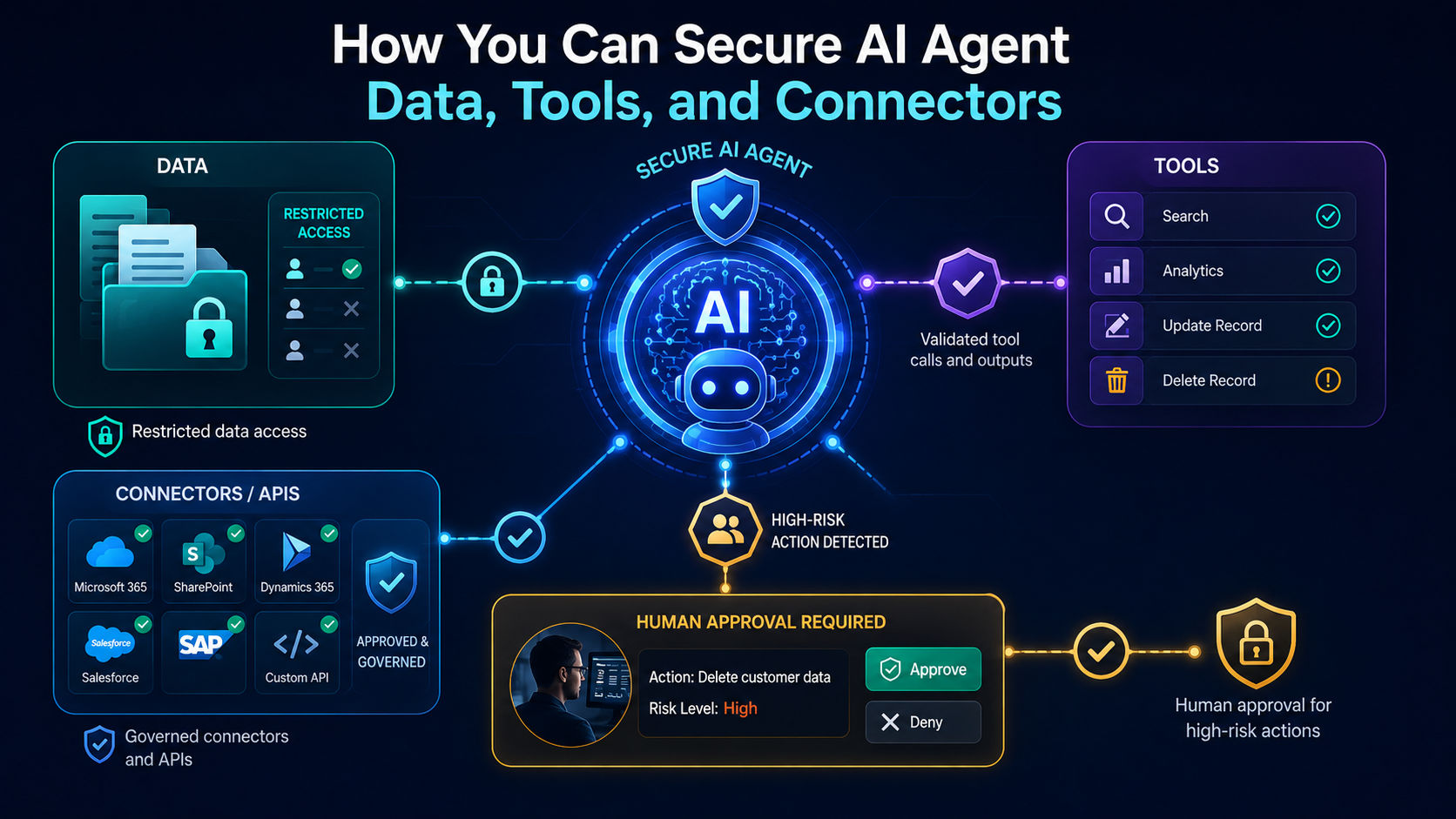
Restrict data access
Agents should access only the information required for their tasks. Sensitive data should remain protected through role-based access controls and classification policies.
This approach strengthens secure AI agents and minimizes unnecessary exposure.
Govern connectors and APIs
Every connector or API an agent uses should be reviewed and approved before it is enabled. Unapproved or loosely configured connectors can quietly expose data or allow unwanted actions.
A strong governance process for connectors is one of the simplest ways to keep secure AI agents from becoming a security gap.
Validate tool calls and outputs
When an agent calls a tool or returns a result, that output should be validated before it is used further. This prevents an agent from passing incorrect or manipulated information, especially if the tool call was influenced by prompt injection.
Validation checks act as a safety net around the agent's decisions.
Require approval for high-risk actions
Some actions carry greater business risk than others. Examples include financial approvals, customer record updates, or policy changes.
Organizations should require human approval before agents perform sensitive actions. This adds another layer of protection for secure AI agents Microsoft ecosystem solutions.
Ready to strengthen your AI agent skills? Explore upGrad KnowledgeHut Artificial Intelligence Courses to learn practical AI concepts and applications.
How do you protect Microsoft AI agents from prompt injection?
Prompt injection is a major concern because agents can process instructions from sources that were not created or controlled by the organization. Microsoft identifies prompt injection, tool misuse, excessive permissions, and data leakage among the security challenges associated with AI agents.
Treat external content as untrusted
Any content that comes from outside the organization, such as emails, web pages, or uploaded files, should be treated as untrusted by default. Agents should never automatically follow instructions found inside this content.
Building this habit into secure AI agents helps stop attackers from hiding commands where the agent might read them.
Add guardrails around autonomous actions
Guardrails are rules that limit what an agent can do on its own. These might include blocking certain phrases, capping how many actions an agent can take in a row, or requiring confirmation before major steps.
Guardrails give teams confidence that secure AI agents in the Microsoft ecosystem will stay within safe boundaries even when facing unexpected input.
Test prompt injection and data-exfiltration scenarios
Before an agent goes live, it should be tested against known prompt injection techniques and data exfiltration attempts. Red teaming exercises, where testers try to trick the agent into leaking data or misbehaving, help uncover weaknesses early. Regular testing is a key part of keeping secure AI agents resilient against new attack patterns.
Use human oversight for high-impact decisions
Human review remains essential for important business decisions. Critical actions should involve human validation before execution.
This does not mean every action need approval, but high impact decisions, like financial transactions or legal communications, should include a review step. Human oversight remains one of the most reliable defenses for secure AI agents in the Microsoft ecosystem.
Also Read: AI Agent Orchestration in the Microsoft Ecosystem
How should you test and monitor secure AI agents?
Testing and monitoring are essential for maintaining secure AI agents after development. Security controls should be checked before deployment and reviewed as the agent changes.
Test agents before production
Every agent should go through structured testing before it is deployed. This includes checking normal use cases, edge cases, and adversarial scenarios where someone tries to misuse the agent.
Thorough pre-production testing catches many issues before they can affect real users
Monitor agent and tool activity
Once an agent is live, its activity should be logged and monitored continuously. This includes tracking which tools it calls, what data it accesses, and how often it takes certain actions.
Monitoring helps security teams spot unusual behavior quickly, which is essential for maintaining secure AI agents in the Microsoft ecosystem at scale.
Review permissions and agent behavior
Permissions and behavior should be reviewed on a regular schedule, not just when something goes wrong. As business needs change, an agent's access should be adjusted to match.
Regular reviews help organizations keep secure AI agents aligned with their original security requirements.
Respond to security incidents
Even with strong safeguards, incidents can still happen. Having a clear response plan, including how to pause an agent, revoke its access, and investigate the issue, helps limit damage quickly.
A fast and organized response is what separates a minor issue from a major security event for secure AI agents.
Which Microsoft tools support secure AI agent development?
Microsoft provides several technologies that can work together to support secure AI agents across identity, development, data protection, threat detection, and governance.
1. Microsoft Copilot Studio
Microsoft Copilot Studio provides tools for creating and governing agents. Its security capabilities include data policies, connector controls, environment controls, and governance features.
It can help organizations control which data sources, connectors, actions, and channels an agent can use.
2. Microsoft Entra Agent ID
Microsoft Entra Agent ID provides identity and access controls specifically for AI agents. It supports agent identities, ownership, authorization, lifecycle management, and access governance.
It is particularly important for secure AI agents that need to access enterprise resources.
3. Microsoft Purview
Microsoft Purview supports data security and compliance for supported AI agent interactions. Its capabilities include data classification, auditing, data loss prevention, and risk management.
This helps organizations understand and control how sensitive information is used by agents.
4. Microsoft Defender
Microsoft Defender provides security monitoring and threat protection capabilities that can be extended to agent environments through Microsoft's broader security architecture.
It can help organizations detect and respond to suspicious activity involving agents and the resources they access.
5. Microsoft Agent 365
Agent 365 is designed to help organizations manage AI agents at scale, covering registration, governance, and oversight across many agents at once.
It gives IT and security teams a central place to keep track of every agent running in the environment.
Also Read: Which Microsoft Tools Are Used for Agentic AI Development?
Conclusion
Developing secure AI agents in the Microsoft ecosystem requires strong controls for identity, permissions, data, tools, and agent behavior. Microsoft technologies can help organizations manage access, protect sensitive information, monitor activity, and govern agents at a scale.
Regular testing, prompt injection protection, and human oversight further reduce security risks. A continuous approach to testing, monitoring, and governance helps keep secure AI agents reliable as business needs change.
Have A Query? Get in Touch With Our Customer Support | upGrad KnowledgeHut
Frequently Asked Questions (FAQs)
What makes AI agents different from chatbots?
Chatbots mainly respond to user questions, while AI agents can plan tasks, use tools, access data, and take actions on a user's or organization's behalf. This greater autonomy creates a larger security boundary. As a result, agents need stronger controls for identity, permissions, tools, data, and actions.
What are the security risks of AI agents?
AI agents can introduce risks such as prompt injection, excessive permissions, data leakage, unauthorized tool use, and identity misuse. Their ability to access systems and take actions can increase the impact of a security issue. Strong access controls, guardrails, testing, and monitoring help reduce these risks.
How does Microsoft secure AI agents?
Microsoft secures AI agents through layered controls for identity, access, data, tools, and monitoring. Technologies such as Microsoft Entra Agent ID, Copilot Studio, Purview, Defender, and Agent 365 support different parts of this security model. The goal is to limit agent access, control actions, protect data, and monitor activity.
How do you implement least privilege for AI agents?
Give an AI agent only the permissions, data, tools, and systems required for its specific task. Avoid broad or permanent access and review permissions as the agent's role changes. Microsoft Entra Agent ID can help organizations manage agent identities and access more securely.
How does Microsoft Entra Agent ID secure AI agents?
Microsoft Entra Agent ID gives AI agents dedicated identities that can be authenticated, authorized, managed, and monitored. It helps organizations define ownership and control the resources an agent can access. This makes it easier to apply least privilege and revoke access when an agent is no longer trusted or needed.
Can Microsoft Purview secure AI agents?
Microsoft Purview can support AI agent security through capabilities such as data classification, data loss prevention, auditing, and compliance controls. These controls can help organizations understand and manage how sensitive information is used. Purview works as part of a broader security strategy rather than securing an agent on its own.
How do you prevent prompt injection in AI agents?
Treat instructions found in external content such as emails, documents, websites, and tool responses as untrusted. Limit the agent's permissions and validate important actions before execution. Regular testing against prompt injection and data exfiltration attempts can also reveal weaknesses before deployment.
How do you deploy a secure AI agent?
Start by defining the agent's purpose, risk level, identity, permissions, data sources, and approved tools. Test its behavior, security controls, prompt injection resistance, and high-risk workflows before production. After deployment, continuously monitor activity and review permissions to maintain security.
How do you stop an AI agent from misusing tools?
Allow agents to use only approved tools and connectors that are necessary for their tasks. Apply permission checks, validate tool inputs and outputs, and restrict sensitive or irreversible actions. Human approval can provide an additional control for high-risk operations.
What should an AI agent security checklist include?
An AI agent security checklist should cover identity, least-privilege permissions, data access, approved tools, prompt injection testing, human oversight, logging, and monitoring. It should also include incident response and access revocation procedures. Regular reviews should be performed whenever the agent, tools, or data sources change.
1639 articles published
KnowledgeHut is an outcome-focused global ed-tech company. We help organizations and professionals unlock excellence through skills development. We offer training solutions under the people and proces...
Get Free Consultation
By submitting, I accept the T&C and
Privacy Policy