
- Blog Categories
- Project Management
- Agile Management
- IT Service Management
- Cloud Computing
- Business Management
- BI And Visualisation
- Quality Management
- Cyber Security
- DevOps
- Most Popular Blogs
- PMP Exam Schedule for 2025: Check PMP Exam Date
- Top 60+ PMP Exam Questions and Answers for 2025
- PMP Cheat Sheet and PMP Formulas To Use in 2025
- What is PMP Process? A Complete List of 49 Processes of PMP
- Top 15+ Project Management Case Studies with Examples 2025
- Top Picks by Authors
- Top 170 Project Management Research Topics
- What is Effective Communication: Definition
- How to Create a Project Plan in Excel in 2025?
- PMP Certification Exam Eligibility in 2025 [A Complete Checklist]
- PMP Certification Fees - All Aspects of PMP Certification Fee
- Most Popular Blogs
- CSM vs PSM: Which Certification to Choose in 2025?
- How Much Does Scrum Master Certification Cost in 2025?
- CSPO vs PSPO Certification: What to Choose in 2025?
- 8 Best Scrum Master Certifications to Pursue in 2025
- Safe Agilist Exam: A Complete Study Guide 2025
- Top Picks by Authors
- SAFe vs Agile: Difference Between Scaled Agile and Agile
- Top 21 Scrum Best Practices for Efficient Agile Workflow
- 30 User Story Examples and Templates to Use in 2025
- State of Agile: Things You Need to Know
- Top 24 Career Benefits of a Certifed Scrum Master
- Most Popular Blogs
- ITIL Certification Cost in 2025 [Exam Fee & Other Expenses]
- Top 17 Required Skills for System Administrator in 2025
- How Effective Is Itil Certification for a Job Switch?
- IT Service Management (ITSM) Role and Responsibilities
- Top 25 Service Based Companies in India in 2025
- Top Picks by Authors
- What is Escalation Matrix & How Does It Work? [Types, Process]
- ITIL Service Operation: Phases, Functions, Best Practices
- 10 Best Facility Management Software in 2025
- What is Service Request Management in ITIL? Example, Steps, Tips
- An Introduction To ITIL® Exam
- Most Popular Blogs
- A Complete AWS Cheat Sheet: Important Topics Covered
- Top AWS Solution Architect Projects in 2025
- 15 Best Azure Certifications 2025: Which one to Choose?
- Top 22 Cloud Computing Project Ideas in 2025 [Source Code]
- How to Become an Azure Data Engineer? 2025 Roadmap
- Top Picks by Authors
- Top 40 IoT Project Ideas and Topics in 2025 [Source Code]
- The Future of AWS: Top Trends & Predictions in 2025
- AWS Solutions Architect vs AWS Developer [Key Differences]
- Top 20 Azure Data Engineering Projects in 2025 [Source Code]
- 25 Best Cloud Computing Tools in 2025
- Most Popular Blogs
- Company Analysis Report: Examples, Templates, Components
- 400 Trending Business Management Research Topics
- Business Analysis Body of Knowledge (BABOK): Guide
- ECBA Certification: Is it Worth it?
- Top Picks by Authors
- Top 20 Business Analytics Project in 2025 [With Source Code]
- ECBA Certification Cost Across Countries
- Top 9 Free Business Requirements Document (BRD) Templates
- Business Analyst Job Description in 2025 [Key Responsibility]
- Business Analysis Framework: Elements, Process, Techniques
- Most Popular Blogs
- Best Career options after BA [2025]
- Top Career Options after BCom to Know in 2025
- Top 10 Power Bi Books of 2025 [Beginners to Experienced]
- Power BI Skills in Demand: How to Stand Out in the Job Market
- Top 15 Power BI Project Ideas
- Top Picks by Authors
- 10 Limitations of Power BI: You Must Know in 2025
- Top 45 Career Options After BBA in 2025 [With Salary]
- Top Power BI Dashboard Templates of 2025
- What is Power BI Used For - Practical Applications Of Power BI
- SSRS Vs Power BI - What are the Key Differences?
- Most Popular Blogs
- Data Collection Plan For Six Sigma: How to Create One?
- Quality Engineer Resume for 2025 [Examples + Tips]
- 20 Best Quality Management Certifications That Pay Well in 2025
- Six Sigma in Operations Management [A Brief Introduction]
- Top Picks by Authors
- Six Sigma Green Belt vs PMP: What's the Difference
- Quality Management: Definition, Importance, Components
- Adding Green Belt Certifications to Your Resume
- Six Sigma Green Belt in Healthcare: Concepts, Benefits and Examples
- Most Popular Blogs
- Latest CISSP Exam Dumps of 2025 [Free CISSP Dumps]
- CISSP vs Security+ Certifications: Which is Best in 2025?
- Best CISSP Study Guides for 2025 + CISSP Study Plan
- How to Become an Ethical Hacker in 2025?
- Top Picks by Authors
- CISSP vs Master's Degree: Which One to Choose in 2025?
- CISSP Endorsement Process: Requirements & Example
- OSCP vs CISSP | Top Cybersecurity Certifications
- How to Pass the CISSP Exam on Your 1st Attempt in 2025?
- Most Popular Blogs
- Top 7 Kubernetes Certifications in 2025
- Kubernetes Pods: Types, Examples, Best Practices
- DevOps Methodologies: Practices & Principles
- Docker Image Commands
- Top Picks by Authors
- Best DevOps Certifications in 2025
- 20 Best Automation Tools for DevOps
- Top 20 DevOps Projects of 2025
- OS for Docker: Features, Factors and Tips
- More
- Agile & PMP Practice Tests
- Agile Testing
- Agile Scrum Practice Exam
- CAPM Practice Test
- PRINCE2 Foundation Exam
- PMP Practice Exam
- Cloud Related Practice Test
- Azure Infrastructure Solutions
- AWS Solutions Architect
- IT Related Pratice Test
- ITIL Practice Test
- Devops Practice Test
- TOGAF® Practice Test
- Other Practice Test
- Oracle Primavera P6 V8
- MS Project Practice Test
- Project Management & Agile
- Project Management Interview Questions
- Release Train Engineer Interview Questions
- Agile Coach Interview Questions
- Scrum Interview Questions
- IT Project Manager Interview Questions
- Cloud & Data
- Azure Databricks Interview Questions
- AWS architect Interview Questions
- Cloud Computing Interview Questions
- AWS Interview Questions
- Kubernetes Interview Questions
- Web Development
- CSS3 Free Course with Certificates
- Basics of Spring Core and MVC
- Javascript Free Course with Certificate
- React Free Course with Certificate
- Node JS Free Certification Course
- Data Science
- Python Machine Learning Course
- Python for Data Science Free Course
- NLP Free Course with Certificate
- Data Analysis Using SQL
- Home
- Blog
- Artificial Intelligence
- How Is Microsoft Agentic AI Different from ChatGPT Workflows?
How Is Microsoft Agentic AI Different from ChatGPT Workflows?
Updated on Aug 10, 2026 | 417 views
Share:
Table of Contents
View all
- Microsoft Agentic AI and ChatGPT Workflows: Key Differences
- What Is Microsoft Agentic AI?
- What Is ChatGPT Workflows?
- How Does Microsoft Agentic AI Work Compared with ChatGPT Workflows?
- How Do Microsoft Agentic AI and ChatGPT Workflows Compare Real Business Tasks?
- Microsoft Agentic AI vs ChatGPT Workflows: Which Should You Choose?
- Conclusion
Quick Overview
- Microsoft Agentic AI focuses on autonomous AI agents that can plan, make decisions, use tools, and coordinate tasks across enterprise systems.
- ChatGPT workflows focus on structured AI assisted tasks such as research, content creation, analysis, and repeatable workflows.
- Microsoft Agentic AI is better suited for complex enterprise automation, while ChatGPT workflows are useful for flexible knowledge and productivity tasks.
- This guide compares Microsoft Agentic AI vs ChatGPT workflows, including their architecture, autonomy, integrations, business use cases, and which option may be the better fit.
Build practical AI skills with the upGrad KnowledgeHut's Applied Agentic AI Certification.
Microsoft Agentic AI and ChatGPT Workflows: Key Differences
The Microsoft agentic AI vs ChatGPT workflows comparison becomes clearer when the platforms are evaluated by their primary purpose, autonomy, integrations, customization, and governance.
| Feature | Microsoft Agentic AI | ChatGPT Workflows |
| Primary focus | AI agents and enterprise processes | AI powered repeatable workflows |
| Best for | Enterprise automation and connected business processes | Research, productivity, and repeatable knowledge work |
| Autonomy | Can make bounded decisions and take permitted actions | Can perform multi step work within configured instructions and tools |
| Integrations | Strong Microsoft ecosystem integration | Connected apps, tools, files, and custom integrations |
| Customization | Declarative and custom engine agent options | Custom workspace agents and connected tools |
| Governance | Enterprise permissions, policies, monitoring, and controls | Workspace permissions, approvals, access controls, and monitoring |
| Decision making | Can determine next actions within defined boundaries | Can interpret context and adjust workflow execution within its instructions |
| Scheduling | Supports event and workflow driven scenarios | Supports scheduled and API triggered workspace agents |
Microsoft describes agents as systems that combine models with skills, actions, triggers, and workflows. OpenAI’s workspace agents similarly support repeatable work, connected applications, schedules, sharing, and API triggers.
What Is Microsoft Agentic AI?
Microsoft Agentic AI refers to Microsoft’s broader ecosystem for building and managing AI agents that can work toward defined goals using models, knowledge, tools, actions, and enterprise controls. Microsoft supports different agent approaches, including declarative agents and custom engine agents.
The main purpose is to move beyond simple questions and answer interactions toward AI systems that can perform tasks and interact with business systems.
Enterprise use cases of Microsoft Agentic AI
Microsoft’s agent ecosystem can support tasks across areas such as:
- IT service processes
- Customer service
- Sales operations
- Employee support
- Business process automation
- Knowledge management
- Document and information processing
- Cross system workflows
The strongest fit is generally work that requires connected enterprise systems, defined permissions, recurring processes, and controlled AI actions.
Advantages and Disadvantages of Microsoft Agentic AI
Microsoft Agentic AI offers strong enterprise automation and integration capabilities. However, its complexity and implementation requirements should be considered before adoption.
Advantages
- Strong enterprise orientation
- Integration with Microsoft business environments
- Support for tools and actions
- Greater control over agent permissions
- Governance and monitoring capabilities
- Support for different levels of agent customization
Microsoft also provides controls around agent identity, access, policies, containment, and observability for enterprise scenarios.
Disadvantages
- Can require more planning for enterprise deployment
- Governance and permissions can add implementation complexity
- Advanced agent scenarios may require technical expertise
- The best value is usually achieved when an organization already relies heavily on connected enterprise systems
Features of Microsoft Agentic AI
Key capabilities include:
- Custom agent creation
- Instructions and specialized skills
- Tool and system connections
- Triggers and actions
- Enterprise permissions
- Governance controls
- Monitoring and observability
- Support for Microsoft 365 and other connected systems
Explore whether Microsoft Agentic AI is worth learning and how it can support AI career growth in 2026.
What Is ChatGPT Workflows?
ChatGPT workflows use AI to complete repeatable tasks through instructions, connected tools, files, applications, schedules, and other workflow components. Current ChatGPT workspace agents can be created for repeatable work, shared with teams, connected to apps and tools, scheduled, or triggered through an API.
This makes Microsoft agentic AI vs ChatGPT workflows less of a simple autonomous versus non autonomous comparison than it once was. ChatGPT now also supports agents that can take action across connected tools.
Common use cases of ChatGPT Workflows
ChatGPT workflows can support:
- Research and information gathering
- Report preparation
- Document creation
- Content workflows
- Data summarization
- Meeting follows ups
- Competitive research
- Recurring business reports
- Knowledge management
- Cross application tasks
OpenAI describes workspace agents as particularly useful for repeatable, structured, time based, event driven, and tool-based work.
Advantages and Disadvantages of ChatGPT Workflows
ChatGPT Workflows offer flexible automation for repeatable AI tasks and productivity. However, their capabilities depend on integration, configuration, and workflow requirements.
Advantages
- Easy natural language setup
- Flexible workflow instructions
- Connected applications and tools
- Scheduled execution
- API based triggers
- Team sharing
- Useful for research and knowledge intensive work
Disadvantages
- Capabilities depend on connected apps and permissions
- Some advanced workflows require additional configuration
- Results can vary depending on task complexity and model behavior
- Governance requirements still need to be configured appropriately
Features of ChatGPT Workflows
Important capabilities include:
- Workspace agents
- Connected applications
- Custom tools
- Files and shared context
- Scheduled execution
- API triggers
- Team sharing
- Access controls
- Approval checkpoints
- Monitoring and governance
OpenAI states that workspace agents can use connected applications such as Slack, Google Drive, SharePoint, and other available tools, depending on workspace configuration.
Explore Artificial Intelligence Courses with Certification Online to build practical AI skills.
How Does Microsoft Agentic AI Work Compared with ChatGPT Workflows?
The main difference in Microsoft agentic AI vs ChatGPT workflows is how each approaches workflow execution and the surrounding enterprise environment. Both can use AI models, tools, instructions, and automation, but their implementation and ecosystem focus can differ.
How Microsoft Agentic AI handles a task
A simplified flow is:
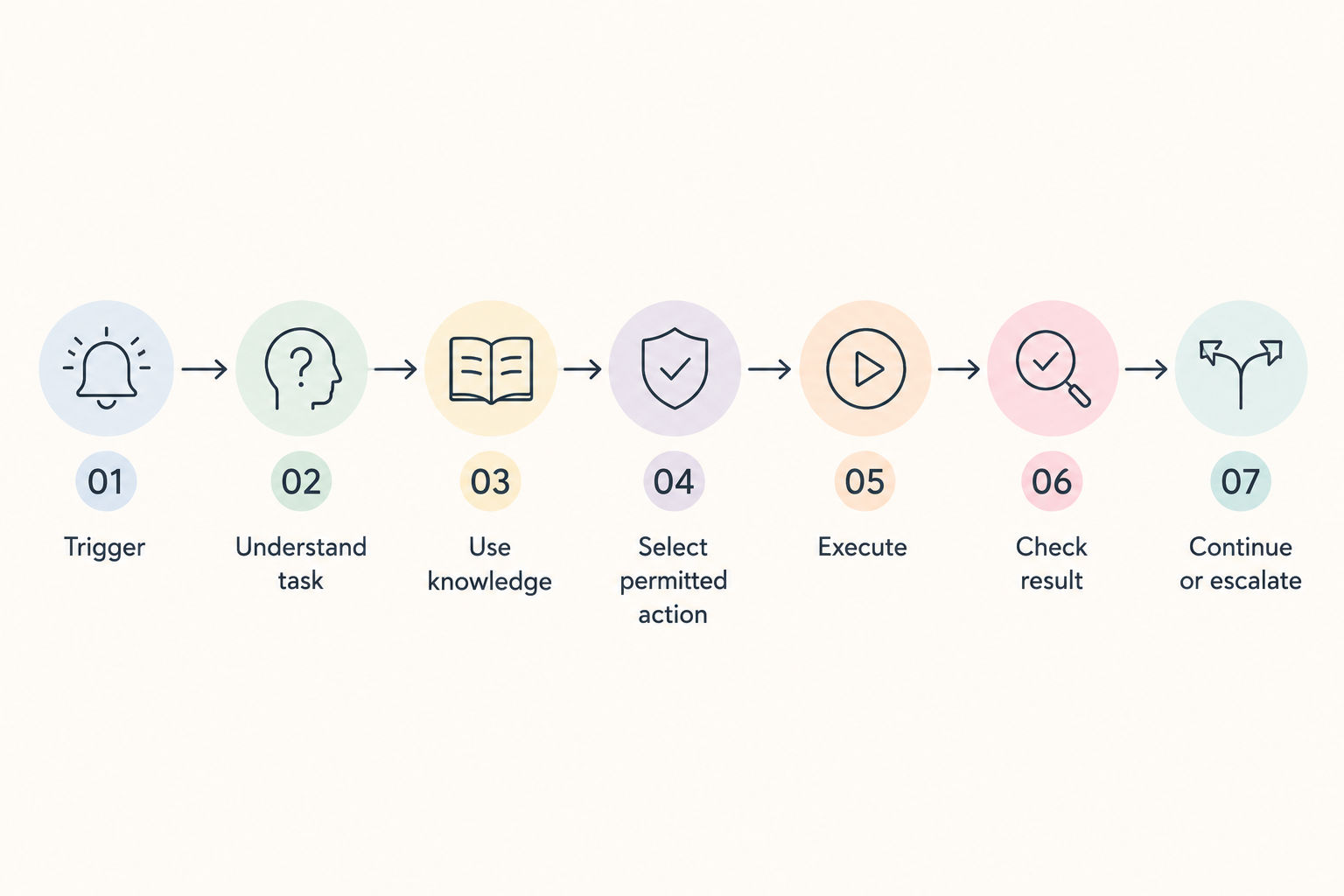
Microsoft agents can operate with triggers, tools, actions, and guardrails rather than requiring a new user instruction for every step. Microsoft’s agent guidance describes agents as systems that use triggers, processes, skills, and connected tools to complete work.
The agent can:
- Interpret the task
- Access approved information
- Select an available tool
- Perform permitted actions
- Follow defined policies
- Escalate when required
- Continue toward the intended outcome
How a ChatGPT workflow handles a task
A simplified flow is:
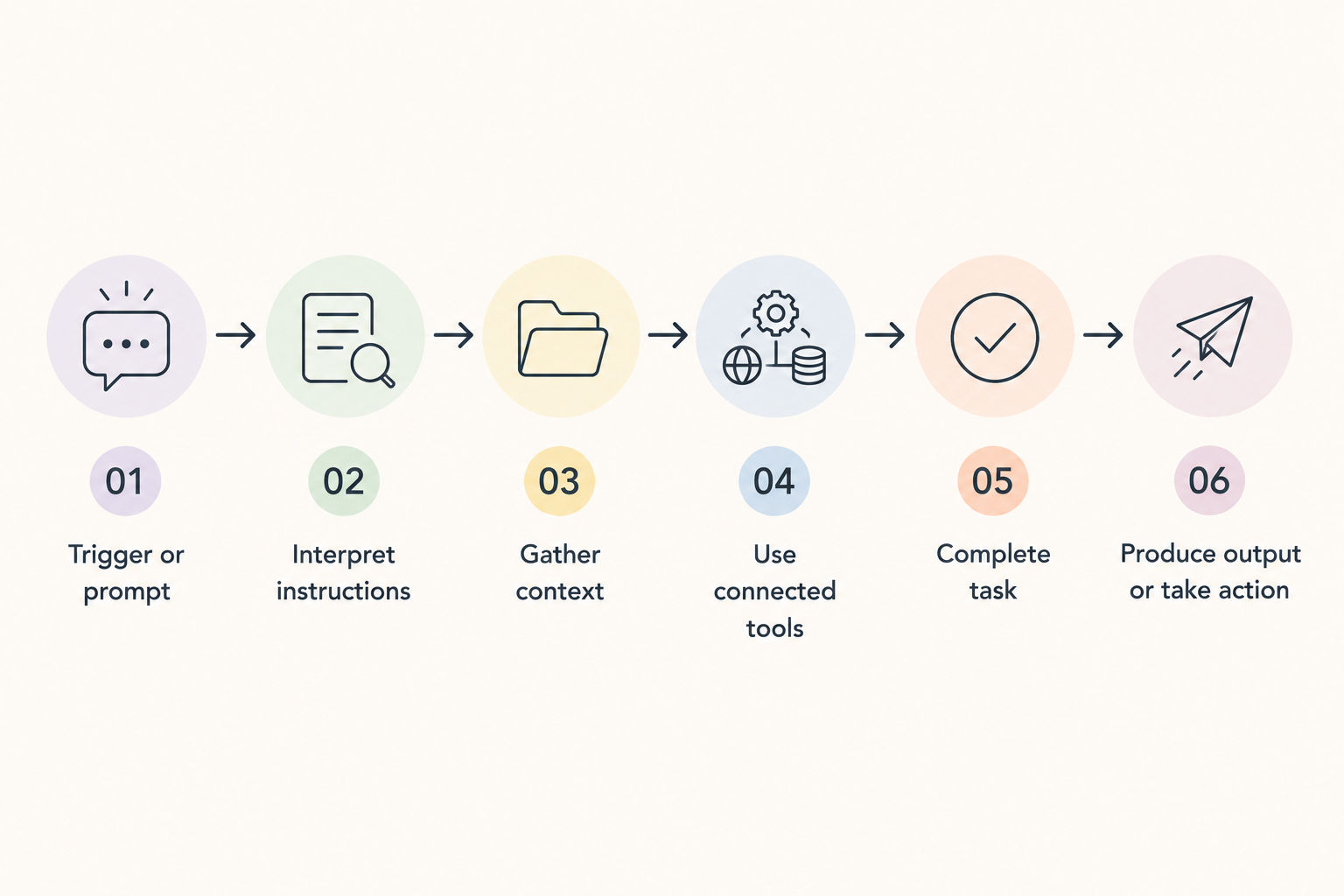
Current ChatGPT workspace agents can run manually, on a schedule, or through API triggers. They can also connect to applications and tools and be shared across a workspace.
This means ChatGPT workflows can also support multi step and increasingly autonomous work rather than being limited to basic sequential prompts.
Where the workflows differ
The biggest consideration is the decision authority and ecosystem fit.
A traditional workflow usually follows explicitly defined steps. An agent can interpret context and make bounded decisions about what to do next within its instructions, tools, permissions, and guardrails.
Both approaches can:
- Use AI models
- Connect to tools
- Process information
- Perform multiple steps
- Automate recurring work
- Apply permissions and controls
The difference is often found in how much flexibility the agent has, which systems it can access, and how the organization governs its actions.
Discover how Microsoft Copilot uses Agentic AI to streamline tasks and automate workflows.
How Do Microsoft Agentic AI and ChatGPT Workflows Compare Real Business Tasks?
There is no universal winner in Microsoft agentic AI vs ChatGPT workflows. The better fit depends on the business process, existing technology environment, required integrations, and level of autonomy.
| Business task | Better fit | Why |
| Employee IT request triage | Microsoft Agentic AI | Strong fit for event driven enterprise processes |
| Customer service escalation | Microsoft Agentic AI | Suitable for multi step actions and system integration |
| Research report creation | ChatGPT workflow | Strong fit for knowledge intensive research and document creation |
| Competitive research | ChatGPT workflow | Useful for research, synthesis, and structured reporting |
| Sales led qualification | Microsoft Agentic AI | Strong fit when business system integration is required |
| Recurring content or report preparation | ChatGPT workflow | Suitable for repeatable knowledge workflows |
| Cross system business process | Microsoft Agentic AI | Useful when multiple enterprise systems must be orchestrated |
These are fit based examples rather than absolute performance claims. Both platforms can support overlapping workflows, and the actual choice depends on configuration, available tools, permissions, and organizational requirements.
Learn how Microsoft Agentic AI can simplify business processes and improve workflow automation.
Microsoft Agentic AI vs ChatGPT Workflows: Which Should You Choose?
Choosing between the two requires looking at the environment in which the AI will operate rather than focusing only on autonomy.
For Microsoft agentic AI vs ChatGPT workflows, the most important decision factors are:
- Existing technology ecosystem
- Required integrations
- Level of AI autonomy
- Governance requirements
- Workflow complexity
- Deployment scale
- Technical resources
- Type of work being automated
Choose Microsoft Agentic AI If:
Microsoft Agentic AI may be a stronger fit when:
- Enterprise automation is the primary requirement
- Microsoft business systems are already widely used
- Multiple systems need to work together
- AI needs to perform permitted actions
- Strong governance is required
- Identity and access controls are important
- Enterprise scale and monitoring matter
Microsoft provides enterprise controls around permissions, agent identity, policies, monitoring, and approved actions.
Choose ChatGPT Workflows If:
ChatGPT workflows may be a stronger fit when:
- Structured AI tasks are the priority
- Research and knowledge work are central
- Flexible AI assistance is required
- Repeatable workflows need to be created quickly
- Connected applications are important
- Scheduled or API triggered work is useful
- Teams want shared AI agents for recurring tasks
OpenAI currently supports workspace agents that can be shared, connected to tools, scheduled, and triggered through APIs.
Conclusion
The key difference in Microsoft agentic AI vs ChatGPT workflows lies in their use cases, integrations, and level of control. Microsoft Agentic AI suits enterprise automation, governance, and Microsoft ecosystem integration, while ChatGPT workflows are well suited for research, knowledge work, and flexible AI tasks.
The right choice depends on the workflow, systems involved, and level of control required.
Contact our upGrad KnowledgeHut experts for personalized guidance on choosing the right course, career path, and certification to achieve your goals.
Frequently Asked Questions (FAQs)
Which platform offers better control over AI agent permissions?
Microsoft Agentic AI provides strong enterprise controls for agent identity, permissions, policies, and access. ChatGPT workflows also support workspace permissions and access controls. The better choice depends on the organization’s security and governance requirements.
How do Microsoft Agentic AI and ChatGPT workflows handle human approval?
Both can incorporate human oversight into workflows. Microsoft Agentic AI supports approval and governance controls for sensitive actions, while ChatGPT workflows can include approval checkpoints where required. The exact process depends on the configuration.
Which platform is better for event triggered AI workflows?
Microsoft Agentic AI is well suited to event driven enterprise processes involving triggers, business systems, and automated actions. ChatGPT workspace agents can also be scheduled or triggered through APIs, making them suitable for recurring and event-based tasks.
Can Microsoft Agentic AI and ChatGPT workflows handle exceptions differently?
Yes. Both can be designed to respond to unexpected situations, but the approach depends on the workflow configuration. Microsoft agents can follow defined escalation and governance rules, while ChatGPT workflows can use instructions, approvals, or tool-based actions to handle exceptions.
How do Microsoft Agentic AI and ChatGPT workflows handle failed tasks?
Both can be configured to identify incomplete or unsuccessful tasks and determine the next step. Microsoft Agentic AI can use defined processes and escalation controls, while ChatGPT workflows can retry, adjust the task, request approval, or produce an output based on the configured workflow.
Which platform is easier to scale from one workflow to multiple AI agents?
Microsoft Agentic AI is designed with enterprise scale and multiple agent scenarios in mind. ChatGPT also supports shared workspace agents and repeatable workflows. The easier option depends on the organization’s existing tools, technical resources, and governance model.
How do Microsoft Agentic AI and ChatGPT workflows manage sensitive business data?
Both require appropriate permissions, access controls, and organizational policies when handling sensitive information. Microsoft provides enterprise governance capabilities, while ChatGPT workspace controls can manage access to connected applications and data based on the configured environment.
Which platform is better for workflows that require human escalation?
Microsoft Agentic AI can be a strong fit for enterprise workflows requiring defined escalation paths and controlled actions. ChatGPT workflows can also include human approval and intervention. The better option depends on the complexity and governance requirements of the process.
How do Microsoft Agentic AI and ChatGPT workflows differ in workflow monitoring?
Microsoft provides enterprise focused monitoring and observability capabilities for agents and their activities. ChatGPT workspace agents also provide controls and monitoring features. The appropriate choice depends on the level of visibility and governance required.
Which platform is more suitable for mission critical business processes?
Microsoft Agentic AI may be more suitable when mission critical processes require enterprise governance, permissions, monitoring, and integration with business systems. ChatGPT workflows can support important business tasks, but suitability depends on the specific workflow, controls, and deployment requirements.
1639 articles published
KnowledgeHut is an outcome-focused global ed-tech company. We help organizations and professionals unlock excellence through skills development. We offer training solutions under the people and proces...
Get Free Consultation
By submitting, I accept the T&C and
Privacy Policy