
- Blog Categories
- Project Management
- Agile Management
- IT Service Management
- Cloud Computing
- Business Management
- BI And Visualisation
- Quality Management
- Cyber Security
- DevOps
- Most Popular Blogs
- PMP Exam Schedule for 2025: Check PMP Exam Date
- Top 60+ PMP Exam Questions and Answers for 2025
- PMP Cheat Sheet and PMP Formulas To Use in 2025
- What is PMP Process? A Complete List of 49 Processes of PMP
- Top 15+ Project Management Case Studies with Examples 2025
- Top Picks by Authors
- Top 170 Project Management Research Topics
- What is Effective Communication: Definition
- How to Create a Project Plan in Excel in 2025?
- PMP Certification Exam Eligibility in 2025 [A Complete Checklist]
- PMP Certification Fees - All Aspects of PMP Certification Fee
- Most Popular Blogs
- CSM vs PSM: Which Certification to Choose in 2025?
- How Much Does Scrum Master Certification Cost in 2025?
- CSPO vs PSPO Certification: What to Choose in 2025?
- 8 Best Scrum Master Certifications to Pursue in 2025
- Safe Agilist Exam: A Complete Study Guide 2025
- Top Picks by Authors
- SAFe vs Agile: Difference Between Scaled Agile and Agile
- Top 21 Scrum Best Practices for Efficient Agile Workflow
- 30 User Story Examples and Templates to Use in 2025
- State of Agile: Things You Need to Know
- Top 24 Career Benefits of a Certifed Scrum Master
- Most Popular Blogs
- ITIL Certification Cost in 2025 [Exam Fee & Other Expenses]
- Top 17 Required Skills for System Administrator in 2025
- How Effective Is Itil Certification for a Job Switch?
- IT Service Management (ITSM) Role and Responsibilities
- Top 25 Service Based Companies in India in 2025
- Top Picks by Authors
- What is Escalation Matrix & How Does It Work? [Types, Process]
- ITIL Service Operation: Phases, Functions, Best Practices
- 10 Best Facility Management Software in 2025
- What is Service Request Management in ITIL? Example, Steps, Tips
- An Introduction To ITIL® Exam
- Most Popular Blogs
- A Complete AWS Cheat Sheet: Important Topics Covered
- Top AWS Solution Architect Projects in 2025
- 15 Best Azure Certifications 2025: Which one to Choose?
- Top 22 Cloud Computing Project Ideas in 2025 [Source Code]
- How to Become an Azure Data Engineer? 2025 Roadmap
- Top Picks by Authors
- Top 40 IoT Project Ideas and Topics in 2025 [Source Code]
- The Future of AWS: Top Trends & Predictions in 2025
- AWS Solutions Architect vs AWS Developer [Key Differences]
- Top 20 Azure Data Engineering Projects in 2025 [Source Code]
- 25 Best Cloud Computing Tools in 2025
- Most Popular Blogs
- Company Analysis Report: Examples, Templates, Components
- 400 Trending Business Management Research Topics
- Business Analysis Body of Knowledge (BABOK): Guide
- ECBA Certification: Is it Worth it?
- Top Picks by Authors
- Top 20 Business Analytics Project in 2025 [With Source Code]
- ECBA Certification Cost Across Countries
- Top 9 Free Business Requirements Document (BRD) Templates
- Business Analyst Job Description in 2025 [Key Responsibility]
- Business Analysis Framework: Elements, Process, Techniques
- Most Popular Blogs
- Best Career options after BA [2025]
- Top Career Options after BCom to Know in 2025
- Top 10 Power Bi Books of 2025 [Beginners to Experienced]
- Power BI Skills in Demand: How to Stand Out in the Job Market
- Top 15 Power BI Project Ideas
- Top Picks by Authors
- 10 Limitations of Power BI: You Must Know in 2025
- Top 45 Career Options After BBA in 2025 [With Salary]
- Top Power BI Dashboard Templates of 2025
- What is Power BI Used For - Practical Applications Of Power BI
- SSRS Vs Power BI - What are the Key Differences?
- Most Popular Blogs
- Data Collection Plan For Six Sigma: How to Create One?
- Quality Engineer Resume for 2025 [Examples + Tips]
- 20 Best Quality Management Certifications That Pay Well in 2025
- Six Sigma in Operations Management [A Brief Introduction]
- Top Picks by Authors
- Six Sigma Green Belt vs PMP: What's the Difference
- Quality Management: Definition, Importance, Components
- Adding Green Belt Certifications to Your Resume
- Six Sigma Green Belt in Healthcare: Concepts, Benefits and Examples
- Most Popular Blogs
- Latest CISSP Exam Dumps of 2025 [Free CISSP Dumps]
- CISSP vs Security+ Certifications: Which is Best in 2025?
- Best CISSP Study Guides for 2025 + CISSP Study Plan
- How to Become an Ethical Hacker in 2025?
- Top Picks by Authors
- CISSP vs Master's Degree: Which One to Choose in 2025?
- CISSP Endorsement Process: Requirements & Example
- OSCP vs CISSP | Top Cybersecurity Certifications
- How to Pass the CISSP Exam on Your 1st Attempt in 2025?
- Most Popular Blogs
- Top 7 Kubernetes Certifications in 2025
- Kubernetes Pods: Types, Examples, Best Practices
- DevOps Methodologies: Practices & Principles
- Docker Image Commands
- Top Picks by Authors
- Best DevOps Certifications in 2025
- 20 Best Automation Tools for DevOps
- Top 20 DevOps Projects of 2025
- OS for Docker: Features, Factors and Tips
- More
- Agile & PMP Practice Tests
- Agile Testing
- Agile Scrum Practice Exam
- CAPM Practice Test
- PRINCE2 Foundation Exam
- PMP Practice Exam
- Cloud Related Practice Test
- Azure Infrastructure Solutions
- AWS Solutions Architect
- IT Related Pratice Test
- ITIL Practice Test
- Devops Practice Test
- TOGAF® Practice Test
- Other Practice Test
- Oracle Primavera P6 V8
- MS Project Practice Test
- Project Management & Agile
- Project Management Interview Questions
- Release Train Engineer Interview Questions
- Agile Coach Interview Questions
- Scrum Interview Questions
- IT Project Manager Interview Questions
- Cloud & Data
- Azure Databricks Interview Questions
- AWS architect Interview Questions
- Cloud Computing Interview Questions
- AWS Interview Questions
- Kubernetes Interview Questions
- Web Development
- CSS3 Free Course with Certificates
- Basics of Spring Core and MVC
- Javascript Free Course with Certificate
- React Free Course with Certificate
- Node JS Free Certification Course
- Data Science
- Python Machine Learning Course
- Python for Data Science Free Course
- NLP Free Course with Certificate
- Data Analysis Using SQL
- Home
- Blog
- Business Intelligence And Visualization
- What Is Microsoft Fabric? How It Relates to Power BI
What Is Microsoft Fabric? How It Relates to Power BI
Updated on Oct 21, 2026
Share:
Table of Contents
View all
Quick Overview
- Microsoft Fabric is an end-to-end data analytics platform that brings data integration, engineering, warehousing, data science, real-time analytics, and business intelligence into one environment.
- Key Components of Microsoft Fabric: Data Factory, Data Engineering, Data Warehouse, Data Science, Real-Time Intelligence, Power BI, and Copilot support different stages of data processing and analysis. OneLake provides a shared storage foundation across supported workloads.
- Microsoft Fabric vs. Power BI: Microsoft Fabric supports the broader data analytics lifecycle, from data collection and preparation to analysis and reporting. Power BI focuses on business intelligence, interactive reports, dashboards, and data visualization.
- This guide explains what Microsoft Fabric is, its key components and features, how it works, and how it relates to Power BI for integrated data analytics and business intelligence.
Professionals looking to understand how AI transforms data analytics and business intelligence can explore the AI Masters Program to build knowledge of artificial intelligence, machine learning, and AI-driven insights for smarter, data-informed decision-making.
Last Few Days to Save Up To 90% on Career Transformation
Ends December 1 – Don't Miss Out!
What is Microsoft Fabric?
Microsoft Fabric is an end to end data analytics platform from Microsoft that brings data integration, engineering, warehousing, data science, real time analytics, and business intelligence into one environment. It helps organizations collect data from different sources, prepare it for analysis, and turn it into useful insights without managing separate tools for every stage.
When exploring what Microsoft Fabric is, it helps to understand that the platform combines several analytics workloads with shared data storage and governance capabilities. Power BI is part of this environment and supports reporting, dashboards, and business intelligence.
How Microsoft Fabric works as an end to end data analytics platform
Microsoft Fabric connects the different stages of working with data, from collecting raw information to presenting business insights.
Its integrated environment helps teams:
- Collect data: Bring information in from databases, applications, files, and other sources.
- Prepare data: Clean, transform, and organize information for analysis.
- Store data: Use shared storage to make data accessible across different workloads.
- Analyze data: Apply SQL queries, engineering workflows, machine learning, and real time analytics.
- Visualize insights: Create interactive reports and dashboards using Power BI.
What is OneLake in Microsoft Fabric?
OneLake is the unified data lake built into Microsoft Fabric. It acts as a shared storage layer where data from different sources can be organized and accessed by multiple Fabric workloads.
OneLake helps simplify data management by providing a common foundation for analytics rather than requiring every team to maintain separate storage environments.
Key features include:
- Centralized data access: Different Fabric workloads can work with data stored in the shared environment.
- Open data formats: Fabric supports formats such as Delta Lake and Parquet for relevant data workloads.
- Reduced duplication: Features such as shortcuts can provide access to data stored in supported locations without copying it unnecessarily.
- Shared analytics foundation: Data engineers, analysts, and data scientists can work with the same underlying data.
Also read: Which Microsoft Tools Are Used for Agentic AI Development?
What are the key components of Microsoft Fabric?
Microsoft Fabric includes several workloads designed for different data tasks. Each workload has a specific purpose, but they work together within the same analytics environment.
Understanding these components makes it easier to see how the platform supports both technical data teams and business users.
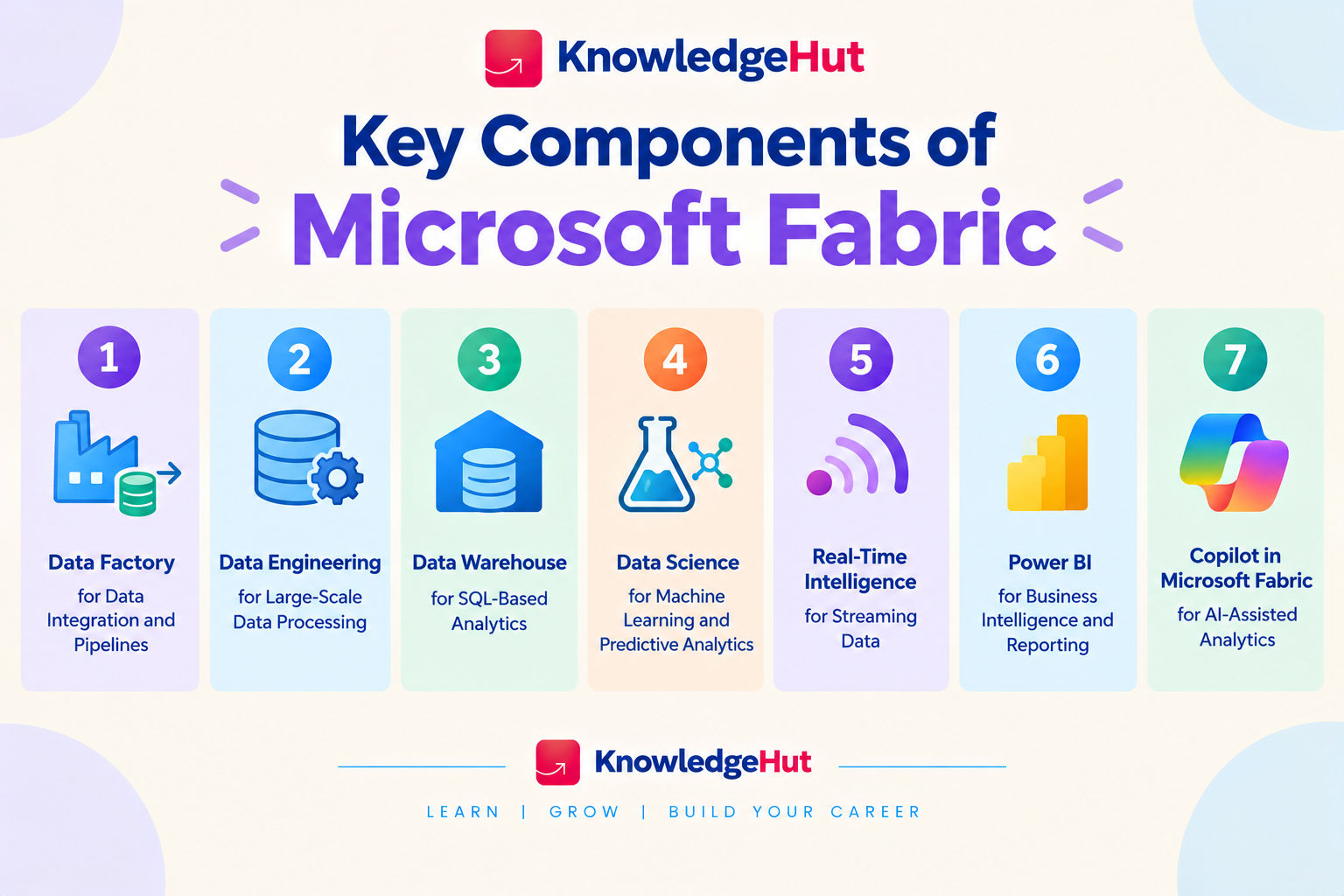
1. Data Factory for data integration and pipelines
Data Factory helps organizations connect to data sources and move information into their analytics environment. It supports data pipelines and dataflows for collecting, transforming, and preparing data.
Its main capabilities include:
- Connecting to databases, cloud services, applications, and files.
- Scheduling and orchestrating data movement.
- Automating repeatable data preparation tasks.
- Combining information from multiple sources for analysis.
2. Data Engineering for large scale data processing
The Data Engineering workload supports the preparation and processing of large datasets. It uses Apache Spark and lakehouse capabilities to help data teams transform raw information into structured, analysis ready data.
Common tasks include:
- Cleaning and standardizing large datasets.
- Combining data from different systems.
- Processing structured and semi structured information.
- Creating reusable data transformation workflows.
3. Data Warehouse for SQL based analytics
The Data Warehouse workload provides a relational data warehouse environment for structured data analysis using SQL. It is suited to organizations that need to query, model, and report on large amounts of business data.
Its capabilities include:
- Writing SQL queries to analyze business information.
- Organizing data into tables and relational structures.
- Supporting analytical models and reporting workflows.
- Integrating warehouse data with Power BI.
4. Data Science for machine learning and predictive analytics
The Data Science workload helps data scientists explore data, develop machine learning models, and evaluate predictions. It supports notebook based development and integration with the broader Fabric environment.
Teams can use it to:
- Explore and understand datasets.
- Prepare features for machine learning.
- Train and evaluate predictive models.
- Develop experiments and machine learning workflows.
- Use analytical findings to support business decisions.
5. Real Time Intelligence for streaming data
Real Time Intelligence helps organizations analyze data as it arrives rather than waiting for scheduled reporting cycles. It supports the ingestion, processing, exploration, and monitoring of streaming events.
Typical uses include:
- Monitoring live operational data.
- Identifying unusual patterns or changes.
- Tracking events as they happen.
- Supporting alerts and time sensitive decisions.
6. Power BI for business intelligence and reporting
Power BI is Microsoft's business intelligence platform for analyzing data and presenting it through interactive reports and dashboards. Within Microsoft Fabric, it works with data from different workloads to make insights accessible to business users.
Power BI supports:
- Creating interactive reports and dashboards.
- Building data models and defining business measures.
- Exploring trends through charts and visualizations.
- Sharing reports with authorized users.
- Monitoring key performance indicators.
7. Copilot in Microsoft Fabric for AI assisted analytics
Copilot capabilities in Microsoft Fabric use AI to help users perform certain analytics tasks, depending on the workload and available features. They can assist with activities such as generating code, exploring data, and creating report content.
Potential uses include:
- Helping users write or understand SQL queries.
- Assisting with code and data transformation tasks.
- Supporting report creation and data exploration.
- Summarizing findings or helping users interpret information.
Professionals looking to turn data insights into customer-focused solutions can explore the PG Certificate in AI Powered Product and Design Thinking to learn how AI-driven insights and design thinking support product innovation, user-centric decisions, and better business outcomes.
How is Microsoft Fabric related to Power BI?
Microsoft Fabric and Power BI are closely connected, but they are not the same thing. Power BI focuses on business intelligence and visualization, while Microsoft Fabric provides a broader environment for data integration, storage, engineering, analytics, and reporting.
This relationship allows organizations to prepare data and create reports within a more connected workflow.
How Power BI works within Microsoft Fabric
Power BI is one of the core workloads available in Microsoft Fabric. It allows users to create data models, build reports, and share insights using data available across the platform.
For example, a Power BI report can use data prepared in a Fabric lakehouse or warehouse. This helps business users analyze information without needing to perform every data preparation task themselves.
Power BI also provides semantic models that define relationships, calculations, and business measures. These models help maintain consistent definitions across reports and support more reliable analysis.
How Microsoft Fabric connects data engineering to Power BI reports
Microsoft Fabric connects data preparation with reporting through shared storage and integrated workloads. Data engineers can prepare information in a lakehouse or warehouse, after which Power BI can use it for analysis and visualization.
A typical workflow looks like this:
- Data Factory collects data from relevant sources.
- Data Engineering transforms and cleans the information.
- OneLake stores the data for use across supported workloads.
- A warehouse or lakehouse organizes data for analytical needs.
- Power BI connects to the prepared data and creates reports.
- Business users explore the reports to understand performance and trends.
Also read: What is Microsoft Agentic AI and How Does It Work?
Microsoft Fabric vs. Power BI: Key differences
The main difference is the scope of each platform. Power BI is focused on business intelligence, while Fabric covers a broader range of data and analytics activities.
Feature |
Microsoft Fabric |
Power BI |
| Primary purpose | End to end data analytics | Business intelligence and visualization |
| Data integration | Includes Data Factory capabilities | Connects to data sources and supports data preparation features |
| Data storage | Includes OneLake and supports lakehouse and warehouse workloads | Uses semantic models and connects to underlying data sources |
| Data engineering | Supports Spark based processing and lakehouse workflows | Not its primary purpose |
| Data science | Provides notebooks and machine learning capabilities | Focuses on reporting and analytical exploration |
| Real time analytics | Includes Real Time Intelligence workloads | Can visualize supported real time or streaming data |
| Reporting | Includes Power BI as a workload | Core capability |
Also read: Microsoft Agentic AI Learning Roadmap for Beginners in 2026
How does Microsoft Fabric work?
Microsoft Fabric works by connecting data ingestion, preparation, storage, analysis, and visualization within one environment. Teams can bring data in from multiple sources, organize it in OneLake, process it through the appropriate workload, and use Power BI to communicate the results.
The exact workflow depends on the data sources and business requirements, but the main stages remain similar.
1. Connect and ingest data from multiple sources
The first step is to collect data from the systems an organization uses. These may include databases, business applications, cloud platforms, files, and streaming sources.
Data Factory helps teams connect to supported sources and build pipelines that move information into Fabric. Data can be ingested in batches or through supported real time approaches, depending on the use case.
At this stage, teams should consider data quality, access permissions, refresh frequency, and the information needed for analysis.
2. Transform and store data in OneLake
After ingestion, data often needs to be cleaned, standardized, combined, or reorganized before it can support analysis.
Teams can use Data Factory, Data Engineering, and other suitable Fabric capabilities to prepare the data. OneLake provides the shared storage foundation, while lakehouses and warehouses support different data organization and analysis needs.
The choice depends on whether the workload requires flexible data processing, structured SQL analytics, or a combination of both.
3. Analyze data using Fabric workloads
Once the data is prepared, teams can select the workload that fits their requirements.
- Data Engineering: Processes and transforms large datasets.
- Data Warehouse: Supports structured analytics using SQL.
- Data Science: Develops machine learning models and predictive analysis.
- Real Time Intelligence: Analyzes streaming events and time sensitive information.
4. Build interactive reports and dashboards with Power BI
The final stage is to turn analytical results into information that business users can understand and act on.
Power BI connects to suitable data sources and semantic models to create reports and dashboards. Users can filter results, compare performance, explore trends, and monitor business metrics.
For effective reporting, teams should validate the underlying data, define measures consistently, and ensure that users have appropriate access to reports.
Professionals looking to understand how AI enhances data analytics can explore Generative AI and Prompt Engineering to learn how to use AI tools to analyze data, summarize insights, and generate reports that support smarter decision-making in business intelligence.
Conclusion
Microsoft Fabric is a useful option for organizations that want to bring data integration, engineering, storage, analytics, and business intelligence into one platform. Power BI remains the reporting and visualization component, while Fabric extends the workflow to cover more of the data lifecycle.
For teams that mainly need dashboards and reports, Power BI may be enough. Organizations managing complex data pipelines or multiple analytics workloads may benefit from Fabric's integrated environment. The right choice depends on existing tools, data complexity, team skills, and the level of integration required.
Have A Query? Get in Touch With Our Customer Support | upGrad KnowledgeHut
Frequently Asked Questions (FAQs)
1. What is Microsoft Fabric used for?
Microsoft Fabric is an analytics platform used to collect, store, process, analyze, and visualize data in one environment. It helps organizations combine data from different sources, run analytics, build machine learning solutions, and create Power BI reports. It also uses OneLake to simplify data access across workloads.
2. What is the difference between Microsoft Fabric and Power BI?
Microsoft Fabric supports the broader data analytics process, including data integration, engineering, warehousing, data science, and real-time analytics. Power BI focuses mainly on business intelligence, data visualization, and reporting. Power BI is one of the workloads available within Microsoft Fabric, so the two can work together.
3. How much does Microsoft Fabric cost?
Microsoft Fabric pricing depends on the capacity selected, usage, and licensing requirements. Organizations can choose pay-as-you-go capacity or reservations, while eligible users can explore a free trial. Additional Power BI licenses may be needed to publish and share reports, depending on the setup.
4. What are the main components of Microsoft Fabric?
Microsoft Fabric includes workloads such as Data Factory, Data Engineering, Data Warehouse, Data Science, Real-Time Intelligence, and Power BI. Each supports a different stage of the analytics process, from moving and preparing data to analyzing results and building reports. OneLake provides shared data storage across these workloads.
5. What is Microsoft Fabric in Power BI?
Microsoft Fabric in Power BI refers to the connected analytics experience where Power BI works alongside other Fabric workloads. Teams can use data prepared or stored in Fabric to create reports and dashboards in Power BI. This integration helps connect data engineering and analytics with business reporting.
6. What is Microsoft Fabric vs Snowflake?
Microsoft Fabric is a unified analytics platform that includes data engineering, data integration, data science, and business intelligence. Snowflake is a cloud data platform focused on data storage, processing, sharing, and analytics. The right choice depends on an organization's existing technology, workloads, governance needs, and preferred tools; they can also be used together.
7. Is Microsoft Fabric part of Azure?
Microsoft Fabric is a software-as-a-service analytics platform from Microsoft, and its capacity can be purchased through Microsoft Azure. However, Fabric provides its own integrated environment for data engineering, analytics, and reporting rather than requiring users to assemble each capability separately. Its licensing and capacity model determine the cost of using its workloads.
8. What is OneLake in Microsoft Fabric?
OneLake is the centralized, logical data lake used across Microsoft Fabric. It allows different Fabric workloads to access and work with data through a shared storage layer, reducing the need to manage separate data stores for every analytics task. This makes it easier for teams to reuse data across engineering, science, and Power BI reporting.
9. Is Microsoft Fabric free to use?
Microsoft Fabric offers a free trial that lets users explore its workloads with trial capacity. However, ongoing use of Fabric workloads may require paid capacity, and some Power BI publishing or sharing activities require additional licenses. The total cost depends on the workload, capacity, and licensing arrangement.
10. How do I log in to Microsoft Fabric?
To access Microsoft Fabric, visit app.fabric.microsoft.com and sign in with your Microsoft work or school account. Your organization’s administrator may need to enable Fabric access and assign the appropriate permissions or licenses. Once signed in, you can open a workspace and use the Fabric workloads available to your account.
1641 articles published
KnowledgeHut is an outcome-focused global ed-tech company. We help organizations and professionals unlock excellence through skills development. We offer training solutions under the people and proces...
Get Free Consultation
By submitting, I accept the T&C and
Privacy Policy