
- Home
- Blog
- Cloud Computing
- AWS for WordPress: How to Setup & Install [With Best Practices]
AWS for WordPress: How to Setup & Install [With Best Practices]
Updated on Mar 19, 2024 | 9 min read | 3.33K+ views
Share:
Table of Contents
View all
WordPress has become a leader as it maintains the leading positions, with over a million sites being run on the platform across the world. If you’re looking forward to taking your WordPress website to the next level by fixing its performance, scalability, and security issues, Amazon Web Services (AWS) is your perfect buddy.
WordPress powers a whopping 43% (Source: themeisle) of the world’s online presence, having its robust and versatile platform that is widely used on the net. AWS, with its strong infrastructure and all-inclusive product portfolio, supports a multitude of companies, providing industry-leading reliability and scalability. In this blog, I will explore the new possibilities that come with AWS for Wordpress, which can help you charge your digital presence with full performance and functioning.
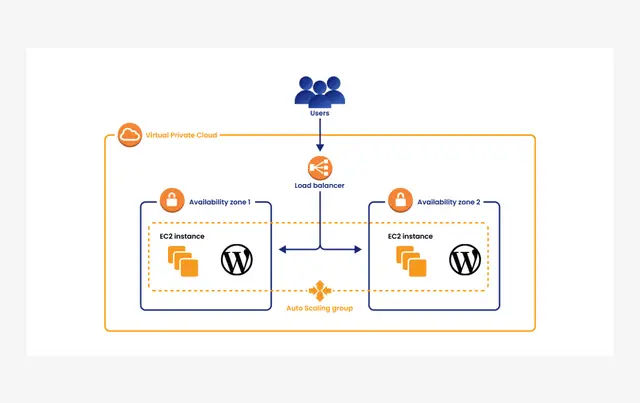
Logicata
Master the Right Skills & Boost Your Career
Avail your free 1:1 mentorship session
Why AWS for WordPress?
AWS is a cloud platform that provides a variety of convenient services that allow companies and individuals to store data and run applications without incurring capital expenses. Among numerous other applications, we can also run WordPress websites on AWS. But why should you choose it? Let me explain you some reasons:
- Scalability: AWS with WordPress can help you have the ultimate scalability, which lets your WordPress site handle spikes in traffic and expenditures without any sweat. Using Amazon EC2 Auto Scaling and Amazon RDS, you can autoscale dynamically and adjust resources according to demand without completely over-provisioning resources.
- Reliability and High Availability: Doubling on AWS’s global infrastructure, your WordPress site can enjoy its high redundancy and availability. By spreading your resources across all the Availability Zones, AWS reduces downtime and increases the resistant power of your website.
- Security: The best feature that AWS provides is its security assurance! So, by using AWS for WordPress hosting, you can benefit from a wide range of security features, including DDoS protection, the deployment of encryption services, and Amazon Web Services Identity and Access Management (IAM).
- Moreover, AWS web hosting WordPress will help you shield your website against security threats and lapses, thus giving you peace of mind and time to focus on content creation without having to think about security issues.
- Cost Efficiency: Self-adjusted AWS pay-as-you-go pricing enables cost optimization for your WordPress site. With this payment model, you pay for the resources only when they are used; therefore, budgeting is flexible, and the cost is judiciously used. Using solutions like AWS Cost Explorer, you can track and analyze your costs, which are, in turn, important for the decisions that address cost optimization.
3 Options for Running WordPress on AWS
Before I start with the steps of AWS for Wordpress, you need to know how you can run Wordpress on AWS. If you’re unaware of any of the ways below, you can take Amazon AWS Cloud training to help clear your basics before getting started.
1. Amazon Lightsail
Amazon Lightsail is a platform that is designed in tune with the need for simplicity and is geared towards individual and small businesses.
Lightsail offers an integrated environment that is complete with necessary services such as computing, Storage, and Network, which are bundled together. This approach does away with unnecessary complications, hence easing the management of the site by focusing on content creation and not infrastructure configuration.
2. Amazon EC2
Being familiar with the Amazon EC2 environment, one gains the flexibility to customize its WordPress features, including the server configuration fully. This method is the most preferable for customers with particular requirements, as they can pick their operating system, instance type, and other tool settings according to their suitability.
3. AWS Marketplace
AWS Marketplace houses much WordPress available from different third parties. Most solutions in the AWS Marketplace update you only for the infrastructure and the tools you consume. This versatility results in cost efficiency and facilitates users to make changes as their WordPress site develops through different stages of its life cycle.
How to Setup WordPress in AWS?
To proceed with AWS for WordPress, let us understand the following step-by-step guide on how to install WordPress on AWS:
Step 1: Register with AWS
To begin with, how to host Wordpress on AWS, you need to register with AWS.
If you’re considering AWS WordPress hosting costs, you need not worry. When you register with AWS, the process includes sending you an SMS to verify your account. You will be charged $1 only to verify your credit card and enjoy a 12-month free trial!
Step 2: AWS Management Console:
First, log into your AWS account and start the AWS Management Console.
Step 3: Create an Amazon EC2 Instance:
Once you are in your AWS Management Console, locate EC2 under Compute and double-click on it to open the EC2 dashboard. Click Launch Instance here to create and configure your EC2 instance.
Step 4: Deploy WordPress on Your EC2:
Now that the LAMP stack has been brought up, WordPress needs to be installed.
AWS Marketplace offers many Amazon Machine Images (AMI) that allow you to install the most popular applications easily. The AMIs are usually pre-set with the best settings for running on AWS. One such AMI will be employed to install WordPress.
Choose the AWS Marketplace from the left menu, enter “WordPress” in the search field, and click on the WordPress Listing powered by BitNami that comes up, after which you press the blue Select button.
Step 5: Identify the Pricing of Your Instance:
You will be shown a very detailed pricing page. In this case, the price will be zero dollars, which will not depend on the size of the instance you choose. Scroll down to the end and select Continue.
In this guide, I will use a free-tier eligible t2 instance. Click on t2 in the Type column, then click Next: Customize Instant Details. It might take a while to load.
On the following screens, click Next, Then Add Storage, and so on: Tag Instance.
Step 6: Instantiate the Key and Value Pair:
Here, you need to name your instance. Put Name in the Key box and WordPress in the Value box. Press Review and Launch to proceed.
Step 7: Look at the Instance Over One More Time:
Once again, you can check your instance configurations before you click Launch. This will launch your WordPress Amazon EC2 instance.
Step 8: Setting Up Key-Pair for SSH:
The next and final step in installing WordPress in AWS is setting up key pairs. Key pairs are the way you can access your EC2 instances using any terminal program that supports the SSH protocol. It is not necessary if you do not know anything about SSH. Remember that you only have to have a key pair to log into your terminal.
Choose ‘Proceed’ without the key pair, and select the box to confirm that you understand that you cannot access an EC2 instance with a key.
Install WordPress Website on AWS Using Cloudways
Cloudways provides an effortless way to install WordPress on AWS, enjoying the potency of AWS and the simplicity hosted by the managed hosting platform of Cloudways. Here’s a concise guide to help you set up WordPress on AWS via Cloudways:
- Sign Up and Launch a Server: Start with creating a Cloudways account. After a successful login, start the server launching process. Choose AWS as your cloud provider and select your preferred data center.
- Configure Server Settings: Alter server specifications like server size, storage, and bandwidth. Cloudways makes the AWS server configuration easier, enabling you to change resources according to your website’s needs.
- Select the Application: Select the application you want to install as WordPress. Cloudways offers a pre-configured environment, thus removing both installation and server setup complexities.
- Launch the Server: Press the “Launch” button, and Cloudways will take care of the server's deployment on AWS. This method involves the implementation of needed software, ensuring a friendly setup.
- Access Cloudways Dashboard: After the server is started, log in to the Cloudways dashboard. Here, you will find indispensable instruments for WordPress site management, like monitoring, scaling, and backup possibilities.
- Access WordPress Admin Panel: Go to the “Application” tab on the Cloudways dashboard and select your WordPress application. Go to the WordPress admin panel to set up your site and develop content.
Best Practises for AWS For WordPress
Following best practices is essential, especially if you’re an AWS enthusiast looking forward to pursuing the Cloud Engineer pathway. To ensure optimal performance, scalability, and security for WordPress on AWS, adhere to the following best practices:
- Use Amazon RDS for Database Management: Use Amazon RDS for WordPress database control. In a full-management mode, this service makes database administration easy, automates backups, and supports high availability.
- Implement Amazon CloudFront for Content Delivery: Improve user interface using Amazon CloudFront as your content delivery network (CDN). This speeds up the delivery of static and dynamic content to decrease the latency and make it quicker for a site to load worldwide.
- Regularly Backup Your WordPress Site: Next, you can use AWS services like Amazon S3 or Amazon EBS Snapshots to schedule automatic backups. This ensures data integrity and recovery speed in case of data loss or system failures.
Conclusion
Amazon is now much more than just a retail giant. It also leads the pack in the cloud hosting services sector. AWS drives web services of big tech players like Apple and Netflix, so you know you are in good company. AWS for WordPress hosting offers complete server control and tremendous performance, but the setup process is complex. And keeping it is still more remarkable. By selecting AWS, users are going on a journey of change, making their WordPress sites beneficial in the changing digital landscape.
To learn about web hosting and AWS services, go through Knowledgehut’s Cloud Computing course syllabus and get a detailed way to sharpen your skills today!
Frequently Asked Questions (FAQs)
1. How will I start using AWS for my WordPress site?
Start by creating an AWS account. Select an AWS service that is convenient for you, for example, Amazon Lightsail or Amazon EC2, and go through the process given step-by-step to launch your WordPress instance. AWS provides solutions that are easy to use and easy to start.
2. Can AWS improve the performance of my WordPress site?
Absolutely. AWS offers scalable infrastructure, content delivery via CloudFront, and managed databases with Amazon RDS, leading to improved performance. Using these characteristics would make your WordPress site fast and dependable.
3. What are the costs associated with using AWS for WordPress?
AWS provides flexible pricing models that let you pay for what you use. The instance type, storage, and data transfer influence the cost. Use resources such as AWS Pricing Calculator for precise estimates and cost optimization.
4. How do I migrate my existing WordPress site to AWS?
AWS offers diverse transport modes. Plugins will make it easy, or you can proceed with migrating by manually exporting/importing databases and files. AWS DMS also provides easy database migration.
5. What AWS services are most beneficial for WordPress sites?
Primary services are Amazon RDS for managed databases, Amazon CloudFront for content distribution, and AWS Auto Scaling for dynamic resource adjustments. Further, such services as Amazon S3, IAM, and CloudWatch also bring some extra advantages to making WordPress run optimally on AWS.
243 articles published
Kingson Jebaraj is a highly respected technology professional, recognized as both a Microsoft Most Valuable Professional (MVP) and an Alibaba Most Valuable Professional. With a wealth of experience in...
Get Free Consultation
By submitting, I accept the T&C and
Privacy Policy