
- Home
- Blog
- Artificial Intelligence
- How to Build Your First AI Agent: A Practical Developer's Guide for 2026
How to Build Your First AI Agent: A Practical Developer's Guide for 2026
Updated on Jul 31, 2026 | 301 views
Share:
Table of Contents
View all
Quick Overview
- Build your first AI agent by defining a narrow use case, choosing a capable LLM, creating a core reasoning loop, adding explicit tools and state management, and then testing, deploying, and improving it iteratively.
- AI agents go beyond simple chatbots by deciding what to do, using tools, working with data, handling multiple steps, and completing tasks with less manual input.
- Building an AI agent involves choosing the right model, adding necessary tools, creating the agent loop, using memory when needed, adding safety checks, testing the workflow, and monitoring it after deployment.
- In this guide, you'll learn how to build an AI agent by choosing the right model, adding tools, creating the agent loop, using memory when needed, adding safety checks, testing the workflow, and monitoring it after deployment.
Build on your AI development foundation with the upGrad KnowledgeHut Applied Agentic AI Certification Course, designed to help you understand and apply agentic AI concepts.
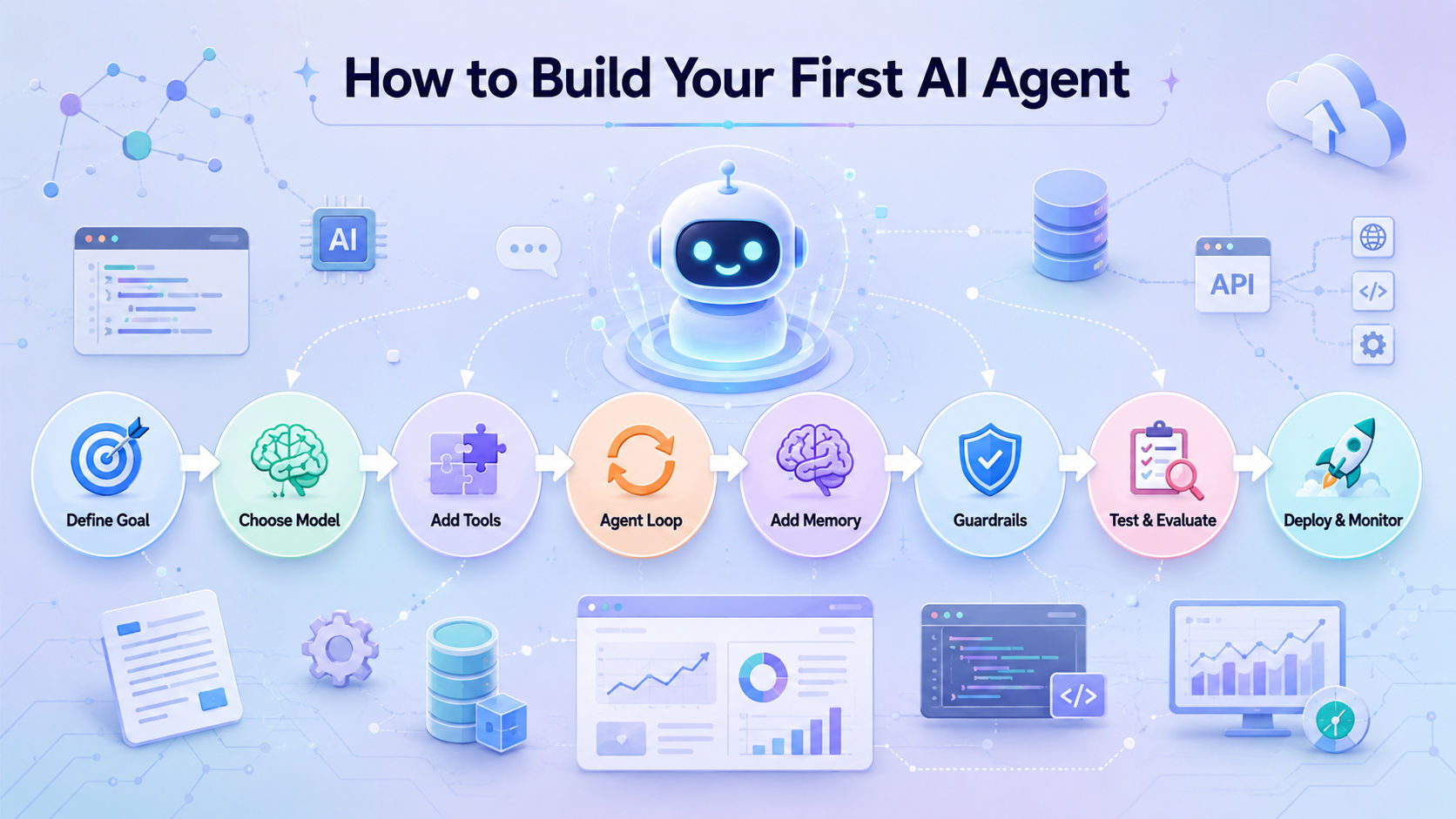
How to Build Your First AI Agent in 8 Steps
To build an AI agent, start small. You do not need a complex multi-agent system for your first project. A practical AI agent workflow is:
Define a goal → Choose a model → Add tools → Create the agent loop → Add memory → Add guardrails → Test → Deploy
Step 1: Define a Narrow Goal
Start by deciding exactly what your agent should do. Ask:
- What task will it complete?
- Who will use it?
- What input will it receive?
- What output should it produce?
- How will you measure success?
For example, instead of building a "general AI assistant," build an agent that searches approved sources and creates a short research brief.
A narrow use case makes your first AI agent easier to build, test, and improve.
Step 2: Choose the Right Model
Choose a model based on what your agent actually needs. Compare:
- Tool calling
- Reasoning ability
- Context window
- Structured output
- Speed
- Cost
- Reliability
There is no single best model for every AI agent. A simple task may work well with a fast, lower-cost model, while complex planning may need stronger reasoning.
Do AI agents need reasoning models? Not always. Use the simplest model that can reliably complete your task.
Step 3: Add the Tools Your Agent Needs
Tools allow an agent to do more than generate text. They can connect it to:
- APIs
- Search
- Databases
- External services
- Internal business systems
The basic tool calling flow is:
User → Model → Tool Call → Application → Tool → Result → Model
For your first agent, start with only the tools it really needs. Too many tools can make the workflow harder to control.
Step 4: Create the Agent Loop
An agent typically follows this cycle:
Goal → Decide → Act → Observe → Decide Again → Complete
Your application should manage the agent's state, tool execution, stop conditions, and error handling.
Set a maximum number of iterations so the agent does not get stuck repeating the same actions.
Step 5: Add Memory
Memory is useful, but it is not required for every first AI agent.
Keep these concepts separate:
- Current context: Information from the current request
- Session state: Information maintained during a session
- Persistent memory: Information saved for future conversations
- RAG/external knowledge: Information retrieved from documents or databases
Start without persistent memory unless your use case genuinely needs it.
Step 6: Implement Guardrails
Guardrails keep your agent within safe and predictable boundaries.
Add controls for:
- Input validation
- Tool permissions
- Output validation
- Human approval for sensitive actions
- Timeouts
- Retry limits
- Cost limits
For example, an agent can recommend a refund, but a human can approve it before the refund is actually processed.
Step 7: Test and Evaluate
Test more than the happy path. Include:
- Normal scenarios
- Edge cases
- Tool failures
- Incorrect inputs
- Adversarial inputs
Track useful metrics such as success rate, latency, cost, and tool-call accuracy.
Create a small test dataset and rerun it whenever you change the model, prompt, tools, or workflow.
Step 8: Deploy and Monitor
Before putting your AI agent into production, make sure you have:
- Secure credentials
- Production infrastructure
- Logging
- Tracing
- Cost monitoring
- Error monitoring
- Continuous evaluation
Monitoring helps you understand what happened when an agent fails, especially when multiple model and tool calls are involved.
Your ongoing workflow should be:
Build → Test → Deploy → Monitor → Improve → Test Again
What Do You Need to Build an AI Agent?
You don't need a large or complex technology stack to build your first AI agent. In most cases, you can get started with basic programming knowledge, access to an AI model through an API, and a few common development tools.
Programming Skills You Need
Python is one of the most popular languages for building AI applications. If you're developing web or full-stack applications, JavaScript or TypeScript is also a great choice.
You should have a basic understanding of:
- Python or JavaScript/TypeScript
- Functions
- APIs
- JSON
- Environment variables
- Basic debugging
- Git
You don't need to be an experienced software engineer. However, you should know how your application communicates with APIs, sends requests, and processes the responses.
AI Concepts You Should Know
You only need to understand a few basic AI concepts before you begin.
1. Large Language Model (LLM)
The AI model that reads instructions, understands information, and generates responses.
2. Prompt or Instructions
The directions you give the model to explain what it should do.
3. Tokens
Small pieces of text that the model processes when reading input or generating output.
4. Context
The information the model has available while completing a task.
5. Tool Calling
A feature that allows the model to request actions from your application, such as calling an API or searching a database.
6. Structured Output
A response in a consistent format, such as JSON, making it easier for applications to process.
You don't need to master these concepts on day one. As you build more advanced projects, you'll naturally learn more about how they work.
Development Tools You Need
A simple setup for building your first AI agent usually includes:
- A code editor
- A terminal
- Git
- An AI model or API account
- An API key
- A Python or Node.js development environment
- An SDK or framework, if your project requires one
You can begin by working directly with an AI model through its API. As your projects become more advanced, you can add AI agent frameworks to simplify more complex workflows.
Do You Need Machine Learning Expertise?
No. Most AI agent developers do not train their own AI models.
Instead, they use existing models through APIs or SDKs and focus on building applications around them.
If you already understand programming, APIs, JSON, debugging, and the basics of large language models, you have everything you need to start building your first AI agent.
Looking to move beyond a simple AI agent prototype? Explore upGrad KnowledgeHut Artificial Intelligence Courses to strengthen the AI knowledge needed for more advanced projects.
Which Tech Stack Should You Use to Build an AI Agent in 2026?
The best tech stack depends on the type of AI agent you want to build, your programming experience, and how complex your project is.
If you're building your first AI agent, keep things simple. Start with basic tools and only add an AI agent framework when you truly need it.
Python vs. JavaScript/TypeScript
Python and JavaScript/TypeScript are both excellent choices for AI agent development. The right option depends on the kind of application you're building.
Factor |
Python |
JavaScript/TypeScript |
| AI and Machine Learning | Excellent | Strong |
| Backend Development | Excellent | Excellent |
| Web Application Integration | Good | Excellent |
| Beginner Friendly | High | High |
| Best For | AI, automation, backend | Full-stack and web development |
Choose Python if you:
- Build AI or machine learning applications
- Work with data processing or automation
- Develop backend services
- Want access to a large AI ecosystem
Choose JavaScript or TypeScript if you:
- Build web or full-stack applications
- Want to integrate AI directly into websites
- Already use the JavaScript ecosystem
Both languages are capable of building powerful AI agents, so choose the one that best matches your project and existing skills.
Should You Build from Scratch or Use an Agent SDK?
There are several ways to build an AI agent.
Raw Model API
Working directly with a model API gives you complete control and helps you understand how AI agents work. It's a good choice for learning and for simple projects.
Provider SDK
Many AI providers offer SDKs that make it easier to interact with their models and services.
Agent SDK
Agent SDKs include features such as:
- Tool calling
- Agent loops
- Session management
- Handoffs between agents
- Guardrails
These features reduce the amount of code you need to write yourself.
Full Agent Framework
A full framework is useful when your application includes complex workflows, multiple agents, state management, or advanced orchestration.
For your first project, a raw API or lightweight SDK is usually enough. You can move to a full framework as your application becomes more complex.
What Should You Look for in an AI Agent Framework?
Before choosing a framework, make sure it provides the features your project actually needs.
Look for support for:
- Tool calling
- State management
- Memory
- Workflow orchestration
- Guardrails
- Tracing and debugging
- Evaluation and testing
- Deployment support
- Integrations with other tools
- Clear documentation
Don't choose a framework just because it's popular. The best framework is the one that makes your project easier to build, maintain, test, and deploy.
Popular AI Agent Frameworks in 2026
There isn't a single framework that's best for every project. The right choice depends on your programming language, AI provider, workflow complexity, and deployment needs.
1. OpenAI Agents SDK
A good choice for building AI agents with features such as tool calling, handoffs, sessions, guardrails, and tracing.
2. Microsoft Agent Framework
Well suited for developers building applications in the Microsoft ecosystem. It supports AI agents, workflows, tools, and state management.
3. Google Agent Development Kit (ADK)
A strong option for projects that use Google's AI models and cloud services.
4. LangGraph and LangChain
These frameworks are useful for building stateful, multi-step, and complex AI workflows where you need more control over agent behavior.
Specialized Frameworks
Some frameworks focus on specific use cases, such as enterprise automation, research assistants, coding agents, or workflow orchestration. These can be a good choice if your project has specialized requirements.
Choosing the Right Stack
There is no one-size-fits-all tech stack for AI agents.
Start with the simplest tools that meet your current needs. As your AI agent grows, you can add more advanced frameworks, workflows, and integrations when they provide real value.
Keeping your stack simple at the beginning makes development easier, reduces complexity, and helps you focus on building an AI agent that works well.
How Do You Make an AI Agent Safe and Reliable?
Building an AI agent is more than making it complete tasks. It also needs the right safeguards to prevent incorrect inputs, unsafe actions, data leaks, and unexpected behavior.
Adding these protections helps your AI agent work more reliably and reduces the risk of costly mistakes.
Add Input Guardrails
The first layer of protection is checking user input before it reaches your AI agent.
Your application should be able to detect and handle:
- Malicious requests
- Invalid or incomplete inputs
- Unexpected data formats
- Requests that violate company policies
Validating input early helps prevent errors and reduces the chance of unsafe behavior.
Add Tool Guardrails
An AI model should not be allowed to use every tool without checks.
Before executing a tool call, verify:
- The tool arguments are valid.
- The user has permission to perform the action.
- The tool returns expected results.
- The requested action is safe to execute.
It's helpful to separate input guardrails, tool guardrails, and output guardrails, since each one protects a different part of the AI agent's workflow.
Require Human Approval for High-Risk Actions
Some actions should always be reviewed by a person before they are carried out.
This is especially important when an AI agent can affect:
- Financial transactions
- Customer accounts
- Sensitive records
- Business-critical systems
For example:
AI Agent Recommends a Refund → Human Reviews and Approves → Refund Is Processed
This approach is known as human-in-the-loop (HITL) AI. It combines AI automation with human oversight to reduce risk.
Set Execution Limits
Without limits, an AI agent may continue running longer than expected, repeat the same actions, or increase API costs.
Set clear limits such as:
- Maximum number of iterations
- Request timeouts
- Retry limits
- Token limits
- Cost limits
These controls help prevent endless loops, repeated tool calls, and unexpected expenses.
Protect Secrets and Sensitive Data
Treat your AI agent like any other production application by following good security practices.
Protect sensitive information such as:
- API keys
- Login credentials
- Personally Identifiable Information (PII)
- Database access permissions
- Application logs
Never store secrets directly in prompts or source code. Instead, keep them in secure storage and give your AI agent access only to the data and permissions it truly needs.
Following the principle of least privilege helps reduce security risks while keeping your AI agent safe and reliable.
What Are the Most Common AI Agent Development Mistakes?
Building an AI agent is much easier when you keep things simple at the beginning. Many developers run into problems because they try to add advanced features too early.
Here are some of the most common mistakes and how you can avoid them.
1. Starting with a Goal That's Too Broad
Mistake:
Trying to build a general-purpose AI assistant right from the start.
Better Approach:
Focus on one specific, well-defined task that your AI agent can complete successfully.
A clear and measurable goal makes development, testing, and improvement much easier.
2. Choosing a Framework Before Defining the Problem
Mistake:
Selecting an AI agent framework simply because it's popular.
Better Approach:
Start by understanding the problem you want to solve. Once your requirements are clear, choose the framework that best fits your project.
The right tool depends on your use case, not on its popularity.
3. Giving the Agent Too Many Tools
Mistake:
Connecting lots of tools and APIs before knowing whether they're actually needed.
Better Approach:
Start with only the tools your AI agent needs to complete its task. You can always add more later as your application grows.
Keeping the toolset small also makes the agent easier to test and maintain.
4. Adding Memory Too Early
Mistake:
Building long-term or persistent memory before the basic agent is working properly.
Better Approach:
Begin with a stateless agent. Add memory only if your use case truly benefits from remembering information across sessions.
Many successful AI agents work well without persistent memory.
5. Building a Multi-Agent System Too Soon
Mistake:
Creating several AI agents to solve a problem that a single agent can handle.
Better Approach:
Build and test a single-agent solution first. Introduce multiple agents only when they clearly improve the workflow.
Starting with one agent keeps the design simpler and easier to manage.
6. Ignoring Tool and API Failures
Mistake:
Assuming that every API request and tool call will succeed.
Better Approach:
Plan for failures by adding:
- Error handling
- Retry logic
- Timeouts
- Fallback options
These safeguards help your AI agent continue working even when external services are unavailable or return unexpected results.
7. Skipping Testing and Evaluation
Mistake:
Believing the AI agent is ready because it works well in a few demonstrations.
Better Approach:
Create a test dataset with different scenarios and measure how the agent performs before deploying it.
Regular testing helps you identify issues early and improve reliability.
8. Deploying Without Monitoring
Mistake:
Launching an AI agent without knowing what happens behind the scenes.
Better Approach:
Add logging, tracing, and monitoring so you can track model responses, tool calls, errors, and workflow execution.
Good observability makes it much easier to troubleshoot problems, improve performance, and maintain a reliable AI agent after deployment.
Conclusion
Building your first AI agent does not require a complex architecture from the start. Begin with a focused use case, choose the right model, add only the tools you need, and create a controlled agent workflow.
As your agent grows, introduce memory, guardrails, testing, and monitoring to make it more reliable. With the right approach, a small AI agent can become the foundation for more advanced, production-ready AI applications.
Have A Query? Get in Touch With Our Customer Support | KnowledgeHut
Frequently Asked Questions (FAQs)
How long does it take to build a basic AI agent?
A simple agent with one model and a few tools can often be prototyped quickly. The timeline becomes longer when you add authentication, databases, guardrails, testing, monitoring, and production deployment. Start with a small prototype before building the full application.
Can I build an AI agent without an API?
Yes, you can run some open-source models locally instead of using a hosted API. However, local development may require suitable hardware and additional setup. For beginners, a hosted model API can be an easier way to experiment.
Can I build an AI agent using no-code tools?
Yes. No-code and low-code platforms can help you create simple agents using visual workflows and prebuilt integrations. They are useful for prototypes and business workflows, while developers may prefer code-based solutions when they need greater control.
How do I give my AI agent access to private company data?
A common approach is to connect the agent to approved internal sources through retrieval or RAG. Instead of putting all company information into the prompt, the application retrieves relevant content when needed and provides only that context to the model.
How do I know if my AI agent is ready for production?
Look beyond whether the agent gives good answers in testing. Check its reliability, tool-call accuracy, security, latency, cost, error handling, and behavior with unexpected inputs. A production agent should also have monitoring and a way to investigate failures.
How do I improve an AI agent that keeps making the same mistakes?
First, identify where the failure occurs instead of immediately changing the model. Check the instructions, tool descriptions, input data, workflow, and previous tool results. Testing specific failure cases can help you make targeted improvements.
Can an AI agent work with multiple APIs at the same time?
Yes. An agent can use different tools connected to different APIs during the same workflow. For example, it could retrieve customer information from one system, check an order in another, and then create a support response.
How do I handle an AI agent when a tool stops working?
Your workflow should have a clear fallback for failed tools. You can use timeouts, limited retries, error messages, alternative tools, or a human handoff depending on the task. The agent should not keep retrying a broken service indefinitely.
Can an AI agent run scheduled tasks automatically?
Yes. An application can trigger an agent on a schedule, such as every morning or every hour. For example, an agent could review new support tickets each morning and prepare a priority summary for the team.
When should I turn a single AI agent into a multi-agent system?
Move to multiple agents only when one agent becomes difficult to manage or different tasks clearly require separate responsibilities. For example, separate research, analysis, and review agents may make sense for a complex workflow. For a first project, keeping one agent is usually simpler.
1639 articles published
KnowledgeHut is an outcome-focused global ed-tech company. We help organizations and professionals unlock excellence through skills development. We offer training solutions under the people and proces...
Get Free Consultation
By submitting, I accept the T&C and
Privacy Policy