
- Blog Categories
- Project Management
- Agile Management
- IT Service Management
- Cloud Computing
- Business Management
- BI And Visualisation
- Quality Management
- Cyber Security
- DevOps
- Most Popular Blogs
- PMP Exam Schedule for 2025: Check PMP Exam Date
- Top 60+ PMP Exam Questions and Answers for 2025
- PMP Cheat Sheet and PMP Formulas To Use in 2025
- What is PMP Process? A Complete List of 49 Processes of PMP
- Top 15+ Project Management Case Studies with Examples 2025
- Top Picks by Authors
- Top 170 Project Management Research Topics
- What is Effective Communication: Definition
- How to Create a Project Plan in Excel in 2025?
- PMP Certification Exam Eligibility in 2025 [A Complete Checklist]
- PMP Certification Fees - All Aspects of PMP Certification Fee
- Most Popular Blogs
- CSM vs PSM: Which Certification to Choose in 2025?
- How Much Does Scrum Master Certification Cost in 2025?
- CSPO vs PSPO Certification: What to Choose in 2025?
- 8 Best Scrum Master Certifications to Pursue in 2025
- Safe Agilist Exam: A Complete Study Guide 2025
- Top Picks by Authors
- SAFe vs Agile: Difference Between Scaled Agile and Agile
- Top 21 Scrum Best Practices for Efficient Agile Workflow
- 30 User Story Examples and Templates to Use in 2025
- State of Agile: Things You Need to Know
- Top 24 Career Benefits of a Certifed Scrum Master
- Most Popular Blogs
- ITIL Certification Cost in 2025 [Exam Fee & Other Expenses]
- Top 17 Required Skills for System Administrator in 2025
- How Effective Is Itil Certification for a Job Switch?
- IT Service Management (ITSM) Role and Responsibilities
- Top 25 Service Based Companies in India in 2025
- Top Picks by Authors
- What is Escalation Matrix & How Does It Work? [Types, Process]
- ITIL Service Operation: Phases, Functions, Best Practices
- 10 Best Facility Management Software in 2025
- What is Service Request Management in ITIL? Example, Steps, Tips
- An Introduction To ITIL® Exam
- Most Popular Blogs
- A Complete AWS Cheat Sheet: Important Topics Covered
- Top AWS Solution Architect Projects in 2025
- 15 Best Azure Certifications 2025: Which one to Choose?
- Top 22 Cloud Computing Project Ideas in 2025 [Source Code]
- How to Become an Azure Data Engineer? 2025 Roadmap
- Top Picks by Authors
- Top 40 IoT Project Ideas and Topics in 2025 [Source Code]
- The Future of AWS: Top Trends & Predictions in 2025
- AWS Solutions Architect vs AWS Developer [Key Differences]
- Top 20 Azure Data Engineering Projects in 2025 [Source Code]
- 25 Best Cloud Computing Tools in 2025
- Most Popular Blogs
- Company Analysis Report: Examples, Templates, Components
- 400 Trending Business Management Research Topics
- Business Analysis Body of Knowledge (BABOK): Guide
- ECBA Certification: Is it Worth it?
- Top Picks by Authors
- Top 20 Business Analytics Project in 2025 [With Source Code]
- ECBA Certification Cost Across Countries
- Top 9 Free Business Requirements Document (BRD) Templates
- Business Analyst Job Description in 2025 [Key Responsibility]
- Business Analysis Framework: Elements, Process, Techniques
- Most Popular Blogs
- Best Career options after BA [2025]
- Top Career Options after BCom to Know in 2025
- Top 10 Power Bi Books of 2025 [Beginners to Experienced]
- Power BI Skills in Demand: How to Stand Out in the Job Market
- Top 15 Power BI Project Ideas
- Top Picks by Authors
- 10 Limitations of Power BI: You Must Know in 2025
- Top 45 Career Options After BBA in 2025 [With Salary]
- Top Power BI Dashboard Templates of 2025
- What is Power BI Used For - Practical Applications Of Power BI
- SSRS Vs Power BI - What are the Key Differences?
- Most Popular Blogs
- Data Collection Plan For Six Sigma: How to Create One?
- Quality Engineer Resume for 2025 [Examples + Tips]
- 20 Best Quality Management Certifications That Pay Well in 2025
- Six Sigma in Operations Management [A Brief Introduction]
- Top Picks by Authors
- Six Sigma Green Belt vs PMP: What's the Difference
- Quality Management: Definition, Importance, Components
- Adding Green Belt Certifications to Your Resume
- Six Sigma Green Belt in Healthcare: Concepts, Benefits and Examples
- Most Popular Blogs
- Latest CISSP Exam Dumps of 2025 [Free CISSP Dumps]
- CISSP vs Security+ Certifications: Which is Best in 2025?
- Best CISSP Study Guides for 2025 + CISSP Study Plan
- How to Become an Ethical Hacker in 2025?
- Top Picks by Authors
- CISSP vs Master's Degree: Which One to Choose in 2025?
- CISSP Endorsement Process: Requirements & Example
- OSCP vs CISSP | Top Cybersecurity Certifications
- How to Pass the CISSP Exam on Your 1st Attempt in 2025?
- Most Popular Blogs
- Top 7 Kubernetes Certifications in 2025
- Kubernetes Pods: Types, Examples, Best Practices
- DevOps Methodologies: Practices & Principles
- Docker Image Commands
- Top Picks by Authors
- Best DevOps Certifications in 2025
- 20 Best Automation Tools for DevOps
- Top 20 DevOps Projects of 2025
- OS for Docker: Features, Factors and Tips
- More
- Agile & PMP Practice Tests
- Agile Testing
- Agile Scrum Practice Exam
- CAPM Practice Test
- PRINCE2 Foundation Exam
- PMP Practice Exam
- Cloud Related Practice Test
- Azure Infrastructure Solutions
- AWS Solutions Architect
- IT Related Pratice Test
- ITIL Practice Test
- Devops Practice Test
- TOGAF® Practice Test
- Other Practice Test
- Oracle Primavera P6 V8
- MS Project Practice Test
- Project Management & Agile
- Project Management Interview Questions
- Release Train Engineer Interview Questions
- Agile Coach Interview Questions
- Scrum Interview Questions
- IT Project Manager Interview Questions
- Cloud & Data
- Azure Databricks Interview Questions
- AWS architect Interview Questions
- Cloud Computing Interview Questions
- AWS Interview Questions
- Kubernetes Interview Questions
- Web Development
- CSS3 Free Course with Certificates
- Basics of Spring Core and MVC
- Javascript Free Course with Certificate
- React Free Course with Certificate
- Node JS Free Certification Course
- Data Science
- Python Machine Learning Course
- Python for Data Science Free Course
- NLP Free Course with Certificate
- Data Analysis Using SQL
- Home
- Blog
- Data Science
- Generative AI in Customer Support: How It Works and Its Uses
Generative AI in Customer Support: How It Works and Its Uses
Updated on Aug 10, 2026 | 453 views
Share:
Table of Contents
View all
- What is generative AI for customer support?
- How generative AI chatbots work in customer support
- Generative AI use cases in customer support
- How to implement generative AI for customer support
- How to measure the success of an AI customer support chatbot?
- Benefits of generative AI for customer support
- Limitations and risks of generative AI chatbots
- Conclusion
Quick Overview
- Generative AI for customer support uses AI models to understand customer queries, generate contextual responses, and assist with support tasks.
- Generative AI chatbots handle FAQs, troubleshooting, order tracking, ticketing, and other routine support tasks.
- Businesses can deploy it by connecting AI to support data and systems, setting guardrails, and adding human escalation.
- It delivers faster support, 24/7 availability, less repetitive work, and more personalized customer interactions.
- In this guide, learn how generative AI works in customer support, its use cases, implementation, benefits, metrics, and risks.
Learn to apply generative AI effectively with the upGrad KnowledgeHut Generative AI and Prompt Engineering Course and build skills for AI-driven business applications.
What is generative AI for customer support?
Generative AI for customer support refers to the use of generative AI models to understand customer queries and create relevant responses. These systems can work with knowledge bases, CRM data, ticketing systems, and other business information to provide more useful support.
For example, a customer asking, "Where is my order?" can receive an answer based on current order information instead of a generic response telling them to check the website. Similarly, a support agent can use AI to summarize a long conversation or suggest a suitable reply.
Also Read: What is Prompt Engineering in Generative AI?
Generative AI vs Traditional customer support chatbots
Traditional chatbots usually depend on predefined rules, menus, keywords, and scripted responses. They work well for simple and predictable questions but may struggle when customers phrase questions differently.
Generative AI chatbots can understand natural language and generate responses based on the context of a conversation.
Factor |
Traditional Chatbots |
Generative AI Chatbots |
| Responses | Predefined | Dynamically generated |
| Conversations | Rule-based | Context-aware |
| Query handling | Mostly predictable queries | Wider range of questions |
| Personalization | Limited | Higher |
| Knowledge access | Fixed information | Can connect to business knowledge |
| Complex queries | Often requires escalation | Can handle more context before escalation |
How generative AI chatbots work in customer support
A generative AI chatbot does not just reply to a message. It goes through several steps behind the scenes to understand the customer, find the right information, and give a useful answer.
Here is how the process usually works.
Understand the customer's query and intent
The first step is understanding what the customer actually wants. The AI system reads the message and identifies the intent, which means the real purpose behind the question
For example, "I haven't received my package," "Where is my delivery?" and "Can you check my order?" may all relate to an order-status request.
This allows AI customer support systems to respond to the customer's actual need instead of matching only specific keywords.
Retrieve relevant customer and knowledge data
Once the intent is clear, the AI looks for relevant information. This can include the company's help articles, product manuals, past support tickets, or the specific customer's account details, such as order history or subscription plan.
This step is often powered by a method called retrieval augmented generation. It means the AI does not just guess an answer from memory. It pulls real information from trusted sources before creating a response.
Connecting generative AI for customer support with reliable business data helps reduce incorrect answers and gives the AI the context it needs.
Generate a contextual response
After gathering the right information, the AI creates a reply. This reply is not copied from a script. It is generated freshly, based on the customer's exact question and the data retrieved in the previous step.
For example, instead of sending the same password-reset instructions to every customer, the system can provide steps based on the customer's specific issue.
The response is designed to sound natural and match the tone of the conversation. If the customer sounds annoyed, the AI can adjust its tone to be calmer and more understanding.
Take action through connected support systems
Modern AI chatbots for customer service can do more than answer questions when they are connected to business systems. They can also perform actions.
For example, the AI can update a delivery address, cancel an order, issue a refund, or reset a password, depending on what permissions the business allows.
This is possible because the AI is connected to other business systems, such as CRM tools, order management platforms, or billing software. Instead of just telling the customer what to do, the AI can complete the task directly.
Escalate complex issues to human agents
AI should not handle every customer problem alone. When a request is sensitive, complex, unclear, or outside the chatbot's permissions, the AI is designed to pass the conversation to a real person.
A good handoff should include the customer's conversation, issue summary, relevant information, and actions already taken. This prevents customers from having to repeat the same problem.
Also Read: How Generative AI and Agentic AI Work Together
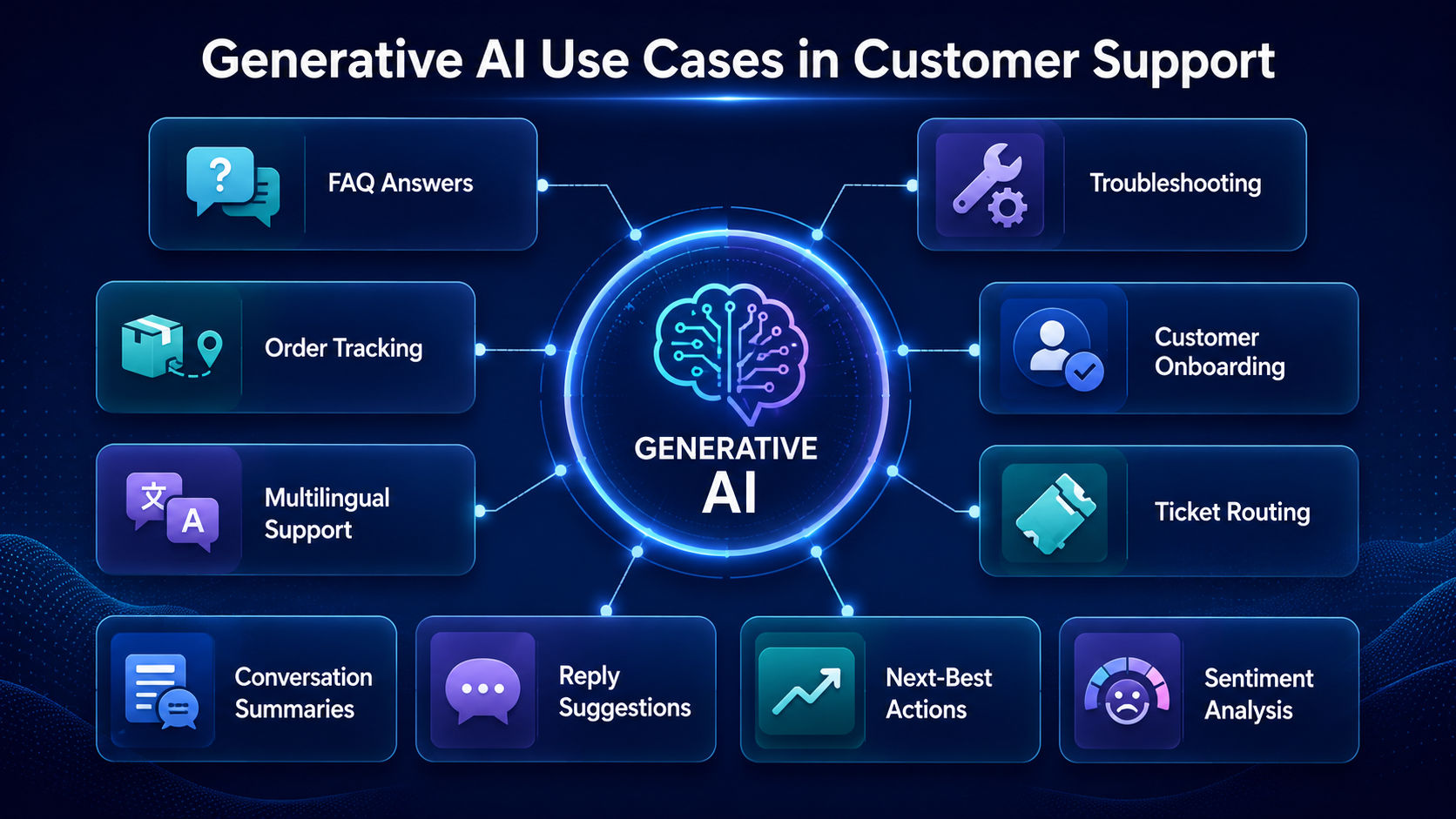
Generative AI use cases in customer support
Generative AI is being used across many parts of customer service, not just in chat windows.
Below are some of the most common ways businesses are applying it today.
1. Answering frequently asked questions
One of the simplest and most common uses is answering repeated questions, such as return policies, pricing details, or account setup steps.
Generative AI can pull the exact answer from a knowledge base and explain it in simple words, saving agents from repeating the same replies daily.
2. Troubleshooting products and services
AI can guide customers through troubleshooting steps using product documentation and approved support information. It can also identify when a problem needs human assistance.
3. Tracking orders, deliveries and appointments
Customers often want quick updates on their orders or bookings. When connected to relevant systems, generative AI chatbots can provide updates about orders, deliveries, bookings, and appointments without requiring customers to contact an agent.
4. Supporting customer onboarding
New customers often need guidance when starting to use a product or service. Generative AI can walk them through setup steps, explain features, and answer early questions, making the onboarding experience smoother and reducing early drop offs.
5. Handling multilingual customer conversations
Businesses that serve global customers often struggle with language barriers. Generative AI can understand and reply in multiple languages, allowing support teams to help customers without hiring separate language specific agents for every region.
6. Creating and routing support tickets
When an issue cannot be solved instantly, generative AI can create a support ticket automatically. It can also read the issue and route it to the correct department, such as billing, technical support, or shipping, and saving time for both the customer and the internal team.
7. Summarizing customer conversations
Long chat or call transcripts take time to read. Generative AI can create short summaries of these conversations, highlighting the main issue and outcome. This is useful for agents picking up a case later or for managers reviewing support quality.
8. Suggesting replies for support agents
Instead of fully automating a response, generative AI can also work alongside human agents by suggesting reply drafts. The agent can review, edit, and send the message, which speeds up response time while keeping a human check in place.
9. Recommending next best actions
Based on the conversation and customer data, generative AI can suggest what the agent or system should do next, such as offering a discount, recommending a product upgrade, or flagging a customer who might cancel their subscription.
10. Analyzing sentiment and customer intent
Generative AI chatbots can detect whether a customer is happy, confused, or upset based on their message. This sentiment analysis helps businesses prioritize urgent cases and understand overall customer satisfaction trends over time.
Also Read: Best Generative AI Tools in 2026
How to implement generative AI for customer support
Bringing generative AI into a support team is not something that should be rushed. A structured approach reduces errors and builds trust with both customers and staff.
Here is a step-by-step way to implement it.
Step 1: Identify suitable support workflows
Not every support task needs AI. Start by identifying repetitive, high-volume queries that follow a predictable pattern, such as order tracking or password resets. These are the safest and most useful starting points.
Step 2: Audit and organize support knowledge
Generative AI needs clean and updated information to give correct answers. This step involves reviewing help articles, product documents, and FAQs, removing outdated content, and organizing everything so the AI can access accurate data easily.
Step 3: Select the right AI model and platform
Choose a generative AI platform that aligns with business requirements, support goals, security needs, and integration capabilities. The platform should support scalability and future growth.
Step 4: Connect CRM, ticketing and business systems
For the AI to give personalized and useful responses, it needs access to systems like CRM software, ticketing tools, and order databases. This integration allows the AI to pull real customer information instead of giving generic answers.
Step 5: Define AI guardrails and permissions
Organizations should establish rules that define what the AI can access, what actions it can perform, and how it should respond in specific situations. Guardrails help maintain security, compliance, and response quality.
Step 6: Design human agent escalation paths
Create clear escalation rules for sensitive, complex, unresolved, or high-value issues. AI chatbots for customer service should make human support easy to reach when needed.
This means deciding when and how a conversation moves from AI to a human agent, along with what information gets passed during the handoff.
Step 7: Run a controlled pilot
Before a full rollout, it is best to test the AI system with a small group of users or a limited set of queries. This helps identify issues early without affecting the entire customer base.
Step 8: Test accuracy, tone and reliability
Test generative AI chatbots using real customer questions and different ways of asking the same thing. Check whether responses are accurate, helpful, consistent, and aligned with the company's tone.
Step 9: Monitor and improve performance
Review conversations regularly, identify failed responses, update knowledge, and improve workflows. AI customer support should be treated as an ongoing process rather than a one-time deployment.
Learn the skills behind AI-powered customer solutions with upGrad KnowledgeHut Data Science Courses and advance your AI expertise.
How to measure the success of an AI customer support chatbot?
After implementation, businesses need clear metrics to know whether the AI chatbot is actually helping. Below are the key measures used to track performance.
Customer resolution rate
This measures the percentage of customer issues that get fully resolved through the AI, without needing further follow up. A higher resolution rate usually means the AI is handling queries effectively.
First contact resolution
This tracks how many issues are solved in a single interaction, without the customer needing to reach out again. High first contact resolution improves customer satisfaction and reduces repeat support requests.
Customer satisfaction and effort score
Customer satisfaction scores and customer effort scores provide insight into how customers feel about their support experience. Lower effort and higher satisfaction are positive outcomes.
Average handling time
This measures how long it takes, on average, to resolve a customer query. Generative AI often reduces handling time significantly compared to fully manual support.
Response and resolution time
Response time tracks how quickly the AI replies to the first message, while resolution time tracks how long it takes to fully solve the issue. Both are important indicators of support speed.
AI containment and deflection rate
Containment rate measures how many conversations are completed without agent involvement. A higher rate can indicate successful automation when customer satisfaction remains strong.
Escalation accuracy
This measures whether the AI is escalating the right cases to human agents at the right time, neither too early nor too late. Poor escalation accuracy can frustrate customers or overload human teams.
Grounded answer and fallback rate
Grounded-answer rate measures how often the chatbot provides responses based on verified company knowledge.
Fallback rate tracks instances where the chatbot cannot answer a question and requires alternative handling.
Agent productivity
AI should help support teams work more efficiently by reducing repetitive tasks and providing assistance during conversations. Productivity improvements are a key success indicator.
Cost per resolution and ROI
This measures the overall cost of resolving a customer issue with AI support compared to traditional methods, helping businesses understand the return on their AI investment.
Also Read: How Companies Use Generative AI for Automation and Productivity
Benefits of generative AI for customer support
Generative AI brings several clear advantages to customer service teams and the customers they serve.
Faster response times
AI can answer routine questions immediately instead of making customers wait for an available agent.
24/7 customer service availability
AI chatbots for customer service can provide support outside normal business hours and handle multiple conversations at the same time.
Reduced repetitive work for agents
AI can handle routine questions and administrative tasks, allowing agents to focus on complex customer problems.
More personalized customer interactions
Generative AI chatbots can use conversation context and approved customer information to provide more relevant responses.
Consistent support across channels
AI can help maintain consistent information across websites, messaging platforms, and other support channels.
Improved support scalability
During high demand periods, such as sales events or product launches, AI customer support can help businesses manage higher customer volumes without increasing support capacity at the same rate.
Also Read: How Generative AI Delivers ROI in Enterprises
Limitations and risks of generative AI chatbots
While generative AI offers many benefits, it also comes with challenges that businesses need to manage carefully.
Hallucinations and inaccurate answers
Generative AI can sometimes create answers that sound confident but are actually incorrect. This is known as hallucination, and it can mislead customers if not controlled properly.
Outdated or conflicting knowledge
If support documents contain old or conflicting information, generative AI chatbots may provide unreliable answers. Knowledge should be reviewed and updated regularly.
Customer data privacy risks
Since generative AI often accesses personal customer information, businesses must ensure strong data protection practices are in place to prevent misuse or leaks of sensitive data.
Security and access control challenges
AI should only access the information and systems required for its assigned tasks. Permissions should be carefully controlled.
Inconsistent responses
Since generative AI creates new responses each time instead of using fixed scripts, there is a chance that answers to the same question may vary slightly, which can confuse some customers.
Poorly designed customer handoffs
If the transition from AI to a human agent is not smooth, customers may feel frustrated repeating their issue. A poor handoff process can undo much of the value AI support provides.
Over automation and customer frustration
Relying too heavily on AI, especially for emotional or complicated issues, can make customers feel unheard. Businesses need to balance automation with genuine human support when it truly matters.
Conclusion
Generative AI is making customer support faster, more personalized, and easier to scale by handling routine queries, assisting agents, and automating support tasks.
However, businesses need reliable data, clear guardrails, and smooth human escalation to manage risks such as inaccurate responses and customer frustration.
The best approach is to use AI for routine support while keeping human agents involved in complex or sensitive issues.
Have A Query? Get in Touch With Our Customer Support | upGrad KnowledgeHut
Frequently Asked Questions
What is an AI customer support chatbot?
An AI customer support chatbot is a software system that uses AI to understand customer questions and provide automated responses. Generative AI chatbots can create responses based on conversation context and relevant business information. They can also connect with CRM, ticketing, and other support systems to assist with customer requests.
How does generative AI improve customer experience?
Generative AI improves customer experience by providing quick, contextual responses based on the customer's question and available information. It can personalize interactions, provide support outside business hours, and reduce the effort customers need to get answers. Human escalation can handle issues that require judgment or deeper assistance.
How do generative AI chatbots understand customer queries?
Generative AI chatbots analyze a customer's message to identify the intent behind the question rather than relying only on specific keywords. For example, different questions about a missing package can be understood as the same order-status request. This allows the chatbot to respond to the customer's actual need more effectively.
How does RAG improve AI customer support?
Retrieval-Augmented Generation (RAG) helps AI customer support systems retrieve relevant information from trusted business sources before generating a response. This gives the AI current context from sources such as help articles, product documents, and customer data. As a result, responses can be more accurate and less dependent on what the AI model knows from training.
How do you measure AI chatbot ROI?
AI chatbot ROI can be measured by comparing the cost of AI-supported customer resolution with traditional support costs. Key metrics include cost per resolution, resolution rate, response time, customer satisfaction, and agent productivity. These measures show whether the chatbot is reducing support costs while maintaining service quality.
When should an AI chatbot escalate to a human agent?
An AI chatbot should escalate when a request is complex, sensitive, unclear, unresolved, or outside its permissions. The handoff should include the conversation history, issue summary, relevant customer information, and actions already taken. This helps the human agent resolve the issue without making the customer repeat everything.
How can businesses reduce hallucinations in AI customer support?
Businesses can reduce hallucinations by connecting AI systems to reliable and updated knowledge sources instead of relying only on generated responses. Clear guardrails, fallback rules, regular testing, and human escalation also help improve response accuracy. Support knowledge should be reviewed regularly to prevent outdated information from reaching customers.
Why do AI customer service chatbots fail?
AI customer service chatbots can fail because of inaccurate or outdated knowledge, poor system integrations, unclear permissions, and weak escalation processes. They may also generate incorrect answers or struggle with complex customer issues. Regular testing, knowledge updates, guardrails, and human escalation can help reduce these failures.
Can generative AI replace customer service agents?
Generative AI can automate many routine customer support tasks, but it should not completely replace human agents. Complex, sensitive, emotional, or unusual issues often require human judgment and empathy. The most effective approach is to use AI for routine work while allowing agents to handle cases that need human intervention.
How do you measure AI customer service performance?
AI customer service performance can be measured using resolution rate, first-contact resolution, CSAT, Customer Effort Score, response time, and resolution time. Businesses can also track containment, escalation accuracy, grounded-answer rate, agent productivity, and cost per resolution. These metrics help evaluate both customer outcomes and operational efficiency.
1639 articles published
KnowledgeHut is an outcome-focused global ed-tech company. We help organizations and professionals unlock excellence through skills development. We offer training solutions under the people and proces...
Get Free Consultation
By submitting, I accept the T&C and
Privacy Policy