
- Blog Categories
- Project Management
- Agile Management
- IT Service Management
- Cloud Computing
- Business Management
- BI And Visualisation
- Quality Management
- Cyber Security
- DevOps
- Most Popular Blogs
- PMP Exam Schedule for 2025: Check PMP Exam Date
- Top 60+ PMP Exam Questions and Answers for 2025
- PMP Cheat Sheet and PMP Formulas To Use in 2025
- What is PMP Process? A Complete List of 49 Processes of PMP
- Top 15+ Project Management Case Studies with Examples 2025
- Top Picks by Authors
- Top 170 Project Management Research Topics
- What is Effective Communication: Definition
- How to Create a Project Plan in Excel in 2025?
- PMP Certification Exam Eligibility in 2025 [A Complete Checklist]
- PMP Certification Fees - All Aspects of PMP Certification Fee
- Most Popular Blogs
- CSM vs PSM: Which Certification to Choose in 2025?
- How Much Does Scrum Master Certification Cost in 2025?
- CSPO vs PSPO Certification: What to Choose in 2025?
- 8 Best Scrum Master Certifications to Pursue in 2025
- Safe Agilist Exam: A Complete Study Guide 2025
- Top Picks by Authors
- SAFe vs Agile: Difference Between Scaled Agile and Agile
- Top 21 Scrum Best Practices for Efficient Agile Workflow
- 30 User Story Examples and Templates to Use in 2025
- State of Agile: Things You Need to Know
- Top 24 Career Benefits of a Certifed Scrum Master
- Most Popular Blogs
- ITIL Certification Cost in 2025 [Exam Fee & Other Expenses]
- Top 17 Required Skills for System Administrator in 2025
- How Effective Is Itil Certification for a Job Switch?
- IT Service Management (ITSM) Role and Responsibilities
- Top 25 Service Based Companies in India in 2025
- Top Picks by Authors
- What is Escalation Matrix & How Does It Work? [Types, Process]
- ITIL Service Operation: Phases, Functions, Best Practices
- 10 Best Facility Management Software in 2025
- What is Service Request Management in ITIL? Example, Steps, Tips
- An Introduction To ITIL® Exam
- Most Popular Blogs
- A Complete AWS Cheat Sheet: Important Topics Covered
- Top AWS Solution Architect Projects in 2025
- 15 Best Azure Certifications 2025: Which one to Choose?
- Top 22 Cloud Computing Project Ideas in 2025 [Source Code]
- How to Become an Azure Data Engineer? 2025 Roadmap
- Top Picks by Authors
- Top 40 IoT Project Ideas and Topics in 2025 [Source Code]
- The Future of AWS: Top Trends & Predictions in 2025
- AWS Solutions Architect vs AWS Developer [Key Differences]
- Top 20 Azure Data Engineering Projects in 2025 [Source Code]
- 25 Best Cloud Computing Tools in 2025
- Most Popular Blogs
- Company Analysis Report: Examples, Templates, Components
- 400 Trending Business Management Research Topics
- Business Analysis Body of Knowledge (BABOK): Guide
- ECBA Certification: Is it Worth it?
- Top Picks by Authors
- Top 20 Business Analytics Project in 2025 [With Source Code]
- ECBA Certification Cost Across Countries
- Top 9 Free Business Requirements Document (BRD) Templates
- Business Analyst Job Description in 2025 [Key Responsibility]
- Business Analysis Framework: Elements, Process, Techniques
- Most Popular Blogs
- Best Career options after BA [2025]
- Top Career Options after BCom to Know in 2025
- Top 10 Power Bi Books of 2025 [Beginners to Experienced]
- Power BI Skills in Demand: How to Stand Out in the Job Market
- Top 15 Power BI Project Ideas
- Top Picks by Authors
- 10 Limitations of Power BI: You Must Know in 2025
- Top 45 Career Options After BBA in 2025 [With Salary]
- Top Power BI Dashboard Templates of 2025
- What is Power BI Used For - Practical Applications Of Power BI
- SSRS Vs Power BI - What are the Key Differences?
- Most Popular Blogs
- Data Collection Plan For Six Sigma: How to Create One?
- Quality Engineer Resume for 2025 [Examples + Tips]
- 20 Best Quality Management Certifications That Pay Well in 2025
- Six Sigma in Operations Management [A Brief Introduction]
- Top Picks by Authors
- Six Sigma Green Belt vs PMP: What's the Difference
- Quality Management: Definition, Importance, Components
- Adding Green Belt Certifications to Your Resume
- Six Sigma Green Belt in Healthcare: Concepts, Benefits and Examples
- Most Popular Blogs
- Latest CISSP Exam Dumps of 2025 [Free CISSP Dumps]
- CISSP vs Security+ Certifications: Which is Best in 2025?
- Best CISSP Study Guides for 2025 + CISSP Study Plan
- How to Become an Ethical Hacker in 2025?
- Top Picks by Authors
- CISSP vs Master's Degree: Which One to Choose in 2025?
- CISSP Endorsement Process: Requirements & Example
- OSCP vs CISSP | Top Cybersecurity Certifications
- How to Pass the CISSP Exam on Your 1st Attempt in 2025?
- Most Popular Blogs
- Top 7 Kubernetes Certifications in 2025
- Kubernetes Pods: Types, Examples, Best Practices
- DevOps Methodologies: Practices & Principles
- Docker Image Commands
- Top Picks by Authors
- Best DevOps Certifications in 2025
- 20 Best Automation Tools for DevOps
- Top 20 DevOps Projects of 2025
- OS for Docker: Features, Factors and Tips
- More
- Agile & PMP Practice Tests
- Agile Testing
- Agile Scrum Practice Exam
- CAPM Practice Test
- PRINCE2 Foundation Exam
- PMP Practice Exam
- Cloud Related Practice Test
- Azure Infrastructure Solutions
- AWS Solutions Architect
- IT Related Pratice Test
- ITIL Practice Test
- Devops Practice Test
- TOGAF® Practice Test
- Other Practice Test
- Oracle Primavera P6 V8
- MS Project Practice Test
- Project Management & Agile
- Project Management Interview Questions
- Release Train Engineer Interview Questions
- Agile Coach Interview Questions
- Scrum Interview Questions
- IT Project Manager Interview Questions
- Cloud & Data
- Azure Databricks Interview Questions
- AWS architect Interview Questions
- Cloud Computing Interview Questions
- AWS Interview Questions
- Kubernetes Interview Questions
- Web Development
- CSS3 Free Course with Certificates
- Basics of Spring Core and MVC
- Javascript Free Course with Certificate
- React Free Course with Certificate
- Node JS Free Certification Course
- Data Science
- Python Machine Learning Course
- Python for Data Science Free Course
- NLP Free Course with Certificate
- Data Analysis Using SQL
Is DevOps a Good Career for Non-Coders?
Updated on Oct 13, 2026 | 0.9k+ views
Share:
Table of Contents
View all
Quick Overview
- Yes, DevOps can be a good career for non-coders who enjoy solving technical problems and improving IT workflows, but technical knowledge and basic scripting become important for long term growth.
- DevOps Roles for Non-Coders: Release management, technical support, technical operations, and cloud administration can offer entry points into the DevOps ecosystem with limited coding requirements.
- Key Skills to Learn: Linux, cloud computing, Git, Docker, CI/CD, and basic Bash or Python scripting help build the technical foundation needed for DevOps roles.
- How to Get Started: Learn DevOps fundamentals, practise with cloud and automation tools, build hands on projects, and apply for entry level roles that match current skills.
- This guide explains DevOps career options for non-coders, required skills, learning steps, practical projects, and entry level job opportunities.
For non-coders exploring career options in DevOps and automation, the AI Masters Program can help build foundational knowledge of artificial intelligence, machine learning, and emerging AI technologies.
Master the Right Skills & Boost Your Career
Avail your free 1:1 mentorship session
Is DevOps a good career for non coders?
Yes, DevOps can be a good career choice for non coders who enjoy solving technical problems, improving workflows, and working with IT systems. A programming background is not essential for every DevOps related position, but technical knowledge is important for long term growth.
The key is to understand which roles match current skills and which require additional preparation.
DevOps roles that require little or no coding
Some roles focus more on coordination, system administration, monitoring, and operational processes than software development. These positions can help beginners enter the DevOps ecosystem while developing stronger technical skills.
Roles worth exploring include:
- Release management: Coordinating releases, tracking deployment schedules, and ensuring teams follow established procedures.
- Technical operations: Monitoring system performance, managing operational processes, and coordinating incident resolution.
- Technical support: Investigating technical issues, documenting solutions, and escalating complex problems.
- Cloud administration: Managing cloud resources, user permissions, configurations, and routine infrastructure tasks.
Coding skills needed for a DevOps career
Coding requirements depend on the role and its level of responsibility. Some operational positions rely mainly on command line tools and existing automation, while DevOps engineering roles generally require scripting and a stronger understanding of software delivery.
Non coders should gradually become comfortable with:
- Basic scripting: Understanding simple Bash or Python scripts used to automate routine tasks.
- Configuration files: Reading YAML files used in pipeline and application configurations.
- Command line operations: Running commands, checking logs, managing files, and troubleshooting errors.
- Automation logic: Understanding variables, conditions, loops, and how scripts perform repetitive tasks.
Also read: Can DevOps certifications help non-developers enter tech roles?
What DevOps jobs can non coders apply for?
Non coders can explore several roles that connect with DevOps practices, particularly in release management, operations, technical support, and infrastructure administration. These positions can provide relevant experience before moving into more automation intensive roles.
The most suitable option depends on previous work experience, technical confidence, and the responsibilities listed by employers.
1. Release manager
A release manager coordinates the activities required to deliver software changes safely and on schedule. The role often involves planning, communication, risk management, and coordination between development, testing, operations, and business teams.
Common responsibilities include:
- Maintaining release schedules and tracking progress.
- Coordinating testing and deployment approvals.
- Identifying release risks and communicating delays.
- Ensuring teams follow release procedures.
- Recording deployment outcomes and lessons learned.
2. Technical operations manager
A technical operations manager focuses on the reliability and smooth functioning of IT services. The role typically involves coordinating teams, managing operational issues, monitoring service performance, and improving processes.
The work may include:
- Tracking system availability and operational performance.
- Coordinating incident management and problem resolution.
- Reviewing operational procedures and service reports.
- Managing communication between technical teams.
- Supporting change management and process improvement.
3. Technical support and operations engineer
Technical support and operations engineers help maintain applications, systems, and IT services. Their work often involves investigating errors, monitoring performance, responding to incidents, and escalating issues when deeper engineering expertise is required.
Typical responsibilities include:
- Reviewing logs to identify errors.
- Troubleshooting connectivity and application issues.
- Monitoring alerts and system health.
- Documenting incidents and their resolution.
- Following established procedures for routine maintenance.
4. Cloud or configuration administrator
Cloud and configuration administrators manage cloud resources, user access, system settings, and infrastructure configurations. Their responsibilities depend on the platform and the complexity of the environment.
Key tasks may include:
- Creating and managing cloud resources.
- Reviewing permissions and access controls.
- Maintaining configuration settings.
- Monitoring resource usage and system health.
- Supporting backups, updates, and routine maintenance.
Non-coders interested in combining technology with business strategy can explore the PG Certificate in AI Powered Product and Design Thinking to learn how AI supports product innovation, customer-centric design, and data-driven decision-making.
What skills are required for a DevOps career without coding experience?
A successful DevOps career for non coders starts with a solid understanding of how operating systems, applications, infrastructure, and software delivery work together. Coding can be learned over time, but technical fundamentals make the learning process easier.
Focus on the following skills before moving into advanced automation or deployment tools.
1. Linux and command line fundamentals
Linux is widely used in servers, cloud environments, containers, and deployment workflows. Learning basic commands helps beginners navigate systems and investigate common issues.
Start with:
- Navigating folders and managing files.
- Checking running processes and system resources.
- Reading logs and understanding error messages.
- Managing file permissions and users.
- Understanding basic networking commands.
2. Cloud computing and infrastructure basics
Cloud platforms provide the computing resources needed to run applications and services. Understanding these resources helps beginners learn how applications are hosted, connected, secured, and monitored.
Focus on:
- Virtual machines, storage, and networking.
- Identity and access management.
- Cloud monitoring and resource usage.
- Basic security and backup practices.
- The purpose of platforms such as AWS, Microsoft Azure, and Google Cloud.
3. Git and version control
Git tracks changes to files and helps teams collaborate without losing earlier versions of their work. It is especially useful for managing configuration files, scripts, and deployment definitions.
Learn how to:
- Create and manage repositories.
- Track changes and review file history.
- Create branches and merge changes.
- Work with commits and pull requests.
- Resolve simple merge conflicts.
4. Docker and containerization
Docker helps package an application and its dependencies into a container, making it easier to run consistently across different environments. Beginners do not need to master container orchestration immediately.
Start by learning:
- What containers are and why teams use them.
- The difference between containers and virtual machines.
- How images and containers work.
- Basic commands for running and inspecting containers.
- How configuration affects container behaviour.
5. Basic Bash or Python scripting
Although the goal may be to enter DevOps without coding experience, basic scripting becomes increasingly useful as technical responsibilities grow. It helps automate repetitive activities and reduces manual effort.
Beginners can start with:
- Variables and simple data types.
- Conditions and loops.
- Reading files and processing basic information.
- Running commands through scripts.
- Handling errors and understanding script output.
6. Infrastructure as code with Terraform and Ansible
Infrastructure as code (IaC) allows teams to define and manage infrastructure through files instead of configuring every resource manually. Terraform is commonly used to provision infrastructure, while Ansible is often used to automate configuration and operational tasks.
For beginners, the main learning goals are:
- Understand why infrastructure configurations are stored as code.
- Learn how configuration files describe resources and settings.
- Explore how Terraform plans and manages infrastructure changes.
- Understand how Ansible playbooks automate routine administration.
- Learn why testing, permissions, and change reviews matter.
Also read: Is DevOps a Good Career Path To Get Into?
How can non coders start a career in DevOps?
The most practical approach is to learn the fundamentals in a clear order, practise with accessible tools, and build evidence of technical ability. A DevOps career for non coders does not require mastering every tool before applying for a role.
Use the following steps to create a realistic learning path.
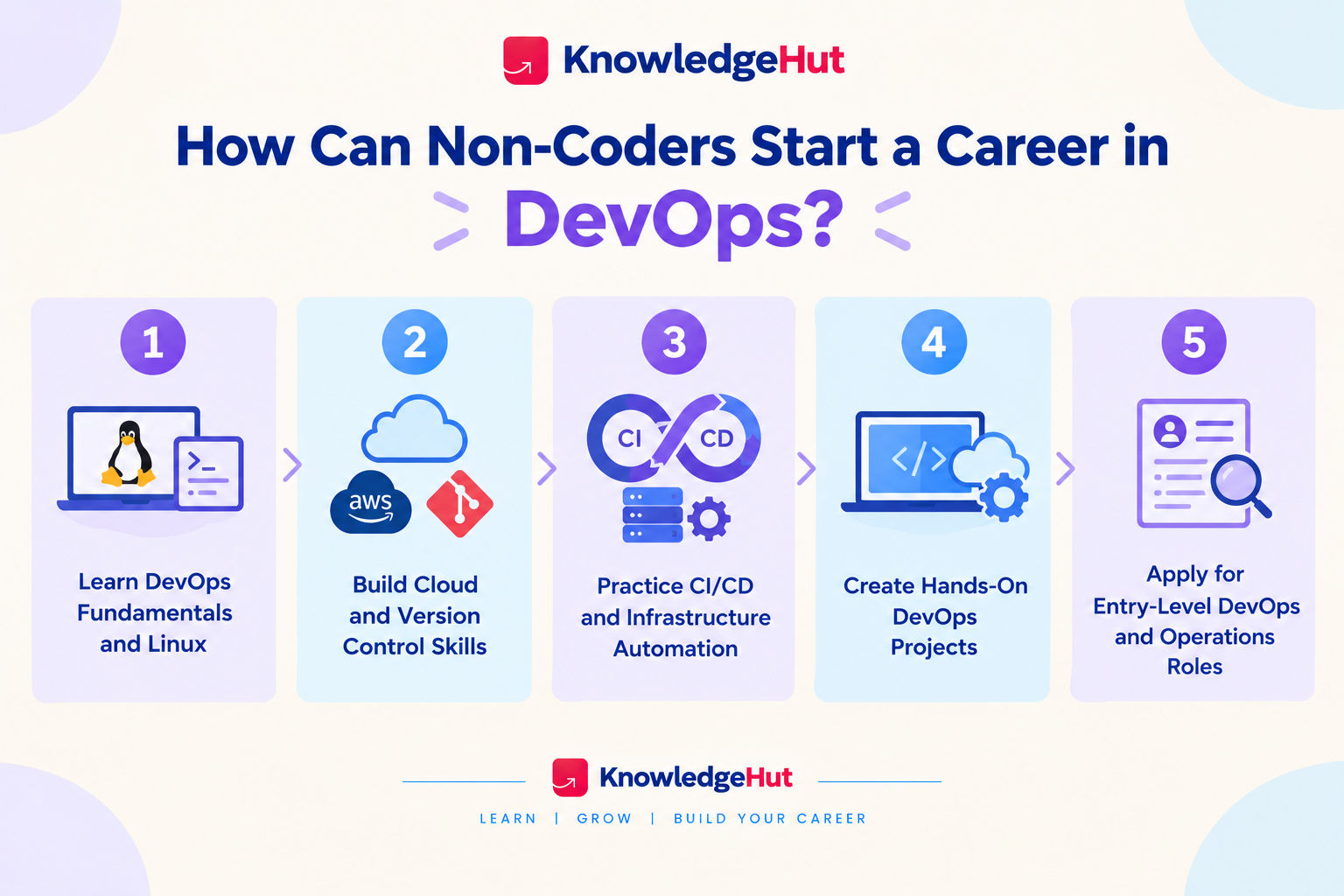
Step-1 Learn DevOps fundamentals and Linux
Begin by understanding how development and operations teams work together to deliver and maintain software. Learn the purpose of continuous integration, continuous delivery, monitoring, incident management, and automation.
Next, practice Linux commands and basic networking concepts. This will help you understand the environment in which many DevOps tools operate.
Step-2 Build cloud and version control skills
Choose one cloud platform and learn its basic services. Alongside this, create a Git repository and practise tracking changes to documentation, configuration files, and simple scripts.
Focus on understanding what each tool does rather than collecting tool names for a résumé.
Step-3 Practice CI/CD and infrastructure automation
Learn how a CI/CD pipeline automates parts of software building, testing, and delivery. Explore a beginner friendly platform such as GitHub Actions or Azure Pipelines.
Then build on that knowledge by:
- Reading pipeline configuration files.
- Understanding how automated checks are triggered.
- Learning how deployment stages and approvals work.
- Exploring basic infrastructure configuration.
- Practising how to identify and investigate failed runs.
Step-4 Create hands on DevOps projects
Practical work helps connect technical concepts and demonstrates what you can do. Keep the projects manageable and document what you learned at each stage.
Useful projects include:
- Creating a Git repository with clear version history.
- Setting up basic cloud resources and access permissions.
- Running a container using Docker.
- Building a simple CI pipeline with automated checks.
- Writing a basic script for a repetitive task.
- Documenting a troubleshooting process and its resolution.
Step-5 Apply for entry level DevOps and operations roles
Once you understand the fundamentals and have practical work to demonstrate, start applying for roles that match your current skills.
Search for positions such as junior cloud administrator, technical support engineer, release coordinator, operations engineer, or junior DevOps engineer. Read job descriptions carefully because coding and experience requirements differ by employer.
Your résumé should highlight relevant technical skills, projects, troubleshooting ability, documentation, and collaboration. Continue learning scripting and automation while gaining practical experience.
Also read: Top 10 DevOps Engineer Skills in 2026
Conclusion
A DevOps career for non coders is a realistic option for people who are willing to learn technical fundamentals and gradually build automation skills. Release coordination, technical support, and cloud operations can provide useful starting points, while DevOps engineering generally demands stronger scripting and infrastructure knowledge. Start with Linux, Git, and one cloud platform, build practical projects, and choose roles that match your current abilities while preparing you for the next step.
Have A Query? Get in Touch With Our Customer Support | upGrad KnowledgeHut
Frequently Asked Questions (FAQs)
1. How can you identify a DevOps job that requires minimal coding from its job description?
Look for responsibilities such as release coordination, cloud administration, system monitoring, incident management, and technical support. Check whether scripting languages, software development, or automation are listed as mandatory requirements. Job titles alone can be misleading, so review the daily responsibilities before applying for a DevOps career for non coders.
2. What technical questions can non coders expect in a DevOps interview?
Interviewers may ask about Linux commands, Git, cloud fundamentals, networking, monitoring, and CI/CD pipelines. Practical questions may involve troubleshooting a failed deployment or explaining how to investigate a server issue. Preparing basic technical concepts and real project experience can help candidates answer confidently.
3. Can you build DevOps projects without paying for cloud services?
Yes, beginners can practise using local virtual machines, Docker, Git, and self hosted tools without renting cloud infrastructure. Cloud providers may also offer free tiers or trial credits, although eligibility and usage limits vary. Always check current pricing and set spending alerts before experimenting with paid resources.
4. How much networking knowledge is needed to start a DevOps career without coding experience?
You should understand fundamental concepts such as IP addresses, DNS, ports, HTTP and HTTPS, firewalls, and basic troubleshooting. These skills help explain how applications communicate and why connections fail. You can begin with the basics and learn more advanced networking as your responsibilities grow.
5. Can you work in DevOps without being comfortable with Linux?
Some release coordination, cloud support, and operations roles may involve limited Linux use, depending on the employer. However, Linux is common in server and container environments, so avoiding it completely can restrict career options. Learning basic commands, file permissions, processes, and log inspection is a practical starting point.
6. Do entry level DevOps jobs involve on call duties and production emergencies?
Some entry level DevOps and operations positions include on call rotations, incident alerts, or occasional after hours support. Others follow regular working hours, depending on the organization and role. Ask about shift patterns, escalation procedures, incident responsibilities, and on call compensation during the hiring process.
7. How can non coders demonstrate their DevOps skills without professional experience?
Build small projects that demonstrate Git usage, Linux troubleshooting, cloud configuration, Docker, or a basic CI/CD pipeline. Document the steps, tools used, problems encountered, and solutions in a portfolio or Git repository. For a DevOps career for non coders, practical evidence can help demonstrate readiness for entry level roles.
8. Can AI tools help non coders learn DevOps scripting and automation?
Yes, AI tools can explain scripts, suggest simple automation tasks, and help interpret error messages. However, generated commands may be incorrect or unsafe, so review and test them in a controlled environment before use. Understanding the underlying logic remains important for troubleshooting and responsible automation.
9. Is DevOps a suitable career for someone who prefers GUI tools over command line tools?
Yes, some cloud administration, release management, and monitoring tasks can be performed through graphical interfaces. However, many DevOps workflows rely on command line tools, configuration files, and automation. Being willing to learn basic terminal commands will open up more opportunities over time.
10. How can you decide between DevOps, cloud support, and system administration as a beginner?
Choose cloud support if you enjoy helping users and troubleshooting cloud services, or system administration if you prefer maintaining servers, accounts, and infrastructure. DevOps may suit you if you are interested in connecting development and operations through automation, deployments, and continuous improvement. Compare job requirements and try introductory projects before choosing your path.
1639 articles published
KnowledgeHut is an outcome-focused global ed-tech company. We help organizations and professionals unlock excellence through skills development. We offer training solutions under the people and proces...
Get Free Consultation
By submitting, I accept the T&C and
Privacy Policy