
- Blog Categories
- Project Management
- Agile Management
- IT Service Management
- Cloud Computing
- Business Management
- BI And Visualisation
- Quality Management
- Cyber Security
- DevOps
- Most Popular Blogs
- PMP Exam Schedule for 2025: Check PMP Exam Date
- Top 60+ PMP Exam Questions and Answers for 2025
- PMP Cheat Sheet and PMP Formulas To Use in 2025
- What is PMP Process? A Complete List of 49 Processes of PMP
- Top 15+ Project Management Case Studies with Examples 2025
- Top Picks by Authors
- Top 170 Project Management Research Topics
- What is Effective Communication: Definition
- How to Create a Project Plan in Excel in 2025?
- PMP Certification Exam Eligibility in 2025 [A Complete Checklist]
- PMP Certification Fees - All Aspects of PMP Certification Fee
- Most Popular Blogs
- CSM vs PSM: Which Certification to Choose in 2025?
- How Much Does Scrum Master Certification Cost in 2025?
- CSPO vs PSPO Certification: What to Choose in 2025?
- 8 Best Scrum Master Certifications to Pursue in 2025
- Safe Agilist Exam: A Complete Study Guide 2025
- Top Picks by Authors
- SAFe vs Agile: Difference Between Scaled Agile and Agile
- Top 21 Scrum Best Practices for Efficient Agile Workflow
- 30 User Story Examples and Templates to Use in 2025
- State of Agile: Things You Need to Know
- Top 24 Career Benefits of a Certifed Scrum Master
- Most Popular Blogs
- ITIL Certification Cost in 2025 [Exam Fee & Other Expenses]
- Top 17 Required Skills for System Administrator in 2025
- How Effective Is Itil Certification for a Job Switch?
- IT Service Management (ITSM) Role and Responsibilities
- Top 25 Service Based Companies in India in 2025
- Top Picks by Authors
- What is Escalation Matrix & How Does It Work? [Types, Process]
- ITIL Service Operation: Phases, Functions, Best Practices
- 10 Best Facility Management Software in 2025
- What is Service Request Management in ITIL? Example, Steps, Tips
- An Introduction To ITIL® Exam
- Most Popular Blogs
- A Complete AWS Cheat Sheet: Important Topics Covered
- Top AWS Solution Architect Projects in 2025
- 15 Best Azure Certifications 2025: Which one to Choose?
- Top 22 Cloud Computing Project Ideas in 2025 [Source Code]
- How to Become an Azure Data Engineer? 2025 Roadmap
- Top Picks by Authors
- Top 40 IoT Project Ideas and Topics in 2025 [Source Code]
- The Future of AWS: Top Trends & Predictions in 2025
- AWS Solutions Architect vs AWS Developer [Key Differences]
- Top 20 Azure Data Engineering Projects in 2025 [Source Code]
- 25 Best Cloud Computing Tools in 2025
- Most Popular Blogs
- Company Analysis Report: Examples, Templates, Components
- 400 Trending Business Management Research Topics
- Business Analysis Body of Knowledge (BABOK): Guide
- ECBA Certification: Is it Worth it?
- Top Picks by Authors
- Top 20 Business Analytics Project in 2025 [With Source Code]
- ECBA Certification Cost Across Countries
- Top 9 Free Business Requirements Document (BRD) Templates
- Business Analyst Job Description in 2025 [Key Responsibility]
- Business Analysis Framework: Elements, Process, Techniques
- Most Popular Blogs
- Best Career options after BA [2025]
- Top Career Options after BCom to Know in 2025
- Top 10 Power Bi Books of 2025 [Beginners to Experienced]
- Power BI Skills in Demand: How to Stand Out in the Job Market
- Top 15 Power BI Project Ideas
- Top Picks by Authors
- 10 Limitations of Power BI: You Must Know in 2025
- Top 45 Career Options After BBA in 2025 [With Salary]
- Top Power BI Dashboard Templates of 2025
- What is Power BI Used For - Practical Applications Of Power BI
- SSRS Vs Power BI - What are the Key Differences?
- Most Popular Blogs
- Data Collection Plan For Six Sigma: How to Create One?
- Quality Engineer Resume for 2025 [Examples + Tips]
- 20 Best Quality Management Certifications That Pay Well in 2025
- Six Sigma in Operations Management [A Brief Introduction]
- Top Picks by Authors
- Six Sigma Green Belt vs PMP: What's the Difference
- Quality Management: Definition, Importance, Components
- Adding Green Belt Certifications to Your Resume
- Six Sigma Green Belt in Healthcare: Concepts, Benefits and Examples
- Most Popular Blogs
- Latest CISSP Exam Dumps of 2025 [Free CISSP Dumps]
- CISSP vs Security+ Certifications: Which is Best in 2025?
- Best CISSP Study Guides for 2025 + CISSP Study Plan
- How to Become an Ethical Hacker in 2025?
- Top Picks by Authors
- CISSP vs Master's Degree: Which One to Choose in 2025?
- CISSP Endorsement Process: Requirements & Example
- OSCP vs CISSP | Top Cybersecurity Certifications
- How to Pass the CISSP Exam on Your 1st Attempt in 2025?
- Most Popular Blogs
- Top 7 Kubernetes Certifications in 2025
- Kubernetes Pods: Types, Examples, Best Practices
- DevOps Methodologies: Practices & Principles
- Docker Image Commands
- Top Picks by Authors
- Best DevOps Certifications in 2025
- 20 Best Automation Tools for DevOps
- Top 20 DevOps Projects of 2025
- OS for Docker: Features, Factors and Tips
- More
- Agile & PMP Practice Tests
- Agile Testing
- Agile Scrum Practice Exam
- CAPM Practice Test
- PRINCE2 Foundation Exam
- PMP Practice Exam
- Cloud Related Practice Test
- Azure Infrastructure Solutions
- AWS Solutions Architect
- IT Related Pratice Test
- ITIL Practice Test
- Devops Practice Test
- TOGAF® Practice Test
- Other Practice Test
- Oracle Primavera P6 V8
- MS Project Practice Test
- Project Management & Agile
- Project Management Interview Questions
- Release Train Engineer Interview Questions
- Agile Coach Interview Questions
- Scrum Interview Questions
- IT Project Manager Interview Questions
- Cloud & Data
- Azure Databricks Interview Questions
- AWS architect Interview Questions
- Cloud Computing Interview Questions
- AWS Interview Questions
- Kubernetes Interview Questions
- Web Development
- CSS3 Free Course with Certificates
- Basics of Spring Core and MVC
- Javascript Free Course with Certificate
- React Free Course with Certificate
- Node JS Free Certification Course
- Data Science
- Python Machine Learning Course
- Python for Data Science Free Course
- NLP Free Course with Certificate
- Data Analysis Using SQL
- Home
- Blog
- Artificial Intelligence
- Model Context Protocol (MCP): What It Is, How It Works, and Use Cases
Model Context Protocol (MCP): What It Is, How It Works, and Use Cases
Updated on Oct 22, 2026
Share:
Table of Contents
View all
- What is Model Context Protocol (MCP)?
- What are the main components of Model Context Protocol (MCP)?
- What is the difference between MCP and APIs?
- How does Model Context Protocol (MCP) work?
- What are the use cases of Model Context Protocol?
- What are the benefits and limitations of MCP?
- How to build and deploy an MCP-powered application?
Quick Overview
- Model Context Protocol (MCP) is an open standard that connects AI applications with external tools, data sources, and services through a common interface.
- MCP uses three main components: the host manages the AI application, the client communicates with servers, and the server exposes tools, resources, and prompts.
- Unlike traditional APIs, MCP standardizes how compatible AI applications discover and use external capabilities, while still allowing MCP servers to work with existing APIs.
- MCP supports practical use cases such as AI-powered coding, business data retrieval, workflow automation, customer support, and enterprise application integration.
- This guide covers how Model Context Protocol works, its main components, differences from APIs, real-world use cases, benefits, limitations, and steps to build and deploy an MCP-powered application.
Explore how to build AI agents that use tools, retrieve information, and automate tasks. Gain hands-on experience developing practical AI systems with the Applied Agentic AI Certification Course.
What is Model Context Protocol (MCP)?
Model Context Protocol is an open standard that allows AI applications to communicate with external tools, data sources, and services via a common interface. It was introduced by Anthropic in November 2024 to make it easier for AI applications to access the tools and information they need.
Think of MCP as a common connection standard, similar to USB-C, that allows different devices to connect through a shared interface. In the same way, MCP helps compatible AI applications connect with different services without requiring a completely different communication method for each one.
For example, an AI assistant may need to read a company document, search a database, or create a task in a project management tool. An MCP server can expose these capabilities so that a compatible AI application can use them when required.
Also Read: What is Microsoft Agentic AI and How Does It Work?
What are the main components of Model Context Protocol (MCP)?
The Model Context Protocol uses a client-server architecture. It has three main parts: the host, the client and the server. Each of these has a different role in connecting an AI application to external systems.
MCP host
The MCP host is the AI application that a user interacts with. It's the one that manages the conversation, coordinates the various MCP connections and determines how information from external tools fits into the response.
For example an AI assistant or code app could be the MCP host. When a user asks it to summarize a document, the host could then use a connected MCP server to get that document.
MCP client
The MCP client is the component inside the host that communicates with an MCP server. It sends the requests, it receives the responses and it's what enables the host to access the capabilities of the server.
A host can use multiple MCP clients to connect to different servers. For example, one client might connect to a file system server, while another connects to a database server.
A host can have multiple MCP clients connected to different servers. For example, one client could be connected to a file system server, another to a database server etc.
MCP server
The MCP server has a number of capabilities which it makes available to an AI application. These can be tools for carrying out actions, resources for providing information and prompts for reusable instructions.
For instance a database MCP server might allow a compatible AI app to run an approved query. A file system server might provide access to certain documents. The capabilities of the server are of course dependent on the implementation of the server and the permissions that have been granted to it.
Together, these components provide a structured way for AI applications to communicate with external systems while keeping the responsibilities of the application, connection, and service separate.
Also Read: Which Microsoft Tools Are Used for Agentic AI Development?
What is the difference between MCP and APIs?
APIs and MCP both enable software systems to communicate in some way. An API defines how one software system can interact with another. MCP is about how compatible AI applications can discover and use external tools and context.
Aspect |
Traditional APIs |
Model Context Protocol (MCP) |
| Main purpose | Enable communication between software systems | Standardize how AI applications connect to tools and data |
| Integration approach | May require application-specific integration code | Provides a common protocol for compatible clients and servers |
| Discovery | Capabilities are defined by the API and its documentation | Servers can expose discoverable tools, resources, and prompts |
| AI application support | Often requires custom logic to use API operations | Compatible applications can use supported MCP capabilities |
| Capabilities | Depend on the API's design | Defines standard ways to expose tools, resources, and prompts |
| Communication | Depends on the API's protocol and implementation | Uses protocol messages and supported transports such as stdio and Streamable HTTP |
| Relationship | Provides services and operations | An MCP server can use existing APIs to expose their capabilities to AI applications |
Also Read: Microsoft Agentic AI Architecture Explained for Beginners
How does Model Context Protocol (MCP) work?
The Model Context Protocol works by allowing an AI application to communicate with an MCP server and use the capabilities it provides. The process starts when a user makes a request and ends when the application uses the returned information to prepare a response or complete an approved action.
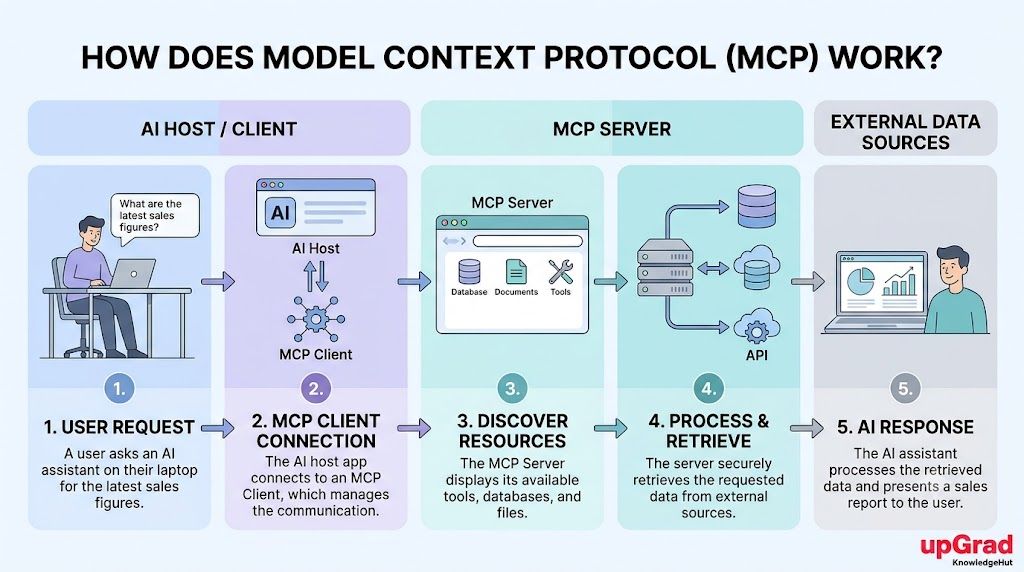
Step 1: The AI application receives a user request
The process begins when a user asks the AI application to do something. For example, a user might ask, "Find the latest sales figures from our database." The application determines what information or capability is needed to answer the question.
Step 2: The MCP client connects to an MCP server
The MCP client establishes communication with a suitable MCP server. The connection method depends on the setup. Local servers can use standard input/output (stdio), while remote servers can use Streamable HTTP.
Step 3: The AI application discovers available tools and resources
The client can discover the capabilities that the server offers. These may include tools for running queries, resources containing relevant information, or reusable prompts. The application can then select an appropriate capability for the user's request.
Step 4: The MCP server processes the request
The client sends the required request to the server. The server performs the permitted operation, such as retrieving records from a database or reading a document, and returns the result. Actions that change data may require additional authorization.
Step 5: The AI application uses the results to respond
The host receives the result and provides it to the AI model as context. The model uses that information to generate a relevant response. If the request involves an action, the application may also report whether the operation was completed successfully.
This process helps AI applications work with external information and services through a consistent communication method.
Learn how to turn business data into actionable insights using SQL, Python, Power BI, and AI-powered analytics workflows. Explore the PG Certificate in Data Analytics and Applied AI to build practical data analysis skills.
What are the use cases of Model Context Protocol?
Model Context Protocol supports a number of practical applications by connecting AI assistants to the tools and data they need in order to carry out a task. The specific capabilities depend on the connected servers and the permissions that are available.
AI-powered coding and software development
Developers can use MCP to connect their coding assistants to project files, code repositories, development tools and other resources. An assistant could retrieve relevant files, look at the code, use an available tool to help investigate an error. That in turn reduces the need to build each of those connections individually.
Business data access and knowledge management
Businesses will often have information stored across documents, databases, internal knowledge bases etc. MCP servers can expose approved sources to compatible AI apps to assist with information retrieval. An example would be an assistant being able to retrieve a policy or search through approved business records before it can answer a question.
Workflow automation and task management
MCP can provide tools for the performance of routine operations (e.g. creating project tasks, updating records, retrieving task status etc). A user might ask their AI assistant to create a task from the meeting notes. The assistant could then use an available tool to make that request subject to the appropriate permissions and confirmation requirements.
Customer support and service automation
Customer support apps can use MCP to access approved customer records, product information and support documentation. An AI assistant could retrieve an order status or locate a relevant troubleshooting guide as part of its response. Access to personal information and to actions that would change a customer's account should be restricted to authorised operations.
AI agents and enterprise application integration
AI agents can use the MCP to access capabilities in a range of different enterprise systems. An agent supporting a business process might retrieve some data from one system and then create a task in another. MCP provides the standard method of connection, the AI application itself is responsible for determining how the capabilities it has access to are to be used.
Also Read: Top 8 Agentic AI Frameworks You Should Know in 2026
What are the benefits and limitations of MCP?
MCP makes it far easier to connect AI apps to the external systems, but it doesn't eliminate all the integration issues. It's important to have a clear understanding of both the capabilities and the limitations of MCP in order to know when it's the right tool to use.
Benefits of MCP
- Simpler integrations: A common protocol can reduce the need for separate connection logic for every compatible AI application.
- Access to external context: Applications can retrieve relevant information from connected sources instead of relying only on the model's existing knowledge.
- Reusable capabilities: An MCP server can expose supported tools and resources to multiple compatible clients.
- Support for automation: Applications can request actions from connected services when the required tools and permissions are available.
- Flexible connections: MCP supports both local and remote communication patterns depending on the implementation.
Limitations of MCP
- Compatibility requirements: Both the AI application and server must support the required protocol features.
- Security risks: Poorly configured servers can expose sensitive data or allow unintended operations.
- Unreliable external data: MCP cannot guarantee that connected sources provide accurate, current, or complete information.
- Setup and maintenance: Servers still need configuration, authentication, testing, updates, and monitoring.
- Permission management: Developers must be very careful about which tools are allowed to access the data or change the system records.
Security is of course the thing that needs to be considered. You need to be using trusted servers, granting only the minimum permissions that are necessary, validating inputs and asking for confirmation for sensitive actions where appropriate. MCP is a communication standard, it's not going to protect you against every security threat out there.
Take your understanding of AI integrations further by learning to build and deploy LLM, RAG, and agentic AI systems. Explore the PG Certificate in Applied Generative Engineering and LLM Applications to develop practical AI engineering skills.
How to build and deploy an MCP-powered application?
Building an MCP powered app is all about picking a use case, having a server, connecting that server to an AI app and then testing the complete workflow. A beginner would probably start off with a simple read only integration before progressing to more complex operations.
Step 1: Choose an AI application and use case
Identify the task the application should perform. That might be searching documents, pulling records from a database or looking up information in a project management system etc. Having a clear use case in mind makes it a lot easier to work out what capabilities you need.
Step 2: Select an MCP SDK and configure the environment
Select an appropriate MCP SDK for your programming language and application. Review the official documentation to find out what protocol features are supported, what connection options are available and what the development requirements are.
Step 3: Build an MCP server with the required tools and resources
Create a server that exposes only the capabilities the application needs. For example, a document search server might provide a tool for finding files and a resource for accessing selected content. Set the permissions in advance before allowing access to any sensitive information.
Step 4: Connect the MCP server to an AI application
Configure the compatible host to connect to the server using a supported transport. Verify that the application can discover the server's capabilities and communicate with them correctly.
Step 5: Test functionality, permissions, and security
Test normal requests, invalid inputs, connection failures, and permission restrictions. Begin with read-only operations. Check that the server cannot access data or perform actions beyond its intended scope.
Step 6: Deploy and monitor the MCP-powered application
Deploy the application and server in an environment appropriate for their security and reliability needs. Monitor errors, access activity, performance, and changes to dependencies. Review permissions regularly and update the integration as needed.
Also Read: Can Beginners Learn Microsoft Agentic AI Without Cloud Experience?
Conclusion
Model Context Protocol (MCP) makes it easier for AI applications to connect with external tools, databases, documents, and business services through a common standard. Its host, client, and server architecture helps applications discover and use available capabilities without building a separate integration for every system.
While MCP works alongside existing APIs, it also brings benefits such as reusable integrations and better access to external context. However, successful implementation depends on compatibility, proper permissions, and strong security practices. Understanding these fundamentals helps developers choose suitable use cases and build reliable MCP-powered applications.
Have A Query? Get in Touch With Our Customer Support | upGrad KnowledgeHut
Frequently Asked Questions (FAQs)
1. Who developed the Model Context Protocol?
Model Context Protocol (MCP) was developed at Anthropic by David Soria Parra and Justin Spahr-Summers. Anthropic introduced it as an open standard on November 25, 2024, to help AI applications connect with external tools and data sources.
2. Why was the Model Context Protocol created?
Model Context Protocol was created to simplify how AI applications connect to external data sources, business tools, and services. Without a common standard, developers often need to build separate integrations for different applications and systems. MCP provides a shared communication method that makes these connections easier to develop and reuse.
3. What is an MCP server?
An MCP server is a program that exposes tools, resources, and prompts to compatible AI applications. It can connect to services such as databases, file systems, and business applications to provide information or perform supported operations. The capabilities available depend on the server's implementation and access permissions.
4. What is the difference between an MCP host, client, and server?
An MCP host is the AI application that manages the interaction with the user. An MCP client is the component within the host that communicates with an MCP server. An MCP server provides access to external tools, data, and reusable prompts through the protocol.
5. What are MCP tools, resources, and prompts?
MCP tools allow AI applications to request actions, such as searching a database or creating a task. Resources provide information, such as documents or database records, while prompts offer reusable instruction templates for common tasks. Together, these capabilities help applications access external context and interact with connected systems.
6. How does MCP connect an LLM to external data?
MCP connects an LLM to external data through an AI application that communicates with an MCP server. The application discovers the server's available capabilities and requests relevant information through the MCP client. The returned data is then provided to the model as context, helping it generate a response based on the retrieved information.
7. What is the Model Context Protocol used for?
Model Context Protocol is used to connect AI applications with external tools, databases, documents, and business services. Common applications include AI-powered coding, enterprise knowledge retrieval, customer support, and workflow automation. It also enables compatible AI agents to use connected tools when the required capabilities and permissions are available.
8. Is Model Context Protocol secure?
Model Context Protocol supports secure integrations, but security depends on how the client, server, authentication, and permissions are configured. Developers should connect only to trusted servers, restrict access to necessary data, and validate tool operations. Sensitive actions should have appropriate approval and authorization controls.
9. What are the security risks of MCP servers?
MCP servers can introduce risks such as unauthorized data access, exposed credentials, prompt injection, and unintended tool execution. A malicious or poorly configured server may misuse granted permissions or return untrusted content that influences an AI application's decisions. Developers should use least-privilege access, protect credentials, validate inputs, and review sensitive actions carefully.
10. Which programming languages support MCP?
MCP has SDKs and implementation options for several programming languages, including Python, TypeScript, Java, C#, and Go. Developers can use these SDKs to build MCP clients and servers without implementing the entire protocol from scratch. The best language depends on the application's existing technology stack and the available SDK support.
1642 articles published
KnowledgeHut is an outcome-focused global ed-tech company. We help organizations and professionals unlock excellence through skills development. We offer training solutions under the people and proces...
Get Free Consultation
By submitting, I accept the T&C and
Privacy Policy