
- Blog Categories
- Project Management
- Agile Management
- IT Service Management
- Cloud Computing
- Business Management
- BI And Visualisation
- Quality Management
- Cyber Security
- DevOps
- Most Popular Blogs
- PMP Exam Schedule for 2026: Check PMP Exam Date
- Top 60+ PMP Exam Questions and Answers for 2026
- PMP Cheat Sheet and PMP Formulas To Use in 2026
- What is PMP Process? A Complete List of 49 Processes of PMP
- Top 15+ Project Management Case Studies with Examples 2026
- Top Picks by Authors
- Top 170 Project Management Research Topics
- What is Effective Communication: Definition
- How to Create a Project Plan in Excel in 2026?
- PMP Certification Exam Eligibility in 2026 [A Complete Checklist]
- PMP Certification Fees - All Aspects of PMP Certification Fee
- Most Popular Blogs
- CSM vs PSM: Which Certification to Choose in 2026?
- How Much Does Scrum Master Certification Cost in 2026?
- CSPO vs PSPO Certification: What to Choose in 2026?
- 8 Best Scrum Master Certifications to Pursue in 2026
- Safe Agilist Exam: A Complete Study Guide 2026
- Top Picks by Authors
- SAFe vs Agile: Difference Between Scaled Agile and Agile
- Top 21 Scrum Best Practices for Efficient Agile Workflow
- 30 User Story Examples and Templates to Use in 2026
- State of Agile: Things You Need to Know
- Top 24 Career Benefits of a Certifed Scrum Master
- Most Popular Blogs
- ITIL Certification Cost in 2026 [Exam Fee & Other Expenses]
- Top 17 Required Skills for System Administrator in 2026
- How Effective Is Itil Certification for a Job Switch?
- IT Service Management (ITSM) Role and Responsibilities
- Top 25 Service Based Companies in India in 2026
- Top Picks by Authors
- What is Escalation Matrix & How Does It Work? [Types, Process]
- ITIL Service Operation: Phases, Functions, Best Practices
- 10 Best Facility Management Software in 2026
- What is Service Request Management in ITIL? Example, Steps, Tips
- An Introduction To ITIL® Exam
- Most Popular Blogs
- A Complete AWS Cheat Sheet: Important Topics Covered
- Top AWS Solution Architect Projects in 2026
- 15 Best Azure Certifications 2026: Which one to Choose?
- Top 22 Cloud Computing Project Ideas in 2026 [Source Code]
- How to Become an Azure Data Engineer? 2026 Roadmap
- Top Picks by Authors
- Top 40 IoT Project Ideas and Topics in 2026 [Source Code]
- The Future of AWS: Top Trends & Predictions in 2026
- AWS Solutions Architect vs AWS Developer [Key Differences]
- Top 20 Azure Data Engineering Projects in 2026 [Source Code]
- 25 Best Cloud Computing Tools in 2026
- Most Popular Blogs
- Company Analysis Report: Examples, Templates, Components
- 400 Trending Business Management Research Topics
- Business Analysis Body of Knowledge (BABOK): Guide
- ECBA Certification: Is it Worth it?
- Top Picks by Authors
- Top 20 Business Analytics Project in 2026 [With Source Code]
- ECBA Certification Cost Across Countries
- Top 9 Free Business Requirements Document (BRD) Templates
- Business Analyst Job Description in 2026 [Key Responsibility]
- Business Analysis Framework: Elements, Process, Techniques
- Most Popular Blogs
- Best Career options after BA [2026]
- Top Career Options after BCom to Know in 2026
- Top 10 Power Bi Books of 2026 [Beginners to Experienced]
- Power BI Skills in Demand: How to Stand Out in the Job Market
- Top 15 Power BI Project Ideas
- Top Picks by Authors
- 10 Limitations of Power BI: You Must Know in 2026
- Top 45 Career Options After BBA in 2026 [With Salary]
- Top Power BI Dashboard Templates of 2026
- What is Power BI Used For - Practical Applications Of Power BI
- SSRS Vs Power BI - What are the Key Differences?
- Most Popular Blogs
- Data Collection Plan For Six Sigma: How to Create One?
- Quality Engineer Resume for 2026 [Examples + Tips]
- 20 Best Quality Management Certifications That Pay Well in 2026
- Six Sigma in Operations Management [A Brief Introduction]
- Top Picks by Authors
- Six Sigma Green Belt vs PMP: What's the Difference
- Quality Management: Definition, Importance, Components
- Adding Green Belt Certifications to Your Resume
- Six Sigma Green Belt in Healthcare: Concepts, Benefits and Examples
- Most Popular Blogs
- Latest CISSP Exam Dumps of 2026 [Free CISSP Dumps]
- CISSP vs Security+ Certifications: Which is Best in 2026?
- Best CISSP Study Guides for 2026 + CISSP Study Plan
- How to Become an Ethical Hacker in 2026?
- Top Picks by Authors
- CISSP vs Master's Degree: Which One to Choose in 2026?
- CISSP Endorsement Process: Requirements & Example
- OSCP vs CISSP | Top Cybersecurity Certifications
- How to Pass the CISSP Exam on Your 1st Attempt in 2026?
- Most Popular Blogs
- Top 7 Kubernetes Certifications in 2026
- Kubernetes Pods: Types, Examples, Best Practices
- DevOps Methodologies: Practices & Principles
- Docker Image Commands
- Top Picks by Authors
- Best DevOps Certifications in 2026
- 20 Best Automation Tools for DevOps
- Top 20 DevOps Projects of 2026
- OS for Docker: Features, Factors and Tips
- More
- Agile & PMP Practice Tests
- Agile Testing
- Agile Scrum Practice Exam
- CAPM Practice Test
- PRINCE2 Foundation Exam
- PMP Practice Exam
- Cloud Related Practice Test
- Azure Infrastructure Solutions
- AWS Solutions Architect
- IT Related Pratice Test
- ITIL Practice Test
- Devops Practice Test
- TOGAF® Practice Test
- Other Practice Test
- Oracle Primavera P6 V8
- MS Project Practice Test
- Project Management & Agile
- Project Management Interview Questions
- Release Train Engineer Interview Questions
- Agile Coach Interview Questions
- Scrum Interview Questions
- IT Project Manager Interview Questions
- Cloud & Data
- Azure Databricks Interview Questions
- AWS architect Interview Questions
- Cloud Computing Interview Questions
- AWS Interview Questions
- Kubernetes Interview Questions
- Web Development
- CSS3 Free Course with Certificates
- Basics of Spring Core and MVC
- Javascript Free Course with Certificate
- React Free Course with Certificate
- Node JS Free Certification Course
- Data Science
- Python Machine Learning Course
- Python for Data Science Free Course
- NLP Free Course with Certificate
- Data Analysis Using SQL
- Home
- Blog
- Data Science
- How to Learn Vibe Coding from Scratch (Step-by-Step Guide)
How to Learn Vibe Coding from Scratch (Step-by-Step Guide)
Updated on Oct 21, 2026 | 0.6k+ views
Share:
Table of Contents
View all
Quick Overview
- How to learn vibe coding from scratch: Start with a small project, learn how AI generates code from natural language prompts, and improve the application through testing and step-by-step changes.
- Tools for beginners: AI coding tools such as Cursor, GitHub Copilot, Replit, and Lovable can help generate and modify code, while platforms like Bubble and Webflow support visual development.
- Essential skills: Prompt writing, problem solving, basic coding concepts, testing, debugging, Git, APIs, and deployment help beginners build more reliable applications.
- This guide explains the step-by-step learning process, tools, projects, essential skills, and common mistakes to avoid when learning vibe coding from scratch.
Once learners are comfortable building simple projects with AI coding tools, Applied Agentic AI can help them understand how AI agents use tools, plan tasks, and automate more complex development workflows.
How to learn vibe coding from scratch?
The easiest way to learn vibe coding is to start with a small project and improve it step by step. Focus on understanding how prompts, generated code, testing, and deployment work together rather than trying to build a complex application immediately.
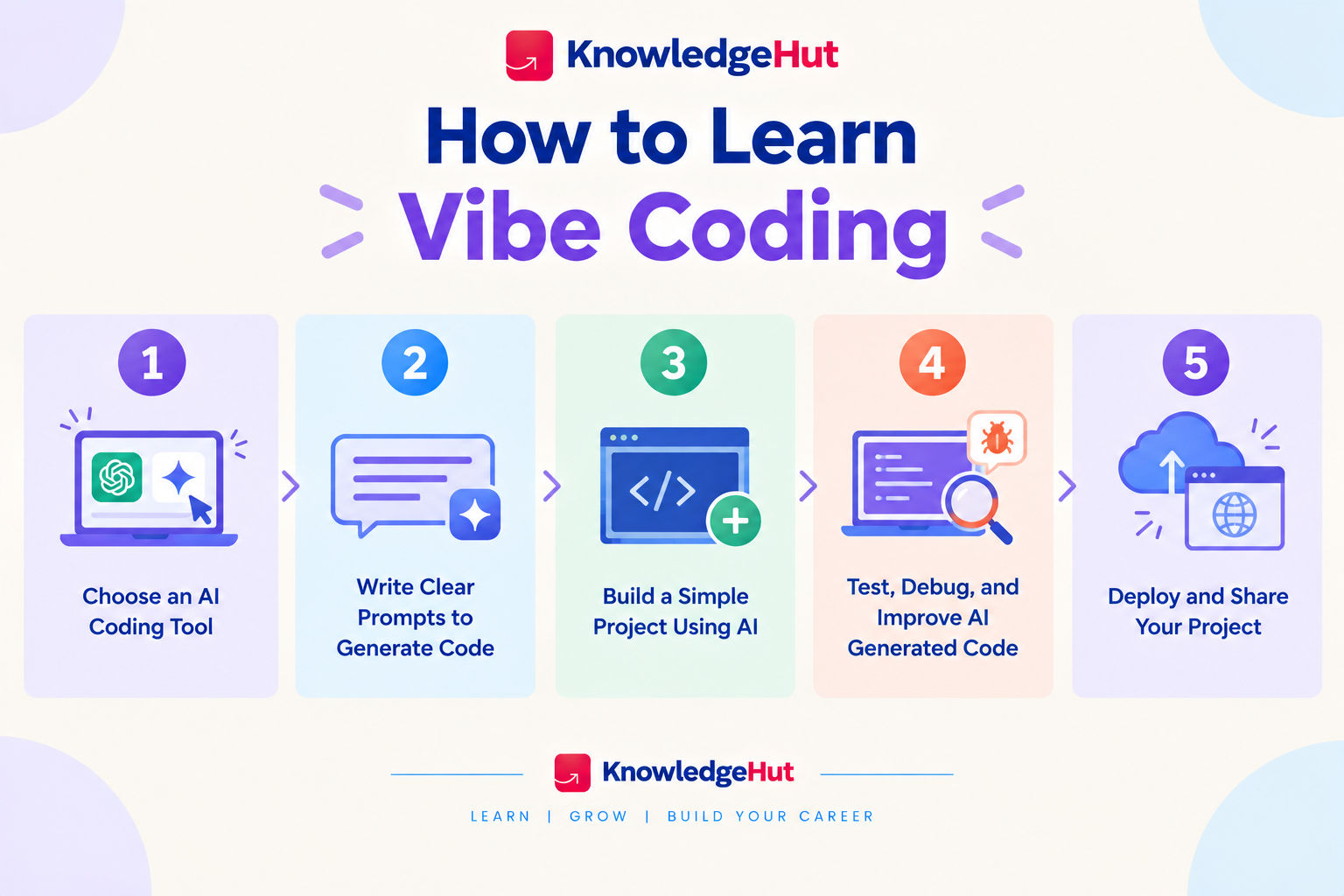
Step 1: Understand the basics of vibe coding
Before choosing a tool, understand how vibe coding works. You describe a feature or application in plain language, the AI generates code, and you review the result before asking for changes.
Start by learning these basics:
- Natural language prompts: Explain what the application should do and who will use it.
- Code generation: Understand how AI turns instructions into working code.
- Iterative development: Improve the application through small, specific requests.
- Testing and validation: Check whether the generated features work as expected.
- Code ownership: Learn what the generated code does before relying on it.
Step 2: Choose an AI coding tool
Choose a beginner friendly tool that matches the type of project you want to build. Some tools generate complete web applications from prompts, while others work inside a code editor and provide assistance as you develop.
When comparing tools, consider:
- Ease of use and the quality of the interface.
- Support for the programming languages you need.
- Whether the tool can preview and test applications.
- Free plan limits and paid feature requirements.
- Options for editing code and connecting to external services.
Step 3: Write clear prompts to generate code
Prompt writing is one of the most important skills when you learn vibe coding. A clear prompt gives the AI enough information to generate useful code without requiring repeated corrections.
Include these details in your prompts:
- Goal: Explain what you want to build.
- Features: List the functions the application should support.
- Design: Describe the layout, colours, and user experience.
- Technical requirements: Mention any preferred language or framework.
- Constraints: Specify what the application should avoid or preserve.
Step 4: Build a simple project using AI
Once you understand the basics and have chosen a tool, start building a small project. A limited scope makes it easier to identify mistakes and understand how the generated code works.
Follow a simple process:
- Define the purpose of the application.
- List two or three essential features.
- Generate the initial version using a clear prompt.
- Preview the result and test each feature.
- Request specific changes based on what you observe.
Step 5: Test, debug, and improve AI generated code
AI generated code can contain bugs, incomplete logic, and security weaknesses. Testing is therefore essential, even when the application appears to work correctly.
Check the following areas:
- Functionality: Do buttons, forms, and navigation work?
- Validation: Does the application handle missing or invalid input?
- Compatibility: Does it work across different screen sizes and browsers?
- Error handling: Does it respond sensibly when something fails?
- Security: Are sensitive credentials and personal information protected?
Step 6: Deploy and share your project
Deployment makes your application accessible beyond your local development environment. Once the main features work, choose a suitable hosting platform and follow its setup instructions.
Before sharing your project:
- Test the final version.
- Remove API keys and other secrets from the code.
- Check that required environment variables are configured securely.
- Verify that external services and integrations work.
- Write a short README explaining the application's purpose and setup.
Also read: What is Vibe Coding?
What tools do beginners need to learn vibe coding?
The right tools depend on whether you want to create a website, build a small application, or experiment with AI features. Beginners should prioritise ease of use, accessible documentation, and the ability to inspect and test the generated code.
1. AI powered coding tools and editors
AI coding tools can generate code, explain errors, suggest improvements, and help developers modify existing projects.
Popular options include:
- Cursor: An AI assisted code editor for working with project files and making code changes.
- GitHub Copilot: Provides code suggestions and AI assistance within supported development environments.
- Replit: Offers an online development environment with AI assisted building features.
- Lovable: Helps users create web applications through natural language instructions.
2. No code and low code platforms for vibe coding
No code and low code platforms can help beginners build applications with less manual programming. They are useful when the main goal is to validate an idea or create a working prototype quickly.
Consider the following options:
- Bubble: Supports visual application development with workflows and database features.
- FlutterFlow: Helps users build applications through a visual interface.
- Webflow: Supports visual website design and development.
- Softr: Helps create applications and portals using connected data sources.
3. GitHub and deployment tools for beginners
Version control and deployment tools help you manage changes and share completed projects. They become especially valuable when an AI tool modifies several files or introduces a change that breaks existing functionality.
Useful tools include:
- GitHub: Stores code repositories and tracks changes.
- Vercel: Supports deployment for many modern web applications.
- Netlify: Offers hosting and deployment options for websites and web applications.
Also read: Essential Skills Required to Become a Vibe Coding Expert
What projects can beginners build with vibe coding?
Small projects provide a practical way to apply prompting, code review, debugging, and deployment skills. Choose something with a clear purpose and a manageable set of features rather than building a large application immediately.
1. A personal portfolio website
A personal portfolio is a useful first project because it introduces layout, navigation, responsive design, and content organisation.
Start with:
- An introduction and short biography.
- A skills section.
- A project gallery.
- A contact section.
- Links to professional profiles.
2. A simple web application
A basic web application helps you practise user input, application logic, and data handling. Begin with a small feature set and add complexity only when the core functionality works.
Possible ideas include a unit converter, expense tracker, or simple calculator. Test normal inputs, unusual values, and error conditions before sharing the application.
3. An AI powered chatbot
A basic chatbot can introduce you to language model APIs and prompt design. You can start with a simple interface that accepts a question and displays the model's response.
As you improve the project, learn how to:
- Connect to an AI service securely.
- Handle loading states and API errors.
- Set limits on requests and usage.
- Display responses clearly.
- Avoid exposing API credentials in frontend code.
4. A task management app
A task management application introduces forms, data storage, and interactive features. It is a useful project for learning how different parts of an application work together.
Start with the ability to add, edit, complete, and delete tasks. Once these functions work reliably, consider adding filters or task categories. If the application stores data remotely, learn about access controls and data protection before using real personal information.
For learners ready to move beyond AI-assisted coding and build more advanced applications, the PG Certificate in Applied Generative Engineering & LLM Applications can help develop practical skills in LLMs, generative AI, and AI-powered application development.
What skills are needed to learn vibe coding?
You can begin without advanced programming knowledge, but building dependable applications requires more than writing prompts. A combination of problem solving, technical fundamentals, testing, and deployment knowledge will help you get better results.
1. Prompt writing and problem solving
Clear instructions help AI tools understand the expected outcome. Problem solving helps you break a large idea into smaller tasks that can be built and tested independently.
Practise describing requirements precisely, identifying what is not working, and requesting one focused change at a time. These habits make the process easier to manage.
2. Basic coding and web development concepts
You do not need to master a programming language before starting, but understanding basic concepts makes it easier to evaluate generated code.
Learn the purpose of:
- Variables, functions, and conditional statements.
- HTML for page structure and CSS for styling.
- JavaScript for interactive web features.
- APIs for communication between applications.
- Databases for storing and retrieving information.
3. Testing, debugging, and code review
Testing helps establish whether an application behaves as expected. Debugging helps identify why something has failed, while code review helps you understand what the AI has changed.
Develop the habit of checking new features, reading error messages, reviewing file changes, and testing existing functionality after updates. Do not assume that code is correct simply because it was generated successfully.
4. Git, APIs, and deployment fundamentals
Git helps you track changes and recover earlier versions of your project. APIs allow applications to communicate with external services, while deployment makes an application available to users.
Learn how to create a repository, manage commits, use environment variables, connect to an API, and publish a basic application. These skills become increasingly important as your projects move beyond simple prototypes.
Also read: 9 Best Vibe Coding Tools in 2026 to Build Apps Faster
What are the common mistakes to avoid when learning vibe coding?
Vibe coding can make development feel quick and straightforward, but rushing through requirements, testing, and security can create problems later. Beginners should focus on building a reliable foundation instead of trying to generate a complete product in one prompt.
1. Using vague or overly broad prompts
Broad prompts often produce generic results or applications with missing features. The AI may also make assumptions about design, data, and functionality that do not match your requirements.
Break the task into smaller instructions, define the expected behaviour, and review the result after each step. Specific prompts make it easier to identify and correct mistakes.
2. Accepting AI generated code without testing
Generated code can contain logical errors, outdated methods, or incomplete functionality. Copying it directly into a project without checking the result can make problems harder to diagnose later.
Test each feature, inspect important code changes, and ask the AI to explain unfamiliar logic. Use version control so you can return to a working version if an update causes problems.
3. Ignoring security and data privacy
Security should be considered from the beginning, not added only after a project is complete. AI tools may generate code that handles credentials or user data incorrectly.
Avoid placing API keys in public code, use appropriate access controls, validate inputs, and review how information is sent to third party services. Never use real sensitive data in a test project unless the environment and data handling practices are appropriate.
4. Building complex projects before learning the basics
Starting with a large application can make it difficult to understand which feature is causing a problem. Complex projects may also require authentication, databases, external integrations, and security controls that beginners have not yet learned.
Begin with one clear purpose and a few essential features. Add functionality gradually, test every change, and move to more complex projects once you can explain how the existing application works.
Also read: How to Use ChatGPT for Vibe Coding: Complete Guide
Conclusion
Learning vibe coding is suitable for beginners, students, professionals, and aspiring creators who want to turn ideas into working applications with AI assistance. It may not be enough on its own for people building complex, security sensitive, or business critical software without technical review.
Start with one AI coding tool and a small project, then practise prompting, testing, debugging, and deployment. The most important factor is not how quickly AI generates code, but whether you can understand, verify, and maintain the application it creates.
Have A Query? Get in Touch With Our Customer Support | upGrad KnowledgeHut
Frequently Asked Questions (FAQs)
1. How do you learn vibe coding from scratch?
To learn vibe coding, start by understanding how AI coding tools turn natural language prompts into code. Choose a beginner friendly tool, build a small project, and practise refining prompts based on the results. Gradually learn testing, debugging, and deployment to create more reliable applications.
2. Is there a course that teaches vibe coding?
Yes, you can explore upGrad KnowledgeHut courses to build relevant skills in AI, programming, and application development. While learning vibe coding, look for practical training that covers AI tools, prompt writing, debugging, and project development. Hands on practice can help you learn vibe coding and turn your ideas into working applications.
3. Can a non coder learn vibe coding?
Yes, non coders can use AI coding tools to build simple websites, applications, and prototypes without writing every line manually. However, understanding basic programming concepts helps with troubleshooting errors and checking generated code. Start with small projects and build your technical knowledge as you progress.
4. Can anyone do vibe coding?
Anyone willing to experiment with AI tools and learn through practice can get started with vibe coding. You need a clear goal, patience, and the ability to describe what you want the application to do. More complex projects still require knowledge of testing, security, and software development.
5. Can ChatGPT be used for vibe coding?
Yes, ChatGPT can help generate code, explain programming concepts, identify errors, and suggest improvements based on your prompts. You can use it to plan features and work through development tasks step by step. Always test the generated code because AI responses can contain mistakes or security issues.
6. How hard is it to learn vibe coding?
The difficulty depends on the project you want to build and your existing technical knowledge. Simple websites and prototypes can be relatively easy to create, while applications involving databases, authentication, and external APIs require more effort. Consistent practice and basic debugging skills make the learning process easier.
7. Do vibe coders actually make money?
Yes, people can earn money by using AI coding tools to build websites, prototypes, internal tools, or small applications for clients. Earnings depend on project quality, customer demand, pricing, and the ability to maintain what they build. Learning vibe coding alone does not guarantee income; solving useful problems is what creates opportunities.
8. Do you need to know coding to do vibe coding?
No, you do not need advanced coding knowledge to begin vibe coding. AI tools can generate code from natural language instructions, allowing beginners to create simple projects. However, learning basic concepts such as variables, APIs, databases, and debugging helps you understand and improve the generated results.
9. Which is better for vibe coding, Claude or Gemini?
Both Claude and Gemini can help generate code, explain errors, and develop applications from prompts. The better option depends on the coding environment, available features, context handling, pricing, and the type of project. Try both on the same small task and compare code quality, ease of use, and debugging support.
10. Is Cursor better than Claude for vibe coding?
Cursor is an AI powered code editor designed to help developers work directly within a codebase, while Claude is an AI assistant that can help with coding, reasoning, and debugging. They serve different purposes, and their capabilities can overlap depending on the available features. Choose Cursor for an integrated editor workflow or Claude for conversational assistance, and test both against your project needs.
1648 articles published
KnowledgeHut is an outcome-focused global ed-tech company. We help organizations and professionals unlock excellence through skills development. We offer training solutions under the people and proces...
Get Free Consultation
By submitting, I accept the T&C and
Privacy Policy