
- Blog Categories
- Project Management
- Agile Management
- IT Service Management
- Cloud Computing
- Business Management
- BI And Visualisation
- Quality Management
- Cyber Security
- DevOps
- Most Popular Blogs
- PMP Exam Schedule for 2026: Check PMP Exam Date
- Top 60+ PMP Exam Questions and Answers for 2026
- PMP Cheat Sheet and PMP Formulas To Use in 2026
- What is PMP Process? A Complete List of 49 Processes of PMP
- Top 15+ Project Management Case Studies with Examples 2026
- Top Picks by Authors
- Top 170 Project Management Research Topics
- What is Effective Communication: Definition
- How to Create a Project Plan in Excel in 2026?
- PMP Certification Exam Eligibility in 2026 [A Complete Checklist]
- PMP Certification Fees - All Aspects of PMP Certification Fee
- Most Popular Blogs
- CSM vs PSM: Which Certification to Choose in 2026?
- How Much Does Scrum Master Certification Cost in 2026?
- CSPO vs PSPO Certification: What to Choose in 2026?
- 8 Best Scrum Master Certifications to Pursue in 2026
- Safe Agilist Exam: A Complete Study Guide 2026
- Top Picks by Authors
- SAFe vs Agile: Difference Between Scaled Agile and Agile
- Top 21 Scrum Best Practices for Efficient Agile Workflow
- 30 User Story Examples and Templates to Use in 2026
- State of Agile: Things You Need to Know
- Top 24 Career Benefits of a Certifed Scrum Master
- Most Popular Blogs
- ITIL Certification Cost in 2026 [Exam Fee & Other Expenses]
- Top 17 Required Skills for System Administrator in 2026
- How Effective Is Itil Certification for a Job Switch?
- IT Service Management (ITSM) Role and Responsibilities
- Top 25 Service Based Companies in India in 2026
- Top Picks by Authors
- What is Escalation Matrix & How Does It Work? [Types, Process]
- ITIL Service Operation: Phases, Functions, Best Practices
- 10 Best Facility Management Software in 2026
- What is Service Request Management in ITIL? Example, Steps, Tips
- An Introduction To ITIL® Exam
- Most Popular Blogs
- A Complete AWS Cheat Sheet: Important Topics Covered
- Top AWS Solution Architect Projects in 2026
- 15 Best Azure Certifications 2026: Which one to Choose?
- Top 22 Cloud Computing Project Ideas in 2026 [Source Code]
- How to Become an Azure Data Engineer? 2026 Roadmap
- Top Picks by Authors
- Top 40 IoT Project Ideas and Topics in 2026 [Source Code]
- The Future of AWS: Top Trends & Predictions in 2026
- AWS Solutions Architect vs AWS Developer [Key Differences]
- Top 20 Azure Data Engineering Projects in 2026 [Source Code]
- 25 Best Cloud Computing Tools in 2026
- Most Popular Blogs
- Company Analysis Report: Examples, Templates, Components
- 400 Trending Business Management Research Topics
- Business Analysis Body of Knowledge (BABOK): Guide
- ECBA Certification: Is it Worth it?
- Top Picks by Authors
- Top 20 Business Analytics Project in 2026 [With Source Code]
- ECBA Certification Cost Across Countries
- Top 9 Free Business Requirements Document (BRD) Templates
- Business Analyst Job Description in 2026 [Key Responsibility]
- Business Analysis Framework: Elements, Process, Techniques
- Most Popular Blogs
- Best Career options after BA [2026]
- Top Career Options after BCom to Know in 2026
- Top 10 Power Bi Books of 2026 [Beginners to Experienced]
- Power BI Skills in Demand: How to Stand Out in the Job Market
- Top 15 Power BI Project Ideas
- Top Picks by Authors
- 10 Limitations of Power BI: You Must Know in 2026
- Top 45 Career Options After BBA in 2026 [With Salary]
- Top Power BI Dashboard Templates of 2026
- What is Power BI Used For - Practical Applications Of Power BI
- SSRS Vs Power BI - What are the Key Differences?
- Most Popular Blogs
- Data Collection Plan For Six Sigma: How to Create One?
- Quality Engineer Resume for 2026 [Examples + Tips]
- 20 Best Quality Management Certifications That Pay Well in 2026
- Six Sigma in Operations Management [A Brief Introduction]
- Top Picks by Authors
- Six Sigma Green Belt vs PMP: What's the Difference
- Quality Management: Definition, Importance, Components
- Adding Green Belt Certifications to Your Resume
- Six Sigma Green Belt in Healthcare: Concepts, Benefits and Examples
- Most Popular Blogs
- Latest CISSP Exam Dumps of 2026 [Free CISSP Dumps]
- CISSP vs Security+ Certifications: Which is Best in 2026?
- Best CISSP Study Guides for 2026 + CISSP Study Plan
- How to Become an Ethical Hacker in 2026?
- Top Picks by Authors
- CISSP vs Master's Degree: Which One to Choose in 2026?
- CISSP Endorsement Process: Requirements & Example
- OSCP vs CISSP | Top Cybersecurity Certifications
- How to Pass the CISSP Exam on Your 1st Attempt in 2026?
- Most Popular Blogs
- Top 7 Kubernetes Certifications in 2026
- Kubernetes Pods: Types, Examples, Best Practices
- DevOps Methodologies: Practices & Principles
- Docker Image Commands
- Top Picks by Authors
- Best DevOps Certifications in 2026
- 20 Best Automation Tools for DevOps
- Top 20 DevOps Projects of 2026
- OS for Docker: Features, Factors and Tips
- More
- Agile & PMP Practice Tests
- Agile Testing
- Agile Scrum Practice Exam
- CAPM Practice Test
- PRINCE2 Foundation Exam
- PMP Practice Exam
- Cloud Related Practice Test
- Azure Infrastructure Solutions
- AWS Solutions Architect
- IT Related Pratice Test
- ITIL Practice Test
- Devops Practice Test
- TOGAF® Practice Test
- Other Practice Test
- Oracle Primavera P6 V8
- MS Project Practice Test
- Project Management & Agile
- Project Management Interview Questions
- Release Train Engineer Interview Questions
- Agile Coach Interview Questions
- Scrum Interview Questions
- IT Project Manager Interview Questions
- Cloud & Data
- Azure Databricks Interview Questions
- AWS architect Interview Questions
- Cloud Computing Interview Questions
- AWS Interview Questions
- Kubernetes Interview Questions
- Web Development
- CSS3 Free Course with Certificates
- Basics of Spring Core and MVC
- Javascript Free Course with Certificate
- React Free Course with Certificate
- Node JS Free Certification Course
- Data Science
- Python Machine Learning Course
- Python for Data Science Free Course
- NLP Free Course with Certificate
- Data Analysis Using SQL
- Home
- Blog
- Data Science
- How to Use ChatGPT for Prompt engineering: A step-by-step Guide with Examples
How to Use ChatGPT for Prompt engineering: A step-by-step Guide with Examples
Updated on Aug 06, 2026 | 0.6k+ views
Share:
Table of Contents
View all
- How to use ChatGPT for prompt engineering?
- What makes an effective ChatGPT prompt?
- Prompt engineering techniques you can use with ChatGPT
- How to improve ChatGPT responses through prompt refinement
- Real-World examples of using ChatGPT for prompt engineering
- Common prompt engineering mistakes to avoid
- Best practices for using ChatGPT as a prompt engineering assistant
- Conclusion
Quick Overview
- ChatGPT can help you create, refine, test, and optimize prompts for better AI-generated responses.
- Start with a clear objective, provide context, define the desired output, and iterate based on results.
- Techniques like role prompting, few-shot prompting, chain-of-thought prompting, and prompt refinement improve response quality.
- This guide covers how to use ChatGPT for prompt engineering, with simple steps, examples, and techniques for writing better prompts.
Ready to move from basic AI usage to professional-level prompting? Explore the upGrad KnowledgeHut Generative AI and Prompt Engineering Course for Professionals and gain practical, industry-relevant AI skills.
How to use ChatGPT for prompt engineering?
Writing effective prompts is the key to getting accurate, relevant, and high-quality responses from ChatGPT. The clearer and more specific your instructions, the better the results.
Follow these simple prompt engineering techniques to make the most of every conversation with ChatGPT.
1. Know what you want before writing a prompt
Before you ask ChatGPT anything, think about one question: What do I want ChatGPT to help me with? Many people write a prompt without having a clear goal. This makes it harder for ChatGPT to give the right answer.
Weak prompt: Tell me about email marketing.
Better prompt: Explain email marketing to a small business owner who is new to digital marketing. Include its benefits, common mistakes, and three simple tips to get started.
2. Give enough background information
ChatGPT gives better answers when it understands your situation.
Think about asking a business consultant for advice without explaining your company or goals. The advice would likely be too general.
The same is true for ChatGPT.
Instead of: Create a content strategy.
Try: Create a content strategy for a SaaS startup that sells project management software to remote teams. The goal is to increase organic traffic over the next six months.
3. Tell ChatGPT what role to play
A simple way to improve your prompts is to give ChatGPT a role. This helps it answer from the right point of view and use the right style.
For example:
- Act as an experienced SEO strategist. Analyze this blog topic and suggest keyword opportunities.
- Act as a senior software engineer reviewing production code.
4. Explain how you want the answer
Don't forget to tell ChatGPT how you want the information presented.
You can ask for:
- Bullet points
- Tables
- Checklists
- Step-by-step guides
- Executive summaries
- Email drafts
- JSON format
Example:
Summarize the report in a table with columns for Key Finding, Impact, and Recommendation.
5. Add clear rules and requirements
Giving ChatGPT some limits helps it produce better results.
You can specify things like:
- Word count
- Tone of writing
- Reading level
- Number of examples
- Target audience
Example:
Write a 500-word article for beginners. Use simple language, include three examples, and avoid technical terms.
6. Improve your prompts over time
You don't have to write the perfect prompt on your first try.
A better approach is to:
- Write your first prompt.
- Read the response.
- See what is missing or needs improvement.
- Update the prompt.
- Repeat until you're happy with the result.
What makes an effective ChatGPT prompt?
Effective prompts do not always need to be long. However, good prompts usually have a few key elements that make the response more useful.
Understanding these elements helps you find what went wrong with a prompt and improve it easily.
1. The essential elements of a high-quality prompt
A strong prompt usually includes four key elements: a clear task, relevant context, the desired output format, and any specific instructions or examples.
Including these details helps the AI generate more accurate, relevant, and useful responses.
2. Why context improves AI responses
Context helps ChatGPT understand exactly what you need. Without enough context, it may provide a general answer that does not fully match your requirements.
Adding details such as your audience, purpose, or skill level, for example, "this is for beginners with no coding experience," helps create responses that are more relevant, clear, and useful.
3. How specificity affects output quality
Specific prompts usually lead to better results. A vague request like "write about marketing" can produce a broad and general answer.
However, a detailed request like "write three cold email subject lines for a B2B SaaS product targeting IT managers" gives clear direction and helps create a more focused and useful response.
4. When to include examples in your prompts
Adding examples to your prompts can help ChatGPT understand the style, format, or tone you want. Even a short sample can make the response more closely match your expectations.
This is useful when you need a specific brand voice, writing style, or content format that may be difficult to explain with words alone.
5. Weak vs. strong prompt examples
A detailed prompt usually gives much better results than a vague one.
Weak prompt |
Strong prompt |
| Write an article. | Write a 1,000-word beginner-friendly article about email marketing. Use a conversational tone and include practical examples. |
| Explain AI. | Explain artificial intelligence to a 12-year-old using simple language and everyday examples. |
| Write code. | Write a Python function that removes duplicate values from a list. Add comments to explain each step. |
| Create social media content. | Write five Instagram captions for a clothing brand's weekend sale. Target young adults and keep the tone fun and engaging. |
Also Read: Prompt Engineering Best Practices for High-Quality Outputs
Prompt engineering techniques you can use with ChatGPT
After learning the basics of prompt engineering, the next step is to understand different prompting techniques.
Each technique is useful for different types of tasks. You can also combine two or more techniques to get better, more accurate, and more consistent responses from ChatGPT.
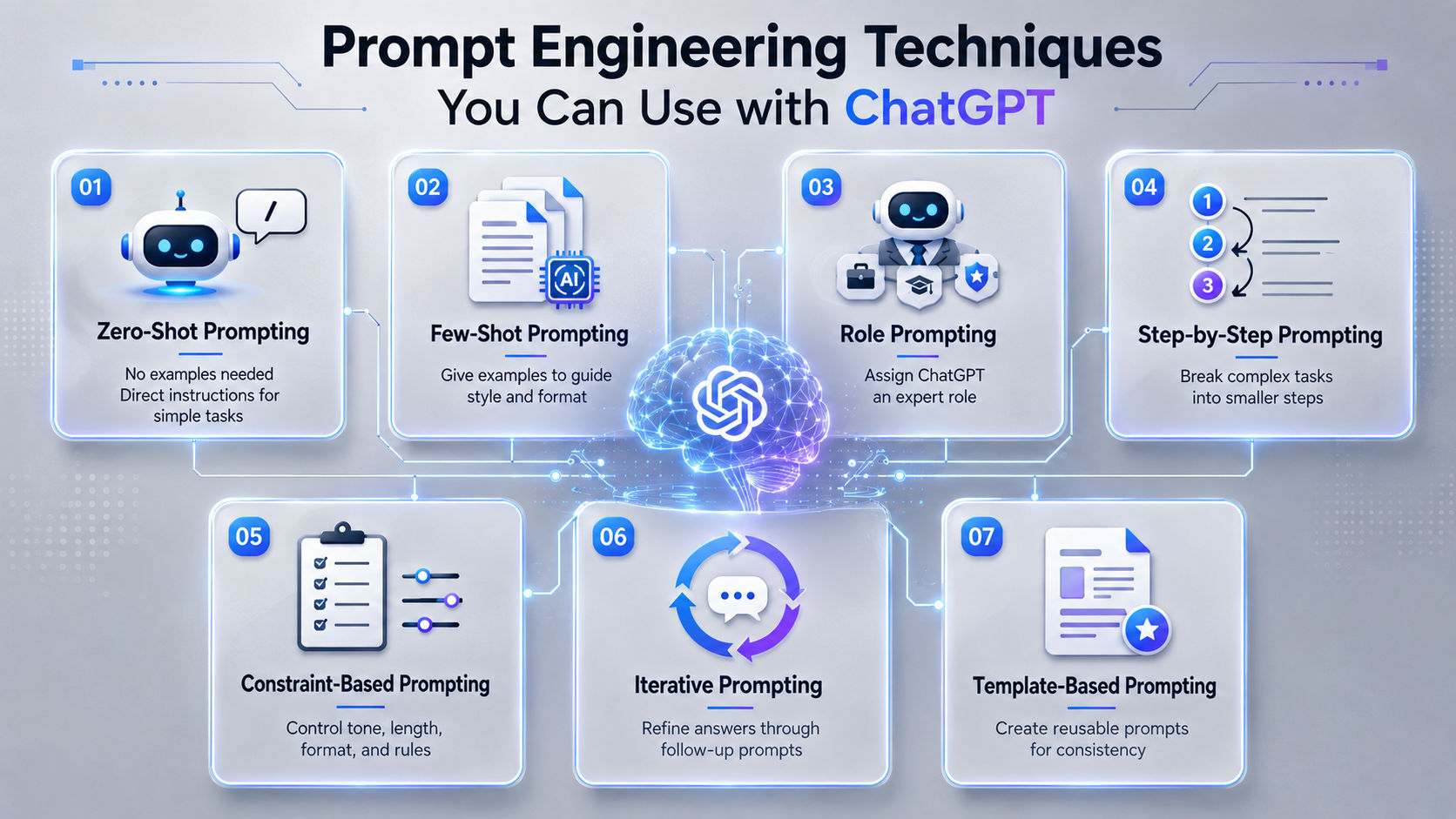
Also Read: Advanced Prompt Engineering Techniques for Better Results
1. Zero-shot prompting
Zero-shot prompting means asking ChatGPT to complete a task without giving any examples. You simply explain what you want, and ChatGPT creates a response based on your instructions.
Example
Summarize the following article in 150 words using simple language.
This technique works well for simple tasks such as summarizing text, answering questions, translating content, or explaining concepts.
2. Few-shot prompting
Few-shot prompting means giving ChatGPT one or more examples before asking it to do a similar task. The examples help ChatGPT understand the style, format, or structure you want.
Example
Product: Wireless Mouse
Description: A lightweight wireless mouse with silent clicks and a 12-month battery life.
Now write a description for:
Product: Bluetooth Keyboard
Because ChatGPT has an example to follow, it is more likely to write in the same style and format.
3. Role prompting
Role prompting tells ChatGPT to answer as if it has a specific job or area of expertise.
Examples
- Act as an SEO consultant.
- Act as a financial advisor.
- Act as a hiring manager.
- Act as a software engineer.
Giving ChatGPT a role helps it choose the right language, knowledge, and suggestions for the task.
4. Step-by-step prompting
For complex tasks, break the work into smaller steps. This helps ChatGPT give a clear and well-organized response.
Instead of writing: Build a marketing strategy.
Try: Create a digital marketing strategy for a new fitness app. First, identify the target audience. Then recommend the best marketing channels. Finally, create a three-month content plan.
Breaking the task into steps usually leads to a more detailed and logical response.
5. Constraint-based prompting
Constraints tell ChatGPT exactly what you need. This helps it create responses that match your requirements.
Some common constraints are:
- Maximum word count
- Writing tone
- Reading level
- Target audience
- Keywords
- Formatting requirements
Example
Write a 300-word introduction for a blog about email marketing. Use a conversational tone, include the keyword "email marketing" three times naturally, and avoid technical terms.
6. Iterative prompting
Prompt engineering is a step-by-step process. Instead of writing a new prompt every time, you can improve the previous response with follow-up prompts.
Prompt 1: Write a blog introduction about remote work.
Prompt 2: Make it more engaging and shorten it to 120 words.
Prompt 3: Add a relevant statistic and end with a thought-provoking question.
Each new prompt improves the previous response until it meets your needs.
7. Template-based prompting
If you often do similar tasks, you can create prompt templates. Templates save time and help you get consistent results.
Template
Act as a [ROLE]. Write a [CONTENT TYPE] about [TOPIC] for [TARGET AUDIENCE]. Use a [TONE] tone, keep it under [WORD COUNT] words, include [KEYWORDS] naturally, and present the output as [FORMAT].
Using prompt templates makes your work faster, reduces repetitive writing, and helps you create consistent prompts for similar tasks.
Explore upGrad KnowledgeHut Data Science Courses to build skills in prompt engineering, data-driven decision-making, and future-ready AI technologies.
How to improve ChatGPT responses through prompt refinement
Sometimes, even a good prompt does not give the exact answer you want. Instead of writing a completely new prompt, you can improve the response by making small changes. Here are some simple ways to do that.
1. Check the first response carefully
Do not accept the first answer just because it sounds good. Compare it with your original goal. Check if it includes all the important details, uses the right tone, gives correct information, and follows your instructions for format or length.
2. Ask follow-up questions to add clarity
If the answer is close but not quite right, ask a follow-up question instead of starting over. For example, you can say, "Make this shorter and remove the technical terms."
ChatGPT remembers the earlier conversation, so it can improve the previous response without needing a new prompt.
3. prompts based on previous outputs
After a few tries, you may notice patterns. If the answers are too general, add more details or include an example in your next prompt. If the tone is too formal, tell ChatGPT to write in a "friendly and conversational" style.
Clear tone words like formal, informal, professional, friendly, humorous, or serious help guide the writing style.
4. Break complex tasks into smaller prompts
If you ask ChatGPT to do many things at once, the response may be short or incomplete. It is often better to split a large task into smaller prompts.
For example, instead of asking it to write a full blog post, first ask for the introduction, then ask for the first section, and continue one step at a time. This usually gives better quality results.
5. Save and reuse successful prompt template
When you find a prompt that gives good results, save it as a template. You can replace small details each time you use it for a new task.
Keeping a collection of useful prompts saves time and gives you a reliable starting point instead of creating a new prompt every time.
Real-World examples of using ChatGPT for prompt engineering
The easiest way to learn prompt engineering is by looking at real examples. ChatGPT is used in many fields, including content writing, coding, marketing, research, education, and business.
A clear prompt helps you get better, more accurate answers.
1. Content writing and SEO
Content writers and SEO experts use ChatGPT to come up with blog ideas, create outlines, improve content, write FAQs, create meta descriptions, and optimize articles for search engines.
A good prompt tells ChatGPT who the content is for, what the reader wants, and how the content should be structured.
Example prompt
Act as an SEO content writer. Create a detailed blog outline for "Best Email Marketing Tools" for beginners. Include H2 headings, H3 subheadings, FAQs, search intent, and keyword suggestions.
Common use cases
- Creating blog outlines
- Writing SEO-friendly titles
- Improving existing articles
- Writing product descriptions
- Creating FAQ sections
- Planning content calendars
2. Coding and debugging
Developers use ChatGPT to write code, fix errors, explain programming concepts, review code, and improve scripts.
The more information you provide, such as the programming language, error message, and expected result, the better the response will be.
Example prompt
Act as a senior Python developer. Review the following code, find the error, explain why it happens, and provide the corrected version with step-by-step explanations.
Common use cases
- Fixing coding errors
- Understanding unfamiliar code
- Creating code examples
- Improving existing scripts
- Learning programming concepts
- Reviewing code quality
Also Read: Prompt Engineering for Developers
3. Marketing and copywriting
Marketing teams use ChatGPT to write ad copy, email campaigns, social media posts, and other promotional content.
Adding details about the brand, audience, platform, and goal helps generate more relevant content.
Example prompt
Act as a digital marketing copywriter. Write five Google Ads headlines for an online digital marketing course for working professionals. Keep each headline under 30 characters and focus on career growth.
Common use cases
- Writing ad copy
- Creating email campaigns
- Writing social media captions
- Creating landing page content
- Brainstorming campaign ideas
- Building customer personas
4. Research and data analysis
Researchers and professionals use ChatGPT to summarize reports, compare information, organize notes, and explain difficult topics in simple language.
Mentioning the purpose and preferred format helps ChatGPT give a better summary.
Example prompt
Analyze this research paper and summarize the main findings in bullet points. Include the research objective, methodology, key results, limitations, and practical applications.
Common use cases
- Summarizing reports
- Finding key insights
- Comparing documents
- Simplifying technical topics
- Creating research summaries
- Organizing notes
5. Education and learning
Students, teachers, and professionals use ChatGPT to learn new topics, understand difficult concepts, prepare for exams, and practice skills.
A clear prompt should mention the learner's level and the type of explanation needed.
Example prompt
Act as a patient teacher. Explain machine learning in simple English with real-life examples for a beginner with no programming knowledge.
Common use cases
- Learning difficult topics
- Creating study notes
- Generating practice questions
- Preparing presentations
- Learning new skills
- Reviewing assignments
6. Business communication and documentation
Businesses use ChatGPT to write emails, reports, proposals, meeting summaries, and internal documents.
Including the purpose, audience, and tone helps create more useful business content.
Example prompt
Act as a business communication expert. Write a short follow-up email after a client meeting. Keep it professional, polite, and action-focused. Include the next steps and a clear call to action.
Common use cases
- Writing professional emails
- Creating business proposals
- Summarizing meetings
- Preparing reports
- Drafting company documents
- Writing internal communication
Also Read: Generative AI for Customer Support and Chatbots
Common prompt engineering mistakes to avoid
Even experienced ChatGPT users fall into a few repeat mistakes. Recognizing these patterns makes it easier to write better prompts from the start.
1. Writing vague or generic prompts
Prompts like "write something about AI" leave too much open to interpretation, forcing ChatGPT to guess at the audience, tone, and purpose.
The fix is always the same: add a specific task, a target audience, and a clear format.
2. Asking multiple questions in a single prompt
Stacking several unrelated questions into one prompt often causes ChatGPT to answer some parts well and skip or rush others.
Splitting the request into separate prompts, one question at a time, produces more complete and accurate answers.
3. Providing too little or too much context
Too little context leads to generic answers, but an excessive amount of unfiltered background information can bury the actual instruction and confuse the response.
The goal is relevant context only, not every possible detail about the task.
4. Ignoring output formatting instructions
Even when a format is specified, ChatGPT can sometimes default back to plain paragraphs if the formatting instruction is buried in the middle of a long prompt.
Placing format requirements clearly, often at the start or end of the prompt, helps the instruction stick.
5. Expecting perfect results without iteration
Many users give up on a prompt after one attempt, assuming ChatGPT simply cannot handle the task. In most cases, the issue is the prompt, not the model, and a small adjustment after reviewing the first response usually solves it, which is exactly why OpenAI frames prompting as an iterative process rather than a single shot request.
Best practices for using ChatGPT as a prompt engineering assistant
Following a few simple habits can help you create better prompts and get more consistent results from ChatGPT.
1. Match the prompt to your specific task
There is no single perfect prompt structure for every situation. A creative writing prompt needs more freedom and fewer constraints, while a technical or data heavy prompt needs tighter formatting and stricter boundaries.
Matching the approach to the task type is more effective than applying the same template everywhere.
2. Keep instructions simple and unambiguous
Long, overly complex prompts filled with conditional instructions often confuse the model rather than helping it.
Short, direct sentences with one clear instruction per line tend to outperform dense paragraphs packed with multiple requirements.
3. Verify AI generated information
ChatGPT can produce information that sounds confident but is inaccurate, especially on niche topics, recent events, or specific statistics.
Any factual claim, number, or data point generated by ChatGPT should be checked against a reliable source before it gets published or used in a decision.
4. Build a personal prompt library
Saving prompts that consistently produce good results, organized by task type, turns prompt engineering from a repeated guessing game into a reusable system.
Over time, this library becomes one of the most valuable time saving assets for anyone who works with ChatGPT regularly.
5. Continuously experiment and improve your prompts
AI models are updated regularly, and a prompt that worked well six months ago might need adjustment today.
Treating prompt engineering as an ongoing skill, not a one-time lesson, keeps results consistent even as the underlying model changes.
Conclusion
Mastering ChatGPT for prompt engineering is all about asking better questions, not using complicated commands. By writing clear prompts, providing the right context, and refining your instructions based on the results, you can consistently generate more accurate and useful AI responses.
As you practice different prompting techniques and build your own prompt library, you'll save time, improve productivity, and get far more value from ChatGPT in both personal and professional tasks.
Have A Query? Get in Touch With Our Customer Support | upGrad KnowledgeHut
Frequently Asked Questions (FAQs)
What is prompt engineering in ChatGPT?
Prompt engineering in ChatGPT is the practice of designing and refining prompts to guide the AI toward producing accurate, relevant, and useful responses. Instead of giving vague instructions, you provide clear context, objectives, and formatting requirements. Effective prompt engineering helps reduce errors, improve response quality, and achieve more consistent results across different tasks.
How much context should I provide in a prompt?
You should provide enough context for ChatGPT to understand your goal, audience, and desired outcome without overwhelming it with unnecessary details. Relevant background information helps the AI generate more accurate responses, while excessive or unrelated information can reduce focus. A good rule is to include only the details that directly impact the task.
What are the best prompt engineering techniques?
Some of the most effective prompt engineering techniques include zero-shot prompting, few-shot prompting, role prompting, step-by-step prompting, constraint-based prompting, and iterative prompting. Each technique serves a different purpose, such as improving accuracy, guiding tone, or ensuring structured outputs. Combining multiple techniques often leads to the best results.
What are common prompt engineering mistakes?
Common prompt engineering mistakes include writing vague prompts, providing insufficient context, asking multiple unrelated questions at once, and failing to specify the desired format. Many users also expect perfect results from a single prompt without refining it. Clear instructions and iterative improvements usually produce significantly better outcomes.
What are the 5 elements of a good prompt?
The five key elements of a good prompt are role, context, task, constraints, and output format. The role defines who ChatGPT should act as, context provides background information, the task states what needs to be done, constraints set boundaries, and the output format specifies how the response should be presented. Together, these elements create clear and effective instructions.
How does role prompting improve ChatGPT responses?
Role prompting improves responses by assigning ChatGPT a specific perspective or area of expertise. For example, asking it to act as an SEO strategist, software engineer, or marketing consultant helps generate more relevant and specialized outputs. This technique provides direction and often results in deeper, more targeted answers.
What are examples of good and bad prompts?
A bad prompt might be, “Write a blog post about marketing.” A good prompt would be, “Act as a digital marketing expert and write a 1,000-word beginner-friendly blog post about email marketing for small businesses, including practical examples and actionable tips.” The stronger prompt provides clear goals, audience, scope, and formatting guidance.
What information should I include in every prompt?
Every prompt should include the objective, relevant context, specific task, audience if applicable, and desired output format. Adding constraints such as tone, length, or content requirements can further improve results. Providing these details helps ChatGPT understand exactly what you need and reduces the chances of generic responses.
What is the best framework for writing ChatGPT prompts?
One of the most effective frameworks is Role + Context + Task + Constraints + Output Format. This structure ensures the AI understands who it should be, what information it has, what it needs to do, any limitations it must follow, and how the final response should look. It's a simple framework that works across most use cases.
What is the fastest way to improve ChatGPT outputs?
The fastest way to improve ChatGPT outputs is to make your prompts more specific and refine them based on previous responses. Adding context, defining the desired format, and giving clear instructions often leads to immediate improvements. If the first response isn't ideal, use follow-up prompts to clarify, expand, or adjust the output rather than starting over.
1648 articles published
KnowledgeHut is an outcome-focused global ed-tech company. We help organizations and professionals unlock excellence through skills development. We offer training solutions under the people and proces...
Get Free Consultation
By submitting, I accept the T&C and
Privacy Policy