
- Home
- Blog
- Data Science
- Microsoft Copilot Studio vs Azure AI Foundry: Which AI Platform Should You Choose?
Microsoft Copilot Studio vs Azure AI Foundry: Which AI Platform Should You Choose?
Updated on Aug 24, 2026 | 485 views
Share:
Table of Contents
View all
- What is the key difference between Microsoft Copilot Studio and Azure AI Foundry?
- What are Microsoft Copilot Studio and Azure AI Foundry?
- When should you choose Microsoft Copilot Studio?
- When should you choose Azure AI Foundry?
- Can Microsoft Copilot and Azure AI Foundry be used together?
- When is a hybrid solution appropriate?
- Which one is better: Microsoft Copilot Studio or Azure AI Foundry?
- Conclusion
Quick Overview
- Microsoft Copilot Studio is a low-code platform for business agents, while Azure AI Foundry is a code-first platform for custom AI applications.
- Copilot Studio prioritizes speed, simplicity, and Microsoft 365 and Power Platform integration, making it suitable for business users and citizen developers.
- Azure AI Foundry provides greater model flexibility, customization, RAG capabilities, orchestration, and AI engineering controls for complex applications.
- Both platforms can work together, with Copilot Studio serving the user-facing agent experience and Foundry supporting advanced AI capabilities in the backend.
- This guide covers the key differences, capabilities, use cases, integration, and decision factors to help you choose the right platform.
Looking to go beyond Microsoft AI platforms? Explore upGrad KnowledgeHut Enterprise AI Platforms with AWS, Azure & Google Cloud to understand AI services, deployment, governance, and infrastructure across major cloud providers.
What is the key difference between Microsoft Copilot Studio and Azure AI Foundry?
The table below lays out the core comparison between Microsoft Copilot Studio vs Azure AI Foundry.
Category |
Copilot Studio |
Azure AI Foundry |
| Primary User | Business users | Developers and AI engineers |
| Development Style | Low code/no code | Code first |
| Main Goal | AI copilots and agents | Custom AI applications |
| Infrastructure | Managed SaaS | Azure managed cloud resources |
| Custom Models | Limited | Extensive |
| RAG Capabilities | Basic to moderate | Advanced |
| Deployment Complexity | Low | Medium to high |
| Best For | Internal copilots | Enterprise scale AI systems |
What are Microsoft Copilot Studio and Azure AI Foundry?
Knowing what both platforms are made for will help compare Azure AI Foundry vs Copilot Studio.
What is Microsoft Copilot Studio?
Copilot Studio is a low-code platform for building AI agents which is designed to enable agents to communicate, perform automated workflows, learn instructions and knowledge, and interact with various types of data.
Its integration into the Microsoft ecosystem is one of the most valuable advantages of Copilot Studio. Connectors and capabilities of Power Platform allow developers to connect agents with various applications and data sources. The platform also enables experiences across websites and Microsoft environments.
Thus, Copilot Studio can be applied to creating conversational agents, employee self-service, customer support, and business process automation.
What is Azure AI Foundry?
Azure AI Foundry is now rebranded into Microsoft Foundry, but the phrase Azure AI Foundry is still popular in searches and the documentation.
Microsoft Foundry is an AI application development platform which combines models, agents, tools, knowledge, evaluation, monitoring, and governance. Developers can develop agents either via the portal or SDKs and also deploy hosted agents with their custom code.
Also, the model ecosystem of Microsoft Foundry is much more diverse. According to Microsoft, Foundry provides models from Microsoft, OpenAI, Anthropic, Meta, and others via the catalog of models.
Who is each platform designed for?
The target user is another major difference between the two platforms.
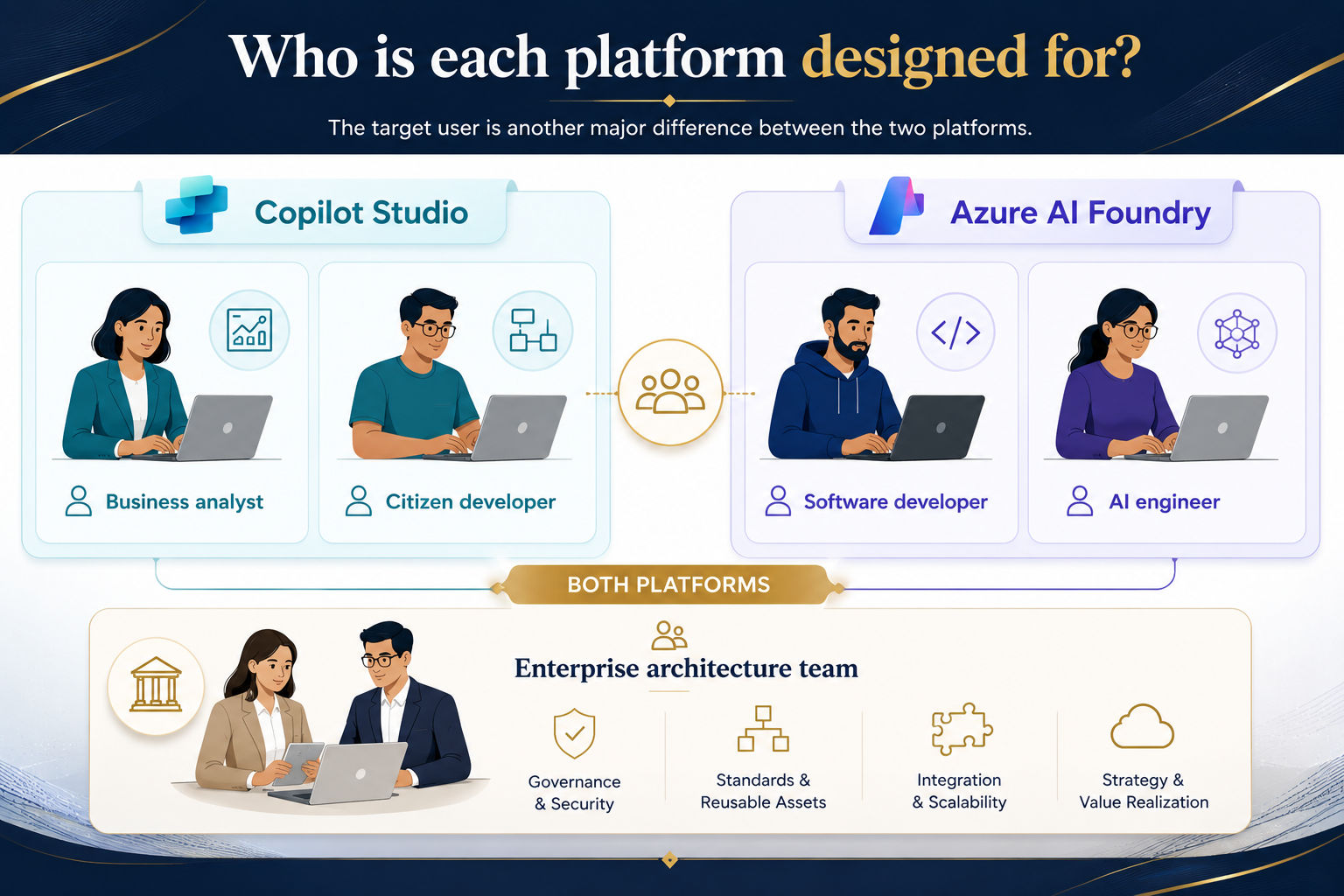
| User Type | Recommended Platform |
| Business analyst | Copilot Studio |
| Citizen developer | Copilot Studio |
| Software developer | Azure AI Foundry |
| AI engineer | Azure AI Foundry |
| Enterprise architecture team | Both |
When should you choose Microsoft Copilot Studio?
Copilot Studio should be chosen when the main goal is to create and deploy an agent without building a complete AI application architecture.
When is Copilot Studio the better choice for Low-Code AI agents?
This platform should be used when rapid deployment and flexibility are preferred over extensive customizations, where agents can be created and deployed in just days, not months. In addition, there is less development involved due to the fact that most tasks are performed visually and do not require coding.
Another advantage is business ownership: teams from other departments (besides IT), such as HR and customer support, can create and manage their own agents without depending on the developers every time they need an adjustment.
Which use cases would suit Copilot Studio best?
Copilot Studio usually fits better for everyday business cases, rather than for major development works. The typical use cases would include:
- Assistant for HR who will answer questions about company policies and help new employees with onboarding
- Support agent that will deal with regular troubleshooting cases
- Self-service tools for leave requests, expenses inquiries, or password reset
- Customer service automation for regular Q&As
- Power Platform workflows that integrate copilots with business applications
- Copilots in Microsoft 365 environment like Teams or Outlook
When should you choose Azure AI Foundry?
Azure Foundry is best suited for those projects where developers had more control over the AI application architecture, models, data, tools, and lifecycle.
When is Azure AI Foundry the better choice for custom AI Applications?
Azure AI Foundry becomes a good choice after the solution goes beyond simple chat-based agents. It is designed for application development with customized logic and full lifecycle support, which includes testing and evaluating models.
It allows developers to do further customization, such as fine-tuning the model or using custom data source, and gives complete control over how the AI should work.
What use cases are best suited to Azure AI Foundry?
Azure AI Foundry is usually chosen in the following cases:
- Advanced RAG apps that gather the answer from a structured knowledge base
- Enterprise knowledge platforms for multiple departments usage
- Custom AI solutions which are intended for external clients
- Multitagent AI system which consists of several AI agents that cooperate when completing a task
- More advanced customer experience than just chatbots powered by AI
- Industry specific AI solutions for Finance, Healthcare, Manufacturing, etc.
Building AI solutions starts with strong data and AI skills. Explore upGrad KnowledgeHut Data Science Courses to learn practical concepts across data science, machine learning, deep learning, and AI.
Can Microsoft Copilot and Azure AI Foundry be used together?
Yes, the two can be used together when the organization wants a simple user-facing experience with advanced AI capabilities in the backend.
How do Copilot Studio and Azure AI Foundry complement each other?
Many companies don't necessarily need to choose between these two solutions. One typical configuration will involve Copilot Studio being used as the user-facing product, which means that users will be interacting with a chat-based UI provided by this product. Azure AI Foundry is the AI backend in such a scenario.
Thus, enterprises get the benefits of a convenient frontend and an advanced backend for processing.
When is a hybrid solution appropriate?
The hybrid solution can be used in the following situations:
- Enterprise employee assistant that requires a simple chat interface but depends on complex backend data
- Customer support agent that needs to get information from various sources and platforms
- Knowledge chatbot for a big knowledge base within a company
Which one is better: Microsoft Copilot Studio or Azure AI Foundry?
There is no definitive winner of Microsoft Copilot Studio vs Azure AI Foundry comparison, since both platforms are created for completely different purposes.
Which platform is better for business teams?
Business teams with limited technical expertise tend to perform better using Copilot Studio, since low code nature allows building, testing, and deploying agents much faster without a need to hire a dedicated developer for every single modification.
Which platform is better for developers?
Developers and AI engineers typically favor Azure AI Foundry platform, since it provides full freedom to select models, orchestrate processes and work through the entire AI engineering cycle.
Which platform is better for large and complex enterprise AI applications?
When it comes to enterprise-scale AI applications, Azure AI Foundry will be the superior choice due to its support of advanced RAG, multi-agent systems and flexible infrastructure that no low code tool can provide.
Conclusion
Microsoft Copilot Studio and Azure AI Foundry serve different AI development needs. Copilot Studio is ideal for fast, low-code business agents, while Foundry suits custom and complex AI applications.
Choose Copilot Studio for simplicity and Microsoft 365 workflows, or Foundry for greater control over models and architecture. For enterprise needs, using both platforms together can combine business-friendly agents with advanced AI capabilities.
Have A Query? Get in Touch With Our Customer Support | upGrad KnowledgeHut
Frequently Asked Questions (FAQs)
Is Copilot Studio better than Azure AI Foundry?
Neither platform is universally better; the right choice depends on the project. Copilot Studio is better for low-code business agents, while Foundry suits custom, developer-led AI applications. Choose based on your team's skills, complexity, customization needs, and deployment requirements.
Which platform is better for building AI agents?
Copilot Studio is a strong choice for quickly building business-focused AI agents with low-code tools. Azure AI Foundry is better for developers building highly customized agents and complex agentic systems. For enterprise projects, both can complement each other.
Can Copilot Studio build production-grade agents?
Yes, Copilot Studio can be used to build and deploy production agents for business use cases. It supports integrations, knowledge sources, workflows, authentication, and enterprise deployment options. However, highly customized AI applications may benefit more from Azure AI Foundry.
What is the architectural difference between Copilot Studio and Foundry?
Copilot Studio provides a managed, low-code environment focused on business agents and workflows. Foundry provides a developer-focused environment for models, agents, tools, data, evaluation, and application development. In simple terms, Copilot Studio abstracts more of the architecture, while Foundry provides deeper control.
Which platform gives more control over model selection?
Azure AI Foundry generally provides more flexibility in choosing and working with different AI models. It supports a broad model catalog and gives developers greater control over how models are used in applications. Copilot Studio offers model capabilities within a more managed agent-building experience.
Which platform provides better observability?
Azure AI Foundry is generally better suited to advanced observability for AI application development. It provides capabilities for tracing, evaluation, monitoring, and understanding agent and application behavior. Copilot Studio provides operational management, but Foundry offers deeper developer-oriented controls.
Which platform is better for large-scale AI applications?
Azure AI Foundry is generally better for complex, large-scale AI applications that require custom architecture and engineering. It supports advanced models, agents, tools, evaluation, and Azure services across the AI lifecycle. Copilot Studio is better suited to scalable business agents and workflow automation.
Which platform gives developers more control over deployment?
Azure AI Foundry gives developers greater control over application architecture, deployment, models, and supporting Azure resources. Copilot Studio simplifies deployment through its managed environment and supported channels. The trade-off is greater control in Foundry versus easier deployment in Copilot Studio.
When should I use Azure AI Foundry instead of Copilot Studio?
Use Azure AI Foundry when you need advanced RAG, custom AI applications, multiple models, complex orchestration, or developer-level control. It is particularly suitable for AI engineers and developers building specialized enterprise applications. Choose it when technical flexibility matters more than low-code simplicity.
When should I use Copilot Studio instead of Foundry?
Use Copilot Studio when you need to build business agents quickly with minimal coding. It works well for HR assistants, IT support, employee self-service, customer service, and Microsoft 365 workflows. Choose Copilot Studio when speed, simplicity, and business-user ownership are the main priorities.
1638 articles published
KnowledgeHut is an outcome-focused global ed-tech company. We help organizations and professionals unlock excellence through skills development. We offer training solutions under the people and proces...
Get Free Consultation
By submitting, I accept the T&C and
Privacy Policy