
- Blog Categories
- Project Management
- Agile Management
- IT Service Management
- Cloud Computing
- Business Management
- BI And Visualisation
- Quality Management
- Cyber Security
- DevOps
- Most Popular Blogs
- PMP Exam Schedule for 2025: Check PMP Exam Date
- Top 60+ PMP Exam Questions and Answers for 2025
- PMP Cheat Sheet and PMP Formulas To Use in 2025
- What is PMP Process? A Complete List of 49 Processes of PMP
- Top 15+ Project Management Case Studies with Examples 2025
- Top Picks by Authors
- Top 170 Project Management Research Topics
- What is Effective Communication: Definition
- How to Create a Project Plan in Excel in 2025?
- PMP Certification Exam Eligibility in 2025 [A Complete Checklist]
- PMP Certification Fees - All Aspects of PMP Certification Fee
- Most Popular Blogs
- CSM vs PSM: Which Certification to Choose in 2025?
- How Much Does Scrum Master Certification Cost in 2025?
- CSPO vs PSPO Certification: What to Choose in 2025?
- 8 Best Scrum Master Certifications to Pursue in 2025
- Safe Agilist Exam: A Complete Study Guide 2025
- Top Picks by Authors
- SAFe vs Agile: Difference Between Scaled Agile and Agile
- Top 21 Scrum Best Practices for Efficient Agile Workflow
- 30 User Story Examples and Templates to Use in 2025
- State of Agile: Things You Need to Know
- Top 24 Career Benefits of a Certifed Scrum Master
- Most Popular Blogs
- ITIL Certification Cost in 2025 [Exam Fee & Other Expenses]
- Top 17 Required Skills for System Administrator in 2025
- How Effective Is Itil Certification for a Job Switch?
- IT Service Management (ITSM) Role and Responsibilities
- Top 25 Service Based Companies in India in 2025
- Top Picks by Authors
- What is Escalation Matrix & How Does It Work? [Types, Process]
- ITIL Service Operation: Phases, Functions, Best Practices
- 10 Best Facility Management Software in 2025
- What is Service Request Management in ITIL? Example, Steps, Tips
- An Introduction To ITIL® Exam
- Most Popular Blogs
- A Complete AWS Cheat Sheet: Important Topics Covered
- Top AWS Solution Architect Projects in 2025
- 15 Best Azure Certifications 2025: Which one to Choose?
- Top 22 Cloud Computing Project Ideas in 2025 [Source Code]
- How to Become an Azure Data Engineer? 2025 Roadmap
- Top Picks by Authors
- Top 40 IoT Project Ideas and Topics in 2025 [Source Code]
- The Future of AWS: Top Trends & Predictions in 2025
- AWS Solutions Architect vs AWS Developer [Key Differences]
- Top 20 Azure Data Engineering Projects in 2025 [Source Code]
- 25 Best Cloud Computing Tools in 2025
- Most Popular Blogs
- Company Analysis Report: Examples, Templates, Components
- 400 Trending Business Management Research Topics
- Business Analysis Body of Knowledge (BABOK): Guide
- ECBA Certification: Is it Worth it?
- Top Picks by Authors
- Top 20 Business Analytics Project in 2025 [With Source Code]
- ECBA Certification Cost Across Countries
- Top 9 Free Business Requirements Document (BRD) Templates
- Business Analyst Job Description in 2025 [Key Responsibility]
- Business Analysis Framework: Elements, Process, Techniques
- Most Popular Blogs
- Best Career options after BA [2025]
- Top Career Options after BCom to Know in 2025
- Top 10 Power Bi Books of 2025 [Beginners to Experienced]
- Power BI Skills in Demand: How to Stand Out in the Job Market
- Top 15 Power BI Project Ideas
- Top Picks by Authors
- 10 Limitations of Power BI: You Must Know in 2025
- Top 45 Career Options After BBA in 2025 [With Salary]
- Top Power BI Dashboard Templates of 2025
- What is Power BI Used For - Practical Applications Of Power BI
- SSRS Vs Power BI - What are the Key Differences?
- Most Popular Blogs
- Data Collection Plan For Six Sigma: How to Create One?
- Quality Engineer Resume for 2025 [Examples + Tips]
- 20 Best Quality Management Certifications That Pay Well in 2025
- Six Sigma in Operations Management [A Brief Introduction]
- Top Picks by Authors
- Six Sigma Green Belt vs PMP: What's the Difference
- Quality Management: Definition, Importance, Components
- Adding Green Belt Certifications to Your Resume
- Six Sigma Green Belt in Healthcare: Concepts, Benefits and Examples
- Most Popular Blogs
- Latest CISSP Exam Dumps of 2025 [Free CISSP Dumps]
- CISSP vs Security+ Certifications: Which is Best in 2025?
- Best CISSP Study Guides for 2025 + CISSP Study Plan
- How to Become an Ethical Hacker in 2025?
- Top Picks by Authors
- CISSP vs Master's Degree: Which One to Choose in 2025?
- CISSP Endorsement Process: Requirements & Example
- OSCP vs CISSP | Top Cybersecurity Certifications
- How to Pass the CISSP Exam on Your 1st Attempt in 2025?
- Most Popular Blogs
- Top 7 Kubernetes Certifications in 2025
- Kubernetes Pods: Types, Examples, Best Practices
- DevOps Methodologies: Practices & Principles
- Docker Image Commands
- Top Picks by Authors
- Best DevOps Certifications in 2025
- 20 Best Automation Tools for DevOps
- Top 20 DevOps Projects of 2025
- OS for Docker: Features, Factors and Tips
- More
- Agile & PMP Practice Tests
- Agile Testing
- Agile Scrum Practice Exam
- CAPM Practice Test
- PRINCE2 Foundation Exam
- PMP Practice Exam
- Cloud Related Practice Test
- Azure Infrastructure Solutions
- AWS Solutions Architect
- IT Related Pratice Test
- ITIL Practice Test
- Devops Practice Test
- TOGAF® Practice Test
- Other Practice Test
- Oracle Primavera P6 V8
- MS Project Practice Test
- Project Management & Agile
- Project Management Interview Questions
- Release Train Engineer Interview Questions
- Agile Coach Interview Questions
- Scrum Interview Questions
- IT Project Manager Interview Questions
- Cloud & Data
- Azure Databricks Interview Questions
- AWS architect Interview Questions
- Cloud Computing Interview Questions
- AWS Interview Questions
- Kubernetes Interview Questions
- Web Development
- CSS3 Free Course with Certificates
- Basics of Spring Core and MVC
- Javascript Free Course with Certificate
- React Free Course with Certificate
- Node JS Free Certification Course
- Data Science
- Python Machine Learning Course
- Python for Data Science Free Course
- NLP Free Course with Certificate
- Data Analysis Using SQL
- Home
- Blog
- Data Science
- Microsoft Copilot Studio: A Practical Guide to Building AI Agents for Business
Microsoft Copilot Studio: A Practical Guide to Building AI Agents for Business
Updated on Aug 01, 2026 | 486 views
Share:
Table of Contents
View all
- Step-by-Step Guide to Building Your First AI Agent for Business Using Copilot Studio
- Integrating Microsoft Copilot Studio with Business Systems
- What Can You Build with Microsoft Copilot Studio?
- Microsoft Copilot Studio Pricing and Licensing
- Best Practices for Building Effective Business AI Agents
- Common Challenges and How to Overcome Them
- The Future of Microsoft Copilot Studio and Enterprise AI Agents
- Wrapping Up
Key highlights
- Microsoft Copilot Studio is a complete tool to build, test, and publish smart AI agents for business.
- Key steps include planning your agent's goal, adding knowledge sources, integrating business actions, testing conversations, and publishing to channels.
- Learn how Microsoft Copilot Studio builds intelligent AI agents by combining enterprise knowledge, automation, integrations, and large language models for business.
- Understand the complete process of creating, deploying, securing, and managing AI agents using Microsoft Copilot Studio with real business use cases.
- Explore pricing, best practices, integrations, governance, common challenges, and future AI agent trends to build scalable enterprise automation solutions.
Ready to build beyond AI agents? Enroll in the Advanced Vibe Coding Program with Microsoft Certification and launch a production-ready AI SaaS application in just 4 weeks; no coding required.
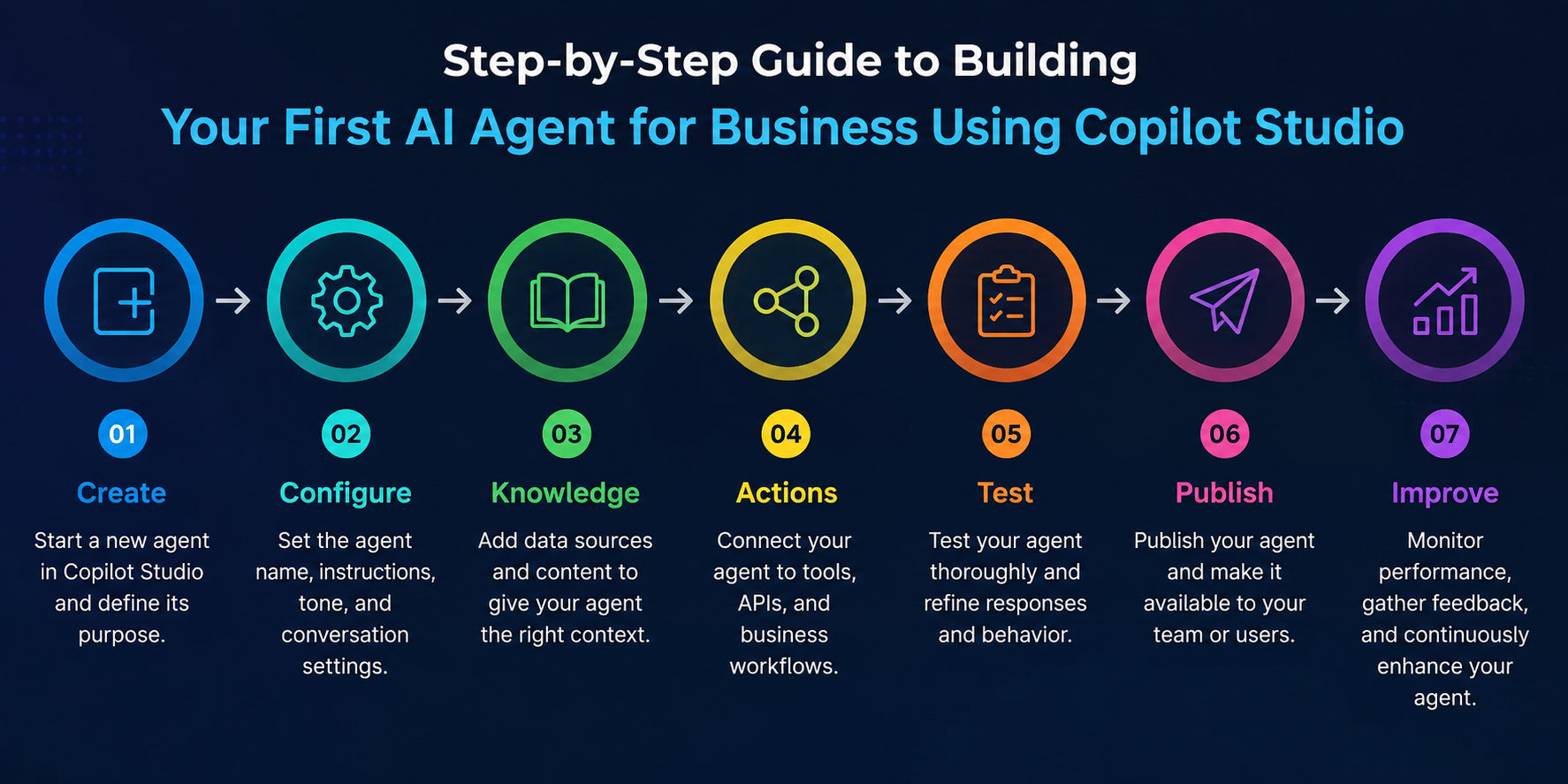
Step-by-Step Guide to Building Your First AI Agent for Business Using Copilot Studio
If you've been hearing "AI agents" thrown around in every meeting lately, you're not imagining it. Businesses everywhere are moving past simple chatbots and into something more capable: AI agents that can actually retrieve knowledge, make decisions, and take action inside your everyday tools. Microsoft Copilot Studio is one of the most accessible ways to build one, even if you've never written a line of code.
This guide walks you through what Copilot Studio actually does, how to build your first agent, and how to avoid the common pitfalls that trip up new users.
Step 1: Create Your Environment
Every agent needs a home. In Copilot Studio, that's your environment, essentially a contained workspace where your agent, its data connections, and its settings all live. If your organization already uses Microsoft 365 or Power Platform, you likely have an environment ready to go.
Step 2: Choose Your Agent Type
Next, decide what kind of agent you're building. Are you creating an internal tool for employees, like an IT help desk assistant? Or something customer-facing, like a support bot for your website? Your answer here shapes everything downstream, from what data the agent needs to where it eventually gets published.
Step 3: Add Knowledge Sources
This is where your agent starts to get smart. You can connect it to SharePoint sites, uploaded documents, public websites, or enterprise databases. The agent uses these sources to answer questions accurately instead of guessing.
Step 4: Design Instructions
Think of instructions as your agent's personality and rulebook combined. You're telling it how to behave, what tone to use, and what boundaries not to cross. Specific instructions produce far better results than vague ones.
Step 5: Add Actions
Actions are what separate an agent from a simple chatbot. This is where you connect your agent to real business systems so it can do things, like creating a ticket, updating a record, or checking an order status, rather than just talking about them.
Step 6: Test Conversations
Before anyone else touches your agent, put it through its paces yourself. Try normal questions, weird phrasing, and edge cases. This is where you catch confusing responses before your users do.
Step 7: Publish
Once you're confident it's ready, publish your agent to wherever it needs to live, whether that's Teams, a website, or another channel.
Step 8: Monitor Performance
Launching isn't the finish line. Keep an eye on how people are actually using the agent and where it's stumbling.
Take your AI skills further with KnowledgeHut's Data Science Courses with Certification Online and build the data, machine learning, and AI expertise needed for real-world business applications.
Integrating Microsoft Copilot Studio with Business Systems
An AI agent is only as useful as the systems it can reach. If it can't pull real data or take real action, it's just a chatbot in a nicer wrapper. Copilot Studio is built to sit on top of tools your business already runs, native Microsoft products on one side, external systems on the other.
Native Microsoft Integrations
- SharePoint: Acts as a native knowledge source, letting agents answer questions from policies and documentation directly.
- Teams: Agents live inside conversations, meeting employees where they already work.
- Outlook: Surfaces relevant information and actions directly inside email.
- Dynamics 365: Retrieves client history and suggests next steps for sales teams.
- Power Apps: Embeds agents into custom low-code applications teams already use.
- Power BI: Lets users ask questions about data instead of digging through dashboards.
- Excel: Brings conversational AI into everyday spreadsheet work.
- OneDrive: Integrates natively, ideal for agents retrieving files or stored documents.
External System Integrations
Copilot Studio connects to over 1,000 external systems through prebuilt Power Platform connectors.
- Salesforce: Fetches live account data on demand instead of relying on a stale snapshot.
- SAP: Supports real-time queries, though older ERP systems may respond slightly slower.
- ServiceNow: Powers IT and helpdesk agents checking tickets and statuses.
- Jira: Gives engineering and product teams visibility into issues.
- SQL: Lets agents query structured databases directly.
- REST APIs: Connects virtually any system that exposes an API.
Worth noting: When agents connect to external systems, typically only schema metadata like field and table names gets indexed ahead of time, the actual business data stays in the source system and is retrieved live, only when a user asks a question. That's an important detail for anyone worried about data duplication or security exposure.
A Few Integrations Worth Noting
- Salesforce: pulls live account data on demand, not a cached snapshot.
- REST APIs: connects virtually any system without a prebuilt connector.
- SharePoint: agents scan documents directly for sourced, accurate answers.
What Can You Build with Microsoft Copilot Studio?
The best way to understand Copilot Studio isn't through features, it's through use cases. Here's how businesses are actually putting it to work:
| Business Function | AI Agent | Benefit |
|---|---|---|
| HR | HR Assistant | Answers policy questions instantly |
| IT | IT Help Desk Agent | Resolves common tickets automatically |
| Customer Service | Customer Support Agent | Handles routine inquiries 24/7 |
| Sales | Sales Assistant | Surfaces account info on demand |
| Finance | Finance Assistant | Speeds up reporting and approvals |
| Procurement | Procurement Agent | Streamlines vendor requests |
| Knowledge Management | Knowledge Bot | Makes internal docs searchable |
| Onboarding | Onboarding Agent | Guides new hires through setup |
It's not really about replacing your existing chatbots, it's about giving them the ability to actually do things, not just chat.
Microsoft Copilot vs. Microsoft Copilot Studio: What's the Difference?
This confuses a lot of people, so let's clear it up quickly. Microsoft Copilot is the ready-made AI assistant baked into Word, Excel, Outlook, and Teams. Copilot Studio, on the other hand, is the toolkit you use to build your own custom agents. Think of Copilot as the product, and Copilot Studio as the workshop.
Want more inspiration? Explore what you can build with Microsoft Copilot without coding, from AI assistants and workflow automations to productivity tools for everyday business tasks.
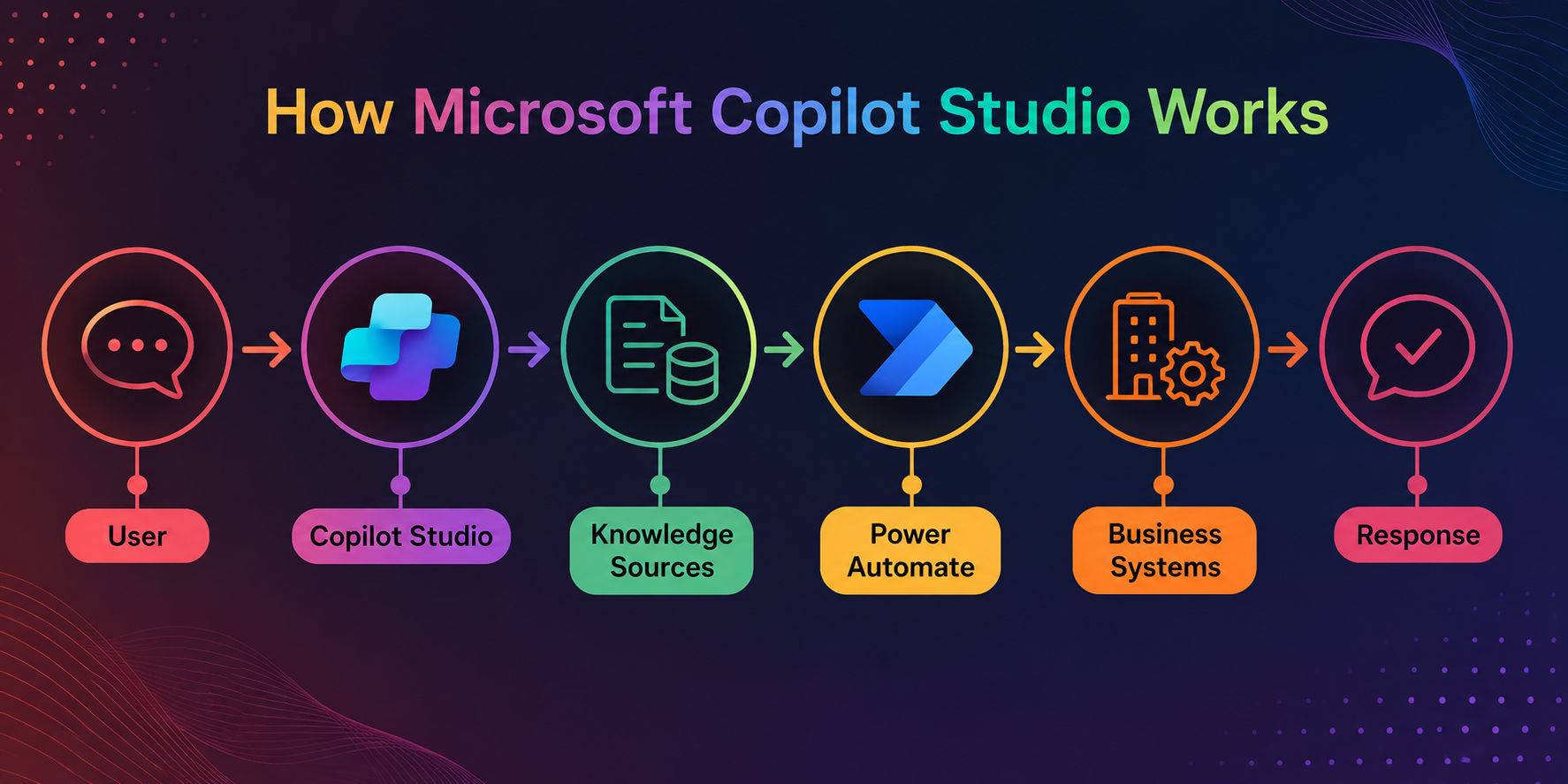
How Microsoft Copilot Studio Works?
Microsoft Copilot Studio follows a structured workflow that combines large language models (LLMs), enterprise data, business logic, and external systems to generate accurate, context-aware responses. Here's how a typical interaction flows from user query to final response.
User Input
The process begins when a user submits a question or request. Copilot Studio captures the intent, context, and conversation history before sending the prompt for processing.
LLM Reasoning
Large Language Models (LLMs), including GPT-powered models, interpret the user's intent, understand natural language, and determine the best approach to generate or retrieve a response.
Enterprise Data Retrieval
If additional context is needed, Copilot Studio retrieves information from connected knowledge sources using knowledge retrieval techniques, including Retrieval-Augmented Generation (RAG), Microsoft Graph, and Dataverse.
Business Logic
Prompt orchestration applies predefined instructions, conversation flows, conditions, and business rules to ensure responses align with organizational policies and user requirements.
API Execution
When a task requires external actions, Copilot Studio uses connectors and actions to securely interact with business applications, APIs, databases, or enterprise workflows.
Response Generation
The LLM combines retrieved knowledge, API results, and business logic to generate a contextual, conversational response before presenting it to the user.
Key Features of Microsoft Copilot Studio
- Build AI Agents: Create no-code AI agents with generative AI for automating business conversations and tasks.
- Connect Enterprise Data: Retrieve information from SharePoint, Dataverse, Microsoft Graph, websites, and other knowledge sources.
- Integrate Business Systems: Connect with Power Automate, prebuilt connectors, and custom APIs to execute workflows and actions.
- Deploy Anywhere: Publish AI agents across Microsoft Teams, websites, mobile apps, and other supported channels.
- Track & Optimize Performance: Monitor conversations, usage, and agent performance with built-in analytics and reporting.
Curious about the technology behind intelligent automation? Learn how Microsoft Copilot uses Agentic AI to plan, reason, and automate complex business workflows.
Microsoft Copilot Studio Pricing and Licensing
Pricing here isn't a simple per-seat model, so it's more useful to understand the structure than chase exact figures, since Microsoft updates these often.
- Free trial: Lets teams explore the platform and test a first agent before committing.
- Pay-as-you-go: Scales cost with actual usage, no upfront commitment needed.
- Capacity-based licensing: Tenant-wide license using Copilot Credit packs, consumed per agent action or response.
- Microsoft licensing considerations: Microsoft 365 Copilot licenses often include Copilot Studio access for internal agents. External publishing needs a standalone license.
- Cost factors: Usage volume, number of connected systems, internal vs. external deployment, and billing model chosen.
Pricing Decision Matrix
Scenario |
Best-Fit Model |
|---|---|
Testing feasibility |
Free trial |
Unpredictable usage |
Pay-as-you-go |
Steady, high-volume use |
Capacity-based licensing |
Already have M365 Copilot |
Included access |
Publishing externally |
Standalone license |
Best Practices for Building Effective Business AI Agents
A few habits separate agents that actually get adopted from ones that quietly get abandoned:
- Define a narrow, specific business goal rather than trying to solve everything at once
- Use trusted, up-to-date knowledge sources
- Keep instructions specific instead of vague
- Design thoughtful fallback responses for when the agent doesn't know the answer
- Test edge cases, not just the happy path
- Monitor analytics regularly
- Update knowledge sources on a schedule
- Minimize unnecessary actions to reduce risk and complexity
- Secure sensitive operations behind proper permissions
- Iterate based on real user feedback
Security, Governance, and Responsible AI
Security is built into Copilot Studio, not bolted on afterward.
- Microsoft Entra ID: Handles identity and authentication for every agent interaction.
- Role-based access: Agents respect existing permissions, only surfacing data the user is already allowed to see.
- Data permissions: This depends on well-managed access controls, since over-permissioned files can still get surfaced.
- Compliance: Copilot Studio follows the Security Development Lifecycle and supports multiple regulatory and standards certifications
- Responsible AI: Aligns with Microsoft's Responsible AI standards to guide safe, ethical agent behavior.
- Data residency: Supports geographic data residency controls, including restricting data movement across regions.
- Audit logs: Track agent activity for visibility and accountability.
- Governance: Admins can disable generative AI publishing or restrict features tenant-wide when needed
Common Challenges and How to Overcome Them
| Challenge | Cause | Solution |
|---|---|---|
| Hallucinations | Poor prompts or weak grounding | Tighten instructions, ground in verified sources |
| Inaccurate responses | Missing or outdated knowledge | Refresh knowledge sources regularly |
| Access failures | Missing permissions | Review role-based access settings |
| Connector failures | Misconfigured integrations | Test connections before publishing |
| Slow responses | Complex action chains | Simplify workflows where possible |
| Low adoption | Unclear value or poor UX | Gather feedback and iterate |
The Future of Microsoft Copilot Studio and Enterprise AI Agents
Multi-agent collaboration is already moving from concept to standard practice. Copilot Studio's visual designer now treats multi-agent orchestration as a first-class capability, letting specialized agents work together without requiring an SDK. Teams can orchestrate Copilot Studio agents alongside those built for Microsoft 365, avoiding duplicated logic across separate systems.
Autonomy is expanding too, but not unchecked. A rebuilt orchestrator now handles longer, multi-step tasks more reliably, holding context across several dependent actions. Even so, human-in-the-loop design remains central to Microsoft's approach, keeping people involved wherever autonomous execution carries real risk. Expect deeper Microsoft 365 integration, smarter agent-to-agent coordination, and governance that scales alongside growing responsibility.
In short: Copilot Studio is evolving from a chatbot builder into a genuine orchestration platform, one where multiple agents collaborate, handle more complex work independently, and stay grounded by human oversight and enterprise governance at every step.
Not sure whether Microsoft Copilot Studio Vs Azure AI Foundry is the right choice? Compare their features, use cases, and ideal users in our detailed comparison guide.
Wrapping Up
Microsoft Copilot Studio makes it easier for businesses to build AI agents that do more than answer questions. With no-code tools, powerful integrations, enterprise security, and automation capabilities, organizations can create agents that improve productivity and simplify daily work.
By following the right setup process, connecting trusted data sources, and continuously monitoring performance, businesses can build reliable AI solutions that grow with their needs. As AI adoption increases, Copilot Studio provides a practical foundation for creating smarter, more efficient business operations.
Have A Query? Get in Touch With Our Customer Support | KnowledgeHut
Frequently Asked Questions (FAQs)
1. Can Microsoft Copilot Studio support multiple languages?
Yes. Microsoft Copilot Studio supports multilingual AI agents, allowing businesses to interact with users in multiple languages. You can configure language settings, localize responses, and provide consistent customer or employee support across global teams without building separate agents for each language.
2. Can Microsoft Copilot Studio handle voice interactions?
Yes. Microsoft Copilot Studio can integrate with voice-enabled channels through Microsoft services and compatible communication platforms. This allows businesses to create AI agents that understand spoken queries and provide natural voice responses for customer service and internal support scenarios.
3. Can multiple team members collaborate on the same AI agent?
Yes. Teams can work together within the same Copilot Studio environment using role-based access controls. Administrators, developers, and business users can collaborate on designing, testing, reviewing, and managing AI agents while maintaining security and version control.
4. Does Microsoft Copilot Studio support custom branding?
Yes. Businesses can customize their AI agents with their own branding, including names, logos, colors, welcome messages, and conversational tone. This helps create a consistent brand experience across websites, Microsoft Teams, and other deployment channels.
5. Can Microsoft Copilot Studio connect to on-premises systems?
Yes. Using Power Platform gateways and supported connectors, Microsoft Copilot Studio can securely access data stored in on-premises databases and business applications. This enables organizations to extend AI capabilities without migrating all existing systems to the cloud.
6. How long does it take to build an AI agent in Microsoft Copilot Studio?
The timeline depends on the agent's complexity. A simple FAQ or knowledge assistant can be built within a few hours, while enterprise AI agents with multiple integrations, workflows, and business actions may require several days or weeks of testing and refinement.
7. Can Microsoft Copilot Studio work with custom AI models?
Yes. Besides Microsoft's built-in AI capabilities, Copilot Studio can connect to custom AI models and external services through APIs and Azure AI integrations. This allows organizations to extend agent capabilities for specialized business or industry-specific use cases.
8. How do you measure the success of a Microsoft Copilot Studio AI agent?
Success can be measured using metrics such as conversation completion rate, user satisfaction, response accuracy, resolution time, task completion rate, and adoption. Monitoring these KPIs helps businesses identify improvement opportunities and optimize agent performance over time.
9. What industries benefit the most from Microsoft Copilot Studio?
Microsoft Copilot Studio is useful across industries including healthcare, banking, retail, manufacturing, education, and professional services. Any organization that needs to automate repetitive tasks, improve customer support, or provide faster access to business knowledge can benefit from AI agents.
10. Can Microsoft Copilot Studio scale as business needs grow?
Yes. Microsoft Copilot Studio is designed to scale from small departmental projects to enterprise-wide deployments. Organizations can add new knowledge sources, integrations, users, and workflows over time while maintaining centralized governance, security, and performance monitoring.
1639 articles published
KnowledgeHut is an outcome-focused global ed-tech company. We help organizations and professionals unlock excellence through skills development. We offer training solutions under the people and proces...
Get Free Consultation
By submitting, I accept the T&C and
Privacy Policy