
- Blog Categories
- Project Management
- Agile Management
- IT Service Management
- Cloud Computing
- Business Management
- BI And Visualisation
- Quality Management
- Cyber Security
- DevOps
- Most Popular Blogs
- PMP Exam Schedule for 2025: Check PMP Exam Date
- Top 60+ PMP Exam Questions and Answers for 2025
- PMP Cheat Sheet and PMP Formulas To Use in 2025
- What is PMP Process? A Complete List of 49 Processes of PMP
- Top 15+ Project Management Case Studies with Examples 2025
- Top Picks by Authors
- Top 170 Project Management Research Topics
- What is Effective Communication: Definition
- How to Create a Project Plan in Excel in 2025?
- PMP Certification Exam Eligibility in 2025 [A Complete Checklist]
- PMP Certification Fees - All Aspects of PMP Certification Fee
- Most Popular Blogs
- CSM vs PSM: Which Certification to Choose in 2025?
- How Much Does Scrum Master Certification Cost in 2025?
- CSPO vs PSPO Certification: What to Choose in 2025?
- 8 Best Scrum Master Certifications to Pursue in 2025
- Safe Agilist Exam: A Complete Study Guide 2025
- Top Picks by Authors
- SAFe vs Agile: Difference Between Scaled Agile and Agile
- Top 21 Scrum Best Practices for Efficient Agile Workflow
- 30 User Story Examples and Templates to Use in 2025
- State of Agile: Things You Need to Know
- Top 24 Career Benefits of a Certifed Scrum Master
- Most Popular Blogs
- ITIL Certification Cost in 2025 [Exam Fee & Other Expenses]
- Top 17 Required Skills for System Administrator in 2025
- How Effective Is Itil Certification for a Job Switch?
- IT Service Management (ITSM) Role and Responsibilities
- Top 25 Service Based Companies in India in 2025
- Top Picks by Authors
- What is Escalation Matrix & How Does It Work? [Types, Process]
- ITIL Service Operation: Phases, Functions, Best Practices
- 10 Best Facility Management Software in 2025
- What is Service Request Management in ITIL? Example, Steps, Tips
- An Introduction To ITIL® Exam
- Most Popular Blogs
- A Complete AWS Cheat Sheet: Important Topics Covered
- Top AWS Solution Architect Projects in 2025
- 15 Best Azure Certifications 2025: Which one to Choose?
- Top 22 Cloud Computing Project Ideas in 2025 [Source Code]
- How to Become an Azure Data Engineer? 2025 Roadmap
- Top Picks by Authors
- Top 40 IoT Project Ideas and Topics in 2025 [Source Code]
- The Future of AWS: Top Trends & Predictions in 2025
- AWS Solutions Architect vs AWS Developer [Key Differences]
- Top 20 Azure Data Engineering Projects in 2025 [Source Code]
- 25 Best Cloud Computing Tools in 2025
- Most Popular Blogs
- Company Analysis Report: Examples, Templates, Components
- 400 Trending Business Management Research Topics
- Business Analysis Body of Knowledge (BABOK): Guide
- ECBA Certification: Is it Worth it?
- Top Picks by Authors
- Top 20 Business Analytics Project in 2025 [With Source Code]
- ECBA Certification Cost Across Countries
- Top 9 Free Business Requirements Document (BRD) Templates
- Business Analyst Job Description in 2025 [Key Responsibility]
- Business Analysis Framework: Elements, Process, Techniques
- Most Popular Blogs
- Best Career options after BA [2025]
- Top Career Options after BCom to Know in 2025
- Top 10 Power Bi Books of 2025 [Beginners to Experienced]
- Power BI Skills in Demand: How to Stand Out in the Job Market
- Top 15 Power BI Project Ideas
- Top Picks by Authors
- 10 Limitations of Power BI: You Must Know in 2025
- Top 45 Career Options After BBA in 2025 [With Salary]
- Top Power BI Dashboard Templates of 2025
- What is Power BI Used For - Practical Applications Of Power BI
- SSRS Vs Power BI - What are the Key Differences?
- Most Popular Blogs
- Data Collection Plan For Six Sigma: How to Create One?
- Quality Engineer Resume for 2025 [Examples + Tips]
- 20 Best Quality Management Certifications That Pay Well in 2025
- Six Sigma in Operations Management [A Brief Introduction]
- Top Picks by Authors
- Six Sigma Green Belt vs PMP: What's the Difference
- Quality Management: Definition, Importance, Components
- Adding Green Belt Certifications to Your Resume
- Six Sigma Green Belt in Healthcare: Concepts, Benefits and Examples
- Most Popular Blogs
- Latest CISSP Exam Dumps of 2025 [Free CISSP Dumps]
- CISSP vs Security+ Certifications: Which is Best in 2025?
- Best CISSP Study Guides for 2025 + CISSP Study Plan
- How to Become an Ethical Hacker in 2025?
- Top Picks by Authors
- CISSP vs Master's Degree: Which One to Choose in 2025?
- CISSP Endorsement Process: Requirements & Example
- OSCP vs CISSP | Top Cybersecurity Certifications
- How to Pass the CISSP Exam on Your 1st Attempt in 2025?
- Most Popular Blogs
- Top 7 Kubernetes Certifications in 2025
- Kubernetes Pods: Types, Examples, Best Practices
- DevOps Methodologies: Practices & Principles
- Docker Image Commands
- Top Picks by Authors
- Best DevOps Certifications in 2025
- 20 Best Automation Tools for DevOps
- Top 20 DevOps Projects of 2025
- OS for Docker: Features, Factors and Tips
- More
- Agile & PMP Practice Tests
- Agile Testing
- Agile Scrum Practice Exam
- CAPM Practice Test
- PRINCE2 Foundation Exam
- PMP Practice Exam
- Cloud Related Practice Test
- Azure Infrastructure Solutions
- AWS Solutions Architect
- IT Related Pratice Test
- ITIL Practice Test
- Devops Practice Test
- TOGAF® Practice Test
- Other Practice Test
- Oracle Primavera P6 V8
- MS Project Practice Test
- Project Management & Agile
- Project Management Interview Questions
- Release Train Engineer Interview Questions
- Agile Coach Interview Questions
- Scrum Interview Questions
- IT Project Manager Interview Questions
- Cloud & Data
- Azure Databricks Interview Questions
- AWS architect Interview Questions
- Cloud Computing Interview Questions
- AWS Interview Questions
- Kubernetes Interview Questions
- Web Development
- CSS3 Free Course with Certificates
- Basics of Spring Core and MVC
- Javascript Free Course with Certificate
- React Free Course with Certificate
- Node JS Free Certification Course
- Data Science
- Python Machine Learning Course
- Python for Data Science Free Course
- NLP Free Course with Certificate
- Data Analysis Using SQL
- Home
- Blog
- Artificial Intelligence
- What is No-Code AI? A Complete Guide for Business Professionals in 2026
What is No-Code AI? A Complete Guide for Business Professionals in 2026
Updated on Jul 29, 2026 | 285 views
Share:
Table of Contents
View all
- What Is No-Code AI?
- How Does No-Code AI Work?
- Benefits of No-Code AI for Businesses
- Limitations and Challenges of No-Code AI
- No-Code AI vs. Low-Code AI vs. Vibe Coding
- What Can You Build with No-Code AI?
- Best No-Code AI Platforms in 2026
- Skills You Still Need to Use No-Code AI Successfully
- The Future of No-Code AI in Business
- Conclusion
Quick Overview
- No-Code AI is a visual approach to building AI-powered applications, chatbots, automations, and business workflows without writing code, making AI accessible to business professionals and non-technical users.
- Instead of relying on programming languages, No-Code AI enables users to create AI models and workflows through drag-and-drop interfaces, visual builders, and plain-English prompts, significantly reducing the technical barrier to AI adoption.
- Its core building blocks include visual workflow canvases, pre-trained machine learning models, and ready-to-use business app connectors that simplify development and accelerate deployment.
- No-Code AI removes many technical barriers to AI adoption, but successful implementation still depends on choosing the right use case, maintaining data quality, testing outputs, and applying human oversight throughout the workflow.
- Its greatest value lies in enabling business teams to solve real operational problems faster, reduce manual effort, and experiment with AI solutions before investing in expensive custom development.
- As AI capabilities continue to advance, professionals who understand business workflows and can effectively use No-Code AI will be better positioned to drive innovation, improve productivity, and stay competitive.
Master practical AI skills with the Generative AI Foundations Certificate Program and turn No-Code AI knowledge into real business value.
What Is No-Code AI?
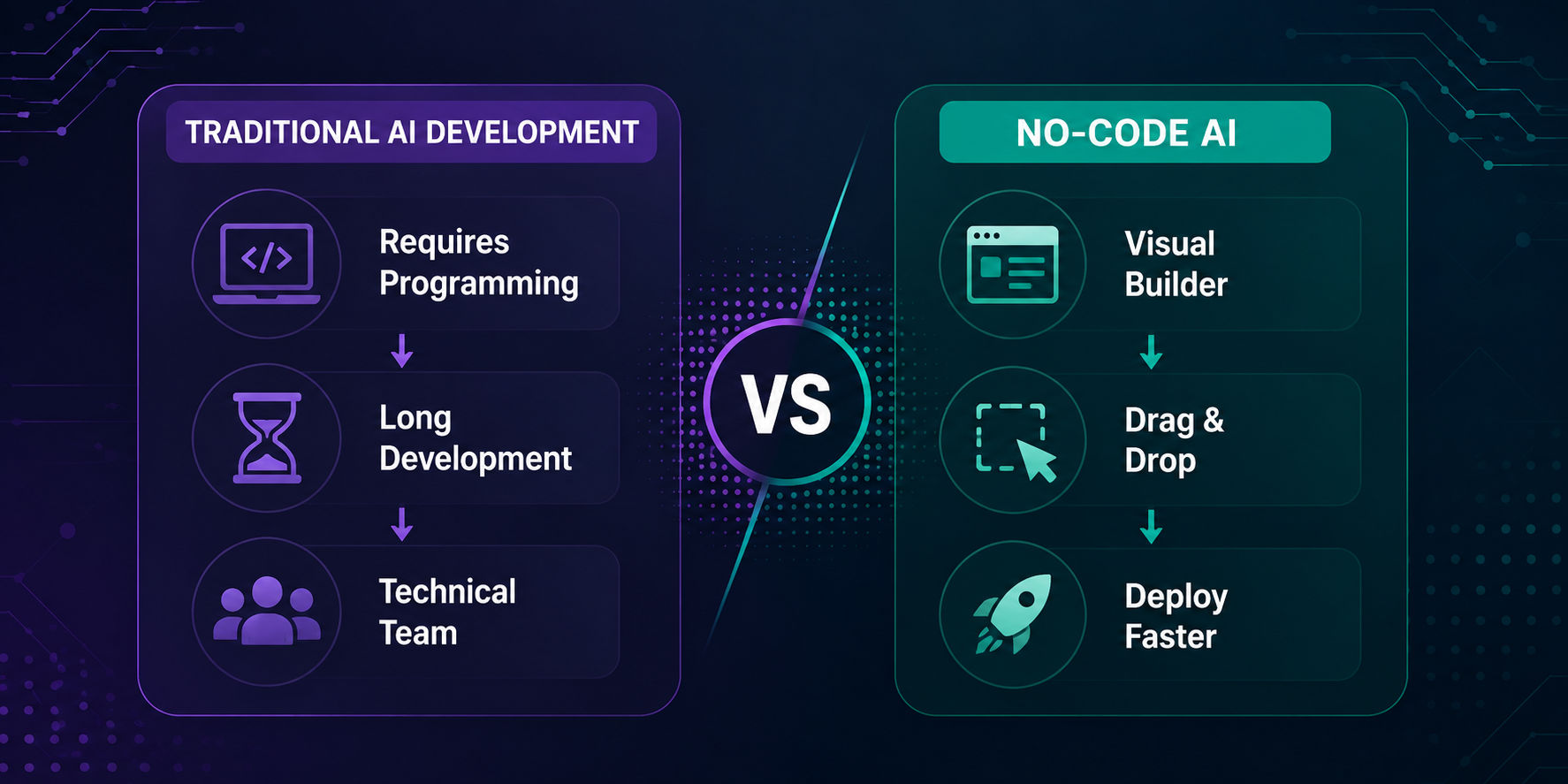
At its core, No-Code AI is the process of building AI-powered applications, automations, chatbots, predictive models, and business workflows using visual interfaces instead of writing code.
Instead of typing lines of Python or JavaScript, you drag and drop elements on a screen, connect them like building blocks, and configure settings through simple menus. The AI itself, the complex machine learning models doing the heavy lifting, is already built and trained by the platform provider. Your job is simply to tell it what you want it to do.
So why does No-Code AI exist in the first place? Simply put, it's a response to a real bottleneck: businesses have ideas, but not always the technical talent to execute them quickly. No-Code AI closes that gap by combining:
- AI development without programming, no syntax, no debugging - Build AI-powered applications without writing code, memorizing programming syntax, or fixing technical errors. The platform handles the underlying complexity, allowing you to focus on solving business problems.
- Visual builders, see your workflow as you build it
Create AI applications using a visual interface where every step is displayed as a connected workflow. This makes it easier to understand, edit, and optimize your automation. - Drag-and-drop workflows, assemble logic like puzzle pieces
Build complex AI processes by dragging and connecting pre-built blocks for inputs, conditions, actions, and outputs. You can create sophisticated workflows without manually coding each step. - Pre-trained AI models, skip months of training data collection
Use ready-made AI models that already understand language, images, and other data types. Instead of collecting and training massive datasets, you can start building and testing immediately.
Is it really code-free?
For the vast majority of everyday use cases, yes. Most no-code AI platforms require little to no programming for common tasks like chatbots, content generation, and workflow automation, making AI accessible even to complete beginners.
How Does No-Code AI Work?
No-Code AI might feel like magic, but the process behind it is actually pretty simple once you break it into steps.
- Choose a platform – Select a No-Code tool that aligns with your specific goal, whether that's building chatbots, automating tasks, generating content, or creating predictive models for your business.
- Connect your data – Link relevant data sources like spreadsheets, CRM systems, or documents so the AI has real information to reference, analyze, and act upon.
- Select an AI model – Choose from available pre-trained models within the platform, many of which are powered by established LLMs such as GPT or Claude.
- Configure prompts or workflows – Direct the AI's behavior using plain-language instructions or visual drag-and-drop logic, without writing any actual code yourself.
- Test – Run sample scenarios and real-world inputs to confirm the AI responds accurately and behaves the way you originally intended.
- Deploy – Launch your finished chatbot, automation, or application so real users or teams can start interacting with it right away.
- Monitor performance – Continuously track how the AI performs after launch, making adjustments and refinements as usage patterns and needs evolve.
A Few Concepts Worth Knowing
- APIs: Think of these as digital messengers that let different apps talk to each other in the background.
- LLM integration: Most No-Code AI tools plug into large language models that are already trained, you're not building the brain, just directing it.
- Pre-built templates: Ready-made starting points for common tasks, so you're not starting from scratch.
- AI automation: The AI handles repetitive tasks automatically once it's set up.
- Cloud infrastructure: Everything runs on remote servers, so you don't need to manage any hardware.
Take the next step with KnowledgeHut's comprehensive Data Science courses for aspiring AI professionals.
Benefits of No-Code AI for Businesses
The appeal of No-Code AI isn't just that it's easier, it fundamentally changes who gets to build with AI. Key benefits include:
- Faster deployment - Go from idea to a working tool in days rather than months, since there's no lengthy development cycle to wait through.
- Lower investment - Build and launch AI solutions without hiring a full development team, cutting costs significantly for smaller businesses.
- Business-led innovation - The people who understand the problem best, not just developers, can directly build and shape the solution themselves.
- Easy experimentation - Test new ideas quickly and cheaply, without committing significant time or budget before knowing if they'll work. This approach is especially useful when learning how to build an AI MVP without code before investing in full-scale development.
- Quick scaling - Expand successful projects smoothly, without waiting on technical teams or hitting development bottlenecks along the way.
This democratization of AI also improves collaboration across departments. Marketing, HR, and operations teams no longer need to wait in a developer's queue, they can prototype and iterate on their own.
Limitations and Challenges of No-Code AI
No-Code AI isn't a silver bullet, and it's worth going in with realistic expectations. Some considerations to keep in mind:
- Limited customization compared to fully custom-coded solutions
- Vendor lock-in, since your workflows often live inside one platform's ecosystem
- Data privacy questions, especially when handling sensitive customer information
- Complex integrations that may still require technical help
- Scaling and governance concerns as usage grows
- Model accuracy, compliance, and security, all still your responsibility to monitor
These aren't reasons to avoid No-Code AI, they're simply factors to weigh, especially for larger enterprises with strict compliance needs.
No-Code AI vs. Low-Code AI vs. Vibe Coding
No-Code AI is best when you need something fast and don't have technical resources. Low-Code AI suits teams with some technical skill who want more flexibility. Vibe coding, where developers use AI to help write and refine actual code, is best for those building custom, scalable software from the ground up.
It helps to understand where No-Code AI sits relative to similar approaches.
Comparing the Three Approaches
Feature |
No-Code AI |
Low-Code AI |
Vibe Coding |
|---|---|---|---|
Coding Required |
None |
Minimal |
AI-assisted coding |
Ease of Use |
Highest |
Moderate |
Requires some technical comfort |
Customization |
Limited |
Moderate-High |
High |
Speed |
Fastest |
Fast |
Variable |
Scalability |
Moderate |
High |
High |
Best For |
Non-technical users, quick builds |
Technical teams needing flexibility |
Developers using AI to speed up coding |
Cost |
Lowest |
Moderate |
Variable |
What Can You Build with No-Code AI?
The range of applications is genuinely broad. Here's a snapshot by category:
- Chatbots: Build customer support bots that answer common questions instantly, sales assistants that qualify leads in real time, or internal knowledge bots that help employees find company information without digging through documents.
- Content Generation: Create marketing copy, blog posts, and email campaigns in minutes instead of hours. No-Code AI tools can also draft social media content, helping teams maintain consistent output without hiring additional writers.
- AI Agents: Automate repetitive tasks like data entry or scheduling, generate concise meeting summaries automatically, and build internal assistants that help employees complete routine work faster and with less manual effort. These capabilities are increasingly being adopted across business functions, including HR teams using no-code agentic AI.
- Predictive Analytics: Forecast future sales trends, identify customers likely to churn before they leave, and predict product demand more accurately, helping businesses make proactive, data-driven decisions instead of reactive ones.
- Document Processing: Automatically extract key details from invoices, screen resumes against job requirements, and summarize lengthy contracts, saving hours of manual review while reducing the chance of human error. These capabilities are increasingly being adopted by HR teams to streamline hiring, onboarding, and employee support through AI-powered automation. Learn how HR teams are using No-Code Agentic AI to automate everyday work.
- Workflow Automation: Qualify incoming leads automatically, keep CRM records updated in real time, route emails to the right teams, and streamline approval processes without manual follow-up at every step.
If your business has a repetitive process or a data-heavy decision to make, there's likely a No-Code AI tool that can help.
Best No-Code AI Platforms in 2026
There's no shortage of options, each with its own strengths. A few worth knowing:
Popular No-Code AI Platforms at a Glance
Platform |
Best For |
|---|---|
Bubble AI |
Building full web apps visually |
Microsoft Copilot Studio |
Enterprise teams already in the Microsoft ecosystem |
Zapier AI / Make |
Connecting apps and automating workflows |
Glide AI |
Turning spreadsheets into mobile apps |
Airtable AI / Notion AI |
Teams already organizing work in these tools |
Google Vertex AI Studio |
No-code capabilities within a broader AI platform |
Voiceflow |
Conversational AI and chatbots |
Relevance AI |
Building AI agents and workflows |
Rather than ranking these, it's worth matching the tool to your specific need—automation, chatbots, app-building, or content creation all have different best fits.
Who Should Learn No-Code AI?
The honest answer: almost anyone in a business role. Business managers, product managers, marketers, HR professionals, analysts, operations teams, entrepreneurs, consultants, and small business owners all stand to benefit. For professionals planning to build AI-focused careers, understanding No-Code AI Agents & Automation Certification salary insights can provide better insights. If your job involves repetitive tasks, data analysis, or customer communication, No-Code AI can likely save you time and open new possibilities.
Skills You Still Need to Use No-Code AI Successfully
Here's an important truth: "No-Code" doesn't mean "no skills." You'll still benefit from developing:
- Prompt engineering: Knowing how to phrase requests clearly so the AI understands exactly what you want.
- Business process thinking: Understanding your own workflows deeply enough to translate them into AI-driven steps.
- Workflow design and automation logic: Structuring tasks logically so automations run smoothly and produce reliable results.
- Data literacy: Recognizing what clean, useful data looks like before feeding it to any AI model.
- AI ethics and critical thinking: Questioning AI outputs instead of accepting them automatically as correct or unbiased.
- Testing AI outputs: Checking results regularly for accuracy, consistency, and reliability before full deployment.
- Basic API concepts: Helpful for troubleshooting integrations, though not mandatory for most everyday users.
How to Start Learning No-Code AI?
If you're ready to dive in, here's a simple roadmap:
- Week 1: Understand AI fundamentals
- Week 2: Learn prompt engineering basics
- Week 3: Explore one No-Code platform hands-on
- Week 4: Build a simple chatbot
- Week 5: Automate a real workflow
- Week 6: Create a full business project
- Week 7+: Build a portfolio and pursue relevant certifications.
No, you don't need to know Python. Most people can get comfortable with a platform within a few weeks of consistent practice.
The Future of No-Code AI in Business
No-Code AI is rapidly evolving from simple workflow automation to intelligent systems that can build applications, automate end-to-end business processes, and support multi-agent collaboration. Industry-specific AI solutions and natural language app creation are making advanced AI more accessible to non-technical users.
This shift is accelerating enterprise adoption. Recent research shows that 88% of organizations already use AI in at least one business function, while 62% are experimenting with AI agents. The future lies in human-AI collaboration, with AI handling repetitive work and people focusing on strategy, creativity, and decision-making.
Conclusion
No-Code AI is making artificial intelligence more accessible by allowing business professionals to build applications, automate workflows, and solve everyday challenges without programming. While it has some limitations, the right platform, strong prompts, and a clear understanding of business processes can help you achieve impressive results.
As AI continues to evolve, learning No-Code AI will become an increasingly valuable skill, helping individuals and organizations improve productivity, innovate faster, and stay competitive in a rapidly changing business landscape.
Have A Query? Get in Touch With Our Customer Support | KnowledgeHut
Frequently Asked Questions (FAQs)
1. Can small businesses benefit from No-Code AI with a limited budget?
Yes. No-Code AI enables small businesses to automate repetitive tasks, improve customer service, and streamline operations without hiring expensive development teams. Many platforms offer affordable pricing, allowing organizations to test AI solutions, scale gradually, and achieve measurable productivity gains while keeping implementation costs under control.
2. How secure is the data used in No-Code AI platforms?
Security depends on the platform you choose and how you configure it. Most enterprise-grade No-Code AI platforms provide encryption, access controls, and compliance features. However, businesses should carefully review privacy policies, avoid exposing sensitive data unnecessarily, and establish governance practices before deploying AI workflows.
3. Can No-Code AI integrate with existing business software?
Yes. Most No-Code AI platforms support integrations with popular business tools such as CRM systems, project management software, databases, cloud storage, and communication platforms. These integrations help automate workflows, synchronize data, and reduce manual effort without requiring extensive technical development.
4. How much time does it take to build a No-Code AI application?
The development timeline depends on the project's complexity. A basic chatbot or workflow automation can often be built within a few hours or days, while more advanced business applications involving multiple integrations and testing may take several weeks to complete effectively.
5. Does No-Code AI require ongoing maintenance after deployment?
Yes. Like any software solution, No-Code AI applications require regular monitoring, prompt updates, workflow improvements, and performance reviews. As business requirements, customer expectations, and AI models evolve, maintaining your applications ensures they remain accurate, secure, and aligned with organizational goals.
6. Can No-Code AI handle large-scale enterprise workloads?
Many modern No-Code AI platforms are designed to support enterprise-level deployments. They can process large datasets, integrate with enterprise systems, and automate high-volume workflows. However, organizations should evaluate scalability, governance, compliance, and performance requirements before selecting a platform.
7. Is No-Code AI suitable for regulated industries like healthcare or finance?
Yes, provided organizations choose platforms that support industry-specific compliance and security requirements. Businesses operating in regulated sectors should carefully assess data handling, privacy controls, audit capabilities, and regulatory standards before implementing AI-powered workflows for sensitive information.
8. What are the biggest mistakes beginners make with No-Code AI?
Common mistakes include choosing overly complex projects, using poor-quality data, writing unclear prompts, skipping testing, and assuming AI outputs are always correct. Starting with simple workflows, validating results, and refining processes gradually leads to more reliable and successful AI implementations.
9. Can No-Code AI replace traditional software development completely?
No. No-Code AI is ideal for many business applications, prototypes, and workflow automations, but highly customized software, complex enterprise systems, and specialized applications often still require traditional programming to achieve greater flexibility, scalability, and technical control.
10. How do you measure the success of a No-Code AI project?
Success should be measured using business-focused metrics such as time saved, process efficiency, cost reduction, customer satisfaction, accuracy, employee productivity, and return on investment. Tracking these indicators helps determine whether the AI solution is delivering meaningful value and supporting business objectives.
1648 articles published
KnowledgeHut is an outcome-focused global ed-tech company. We help organizations and professionals unlock excellence through skills development. We offer training solutions under the people and proces...
Get Free Consultation
By submitting, I accept the T&C and
Privacy Policy