
- Blog Categories
- Project Management
- Agile Management
- IT Service Management
- Cloud Computing
- Business Management
- BI And Visualisation
- Quality Management
- Cyber Security
- DevOps
- Most Popular Blogs
- PMP Exam Schedule for 2025: Check PMP Exam Date
- Top 60+ PMP Exam Questions and Answers for 2025
- PMP Cheat Sheet and PMP Formulas To Use in 2025
- What is PMP Process? A Complete List of 49 Processes of PMP
- Top 15+ Project Management Case Studies with Examples 2025
- Top Picks by Authors
- Top 170 Project Management Research Topics
- What is Effective Communication: Definition
- How to Create a Project Plan in Excel in 2025?
- PMP Certification Exam Eligibility in 2025 [A Complete Checklist]
- PMP Certification Fees - All Aspects of PMP Certification Fee
- Most Popular Blogs
- CSM vs PSM: Which Certification to Choose in 2025?
- How Much Does Scrum Master Certification Cost in 2025?
- CSPO vs PSPO Certification: What to Choose in 2025?
- 8 Best Scrum Master Certifications to Pursue in 2025
- Safe Agilist Exam: A Complete Study Guide 2025
- Top Picks by Authors
- SAFe vs Agile: Difference Between Scaled Agile and Agile
- Top 21 Scrum Best Practices for Efficient Agile Workflow
- 30 User Story Examples and Templates to Use in 2025
- State of Agile: Things You Need to Know
- Top 24 Career Benefits of a Certifed Scrum Master
- Most Popular Blogs
- ITIL Certification Cost in 2025 [Exam Fee & Other Expenses]
- Top 17 Required Skills for System Administrator in 2025
- How Effective Is Itil Certification for a Job Switch?
- IT Service Management (ITSM) Role and Responsibilities
- Top 25 Service Based Companies in India in 2025
- Top Picks by Authors
- What is Escalation Matrix & How Does It Work? [Types, Process]
- ITIL Service Operation: Phases, Functions, Best Practices
- 10 Best Facility Management Software in 2025
- What is Service Request Management in ITIL? Example, Steps, Tips
- An Introduction To ITIL® Exam
- Most Popular Blogs
- A Complete AWS Cheat Sheet: Important Topics Covered
- Top AWS Solution Architect Projects in 2025
- 15 Best Azure Certifications 2025: Which one to Choose?
- Top 22 Cloud Computing Project Ideas in 2025 [Source Code]
- How to Become an Azure Data Engineer? 2025 Roadmap
- Top Picks by Authors
- Top 40 IoT Project Ideas and Topics in 2025 [Source Code]
- The Future of AWS: Top Trends & Predictions in 2025
- AWS Solutions Architect vs AWS Developer [Key Differences]
- Top 20 Azure Data Engineering Projects in 2025 [Source Code]
- 25 Best Cloud Computing Tools in 2025
- Most Popular Blogs
- Company Analysis Report: Examples, Templates, Components
- 400 Trending Business Management Research Topics
- Business Analysis Body of Knowledge (BABOK): Guide
- ECBA Certification: Is it Worth it?
- Top Picks by Authors
- Top 20 Business Analytics Project in 2025 [With Source Code]
- ECBA Certification Cost Across Countries
- Top 9 Free Business Requirements Document (BRD) Templates
- Business Analyst Job Description in 2025 [Key Responsibility]
- Business Analysis Framework: Elements, Process, Techniques
- Most Popular Blogs
- Best Career options after BA [2025]
- Top Career Options after BCom to Know in 2025
- Top 10 Power Bi Books of 2025 [Beginners to Experienced]
- Power BI Skills in Demand: How to Stand Out in the Job Market
- Top 15 Power BI Project Ideas
- Top Picks by Authors
- 10 Limitations of Power BI: You Must Know in 2025
- Top 45 Career Options After BBA in 2025 [With Salary]
- Top Power BI Dashboard Templates of 2025
- What is Power BI Used For - Practical Applications Of Power BI
- SSRS Vs Power BI - What are the Key Differences?
- Most Popular Blogs
- Data Collection Plan For Six Sigma: How to Create One?
- Quality Engineer Resume for 2025 [Examples + Tips]
- 20 Best Quality Management Certifications That Pay Well in 2025
- Six Sigma in Operations Management [A Brief Introduction]
- Top Picks by Authors
- Six Sigma Green Belt vs PMP: What's the Difference
- Quality Management: Definition, Importance, Components
- Adding Green Belt Certifications to Your Resume
- Six Sigma Green Belt in Healthcare: Concepts, Benefits and Examples
- Most Popular Blogs
- Latest CISSP Exam Dumps of 2025 [Free CISSP Dumps]
- CISSP vs Security+ Certifications: Which is Best in 2025?
- Best CISSP Study Guides for 2025 + CISSP Study Plan
- How to Become an Ethical Hacker in 2025?
- Top Picks by Authors
- CISSP vs Master's Degree: Which One to Choose in 2025?
- CISSP Endorsement Process: Requirements & Example
- OSCP vs CISSP | Top Cybersecurity Certifications
- How to Pass the CISSP Exam on Your 1st Attempt in 2025?
- Most Popular Blogs
- Top 7 Kubernetes Certifications in 2025
- Kubernetes Pods: Types, Examples, Best Practices
- DevOps Methodologies: Practices & Principles
- Docker Image Commands
- Top Picks by Authors
- Best DevOps Certifications in 2025
- 20 Best Automation Tools for DevOps
- Top 20 DevOps Projects of 2025
- OS for Docker: Features, Factors and Tips
- More
- Agile & PMP Practice Tests
- Agile Testing
- Agile Scrum Practice Exam
- CAPM Practice Test
- PRINCE2 Foundation Exam
- PMP Practice Exam
- Cloud Related Practice Test
- Azure Infrastructure Solutions
- AWS Solutions Architect
- IT Related Pratice Test
- ITIL Practice Test
- Devops Practice Test
- TOGAF® Practice Test
- Other Practice Test
- Oracle Primavera P6 V8
- MS Project Practice Test
- Project Management & Agile
- Project Management Interview Questions
- Release Train Engineer Interview Questions
- Agile Coach Interview Questions
- Scrum Interview Questions
- IT Project Manager Interview Questions
- Cloud & Data
- Azure Databricks Interview Questions
- AWS architect Interview Questions
- Cloud Computing Interview Questions
- AWS Interview Questions
- Kubernetes Interview Questions
- Web Development
- CSS3 Free Course with Certificates
- Basics of Spring Core and MVC
- Javascript Free Course with Certificate
- React Free Course with Certificate
- Node JS Free Certification Course
- Data Science
- Python Machine Learning Course
- Python for Data Science Free Course
- NLP Free Course with Certificate
- Data Analysis Using SQL
- Home
- Blog
- Business Intelligence And Visualization
- Power BI DAX Functions: Cheat Sheet with Examples
Power BI DAX Functions: Cheat Sheet with Examples
Updated on Oct 23, 2026
Share:
Table of Contents
View all
- What are the most useful Power BI DAX functions?
- What are the basic DAX functions for aggregation and calculations?
- Which DAX functions help filter data and create dynamic measures?
- Which DAX functions are used for date and time intelligence?
- What is the difference between commonly confused DAX functions?
- What are the common mistakes to avoid when using DAX functions?
Quick Overview
- Power BI DAX functions help calculate sales totals, profit margins, unique customers, filtered results, and year-over-year growth in Power BI reports.
- Functions such as SUM, AVERAGE, COUNTROWS, DISTINCTCOUNT, and DIVIDE handle common calculations, while SUMX performs row-by-row calculations before adding the results.
- CALCULATE, FILTER, and REMOVEFILTERS help control filter context and create measures such as category-wise sales and percentage of total.
- TOTALYTD, SAMEPERIODLASTYEAR, and DATEADD support time-based analysis, including year-to-date sales and comparisons with previous periods.
- This guide covers the most useful Power BI DAX functions, basic aggregation and calculations, filtering and dynamic measures, date and time intelligence, differences between commonly confused functions, and common mistakes to avoid.
Strengthen Power BI skills and learn to build interactive dashboards, analyze data, and apply DAX functions through practical training with Microsoft Power BI Training.
Last Few Days to Save Up To 90% on Career Transformation
Ends December 1 – Don't Miss Out!
What are the most useful Power BI DAX functions?
Power BI DAX functions are built-in functions which help in carrying out calculations on the data in a model. They are capable of calculating totals, applying conditions, altering the filter context, and supporting time-based analysis.
The following is a brief reference table of useful functions for everyday Power BI reports.
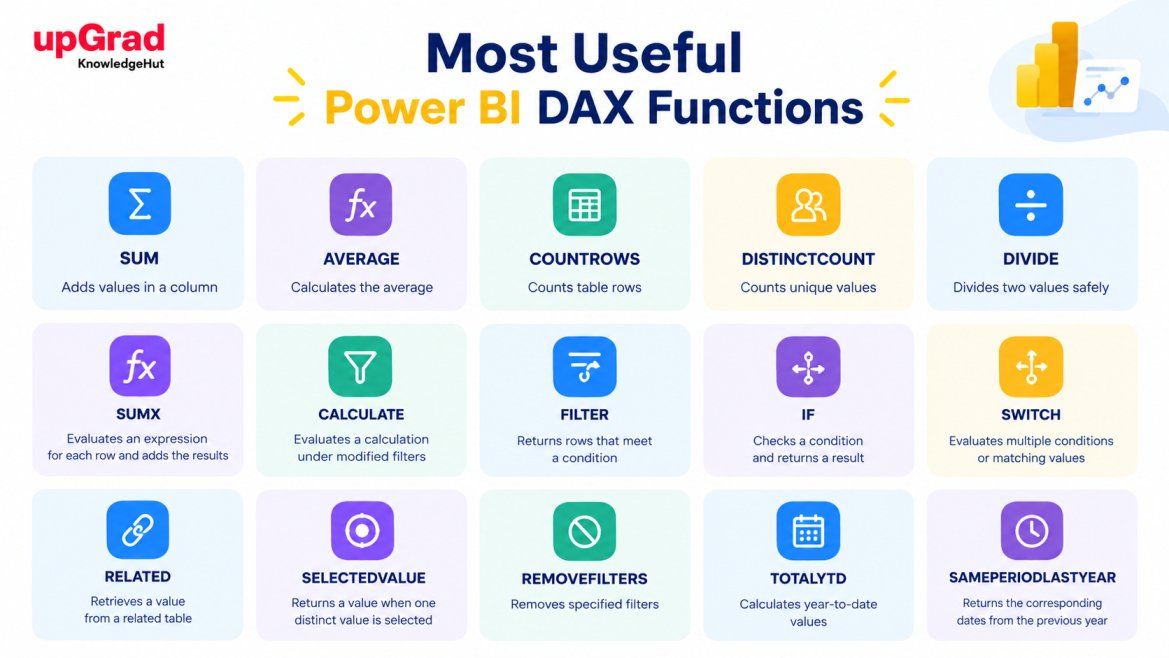
Function |
Purpose |
Example use |
| SUM | Adds values in a column | Calculate total sales |
| AVERAGE | Calculates the average | Find average sales |
| COUNTROWS | Counts table rows | Count sales records |
| DISTINCTCOUNT | Counts unique values | Count unique customers |
| DIVIDE | Divides two values safely | Calculate profit margin |
| SUMX | Evaluates an expression for each row and adds the results | Calculate revenue from quantity and price |
| CALCULATE | Evaluates a calculation under modified filters | Calculate sales for a category |
| FILTER | Returns rows that meet a condition | Find high-value sales |
| IF | Checks a condition and returns a result | Label profit or loss |
| SWITCH | Evaluates multiple conditions or matching values | Group sales into performance bands |
| RELATED | Retrieves a value from a related table | Get a product category |
| SELECTEDVALUE | Returns a value when one distinct value is selected | Display a selected category |
| REMOVEFILTERS | Removes specified filters | Calculate a category's share of total sales |
| TOTALYTD | Calculates year-to-date values | Track sales so far this year |
| SAMEPERIODLASTYEAR | Returns the corresponding dates from the previous year | Compare yearly sales |
Also Read: Features of Power BI
What are the basic DAX functions for aggregation and calculations?
These are the basic Power BI DAX functions very much like SUM and AVERAGE in Excel, which are used in measures, so their result will change as the filters and slicers on the report page change.
1. SUM, AVERAGE, MIN and MAX
These four functions perform basic calculations on a column. SUM adds up the values in a column. AVERAGE gives the mean. MIN and MAX give the smallest and largest values respectively. They're the trio of functions that answer the first questions in any report: what's the total, what's the average, what's the best and what's the worst.
Total Sales = SUM(Sales[SalesAmount])
Average Sales = AVERAGE(Sales[SalesAmount])
Highest Sale = MAX(Sales[SalesAmount])
Lowest Sale = MIN(Sales[SalesAmount]) |
For example, a sales report can use these measures to show total revenue, average transaction value, and the highest and lowest sales amounts. The results can change based on the filters applied to the report.
2. COUNTROWS and DISTINCTCOUNT
COUNTROWS counts the rows in a table and is therefore ideal for counting total orders. DISTINCTCOUNT counts only the unique values in a column. A customer who has placed five orders will be counted five times by COUNTROWS and only once by DISTINCTCOUNT.
Total Sales Records = COUNTROWS(Sales)
Unique Customers = DISTINCTCOUNT(Sales[CustomerID]) |
3. DIVIDE and SUMX
Use DIVIDE when one value needs to be divided by another. It handles zero or blank denominators more safely than ordinary division.
Profit Margin = DIVIDE([Total Profit], [Total Sales], 0) |
This measure divides total profit by total sales. If total sales is zero or blank, the formula returns zero.
SUMX is useful when a calculation must be performed for every row before the results are added.
Calculated Revenue = SUMX( Sales, Sales[Quantity] * Sales[UnitPrice] ) |
For each row, Power BI multiplies quantity by unit price and then adds the results. This is useful when revenue is not already stored as a column in the source data.
Also Read: Power BI Skills
Which DAX functions help filter data and create dynamic measures?
Some DAX calculations need to respond to report filters or apply specific conditions. Functions such as CALCULATE, FILTER, REMOVEFILTERS, IF, and SWITCH help create these measures.
1. CALCULATE, FILTER and REMOVEFILTERS
CALCULATE is the most important function in DAX. It takes a measure and re-evaluates it under a new filter context.
Electronics Sales = CALCULATE( [Total Sales], Product[Category] = "Electronics" ) |
This measure calculates sales for the Electronics category while retaining other applicable report filters.
FILTER returns a table of rows that meet a condition. It is useful when your logic is more complex than a simple column match.
For example, a measure that calculates sales from transactions above a certain amount can use FILTER to identify qualifying rows.
High Value Sales = CALCULATE( [Total Sales], FILTER( Sales, Sales[SalesAmount] > 1000 ) ) |
This example assumes that SalesAmount contains the amount for each sales row.
REMOVEFILTERS removes the filters, which is useful for calculating the percentage of a larger total.
Sales % of Total = DIVIDE( [Total Sales], CALCULATE( [Total Sales], REMOVEFILTERS(Product[Category]) ) ) |
2. IF, SWITCH and SELECTEDVALUE
These functions help make reports more flexible and easier to understand. IF handles a simple two way decision. SWITCH is cleaner when you have multiple outcomes and you can use TRUE() as the first argument to have it test ranges. SELECTEDVALUE returns the selected item where exactly one is selected and that makes it ideal for dynamic report titles.
Profit Status = IF([Total Profit] >= 0, "Profit", "Loss")
Sales Band = SWITCH( TRUE(), [Total Sales] >= 100000, "High", [Total Sales] >= 50000, "Medium", "Low" )
Selected Category = SELECTEDVALUE(Product[Category], "Multiple or none") |
Also Read: Top 20 Benefits of Power BI you Should Know in 2026
Which DAX functions are used for date and time intelligence?
Time intelligence is one of the primary reasons people go and learn Power BI DAX functions in the first instance. Business users are always looking to see year to date numbers or to compare this year with last year and these functions enable you to do that with very little code. The one rule that applies to all of them is that you need a proper date table in the model i.e. one that's marked as a date table.
1. TOTALYTD and DATESYTD
Year to date reporting is the sum of the values from the start of the year up to the most recent date in the current filter. TOTALYTD does this in one go. DATESYTD returns the list of dates and CALCULATE then uses that list which is useful when you have additional filters required.
Sales YTD = TOTALYTD( [Total Sales], 'Date'[Date] )
Sales YTD (DATESYTD) = CALCULATE( [Total Sales], DATESYTD('Date'[Date]) ) |
Both give the same answer in this case. TOTALYTD is the shorter of the two so that's the one most people start with.
2. SAMEPERIODLASTYEAR and DATEADD
SAMEPERIODLASTYEAR simply shifts the current date selection back by one year. DATEADD is more flexible as it can shift the date by days, months, quarters or years. Once you have the value for last year the year on year change is just a simple division.
Sales Last Year = CALCULATE( [Total Sales], SAMEPERIODLASTYEAR('Date'[Date]) ) |
To calculate the percentage change from the previous year, use:
Sales YoY Change % = DIVIDE( [Total Sales] - [Sales Last Year], [Sales Last Year] ) |
Build a strong foundation in analytics with the PG Certificate in Data Analytics and Applied AI, covering Power BI, SQL, Python, and AI-powered analytics for real-world business problems.
What is the difference between commonly confused DAX functions?
Some Power BI DAX functions appear similar but serve different purposes. Choosing the right one helps prevent incorrect results and makes formulas easier to maintain.
Functions |
Key difference |
When to use |
| SUM vs. SUMX | SUM adds a column; SUMX evaluates an expression for each row and adds the results | Use SUM for existing totals and SUMX for calculations such as quantity × price |
| COUNTROWS vs. DISTINCTCOUNT | COUNTROWS counts rows; DISTINCTCOUNT counts unique values in a column | Use the first for records and the second for unique customers |
| CALCULATE vs. FILTER | CALCULATE evaluates an expression under modified filters; FILTER returns a filtered table | Use them for filtered measures and more complex row conditions |
| IF vs. SWITCH | IF checks a condition; SWITCH handles multiple branches or matching values | Use IF for simple decisions and SWITCH for several categories |
| ALL vs. REMOVEFILTERS | ALL can return a table or act as a filter modifier; REMOVEFILTERS is specifically used to clear filters | Use ALL when a table expression is needed and REMOVEFILTERS when the goal is to remove filters |
Also Read: Power BI with AI vs Traditional Data Analytics: What’s Different?
What are the common mistakes to avoid when using DAX functions?
Using DAX incorrectly can lead to unexpected totals, blank results, or inaccurate percentages. Keep these common mistakes in mind when writing formulas.
1. Using SUM instead of SUMX
SUM will only work on a single column. If revenue is a function of quantity and price which are stored in separate columns then SUM won't work as it can't multiply them together first. SUMX will do the calculation row by row and then sum the results which will give you the correct total.
2. Confusing COUNTROWS with DISTINCTCOUNT
A report which shows "customers" but uses COUNTROWS will count every order rather than every customer. The number will appear larger than it should. Using DISTINCTCOUNT on the customer ID column will correct this. Choose the function based on whether the requirement is to count records or distinct values.
3. Ignoring filter context in CALCULATE
A measure doesn't return a single value. It varies with every slicer, every row and every column in the visual. CALCULATE can override that context but only if you're very careful about the filters you use. It's always worth testing the measure in a simple table first to catch any surprises.
4. Dividing without handling zero values
If you divide numbers without checking for zero values first, you can run into errors. Division by zero is not allowed in math. If your code tries to do this, it will crash or give wrong results. Always check that the divisor is not zero before dividing. This helps keep your program running smoothly and prevents mistakes.
5. Using time-intelligence functions without a proper date table
TOTALYTD, SAMEPERIODLASTYEAR and DATEADD all require a continuous date table with no gaps. If you don't have one then you can end up with incorrect results or blank results. The safe way to set this up is to have a separate date table (marked as a date table) and link it to the fact table.
Take your AI skills further with the Applied Agentic AI Certification Course and learn to build intelligent AI applications through hands-on projects.
Conclusion
Power BI DAX functions make it easier to turn raw data into meaningful insights, from calculating total sales and profit margins to tracking year-to-date performance. Choosing the right function, whether SUMX for row-by-row calculations or CALCULATE for changing filter context, helps produce accurate results.
Beginners should start with basic aggregation functions before moving to conditional logic and time intelligence. Practicing these formulas with real datasets is the best way to understand how DAX works in different reporting situations.
Have A Query? Get in Touch With Our Customer Support | upGrad KnowledgeHut
Frequently Asked Questions (FAQs)
1. Is DAX more difficult than SQL?
DAX can be more challenging than basic SQL because it relies heavily on filter context and data model relationships. SQL is commonly used to query and manipulate data in databases, while DAX creates calculations within Power BI data models. Beginners can start with simple DAX functions and gradually learn more advanced calculations.
2. What are the top 10 most used DAX functions?
Ten commonly used DAX functions are SUM, AVERAGE, COUNTROWS, DISTINCTCOUNT, DIVIDE, SUMX, CALCULATE, FILTER, IF, and SWITCH. They help calculate totals, averages, unique counts, ratios, filtered results, and conditional values. The best function depends on the calculation required.
3. Which DAX functions should beginners learn first?
Beginners should start with SUM, AVERAGE, MIN, MAX, COUNTROWS, and DISTINCTCOUNT for basic calculations. Next, learn DIVIDE and SUMX for ratios and row-by-row calculations. Then practice CALCULATE, IF, and SWITCH to create filtered measures and conditional results.
4. What is the Power BI DAX functions cheat sheet?
A Power BI DAX functions cheat sheet is a quick reference that lists commonly used DAX functions, their purposes, syntax, and examples. It helps users choose the right function for tasks such as calculating totals, counting unique values, filtering data, and comparing dates.
5. How do I count unique customers in DAX?
Use the DISTINCTCOUNT function to count unique customer IDs in a table. For example:
Unique Customers = DISTINCTCOUNT(Sales[CustomerID]) |
Replace Sales[CustomerID] with the relevant table and customer ID column. The result counts each distinct customer once within the current filter context.
6. How does CALCULATE work in Power BI?
CALCULATE evaluates an expression under a modified filter context. It can add filters, replace existing filters on specified columns, or work with filter-removal functions. For example, CALCULATE([Total Sales], Product[Category] = "Electronics") calculates sales for the Electronics category while respecting other applicable filters.
7. What is the difference between COUNT and COUNTROWS?
COUNT counts nonblank values in a column that contains supported values, such as numbers or dates. COUNTROWS counts the rows in a table or filtered table, regardless of the values in individual columns. Use COUNT to count populated column values and COUNTROWS to count records.
8. Which DAX function is used for month-over-month growth?
Month-over-month growth can be calculated using DATEADD with CALCULATE to obtain the previous month's sales, followed by DIVIDE to calculate the percentage change. For example, the formula is (Current Month Sales - Previous Month Sales) ÷ Previous Month Sales. A proper date table is recommended for reliable time-based calculations.
9. Which DAX function is best for conditional calculations?
IF is suitable for calculations involving a single condition, while SWITCH is useful when several conditions or possible results must be evaluated. For example, IF([Total Profit] > 0, "Profit", "Loss") labels a result based on profitability. Use SWITCH to classify sales into multiple performance categories.
10. Why does a DAX measure return an unexpected result?
A DAX measure may return an unexpected result because of filter context, incorrect relationships between tables, an unsuitable function, or missing values in the data. Check the measure's filters, the model relationships, and whether the calculation should respond to report slicers. Test the measure with a small dataset to identify the source of the issue.
1647 articles published
KnowledgeHut is an outcome-focused global ed-tech company. We help organizations and professionals unlock excellence through skills development. We offer training solutions under the people and proces...
Get Free Consultation
By submitting, I accept the T&C and
Privacy Policy