
- Blog Categories
- Project Management
- Agile Management
- IT Service Management
- Cloud Computing
- Business Management
- BI And Visualisation
- Quality Management
- Cyber Security
- DevOps
- Most Popular Blogs
- PMP Exam Schedule for 2025: Check PMP Exam Date
- Top 60+ PMP Exam Questions and Answers for 2025
- PMP Cheat Sheet and PMP Formulas To Use in 2025
- What is PMP Process? A Complete List of 49 Processes of PMP
- Top 15+ Project Management Case Studies with Examples 2025
- Top Picks by Authors
- Top 170 Project Management Research Topics
- What is Effective Communication: Definition
- How to Create a Project Plan in Excel in 2025?
- PMP Certification Exam Eligibility in 2025 [A Complete Checklist]
- PMP Certification Fees - All Aspects of PMP Certification Fee
- Most Popular Blogs
- CSM vs PSM: Which Certification to Choose in 2025?
- How Much Does Scrum Master Certification Cost in 2025?
- CSPO vs PSPO Certification: What to Choose in 2025?
- 8 Best Scrum Master Certifications to Pursue in 2025
- Safe Agilist Exam: A Complete Study Guide 2025
- Top Picks by Authors
- SAFe vs Agile: Difference Between Scaled Agile and Agile
- Top 21 Scrum Best Practices for Efficient Agile Workflow
- 30 User Story Examples and Templates to Use in 2025
- State of Agile: Things You Need to Know
- Top 24 Career Benefits of a Certifed Scrum Master
- Most Popular Blogs
- ITIL Certification Cost in 2025 [Exam Fee & Other Expenses]
- Top 17 Required Skills for System Administrator in 2025
- How Effective Is Itil Certification for a Job Switch?
- IT Service Management (ITSM) Role and Responsibilities
- Top 25 Service Based Companies in India in 2025
- Top Picks by Authors
- What is Escalation Matrix & How Does It Work? [Types, Process]
- ITIL Service Operation: Phases, Functions, Best Practices
- 10 Best Facility Management Software in 2025
- What is Service Request Management in ITIL? Example, Steps, Tips
- An Introduction To ITIL® Exam
- Most Popular Blogs
- A Complete AWS Cheat Sheet: Important Topics Covered
- Top AWS Solution Architect Projects in 2025
- 15 Best Azure Certifications 2025: Which one to Choose?
- Top 22 Cloud Computing Project Ideas in 2025 [Source Code]
- How to Become an Azure Data Engineer? 2025 Roadmap
- Top Picks by Authors
- Top 40 IoT Project Ideas and Topics in 2025 [Source Code]
- The Future of AWS: Top Trends & Predictions in 2025
- AWS Solutions Architect vs AWS Developer [Key Differences]
- Top 20 Azure Data Engineering Projects in 2025 [Source Code]
- 25 Best Cloud Computing Tools in 2025
- Most Popular Blogs
- Company Analysis Report: Examples, Templates, Components
- 400 Trending Business Management Research Topics
- Business Analysis Body of Knowledge (BABOK): Guide
- ECBA Certification: Is it Worth it?
- Top Picks by Authors
- Top 20 Business Analytics Project in 2025 [With Source Code]
- ECBA Certification Cost Across Countries
- Top 9 Free Business Requirements Document (BRD) Templates
- Business Analyst Job Description in 2025 [Key Responsibility]
- Business Analysis Framework: Elements, Process, Techniques
- Most Popular Blogs
- Best Career options after BA [2025]
- Top Career Options after BCom to Know in 2025
- Top 10 Power Bi Books of 2025 [Beginners to Experienced]
- Power BI Skills in Demand: How to Stand Out in the Job Market
- Top 15 Power BI Project Ideas
- Top Picks by Authors
- 10 Limitations of Power BI: You Must Know in 2025
- Top 45 Career Options After BBA in 2025 [With Salary]
- Top Power BI Dashboard Templates of 2025
- What is Power BI Used For - Practical Applications Of Power BI
- SSRS Vs Power BI - What are the Key Differences?
- Most Popular Blogs
- Data Collection Plan For Six Sigma: How to Create One?
- Quality Engineer Resume for 2025 [Examples + Tips]
- 20 Best Quality Management Certifications That Pay Well in 2025
- Six Sigma in Operations Management [A Brief Introduction]
- Top Picks by Authors
- Six Sigma Green Belt vs PMP: What's the Difference
- Quality Management: Definition, Importance, Components
- Adding Green Belt Certifications to Your Resume
- Six Sigma Green Belt in Healthcare: Concepts, Benefits and Examples
- Most Popular Blogs
- Latest CISSP Exam Dumps of 2025 [Free CISSP Dumps]
- CISSP vs Security+ Certifications: Which is Best in 2025?
- Best CISSP Study Guides for 2025 + CISSP Study Plan
- How to Become an Ethical Hacker in 2025?
- Top Picks by Authors
- CISSP vs Master's Degree: Which One to Choose in 2025?
- CISSP Endorsement Process: Requirements & Example
- OSCP vs CISSP | Top Cybersecurity Certifications
- How to Pass the CISSP Exam on Your 1st Attempt in 2025?
- Most Popular Blogs
- Top 7 Kubernetes Certifications in 2025
- Kubernetes Pods: Types, Examples, Best Practices
- DevOps Methodologies: Practices & Principles
- Docker Image Commands
- Top Picks by Authors
- Best DevOps Certifications in 2025
- 20 Best Automation Tools for DevOps
- Top 20 DevOps Projects of 2025
- OS for Docker: Features, Factors and Tips
- More
- Agile & PMP Practice Tests
- Agile Testing
- Agile Scrum Practice Exam
- CAPM Practice Test
- PRINCE2 Foundation Exam
- PMP Practice Exam
- Cloud Related Practice Test
- Azure Infrastructure Solutions
- AWS Solutions Architect
- IT Related Pratice Test
- ITIL Practice Test
- Devops Practice Test
- TOGAF® Practice Test
- Other Practice Test
- Oracle Primavera P6 V8
- MS Project Practice Test
- Project Management & Agile
- Project Management Interview Questions
- Release Train Engineer Interview Questions
- Agile Coach Interview Questions
- Scrum Interview Questions
- IT Project Manager Interview Questions
- Cloud & Data
- Azure Databricks Interview Questions
- AWS architect Interview Questions
- Cloud Computing Interview Questions
- AWS Interview Questions
- Kubernetes Interview Questions
- Web Development
- CSS3 Free Course with Certificates
- Basics of Spring Core and MVC
- Javascript Free Course with Certificate
- React Free Course with Certificate
- Node JS Free Certification Course
- Data Science
- Python Machine Learning Course
- Python for Data Science Free Course
- NLP Free Course with Certificate
- Data Analysis Using SQL
- Home
- Blog
- Data Science
- Best Generative AI Tools in 2026: A Complete Guide
Best Generative AI Tools in 2026: A Complete Guide
Updated on Aug 06, 2026 | 1.15K+ views
Share:
Table of Contents
View all
Quick Overview
- Generative AI tools help users create text, images, videos, code, audio, and other digital content using AI.
- Popular tools include ChatGPT, Claude, Gemini, Microsoft Copilot, Midjourney, Runway, Perplexity AI, and GitHub Copilot.
- Each platform is designed for different use cases, from writing and coding to research, image generation, and video creation.
- Compare features, strengths, and limitations to choose the right tool for your personal or professional needs.
- This guide covers the best generative AI tools in 2026, their strengths, use cases, types, and the factors to consider when selecting the right platform.
Build in-demand AI skills with the upGrad KnowledgeHut Generative AI Masters Program and stay ahead in the AI era.
What are the best Generative AI tools in 2026?
The table below compares some of the best generative AI tools in 2026 based on their strengths, core capabilities, ideal users, and supported platforms.
Tool |
Best For |
Key Features |
Ideal User |
Platforms |
| ChatGPT | Writing, coding, AI agents | GPT-5.5, multimodal, custom GPTs, deep research | Professionals, developers, students | Web, Windows, macOS, iOS, Android |
| Claude | Long documents and reasoning | Large context window, document analysis, coding | Writers, researchers, analysts | Web, iOS, Android |
| Gemini | Google productivity | Google Workspace integration, multimodal AI, coding | Businesses, Workspace users | Web, Android, iOS |
| Microsoft Copilot | Microsoft 365 productivity | Word, Excel, PowerPoint, Teams integration | Enterprise users | Web, Windows, Microsoft 365 |
| Perplexity AI | AI search and research | Web search, citations, Deep Research | Researchers, students | Web, iOS, Android |
| Midjourney | AI image generation | High-quality artistic images | Designers, creators | Web |
| Adobe Firefly | Commercial AI design | Generative Fill, image editing, Adobe integration | Designers, marketers | Web, Adobe Creative Cloud |
| Runway | AI video generation | Text-to-video, video editing, motion tools | Video creators, marketers | Web |
| ElevenLabs | AI voice generation | Voice cloning, multilingual speech | Creators, businesses | Web, API |
| Cursor | AI coding | AI coding assistant, debugging, codebase understanding | Developers | Windows, macOS, Linux |
| GitHub Copilot | AI pair programming | Code completion, chat, IDE integration | Developers | VS Code, JetBrains, Visual Studio, Neovim |
| Canva Magic Studio | AI design | Magic Write, Magic Design, AI image editing | Marketers, educators | Web, Windows, macOS, iOS, Android |
| Notion AI | Productivity | Writing, summaries, workspace automation | Teams, knowledge workers | Web, Windows, macOS, iOS, Android |
| Gamma | AI presentations | Presentations, documents, webpages | Professionals, educators | Web |
| NotebookLM | Research and note-taking | Source-grounded summaries, Audio Overviews | Researchers, students | Web |
The table above highlights the top generative AI tools at a glance. Below, we'll explore each tool in more detail, including what it does, where it works best, its standout capabilities, and its key pros and cons.
1. ChatGPT
ChatGPT is one of the most popular AI tools in 2026. It is built on OpenAI's GPT-5 models and can help with writing, coding, research, image understanding, and problem-solving. You can also create custom GPTs for different tasks.
Common use cases
- Blog writing and content creation
- Writing and fixing code
- Research and summaries
- Business communication
- Brainstorming ideas
Standout capabilities
- Understands text and images
- Create custom GPTs for different needs
- Strong coding and reasoning skills
- Connects with business tools and knowledge sources
Pros & cons
Pros
- Great for many different tasks
- Easy to use for personal and work projects
- Can be customized
Cons
- Many advanced features need a paid plan
- Important information should still be checked for accuracy
Also Read: Gen AI Certification vs ChatGPT Course
2. Claude
Claude, developed by Anthropic, is known for its strong reasoning abilities and large context window, making it well suited for working with lengthy documents. It is commonly used for drafting reports, summarizing research, analyzing contracts, and technical writing.
Common use cases
- Reading research papers
- Writing long articles
- Reviewing legal and policy documents
- Business research
Standout capabilities
- Handles very large documents
- Understands complex information well
- Good at logical thinking
Pros & cons
Pros
- Excellent for long documents
- High-quality writing
- Creates clear summaries
Cons
- Smaller app ecosystem than some competitors
- Fewer third-party integrations
3. Gemini
Google Gemini combines powerful multimodal AI with deep integration across Google Workspace. It is widely used for drafting emails, creating documents, generating spreadsheets, researching topics, and analyzing images.
Common use cases
- Daily work in Google Workspace
- Research
- Writing content
- Email and meeting support
Standout capabilities
- Works smoothly with Google apps
- Understands text and images
- Easy access to Google services
Pros & cons
Pros
- Best for Google Workspace users
- Familiar and simple to use
- Works across multiple Google apps
Cons
- Most useful if you already use Google services
- Some advanced features require a paid plan
Also Read: Claude vs ChatGPT vs Gemini
4. Microsoft Copilot
Microsoft Copilot is designed for workplace productivity and is deeply integrated across Word, Excel, PowerPoint, Outlook, Teams, and other Microsoft applications. It can draft documents, analyze data, summarize meetings, and automate routine work inside Microsoft 365.
Common use cases
- Writing documents
- Analyzing spreadsheets
- Creating presentations
- Meeting summaries
- Managing emails
Standout capabilities
- Built into Microsoft 365
- Uses your work files and data
- Strong security for businesses
Pros & cons
Pros
- Great for office work
- Works smoothly with Microsoft apps
- Improves productivity
Cons
- Best features require Microsoft 365 subscriptions
- Less useful if you do not use Microsoft apps
5. Perplexity AI
Perplexity AI combines conversational AI with real-time web search, making it a popular choice for research-intensive tasks. It helps users explore topics, compare sources, and generate answers backed by citations.
Common use cases
- Finding facts
- Market research
- Academic research
- Competitor research
Standout capabilities
- Provides source citations
- Supports deep research
- Gives web-based answers
Pros & cons
Pros
- Shows reliable sources
- Good for research
- Finds information quickly
Cons
- Not as focused on creative writing
- Some advanced features require a paid plan
6. Midjourney
Midjourney specializes in creating highly detailed AI-generated artwork from text prompts. It is widely used by designers, artists, marketers, and creative professionals for concept art, illustrations, branding, and visual storytelling.
Common use cases
- Concept art
- Marketing images
- Social media graphics
- Creative design
Standout capabilities
- High-quality images
- Strong artistic style
- Detailed visuals
Pros & cons
Pros
- Excellent image quality
- Flexible creative options
Cons
- Takes time to learn good prompts
- Mainly designed for image creation
7. Adobe Firefly
Adobe Firefly is designed for commercially responsible AI content creation and integrates directly with Adobe Creative Cloud applications. It is commonly used for image editing, generative fill, background replacement, and creative asset generation.
Common use cases
- Marketing designs
- Photo editing
- Graphic design
- Business creative projects
Standout capabilities
- Generative Fill
- Photoshop integration
- Works with Creative Cloud
Pros & cons
Pros
- Great for professional designers
- Easy for Adobe users
Cons
- Best value comes with an Adobe subscription
- Smaller community than some other image tools
8. Runway
Runway is an AI-powered creative platform focused on video generation and editing. It enables creators to generate videos from text prompts, remove backgrounds, edit footage, and create visual effects without advanced editing skills.
Common use cases
- Marketing videos
- Social media videos
- Storyboards
- Product demos
Standout capabilities
- Text-to-video creation
- AI video editing
- Fast video production
Pros & cons
Pros
- Strong video creation features
- Useful for creators and marketers
Cons
- May need several attempts to get the best results
9. ElevenLabs
ElevenLabs specializes in AI-generated speech and realistic voice synthesis. It is widely used for audiobooks, podcasts, video narration, voiceovers, and multilingual content creation.
Common use cases
- Podcasts
- Audiobooks
- Voiceovers
- Customer support
Standout capabilities
- Natural-sounding voices
- Voice cloning
- Supports many languages
Pros & cons
Pros
- Excellent voice quality
- Works in multiple languages
Cons
- Voice cloning raises ethical concerns
- Premium voices can cost more
10. Cursor
Cursor is an AI-first code editor built to improve developer productivity. It assists with writing, editing, explaining, and debugging code directly within the development environment.
Common use cases
- Writing code
- Improving existing code
- Fixing bugs
- Understanding large projects
Standout capabilities
- Smart coding suggestions
- Understands entire code projects
- Built for developers
Pros & cons
Pros
- Speeds up software development
- Designed for programmers
Cons
- Mainly useful for coding tasks
Also Read: How Companies Use Generative AI for Automation and Productivity
11. GitHub Copilot
GitHub Copilot functions as an AI pair programmer by suggesting code, completing functions, and generating boilerplate across multiple programming languages. It integrates with popular IDEs to speed up development.
Common use cases
- Code completion
- Creating tests
- Writing documentation
- Software development
Standout capabilities
- Works with many code editors
- Gives suggestions in real time
- Good for teams
Pros & cons
Pros
- Well-established tool
- Supports many IDEs
Cons
- AI-generated code should always be reviewed
- Advanced features require a subscription
12. Canva Magic Studio
Canva Magic Studio adds generative AI capabilities to Canva's design platform, allowing users to create social media graphics, presentations, marketing assets, and written content more quickly.
Common use cases
- Social media posts
- Presentations
- Educational content
- Marketing materials
Standout capabilities
- Magic Design
- Magic Write
- AI editing tools
Pros & cons
Pros
- Easy for beginners
- Creates content quickly
Cons
- Offers less control than professional design software
13. Notion AI
Notion AI enhances the Notion workspace by helping users draft documents, summarize notes, organize information, and automate routine writing tasks. It is commonly used for documentation, project planning, and knowledge management.
Common use cases
- Taking notes
- Meeting summaries
- Writing documents
- Managing team knowledge
Standout capabilities
- Built into Notion
- Creates summaries
- Helps organize information
Pros & cons
Pros
- Great for team collaboration
- Saves time on documentation
Cons
- Works best inside Notion workspaces
14. Gamma
Gamma simplifies the creation of presentations, documents, and web pages using AI. Instead of designing slides manually, users can generate polished presentations from simple prompts.
Common use cases
- Pitch decks
- Client presentations
- Training materials
- Business communication
Standout capabilities
- AI presentation creation
- Clean layouts
- Fast content generation
Pros & cons
Pros
- Saves time when making presentations
- Easy to use
Cons
- Limited customization for complex projects
15. NotebookLM
NotebookLM is Google's AI-powered research assistant that helps users understand information from their own uploaded sources. It summarizes documents, answers questions, and generates Audio Overviews based on source material.
Common use cases
- Literature reviews
- Research projects
- Studying
- Combining information from different sources
Standout capabilities
- Answers based on your uploaded sources
- Gives document-based insights
- Audio Overviews
Pros & cons
Pros
- Reduces incorrect answers by using your documents
- Excellent for research and studying
Cons
- Not the best choice for general creative writing compared to all-purpose AI assistants
Also Read: How Generative AI is Changing Creative Industries in 2026
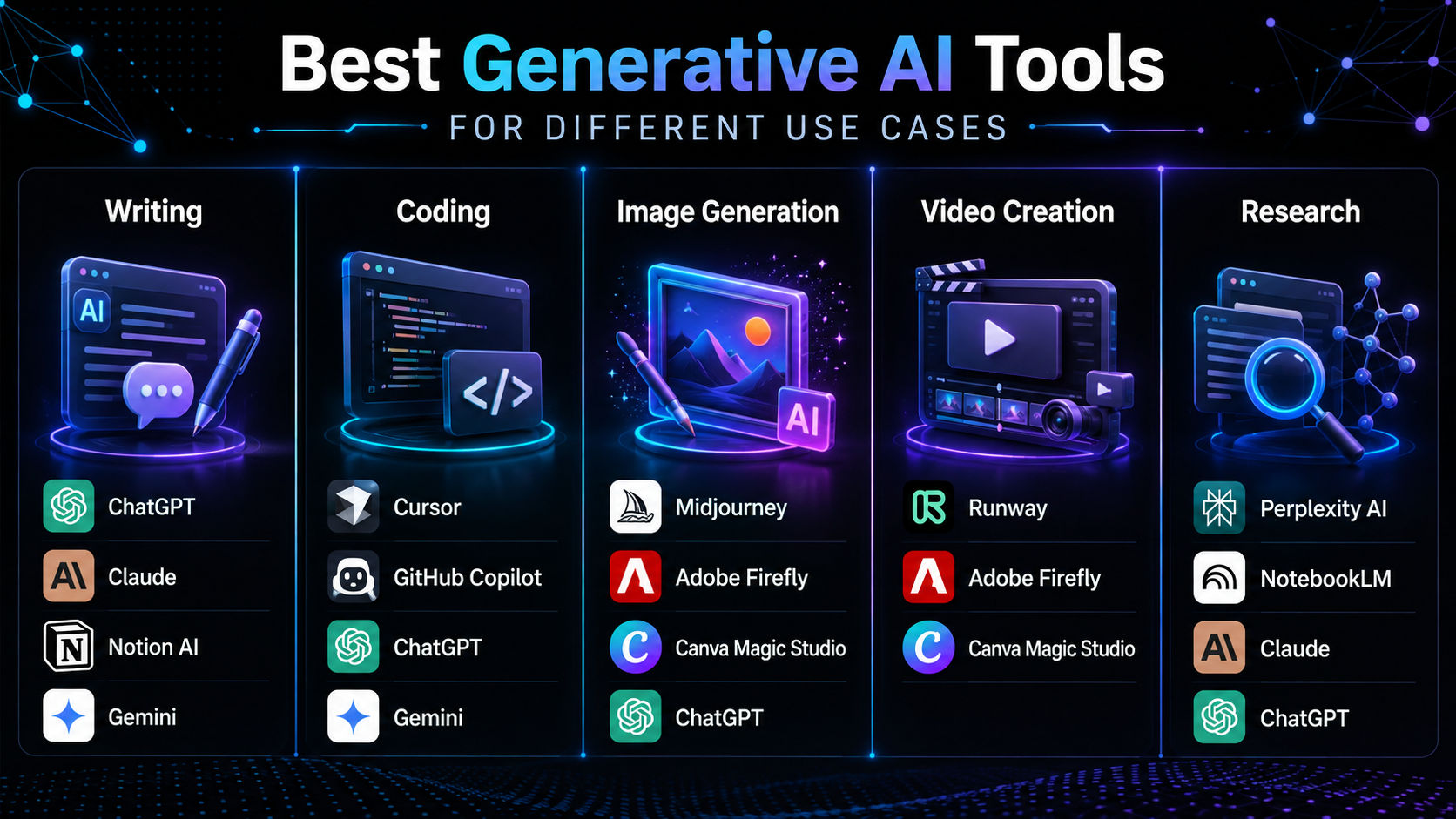
Best generative AI tools for different use cases
The best generative AI tool depends on what you want to do. Some tools are great for writing and coding, while others work better for creating images, doing research, improving productivity, or automating tasks.
Here are the best AI tools for each use case.
Best AI tools for writing
ChatGPT is great for writing content, brainstorming ideas, editing, and business writing. Claude works well for long documents and research. Notion AI and Gemini are good choices for everyday writing and work tasks.
Top picks:
- ChatGPT
- Claude
- Notion AI
- Gemini
Best AI tools for coding
Cursor and GitHub Copilot are excellent AI coding tools. They help you write, fix, and improve code. ChatGPT and Gemini can also generate code, explain programming concepts, and solve coding problems.
Top picks:
- Cursor
- GitHub Copilot
- ChatGPT
- Gemini
Best AI tools for image generation
Midjourney is known for creating high-quality AI images and artwork. Adobe Firefly is a good choice for design projects and commercial use. Canva Magic Studio and ChatGPT also make it easy to create and edit images.
Top picks:
- Midjourney
- Adobe Firefly
- Canva Magic Studio
- ChatGPT
Also Read: How to use ChatGPT for Prompt Writing?
Best AI tools for video creation
Runway is one of the best AI tools for creating and editing videos from text prompts. Adobe Firefly and Canva Magic Studio also include useful AI video features.
Top picks:
- Runway
- Adobe Firefly
- Canva Magic Studio
Best AI tools for presentations
Gamma can create presentations in minutes from a simple prompt. Microsoft Copilot helps you build slides directly in PowerPoint. Canva Magic Studio and ChatGPT also make presentation creation easier.
Top picks:
- Gamma
- Microsoft Copilot
- Canva Magic Studio
- ChatGPT
Best AI tools for research
Perplexity AI gives answers with source citations, making it a great tool for research. NotebookLM helps you understand your own documents. Claude and ChatGPT are useful for summarizing and explaining complex information.
Top picks:
- Perplexity AI
- NotebookLM
- Claude
- ChatGPT
Best AI tools for marketing
ChatGPT helps you write marketing content and come up with campaign ideas. Canva Magic Studio and Adobe Firefly make it easy to create visual content. Gamma is also useful for making sales presentations and pitch decks.
Top picks:
- ChatGPT
- Canva Magic Studio
- Adobe Firefly
- Gamma
Also Read: Gen AI for Marketers
Best AI tools for productivity
Microsoft Copilot works best with Microsoft 365 apps. Gemini is a great option for Google Workspace users. Notion AI and ChatGPT help with planning, note-taking, documentation, and everyday work.
Top picks:
- Microsoft Copilot
- Gemini
- Notion AI
- ChatGPT
Best AI tools for AI agents and automation
ChatGPT lets you create custom GPTs and AI agents to automate tasks. Microsoft Copilot helps automate work across Microsoft 365. Gemini and Notion AI also make routine business tasks faster and easier.
Top picks:
- ChatGPT
- Microsoft Copilot
- Gemini
- Notion AI
Also Read: Generative AI Tools for Business Analysis
Types of Generative AI Tools
Generative AI tools are made for different tasks. Some focus on writing, while others help with images, videos, coding, or research. Knowing these types can help you choose the right tool for your work.
1. AI chatbots and assistants
AI chatbots help users answer questions, create content, solve problems, and complete everyday tasks.
Examples:
- ChatGPT
- Claude
- Gemini
- Microsoft Copilot
2. AI writing tools
AI writing tools help users write, edit, summarize, and improve text.
Common uses:
- Writing blogs and articles
- Drafting emails
- Creating social media posts
- Preparing business documents
Examples:
- ChatGPT
- Claude
- Notion AI
3. AI image generators
AI image generators create images from text prompts and help users make visual content quickly.
Common uses:
- Marketing graphics
- Product designs
- Social media images
- Brand content
Examples:
- Midjourney
- Adobe Firefly
- Canva Magic Studio
4. AI video generators
AI video tools help users create, edit, and improve videos with the help of AI.
Common uses:
- Marketing videos
- Social media videos
- Animations
- Video editing
Examples:
- Runway
- Adobe Firefly Video
- Canva Magic Studio
5. AI coding assistants
AI coding tools help developers write code, find and fix errors, suggest improvements, and understand programming concepts.
Common uses:
- Writing code
- Debugging
- Reviewing code
- Creating documentation
Examples:
- Cursor
- GitHub Copilot
- ChatGPT
6. AI presentation tools
AI presentation tools turn ideas, notes, and documents into professional-looking slides.
Common uses:
- Business presentations
- Sales presentations
- Educational content
- Reports
Examples:
- Gamma
- Microsoft Copilot
- Canva Magic Studio
7. AI research tools
AI research tools help users find information, summarize content, study documents, and discover useful insights.
Common uses:
- Academic research
- Market research
- Document summaries
- Finding insights
Examples:
- Perplexity AI
- NotebookLM
- Claude
8. AI voice and audio generators
AI voice tools create natural-sounding speech and can copy voices for different types of content.
Common uses:
- Podcasts
- Audiobooks
- Training materials
- Customer support
Examples:
- ElevenLabs
- Murf
- Speechify
9. AI agents and workflow automation tools
AI agents can complete tasks, automate workflows, and work with business systems, going beyond simple content creation.
Common uses:
- Customer support automation
- Business process automation
- Data analysis
- Task management
Examples:
- ChatGPT Custom GPTs
- Microsoft Copilot
- Google Gemini Agents
Want to go beyond using generative AI tools? Explore upGrad KnowledgeHut Data Science Courses to build practical skills in AI, machine learning, and real-world applications.
What features should you look for in a generative AI tool?
With so many generative AI platforms available, choosing the right tool depends on factors like performance, usability, integrations, security, and pricing.
The ideal tool should match your workflow and deliver reliable results for your specific needs.
1. AI model quality and performance
The quality of the AI model directly impacts accuracy, reasoning, and output quality. Look for tools that provide strong performance in tasks such as writing, coding, research, or creative work.
2. Multimodal capabilities
Modern AI tools can work with multiple formats, including text, images, audio, video, and documents. Multimodal support allows users to complete different tasks within a single platform.
3. Ease of use
A simple interface, helpful templates, and intuitive workflows make AI tools easier to adopt. Good usability helps both beginners and experienced users get better results.
4. Integrations and compatibility
AI tools should connect easily with the applications you already use, such as Microsoft 365, Google Workspace, IDEs, design platforms, and business software. Strong integrations improve productivity and workflow efficiency.
5. Collaboration features
For teams, features like shared workspaces, permissions, comments, and version history help users collaborate effectively while managing AI-generated content.
6. Privacy and security
When using AI tools for business data, check privacy policies, data handling practices, and security features. Enterprise users should also consider compliance requirements before selecting a platform.
7. API availability
APIs allow developers and businesses to integrate generative AI capabilities into their own applications and workflows. Well-documented APIs provide more flexibility for building custom AI solutions.
8. Pricing and scalability
Compare pricing plans based on usage, features, and future growth. Free plans work well for experimentation, while paid and enterprise plans usually offer higher limits, advanced features, and better management controls. A scalable tool can support growing teams and workloads over time.
Also Read: Generative AI for Business Analysts
Conclusion
Generative AI tools are transforming how individuals and businesses create content, write code, conduct research, design visuals, and automate everyday tasks.
Each platform offers unique strengths, making it important to compare features, capabilities, and intended use cases before making a choice.
By selecting a tool that aligns with your goals and workflow, you can improve productivity, streamline tasks, and get more value from AI in your daily work.
Have A Query? Get in Touch With Our Customer Support | upGrad KnowledgeHut
Frequently Asked Questions (FAQs)
What are the best free generative AI tools?
Several leading generative AI tools offer free plans with limited usage, including ChatGPT, Gemini, Claude, Microsoft Copilot, Perplexity AI, Canva Magic Studio, NotebookLM, and Adobe Firefly. These free versions are suitable for everyday writing, research, coding, design, and productivity tasks. If you need higher usage limits or advanced features, you can upgrade to a paid plan.
Which generative AI tools are the most popular?
Some of the most widely used generative AI tools in 2026 include ChatGPT, Claude, Gemini, Microsoft Copilot, Perplexity AI, Midjourney, Adobe Firefly, GitHub Copilot, and Runway. Each tool is designed for different use cases, such as content creation, coding, research, image generation, or video production. The best choice depends on the task you want to accomplish.
How do I choose the right generative AI tool?
Start by identifying your primary use case, whether it's writing, coding, design, research, or business productivity. Then compare factors such as AI capabilities, ease of use, integrations, security, pricing, and collaboration features. Choosing a tool that fits your workflow will help you get better results and improve productivity.
What features should I look for in a generative AI tool?
Look for strong AI reasoning, multimodal support, an intuitive interface, and seamless integrations with the apps you already use. If you're working in a team or business environment, also consider collaboration features, privacy controls, API access, and scalability. These factors determine how well the tool performs as your needs grow.
What is the difference between ChatGPT, Claude, and Gemini?
ChatGPT is a versatile AI assistant for writing, coding, brainstorming, and everyday productivity. Claude is known for its strong reasoning, long-form writing, and document analysis, while Gemini stands out for its deep integration with Google Workspace and multimodal capabilities. Each platform has unique strengths, so the best option depends on your workflow and preferred ecosystem.
Which generative AI tool is best for beginners?
ChatGPT, Gemini, and Microsoft Copilot are excellent choices for beginners because they offer intuitive interfaces and require little technical knowledge. They can help with writing, brainstorming, coding, research, and everyday productivity, making them ideal for users new to generative AI.
Which generative AI tool is best for businesses?
Businesses often use Microsoft Copilot, ChatGPT, Gemini, and Claude to improve productivity, automate workflows, and enhance collaboration. The right choice depends on your existing software ecosystem, security requirements, and the type of tasks you want to automate.
Which generative AI tool is best for coding?
Cursor and GitHub Copilot are leading AI coding assistants that help developers write, debug, and optimize code directly within their development environment. ChatGPT is also useful for explaining programming concepts, generating code snippets, and troubleshooting errors.
Can generative AI tools create images and videos?
Yes. Tools like Midjourney and Adobe Firefly generate high-quality images from text prompts, while Runway enables AI-powered video generation and editing. These platforms are widely used for marketing, design, social media, and creative projects.
Are generative AI tools safe?
Yes, leading generative AI tools generally include security and privacy features to protect user data. However, you should avoid sharing sensitive or confidential information unless the platform meets your organization's security and compliance requirements. For business use, review the provider's privacy policy, data retention practices, and enterprise security features before using the tool.
1648 articles published
KnowledgeHut is an outcome-focused global ed-tech company. We help organizations and professionals unlock excellence through skills development. We offer training solutions under the people and proces...
Get Free Consultation
By submitting, I accept the T&C and
Privacy Policy