
- Blog Categories
- Project Management
- Agile Management
- IT Service Management
- Cloud Computing
- Business Management
- BI And Visualisation
- Quality Management
- Cyber Security
- DevOps
- Most Popular Blogs
- PMP Exam Schedule for 2025: Check PMP Exam Date
- Top 60+ PMP Exam Questions and Answers for 2025
- PMP Cheat Sheet and PMP Formulas To Use in 2025
- What is PMP Process? A Complete List of 49 Processes of PMP
- Top 15+ Project Management Case Studies with Examples 2025
- Top Picks by Authors
- Top 170 Project Management Research Topics
- What is Effective Communication: Definition
- How to Create a Project Plan in Excel in 2025?
- PMP Certification Exam Eligibility in 2025 [A Complete Checklist]
- PMP Certification Fees - All Aspects of PMP Certification Fee
- Most Popular Blogs
- CSM vs PSM: Which Certification to Choose in 2025?
- How Much Does Scrum Master Certification Cost in 2025?
- CSPO vs PSPO Certification: What to Choose in 2025?
- 8 Best Scrum Master Certifications to Pursue in 2025
- Safe Agilist Exam: A Complete Study Guide 2025
- Top Picks by Authors
- SAFe vs Agile: Difference Between Scaled Agile and Agile
- Top 21 Scrum Best Practices for Efficient Agile Workflow
- 30 User Story Examples and Templates to Use in 2025
- State of Agile: Things You Need to Know
- Top 24 Career Benefits of a Certifed Scrum Master
- Most Popular Blogs
- ITIL Certification Cost in 2025 [Exam Fee & Other Expenses]
- Top 17 Required Skills for System Administrator in 2025
- How Effective Is Itil Certification for a Job Switch?
- IT Service Management (ITSM) Role and Responsibilities
- Top 25 Service Based Companies in India in 2025
- Top Picks by Authors
- What is Escalation Matrix & How Does It Work? [Types, Process]
- ITIL Service Operation: Phases, Functions, Best Practices
- 10 Best Facility Management Software in 2025
- What is Service Request Management in ITIL? Example, Steps, Tips
- An Introduction To ITIL® Exam
- Most Popular Blogs
- A Complete AWS Cheat Sheet: Important Topics Covered
- Top AWS Solution Architect Projects in 2025
- 15 Best Azure Certifications 2025: Which one to Choose?
- Top 22 Cloud Computing Project Ideas in 2025 [Source Code]
- How to Become an Azure Data Engineer? 2025 Roadmap
- Top Picks by Authors
- Top 40 IoT Project Ideas and Topics in 2025 [Source Code]
- The Future of AWS: Top Trends & Predictions in 2025
- AWS Solutions Architect vs AWS Developer [Key Differences]
- Top 20 Azure Data Engineering Projects in 2025 [Source Code]
- 25 Best Cloud Computing Tools in 2025
- Most Popular Blogs
- Company Analysis Report: Examples, Templates, Components
- 400 Trending Business Management Research Topics
- Business Analysis Body of Knowledge (BABOK): Guide
- ECBA Certification: Is it Worth it?
- Top Picks by Authors
- Top 20 Business Analytics Project in 2025 [With Source Code]
- ECBA Certification Cost Across Countries
- Top 9 Free Business Requirements Document (BRD) Templates
- Business Analyst Job Description in 2025 [Key Responsibility]
- Business Analysis Framework: Elements, Process, Techniques
- Most Popular Blogs
- Best Career options after BA [2025]
- Top Career Options after BCom to Know in 2025
- Top 10 Power Bi Books of 2025 [Beginners to Experienced]
- Power BI Skills in Demand: How to Stand Out in the Job Market
- Top 15 Power BI Project Ideas
- Top Picks by Authors
- 10 Limitations of Power BI: You Must Know in 2025
- Top 45 Career Options After BBA in 2025 [With Salary]
- Top Power BI Dashboard Templates of 2025
- What is Power BI Used For - Practical Applications Of Power BI
- SSRS Vs Power BI - What are the Key Differences?
- Most Popular Blogs
- Data Collection Plan For Six Sigma: How to Create One?
- Quality Engineer Resume for 2025 [Examples + Tips]
- 20 Best Quality Management Certifications That Pay Well in 2025
- Six Sigma in Operations Management [A Brief Introduction]
- Top Picks by Authors
- Six Sigma Green Belt vs PMP: What's the Difference
- Quality Management: Definition, Importance, Components
- Adding Green Belt Certifications to Your Resume
- Six Sigma Green Belt in Healthcare: Concepts, Benefits and Examples
- Most Popular Blogs
- Latest CISSP Exam Dumps of 2025 [Free CISSP Dumps]
- CISSP vs Security+ Certifications: Which is Best in 2025?
- Best CISSP Study Guides for 2025 + CISSP Study Plan
- How to Become an Ethical Hacker in 2025?
- Top Picks by Authors
- CISSP vs Master's Degree: Which One to Choose in 2025?
- CISSP Endorsement Process: Requirements & Example
- OSCP vs CISSP | Top Cybersecurity Certifications
- How to Pass the CISSP Exam on Your 1st Attempt in 2025?
- Most Popular Blogs
- Top 7 Kubernetes Certifications in 2025
- Kubernetes Pods: Types, Examples, Best Practices
- DevOps Methodologies: Practices & Principles
- Docker Image Commands
- Top Picks by Authors
- Best DevOps Certifications in 2025
- 20 Best Automation Tools for DevOps
- Top 20 DevOps Projects of 2025
- OS for Docker: Features, Factors and Tips
- More
- Agile & PMP Practice Tests
- Agile Testing
- Agile Scrum Practice Exam
- CAPM Practice Test
- PRINCE2 Foundation Exam
- PMP Practice Exam
- Cloud Related Practice Test
- Azure Infrastructure Solutions
- AWS Solutions Architect
- IT Related Pratice Test
- ITIL Practice Test
- Devops Practice Test
- TOGAF® Practice Test
- Other Practice Test
- Oracle Primavera P6 V8
- MS Project Practice Test
- Project Management & Agile
- Project Management Interview Questions
- Release Train Engineer Interview Questions
- Agile Coach Interview Questions
- Scrum Interview Questions
- IT Project Manager Interview Questions
- Cloud & Data
- Azure Databricks Interview Questions
- AWS architect Interview Questions
- Cloud Computing Interview Questions
- AWS Interview Questions
- Kubernetes Interview Questions
- Web Development
- CSS3 Free Course with Certificates
- Basics of Spring Core and MVC
- Javascript Free Course with Certificate
- React Free Course with Certificate
- Node JS Free Certification Course
- Data Science
- Python Machine Learning Course
- Python for Data Science Free Course
- NLP Free Course with Certificate
- Data Analysis Using SQL
- Home
- Blog
- Data Science
- Enterprise Vector Databases: Features, Use Cases, and How to Choose the Right One in 2026
Enterprise Vector Databases: Features, Use Cases, and How to Choose the Right One in 2026
Updated on Sep 28, 2026 | 392 views
Share:
Table of Contents
View all
- What Are Enterprise Vector Databases?
- Why Are Enterprise Vector Databases Important for AI Applications?
- What Are the Essential Features of an Enterprise Vector Database?
- What Are the Common Enterprise Vector Database Use Cases?
- Most Popular Enterprise Vector Databases
- How Do Enterprises Choose the Right Vector Database?
Quick Overview
- Enterprise Vector Databases are designed to store, manage, and search high dimensional vector embeddings at enterprise scale with features such as scalability, security, governance, and high availability.
- They support AI applications such as RAG, semantic search, AI assistants, recommendations, and multimodal search by enabling meaning-based information retrieval.
- Key features to evaluate include fast vector search, metadata filtering, hybrid search, security, multi-tenancy, disaster recovery, monitoring, and enterprise integrations.
- Popular options include Pinecone, Weaviate, Milvus, Qdrant, pgvector, and OpenSearch, with each offering different deployment models and capabilities.
- This guide covers the essential features, common use cases, popular platforms, and key factors to consider when choosing an Enterprise Vector Database in 2026.
Build practical skills for designing AI agents and connecting them with enterprise data and retrieval systems. Explore the Applied Agentic AI Certification Course by upGrad KnowledgeHut to learn through hands-on projects.
What Are Enterprise Vector Databases?
An enterprise vector database is a database designed to store and search vector embeddings, which are numerical representations of data such as text, images, audio, and documents. These types of databases assist AI applications in retrieving data based on similarity and meaning, instead of searching based on exact keywords.
They are commonly used in applications like Retrieval-Augmented Generation (RAG), enterprise search, AI assistants, recommendations, and AI agents.
How Enterprise Vector Databases Differ from Traditional Databases
While traditional databases excel in dealing with structured data in the form of rows and columns, they cannot understand the meaning. The enterprise vector databases fill this gap by focusing on semantic searches and native AI workloads.
Feature |
Enterprise Vector Database |
Traditional Database |
| Primary data type | Vector embeddings and unstructured data | Structured and relational data |
| Search method | Semantic similarity searches | Exact matches and structured queries |
| Main purpose | AI retrieval and similarity-based search | Transaction processing and data management |
| High-dimensional search | Designed to handle it | Not the primary use case |
| RAG support | Commonly used for RAG retrieval | Usually requires an extension or additional vector capability |
| Metadata filtering | Supports filtering alongside vector search | Supports structured filtering |
| Typical AI use cases | Semantic search, RAG, recommendations, AI agents | Data management, reporting, transactions, analytics |
Also Read: Vector Databases for Generative AI Applications
Why Are Enterprise Vector Databases Important for AI Applications?
Fast access to enterprise data is required for AI applications deployed at the enterprise level in order to be able to deliver relevant responses. This is achieved through the use of Enterprise Vector Databases.
Powering Retrieval-Augmented Generation (RAG)
RAG systems require retrieval of information before generation of some output. The information needed for generation is saved in enterprise vector databases in the form of embeddings. This way, AI models get access to relevant information beyond their training data.
Supporting Enterprise AI Search
Employees may be required to search through an enormous number of documents, policies, and other resources. Enterprise vector databases make this process quick and effective by enabling intention-based searching experience.
Enabling AI Agents to Access Business Knowledge
AI agents require access to the business knowledge to be able to complete certain tasks. Enterprise vector databases provide them with a memory layer that helps retrieve information accurately.
Improving Recommendations and Personalization
With the help of embedding comparison, enterprise vector databases can detect similar items, content, or behavior patterns, which improves recommendation systems and personalization on various platforms.
What Are the Essential Features of an Enterprise Vector Database?
The following features are especially important when considering Enterprise Vector Databases.
Scalability and High-Volume Data Handling
Enterprise vector databases must be scalable to work with large amounts of vectors. As the amount of data grows, the platform should be able to scale without a significant drop in performance.
Fast and Accurate Vector Search
The speed and accuracy of the search operations are very important. To provide a low latency, high-performance search in huge datasets enterprise vector databases use approximate nearest neighbor (ANN) search technique.
Metadata Filtering and Hybrid Search
Vector similarity is useful, but enterprise search often needs additional conditions. For example, there may be a requirement to search documents for which semantically relevance is not enough and there should be a certain department, location, date or access group restriction. Metadata filtering helps to apply these conditions during the search process.
Hybrid approach involves vector search and keyword or sparse search. It may be helpful in the case of searching by specific terms, product names, codes, etc.
Security and Access Controls
One of the key features that differentiate enterprise vector databases from their non-enterprise counterparts is security. Encryption of data at rest and during transmission, authentication and role-based access control and auditing capabilities are just some of the security features that help protect sensitive company data.
Multitenancy and Data Isolation
Big companies usually have to keep their data isolated between different departments, business lines, customers or applications. Enterprise vector databases provide multitenancy so this separation can happen securely within a single platform.
High Availability and Disaster Recovery
Downtimes may affect the crucial AI solutions. The majority of enterprise vector databases have built-in replication, backups, and failovers that will help in to operate even when something goes wrong.
Monitoring and Observability
Observability is essential for keeping performance good. Enterprise vector databases usually have dashboards, query metrics, logging, alerts, etc., that will enable monitoring system status.
Integration With Enterprise AI and Data Stacks
Lastly, enterprise vector databases should be integrated with already present technologies. That means that it should have API/SDK, compatibility with model embedding, LLM platforms, data pipelines, clouds, and existing databases.
Learn how generative AI and prompt engineering can support enterprise search, RAG, and AI applications. Explore the Generative AI and Prompt Engineering Course for Professionals by upGrad KnowledgeHut to build practical skills.
What Are the Common Enterprise Vector Database Use Cases?
Enterprise Vector Databases have more functions than document search. There are some AI use cases where fast retrieval of information becomes essential.
Enterprise Semantic Search
Semantic search helps users find documents and information based on meaning rather than exact keywords. For example, an employee searching for "how to claim travel expenses" may find relevant reimbursement policies even when the document uses different terminology.
Retrieval-Augmented Generation (RAG)
RAG is one of the most common use cases for vector databases. Enterprise documents get embedded along with their metadata and become available to the LLM upon user queries.
The RAG approach may allow providing AI applications with the organization-specific answers based on the data from within the company.
Also Read: Enterprise RAG Architecture: Components, Workflow, and Best Practices
AI-Powered Enterprise Assistants
Enterprises can build assistants that answer questions about internal policies, products, processes, technical documentation, and supporting information. The vector database can act as the retrieval layer and help an AI-powered assistant to access enterprise knowledge in order to generate an answer.
Multimodal Search and Discovery
Vector embedding is not limited to text data only. It could also be applied to images, audio, video, and other types of unstructured data.
This way, vector database search might become useful for image discovery, media search, visual product search, and other multimodal AI use cases.
Fraud Detection and Anomaly Identification
Vector representations can also be used to help in comparing patterns in transaction or user behavior.
If a new data point turns out to differ significantly from existing patterns, then it can be detected as suspicious and subjected to further investigation. Thus, vector search can also be used in anomaly detection.
Also Read: Hybrid Search vs Vector Search: What Is the Difference
Most Popular Enterprise Vector Databases
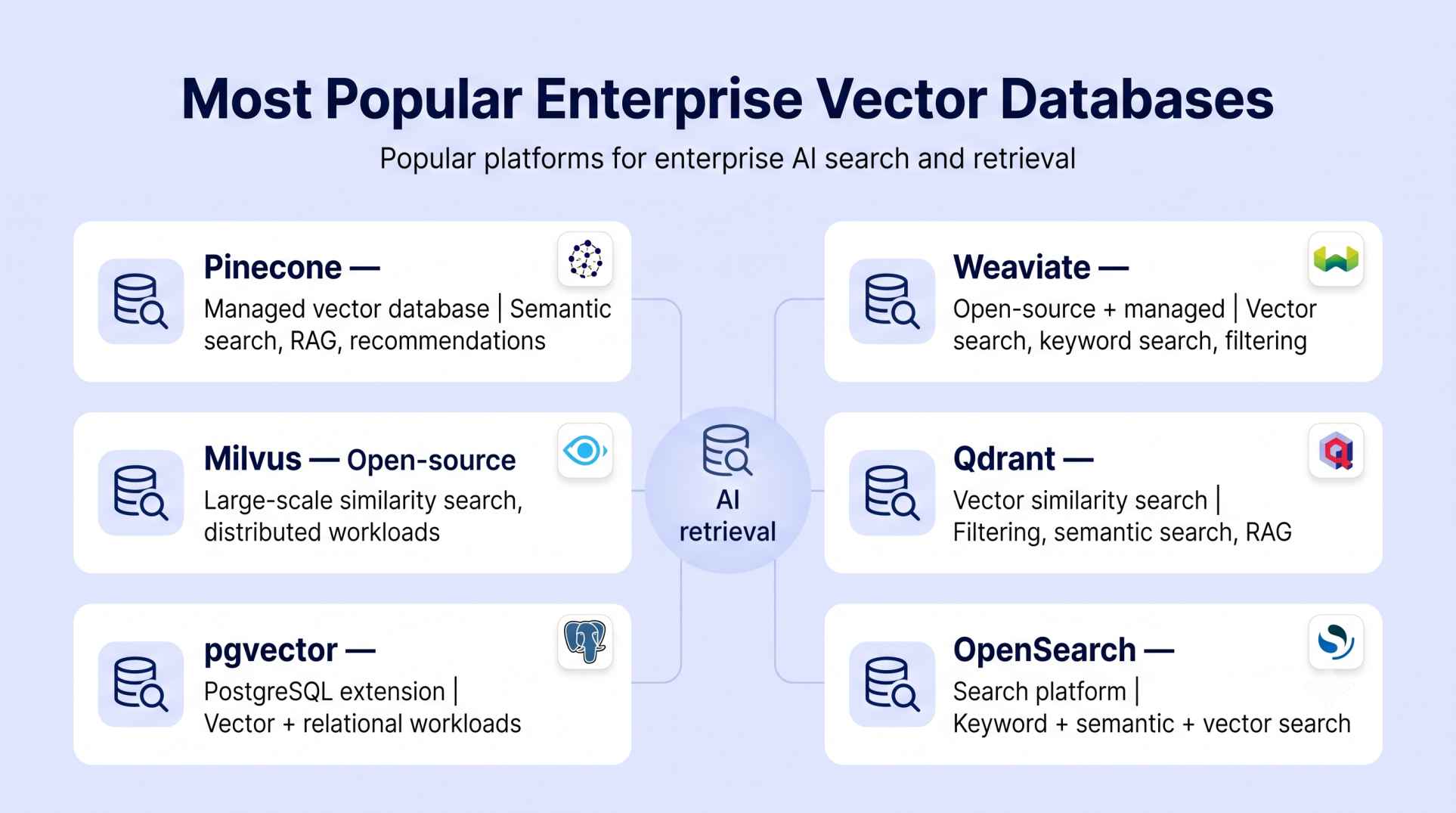
There are several platforms for enterprise vector search that differ from one another in terms of their architectures, deployment modes, searching features, integrations, and operation requirements.
The following platforms are just some of the examples.
1. Pinecone
Pinecone is a managed vector database focused on building and operating vector search applications. It is commonly used for semantic search, RAG, recommendations, and other AI retrieval workloads.
2. Weaviate
Weaviate is an open-source vector database that can be self-hosted or used as a managed service. It supports vector search, keyword search, filtering, and AI-oriented integrations.
3. Milvus
Milvus is an open-source vector database designed for large-scale similarity search. It can be deployed in different environments and is commonly considered for workloads requiring distributed vector search.
4. Qdrant
Qdrant is a vector similarity search engine that supports vector search, metadata filtering, and different deployment approaches. It is used for applications such as semantic search, recommendations, and RAG.
5. pgvector
pgvector adds vector similarity search capabilities to PostgreSQL. It can be useful for organizations that already rely heavily on PostgreSQL and want to manage relational and vector workloads within the same database environment.
6. OpenSearch
OpenSearch combines traditional search capabilities with vector search. This makes it relevant for organizations that want keyword, semantic, and other search capabilities within a broader search platform.
Take your enterprise AI skills further by learning how modern AI systems work with data, retrieval, and intelligent applications. Explore the Advanced AI Masters Program with Microsoft by upGrad KnowledgeHut.
How Do Enterprises Choose the Right Vector Database?
Enterprises should evaluate both current requirements and future growth to ensure the platform can support production AI workloads over the long term.
Define AI and Search Requirements
The first step is identifying how the database will be used. Some organizations need semantic search across documents, while others require RAG systems, AI agents, recommendation engines, or multimodal search. Understanding the workload helps narrow down which enterprise vector databases fit best.
Estimate Data Volume and Query Scale
The number of vectors stored and the volume of queries processed have a big impact on platform choice. Small deployments may work well with PostgreSQL and pgvector, while large scale applications handling hundreds of millions or billions of vectors often require distributed enterprise vector databases built for high performance retrieval.
Evaluate Search Quality and Hybrid Search Capabilities
Modern enterprise search often combines vector similarity with keyword based retrieval. It helps to look for platforms that support hybrid search, metadata filtering, reranking, and strong indexing techniques to improve relevance for business users.
Assess Security, Compliance, and Governance
Enterprise AI systems often handle sensitive company data. It is important to evaluate support for role based access control, encryption, audit logging, data isolation, compliance certifications, and multitenant architecture. These capabilities are often just as important as raw search performance.
Consider Integration With AI and Data Ecosystems
The chosen database should fit naturally into the existing technology stack. This includes compatibility with LLM frameworks, data pipelines, cloud platforms, orchestration tools, and enterprise data warehouses. Strong integration can significantly reduce implementation effort.
Analyze Total Cost of Ownership (TCO)
Licensing cost is only one part of the investment. Organizations should also account for infrastructure expenses, operational management, maintenance, monitoring, scaling needs, staffing, and future storage growth. A platform with lower operational complexity may offer a lower overall cost over time.
Conclusion
Enterprise Vector Databases provide the foundation for storing and retrieving information in many modern AI applications. Their value goes beyond vector search, with features such as scalability, security, metadata filtering, high availability, and monitoring supporting production workloads.
From RAG and semantic search to AI assistants and recommendations, these databases can support a wide range of enterprise use cases. Choosing the right platform requires considering data volume, search requirements, security, integrations, deployment needs, and total cost of ownership.
Have A Query? Get in Touch With Our Customer Support | upGrad KnowledgeHut
Frequently Asked Questions (FAQs)
1. Why do enterprises use vector databases for AI?
Enterprises use vector databases to store and retrieve embeddings from large collections of unstructured data. They support semantic search, RAG, recommendations, AI assistants, and other AI applications. This helps AI systems retrieve relevant information based on meaning rather than exact keyword matches.
2. Why are vector databases important?
Vector databases are important because they enable fast similarity searches across high-dimensional data. They help AI applications find semantically relevant text, images, documents, and other content. This makes them useful for RAG, semantic search, recommendations, and AI-powered discovery.
3. How Do Vector Databases Work?
Vector databases work by converting unstructured data into numerical representations called vector embeddings and storing them with relevant metadata. When a user submits a query, the query is also converted into a vector. The database then performs a similarity search to find the most relevant vectors and returns the matching data.
The basic process is: Data → Embeddings → Vector storage → Query embedding → Similarity search → Relevant results
4. Which enterprise vector database is best for RAG?
There is no single best enterprise vector database for every RAG workload. Pinecone, Weaviate, Milvus, Qdrant, and pgvector are commonly considered based on factors such as scale, filtering, hybrid search, deployment, security, and cost. The appropriate choice depends on the application's specific requirements.
5. Is pgvector suitable for enterprise workloads?
Yes, pgvector can be suitable for enterprise workloads, particularly when an organization already uses PostgreSQL. It allows vector search alongside relational data and SQL capabilities. Suitability depends on factors such as dataset size, query volume, performance requirements, and operational needs.
6. What is hybrid search in a vector database?
Hybrid search combines vector similarity search with keyword or sparse search to retrieve relevant results. Vector search captures semantic meaning, while keyword search can match exact terms, names, or identifiers. Combining both approaches can improve retrieval for enterprise search and RAG applications.
7. How secure are enterprise vector databases?
The security of an enterprise vector database depends on its platform capabilities and deployment configuration. Important controls include encryption, authentication, role-based access control, network security, audit logging, and data isolation. Organizations should evaluate these controls against their security and compliance requirements.
8. Can vector databases scale to billions of vectors?
Yes, some vector databases are designed to distribute and manage billions of vectors across multiple resources. Actual performance depends on factors such as index design, hardware, vector dimensions, query volume, and filtering requirements. Enterprise-scale capacity should therefore be validated with workload-specific testing.
9. When should an organization use a dedicated vector database instead of PostgreSQL?
A dedicated vector database may be considered when vector workloads require specialized scaling, high search throughput, low latency, or advanced vector retrieval capabilities. PostgreSQL with pgvector can remain suitable when relational and vector workloads can be efficiently managed within the same database.
10. What role do vector databases play in AI agents?
Vector databases provide AI agents with fast access to relevant knowledge, documents, previous interactions, and other stored information. They can support retrieval-based memory and contextual information during multi-step tasks. This helps agents access information beyond the immediate conversation or prompt.
1639 articles published
KnowledgeHut is an outcome-focused global ed-tech company. We help organizations and professionals unlock excellence through skills development. We offer training solutions under the people and proces...
Get Free Consultation
By submitting, I accept the T&C and
Privacy Policy